Time runs the food delivery business. Not margins. Not marketing. Time.
Meals get cold. Customers get impatient. Drivers juggle pressure from all directions—make the right call, right now, or lose the customer forever. Five minutes late? That’s not a minor hiccup. That’s someone switching to your competitor next time they’re hungry.
Here’s the thing about traditional CRM setups: they show you lists. Order lists. Driver lists. Customer lists. What they don’t show you? Who’s actually closest? Whether three pending deliveries happen to be on the same block. The geographic reality of your operation.
Location intelligence inside Dynamics 365 changes that equation completely. And MappyField 365 is how that change happens—quietly reshaping food delivery operations behind the scenes.
Let’s ground this with a real scenario.
A Story from the Streets: “The Last-Minute Order”
Early evening. Order cancellation is recorded in the system minutes after the kitchen finishes preparing the meal. The restaurant can’t eat that cost. Someone needs to act. Fast.
The situation:
- One delivery agent’s CRM record shows them nearby
- A different customer lives just minutes away
- Operations needs to reassign before the food goes to waste
What happens next? The operations team opens the map view in MappyField 365. They spot:
- Nearest customer based on plotted address data
- Closest available agent according to their last recorded position
- Best route to salvage the delivery
The customer thinks they got lucky. Reality? Maps inside Dynamics 365 made the save. Geographic intelligence connecting dots that spreadsheets never could.
Where Maps Fit into the Food Delivery Workflow
Food delivery? It’s a coordination puzzle. Four pieces that need to move together:
- Restaurants cooking orders
- Drivers navigating streets
- Customers waiting (impatiently, usually)
- Operations teams trying to keep everything synchronized
A Dynamics 365 map ties these pieces together using location data already sitting in your CRM. Check-in and Check-out. Address records. All of it becomes visual, actionable intelligence rather than static text fields no one looks at. Swap from list views to map views once, and going back feels like putting on a blindfold.
Now, some may wonder, “Does this require us to tear apart our existing Dynamics 365 setup? Rebuild our data structure from scratch?” To which, the answer is no. MappyField 365 plugs into your existing entities. Got address fields on customer records? Order records? Driver records? You can implement map plotting without restructuring a thing. The solution geocodes what you already have. Extension, not replacement.”
Visualizing Orders, Customers, and Deliveries on a Map
When your data becomes destination pins on a map, you start seeing how things can work instead of just reading the task list and assuming how they can be managed.
Map view inside Dynamics 365 lets operations teams:
- Plot customer addresses across the entire service area
- View active orders geographically instead of alphabetically
- Spot high-demand clusters that lists completely hide
Cluster of pins in one neighborhood? That tells you something no sorted spreadsheet ever will. Patterns emerge. Downtown lunch orders spiking between 11:45 and 12:30. Certain zones are consistently short on driver coverage. Dispatchers stop guessing. They start seeing. Big difference.
Map-Based Status Visibility Enables Faster Decisions
Dynamic things like order delays, early job completion, or urgent reassignments become manageable when map-based visibility is combined with activity tracking.
How this streamlines the processes is:
- Agent locations based on CRM address data, updated when records are modified in Dynamics 365
- Order status pulled from CRM activity updates
- Quick reassignment capability when cancellations hit
MappyField 365 shows agent locations based on what’s stored in your CRM. Agent updates their location through check-in? Their address record changes in Dynamics 365. Refresh the map page, and you’ll see the new position. This is CRM-synced visibility. The map reflects your CRM data as it gets updated.
This Dynamics 365 map integration cuts wasted deliveries. Cancellation comes in—you see which drivers were recorded nearby, who might grab the reassigned order based on their last positions. Visual assessment, confident decision, move on.
Finding the Right Delivery Agent Using Proximity Search
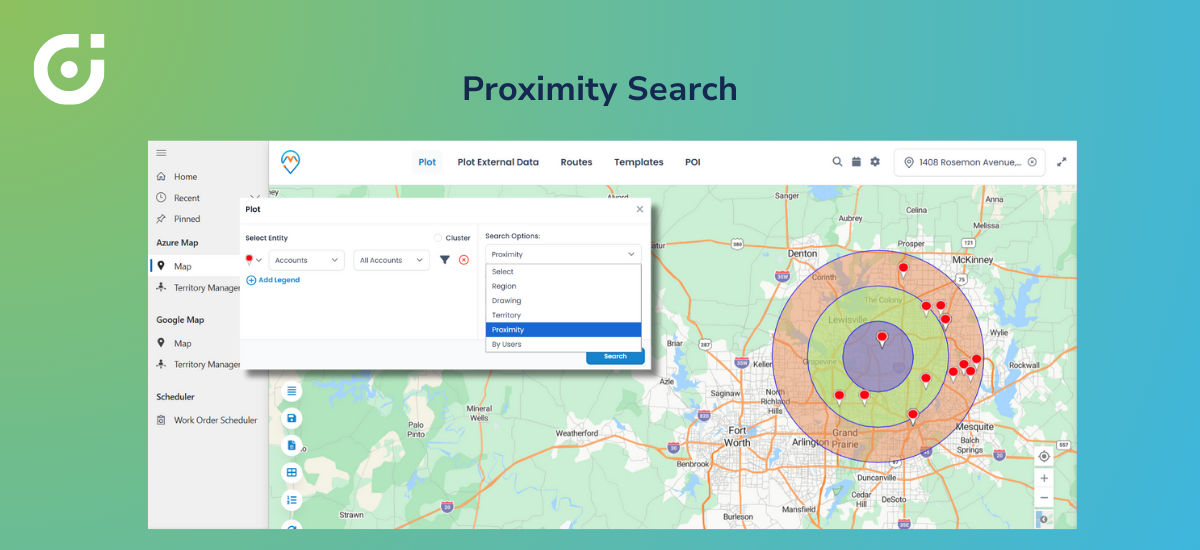
Every minute counts when it comes to food delivery, because nobody loves cold meals. But with map visualization, ticking of the clock becomes less scary when reassigning gets simpler.
Proximity search on the map lets dispatchers:
- Find agents closest to the restaurant or the customer based on recorded CRM locations
- Check nearby appointments and current assignments
- Assign based on actual distance from stored address data
Result? Orders go to the most efficient resource. Not just whoever shows up first in a dropdown list. The driver whose last check-in was three blocks away beats someone recorded twenty minutes out—even if the far-away driver appears higher on an alphabetical sort.
Geographic decision-making instead of queue-based guessing.
Smarter Routing with Multi-Stop Route Planning
Peak hours also become manageable because drivers get delivery orders based on actual data and not just assumptions. This eliminates backtracking, excessive fuel consumption, and longer delivery times.
Route planning capabilities let teams implement food delivery route optimization that:
- Builds multi-stop routes based on actual geography
- Optimizes stop sequence by distance or travel time
- Cuts delays during dinner rush when every inefficiency compounds
Multi-stop route planning done right means drivers complete more deliveries per hour. Less windshield time. Lower fuel bills. Fewer late arrivals. Scale that across your whole fleet, and the savings stack up fast.
Scheduling Deliveries Directly from the Map
Routes finalized? Create delivery-related activities directly from the map and associate them with Dynamics 365 records and calendars.
No more toggling between tools. Dispatcher sees the optimized route, assigns stops in order, and those assignments land on driver calendars with realistic timing built in. No copy-pasting addresses. No manual calendar entries. The map becomes a central interface for scheduling-related actions.
Operations handling hundreds of daily deliveries? This strips out an entire layer of administrative hassle. Schedules stay accurate because they’re built from geography, not guesswork.
Monitoring Delivery Progress with Map Visibility
Active delivery hours demand answers. Which agent was last recorded near that VIP order? Has anyone updated this delivery status? Who’s available based on recent check-ins?
Dynamics 365 map visibility gives managers:
- Agent positions based on CRM-synced location data
- Delivery status through CRM activity and record updates
- Flags for agents who haven’t checked in or updated recently
MappyField 365 reflects your CRM data. Agent logs a check-in? Address record changes? The updated position is displayed on the map immediately. There’s no continuous GPS feed running in the background and no live tracking. The map displays the most recent CRM-synced location data each time it’s refreshed.
Managers can act on recorded information instead of waiting for angry customer calls to surface problems. Notice someone hasn’t updated their status in a while? Reach out. Check if they need backup.
Mobile Map Access for On-the-Go Delivery Teams
Drivers aren’t sitting at desks. They’re in vehicles, navigating traffic, hunting for parking, and managing multiple stops with phones mounted on dashboards.
Mobile map access means drivers can:
- View assigned routes and locations without switching between tools
- Navigate delivery points with visual guidance
- Check in at locations to update their CRM records
- Stay synced with schedules through calendar integration
Managers? They can review operations from anywhere. Home office. Evening shift. Wherever. The geographic view remains accessible on the map synced with the latest CRM data.
Dynamics 365 map integration goes from dispatch tool to field companion. Drivers get what they need where they need it. Managers stay connected without everyone sitting in the same building.
Want to see map-driven operations in action?
Visual Insights: Identifying Demand Patterns on the Map
Give it time, and map-based insights reveal trends that spreadsheets bury.
Analytical workflows can surface:
- High-demand zones where resources consistently run thin
- Areas causing predictable delays based on historical data
- Routes needing regular adjustments or extra travel time
That intelligence drives better decisions around:
- Resource allocation during peak windows
- Territory rebalancing across driver teams
- Expansion planning into underserved neighborhoods
Heat map views can highlight order density across the service area, helping identify demand clusters and coverage gaps. The data helps them develop targeted marketing strategies and make sound growth decisions for the next quarter.
Why Maps in Dynamics 365 Drive Growth for Food Delivery
Modern food delivery runs on a few non-negotiables:
- Speed matching customer expectations
- Accuracy preventing wrong deliveries and wasted food
- Visibility into operations through reliable CRM data
- Location-based decisions optimizing every handoff
A Dynamics 365 map pulls these together. Operational data becomes actionable. Instead of hoping processes work, you can implement visual proof that resources sit where they should and routes actually make geographic sense.
MappyField 365 enables this without complexity explosions. The map layer sits on existing CRM data. Extends capabilities. Doesn’t demand a rebuild.
For food delivery businesses managing the pressure to deliver orders faster while keeping costs controlled, adopting this technology is no longer a luxury. Food delivery route optimization through integrated mapping is how the competitive players operate.
The Invisible Engine Behind Seamless Food Delivery
Customers want food delivery to feel effortless. Tap the app. Wait a bit. Hot food shows up. Magic.
Behind that magic? A system making hundreds of location-based decisions. Which driver grabs which order? What route makes sense? How to handle last-minute chaos without everything cascading into delays.
Maps inside Dynamics 365 power those calls. Efficiency improves quietly. Waste drops. Customers stay happy. The driver arriving ahead of schedule, the dispatcher reassigning before complaints roll in, the manager catching bottlenecks through pattern analysis—geographic visibility makes all of it possible. Traditional CRM views? They can’t touch this.
Food delivery businesses scaling with confidence need last-mile delivery optimization through map-driven workflows. Not optional. Essential. Companies figuring this out pull ahead. Companies that don’t keep wrestling inefficiencies that better tools would’ve solved.
Customers expect speed and accuracy. Drivers need efficient routes. Operations need visibility grounded in solid CRM data. Map-driven workflows inside Dynamics 365 deliver on all fronts. See How Maps in Dynamics 365 Power Smarter Food Delivery
Request DemoAll product and company names are trademarks , registered® or copyright© trademarks of their respective holders. Use of them does not imply any affiliation with or endorsement by them.
The post MappyField 365 for Dynamics: Your Key to Food Delivery Route Optimization appeared first on AppJetty .
This articles is written by : Nermeen Nabil Khear Abdelmalak
All rights reserved to : USAGOLDMIES . www.usagoldmines.com
You can Enjoy surfing our website categories and read more content in many fields you may like .
Why USAGoldMines ?
USAGoldMines is a comprehensive website offering the latest in financial, crypto, and technical news. With specialized sections for each category, it provides readers with up-to-date market insights, investment trends, and technological advancements, making it a valuable resource for investors and enthusiasts in the fast-paced financial world.