AI face swapping used to be a party trick. Now it’s quietly becoming a serious shortcut for creativity.
Creators use it to localize marketing campaigns. Meme accounts use it to generate viral parody clips. Even indie filmmakers experiment with digital casting swaps. Technology has advanced rapidly, and having a reliable tool can make all the difference.
This guide provides an overview of how automated video face-swapping AI works and explores the features of one dedicated tool on the market: VidMage AI.
Introducing VidMage AI: A Specialized Face Swap Tool

VidMage
VidMage AI is a specialized web-based tool designed for one primary purpose: replacing faces in video content.
Unlike all-in-one creative platforms that include face swapping as one feature among many, VidMage AI focuses exclusively on this single task. The tool operates entirely in the cloud, meaning users can access it from any device with a browser and internet connection—no software installation, powerful hardware, or technical expertise required.
The platform is built around a streamlined interface that guides users through a simple upload-process-preview-export workflow. This specialization allows the tool to prioritize the specific technical requirements of video face swapping without the distractions of templates, stock libraries, or unrelated creative features.
Key Features of VidMage AI
- Specialized Engine – Built specifically for video face swapping, prioritizing quality and stability.
- Automated Workflow – Designed to handle facial mapping and alignment without manual intervention.
- High-Resolution Support – Offers export options up to 4K, depending on the user’s plan.
- Multi-Face Capability – Capable of processing scenes with multiple subjects.
- User-Friendly Interface – Streamlined for users with any level of editing experience.
What VidMage AI Does
VidMage AI automates the complex process of detecting, mapping, and replacing faces throughout a video clip. The core functionality includes:
Automated Facial Detection
The tool scans every frame of the uploaded video to identify all faces present, creating a map of facial landmarks that serves as the foundation for replacement.
Reference-Based Face Insertion
Users provide a clear reference photo of the face they want to insert. The AI analyzes this image to understand facial structure, skin tone, and features.
Frame-by-Frame Alignment
The inserted face is warped and aligned to match head movements, expressions, and angles throughout the entire video duration.
Lighting and Color Blending
Skin tones are adjusted to match the lighting conditions of each frame, with edge softening applied where needed for natural integration.
Resolution Options
Depending on the user’s plan, exports are available at various resolutions, including standard HD (1080p) and 4K Ultra HD.
Multi-Face Support
The tool can detect and replace multiple faces within a single video scene, handling each subject independently.
How to Swap Faces with VidMage AI
The comprehensive guide on how to change a face in the video takes about five minutes from start to finish:
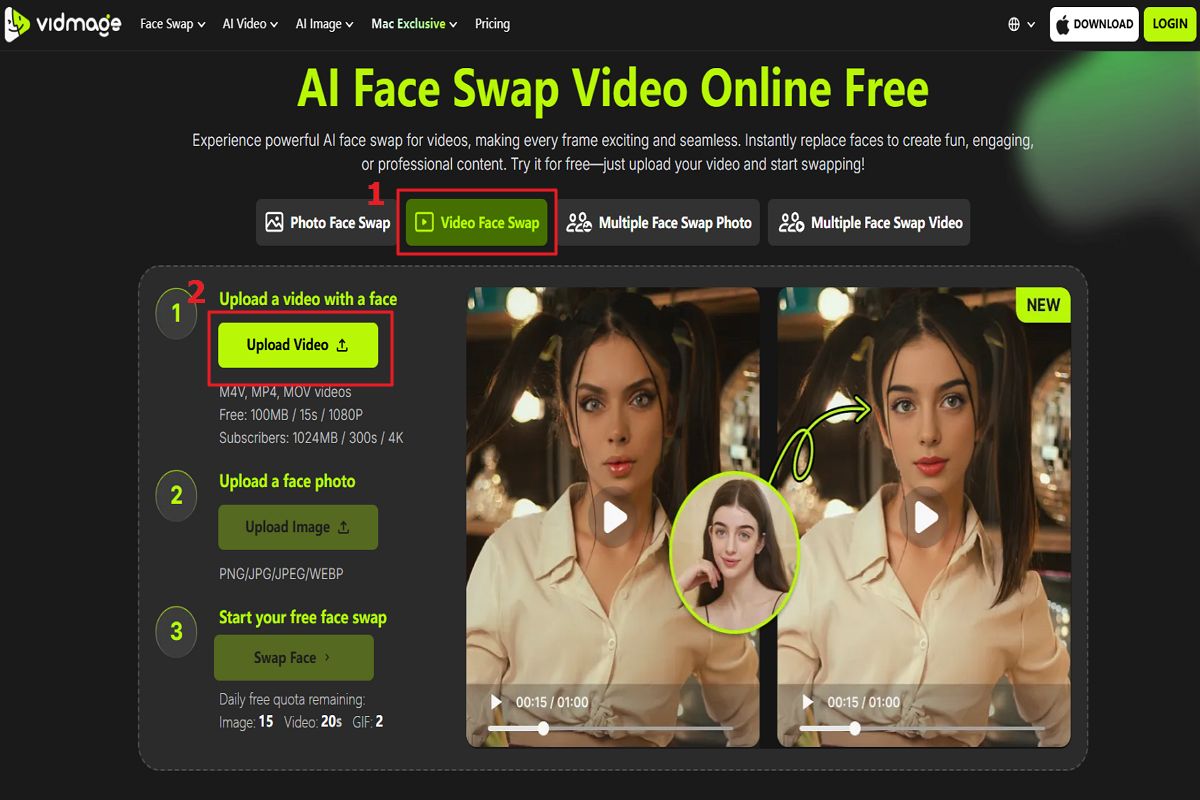
Step 1: Upload Your Source Video
Start by uploading the video you want to edit. VidMage AI accepts any standard video format.
VidMage
Step 2: Upload a Reference Face
Provide a clear, frontal image of the face you want to insert into the video. The quality of this source image directly affects the final result.
Step 3: Let the AI Analyze
The AI automatically maps facial landmarks across every frame of your video to prepare for the swap.
Step 4: Preview the Result
Before finalizing, you can preview the video to check alignment and blending.
Step 5: Export
Once satisfied, choose your desired export resolution (options include 4K, depending on your plan) and render the final video.
The setup is designed to be completed in under two minutes before rendering begins, allowing for a fast and efficient workflow.
VidMage AI vs. Alternative Tools: Feature Comparison
For users evaluating face swap solutions, here is a comparison of VidMage AI’s feature set against those of general AI creation platforms. Note that this comparison focuses on available features and specifications, not performance or testing results.
| Criteria | 1️⃣ VidMage AI | 2️⃣ General AI Creation Platforms |
|---|---|---|
| Ease of Use | Simple, dedicated UI | Template-driven, easy |
| Tracking Stability | Strong during motion and lighting changes | Stable in static scenes; reduced stability with motion |
| 4K Support | Yes, supported across all plans. | Limited to the highest-tier “Business” plan |
| Multi-Face | Successfully handled two-person scenes in tests | Basic support; occasional crossover in complex scenes |
| Processing | Cloud-based (Mac available) | Cloud-based |
| Primary Use Case | Users prioritizing video face swap quality | Teams needing integrated AI content tools |
Note: This comparison illustrates the different approaches available: specialized tools like VidMage AI concentrate all development resources on optimizing the face swap function, while general platforms offer convenience through integrated workflows at the potential cost of feature depth.
Final Verdict
AI has made face-swapping accessible to everyone. For users whose priority is a dedicated, automated tool for realistic face swaps, VidMage AI offers a specialized solution. Its single-purpose design aims to provide a predictable and reliable workflow from initial upload through final export.
FAQ
Is VidMage AI suitable for users without editing experience?
Yes. The automated workflow requires no prior editing knowledge, and the interface is streamlined around a single task.
Does VidMage AI support 4K exports?
Yes, depending on the selected plan. 4K export is supported for higher-tier users.
Can VidMage AI swap multiple faces in one video?
Yes. During testing, it successfully processed two-person scenes with accurate subject tracking.
Is video face swap AI legal?
Usage depends on local laws and consent. Always ensure you have permission to use someone’s likeness.
This articles is written by : Nermeen Nabil Khear Abdelmalak
All rights reserved to : USAGOLDMIES . www.usagoldmines.com
You can Enjoy surfing our website categories and read more content in many fields you may like .
Why USAGoldMines ?
USAGoldMines is a comprehensive website offering the latest in financial, crypto, and technical news. With specialized sections for each category, it provides readers with up-to-date market insights, investment trends, and technological advancements, making it a valuable resource for investors and enthusiasts in the fast-paced financial world.