
At a glance
Expert’s Rating
Pros
- Immersive 39-inch display size
- Functional design and compact stand
- Extremely sharp 39-inch ultrawide panel
- Great contrast and color gamut
- HDR brightness beats most rivals
Cons
- Lacking features found on competitors like RGB sync and presence detection
- AI upscaling and scene optimization offer little benefit
- Expensive at MSRP
Our Verdict
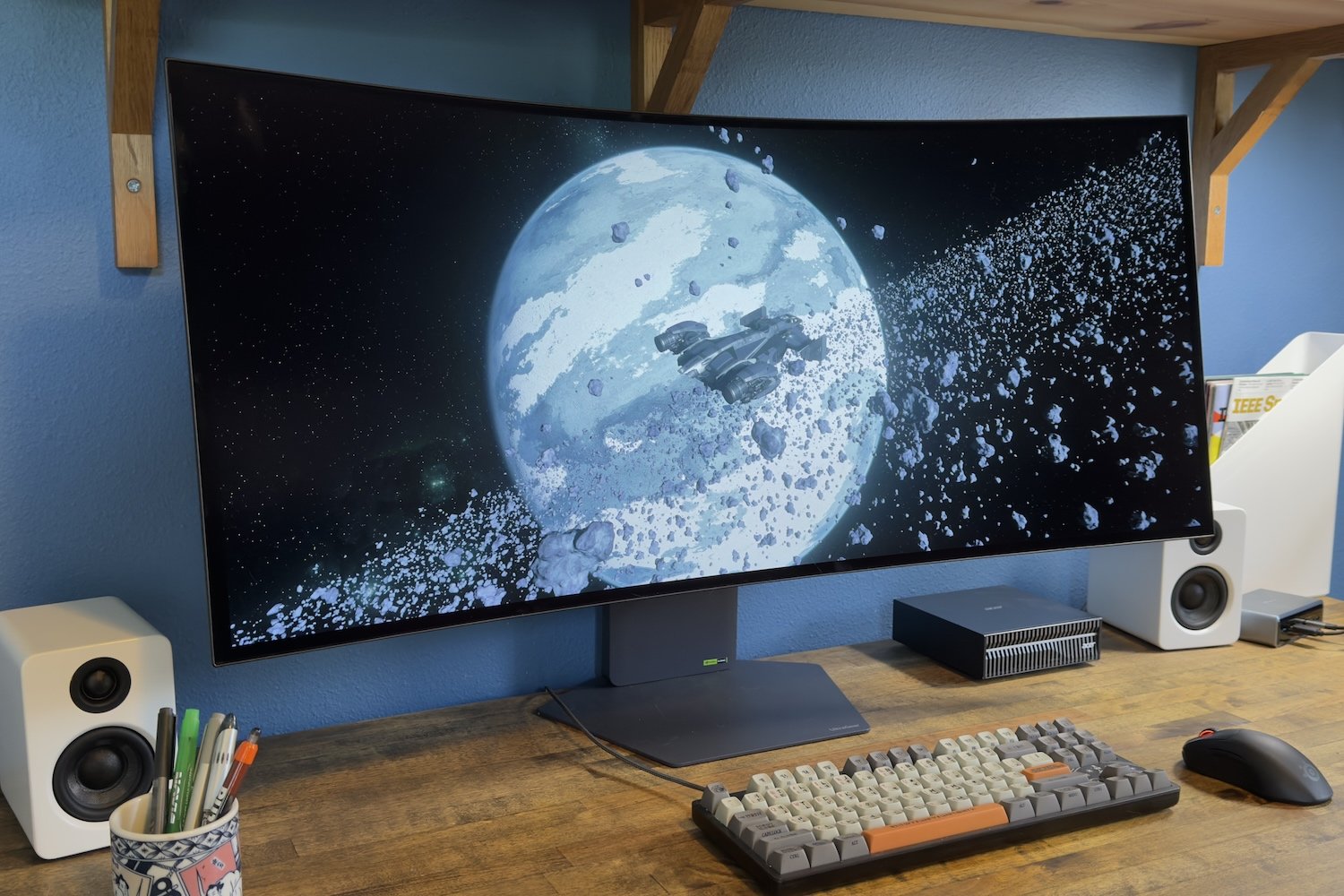
LG’s Ultragear Evo GX9 is a big, expensive OLED with a razor-sharp image and plenty of HDR punch.
Price When Reviewed
This value will show the geolocated pricing text for product undefined
Best Pricing Today
Price When Reviewed
1799.99
Best Prices Today: LG Ultragear Evo 39GX950B-B




LG has a long history of launching big new OLED monitors at sky-high pricing, and while they’re often difficult to afford, they’re usually great monitors. The LG Ultragear Evo GX9 continues this lineage with a 39-inch 5K2K panel that delivers fantastic SDR and HDR image quality. It’s expensive, but it’s worth it.
Read on to learn more, then see our roundup of the best gaming monitors for comparison.
LG Ultragear Evo GX9 (39GX950B-B) specs and features
The LG Ultragear Evo GX9 isn’t your typical ultrawide OLED display. It provides an uncommon 39-inch display size, an LG tandem WOLED display, and a high maximum resolution of 5120×2160.
Together, these features make the Evo GX9 a unique monitor. You’ll find other 39-inch OLED ultrawides, and others with 5120×2160 resolution, and others with a tandem WOLED panel, but the Evo GX9 is the only monitor that currently combines them.
- Display size: 39-inch 21:9 ultrawide
- Native resolution: 5120×2160 / 2560×1080
- Panel type: LG tandem WOLED
- Refresh rate: 5120×2160@165Hz / 2560×1080@330Hz
- Adaptive sync: Yes, Nvidia G-Sync Compatible, AMD FreeSync Premium Pro
- HDR: HDR10, VESA DisplayHDR True Black 500 certified
- Ports: 2x HDMI 2.1, 1x DisplayPort 2.1, 1x USB-C with DisplayPort and 90 watts of Power Delivery, 2x USB-A 3.2 Gen 2 downstream
- Audio: Built-in speakers
- Additional features: AI upscaling and picture optimization
- Warranty: 2-year limited warranty
- Price: $1,799.99 MSRP
This combination doesn’t come cheap, though. The LG Ultragear Evo GX9 has an MSRP of $1,799.99. That’s a lot of money and, because the monitor is new and unique, it’s unlikely to see rapid discounts.
LG Ultragear Evo GX9 design
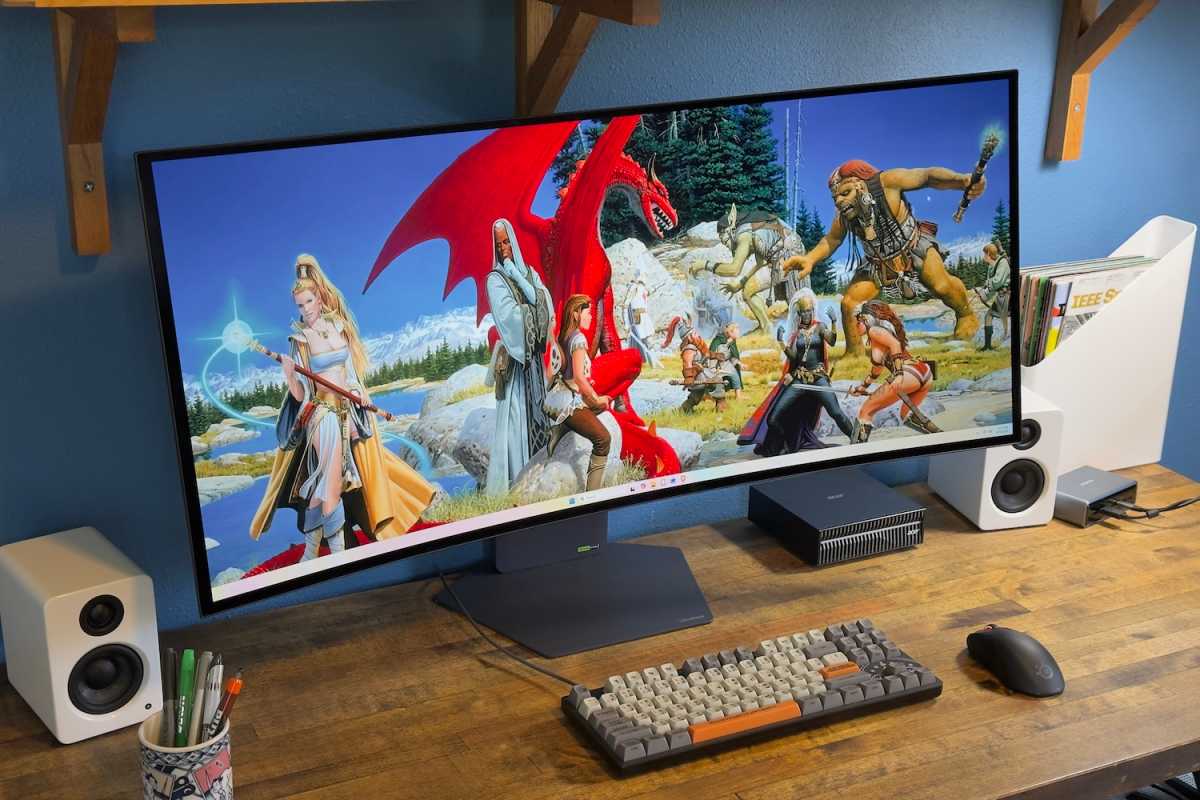
The LG Ultragear Evo GX9 is a 39-inch ultrawide, and while it’s not the first I’ve seen, it did remind me that this form factor is rather excellent. While I like 34-inch ultrawides well enough, a 39-inch ultrawide provides a nice upgrade in display real estate (roughly 30 percent more than a 34-inch ultrawide) — yet, at 36 inches wide, it will still fit on most desks.
LG’s stand design helps, too. The stand base is solid yet compact and flat, so it doesn’t feel obtrusive on your desk or take away from usable space. Ergonomic adjustment is respectable, too, with support for height, tilt, and swivel adjustment (though, at an MSRP of $1,799.99, I would expect that).
Matthew Smith / Foundry
The display has a 1500R curve, which is typical for this type of monitor. I personally prefer a less dramatic curve, or none at all, but I didn’t find it overly annoying or distracting.
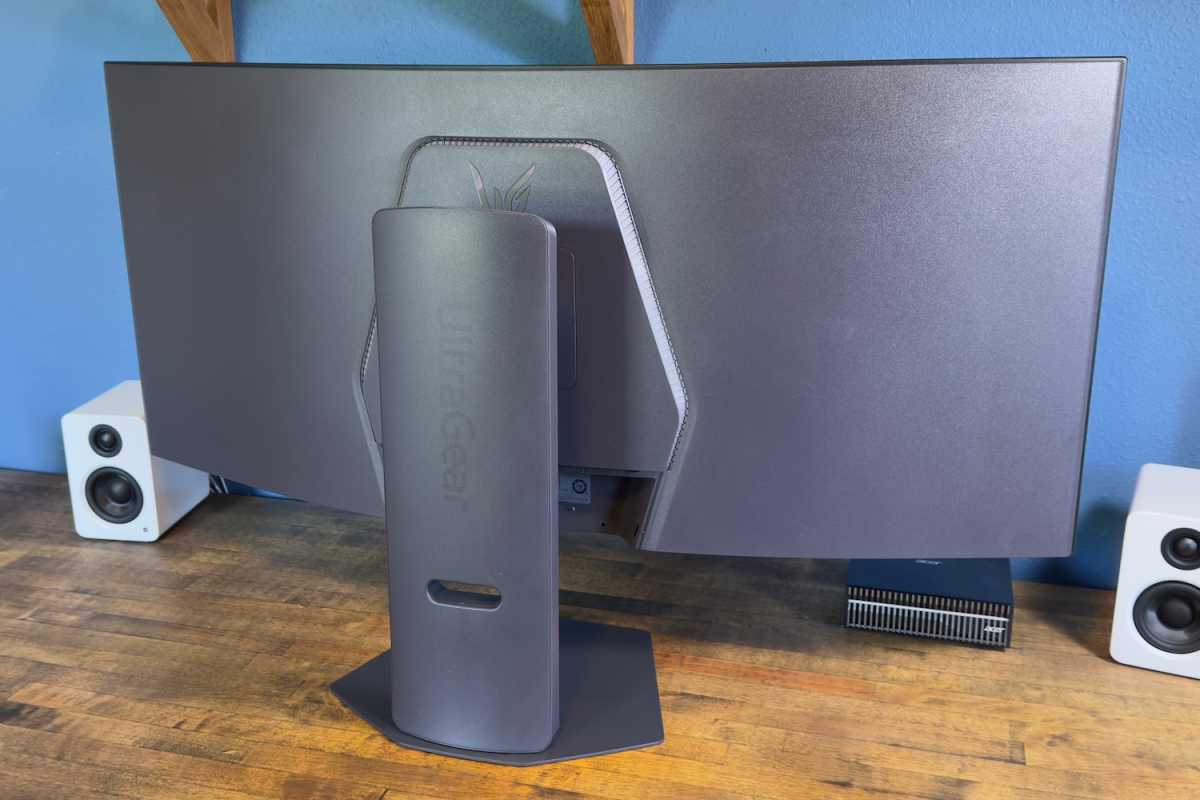
Build quality is adequate. Aside from the stand, which is partially made of metal, the monitor’s body is plastic. The plastics used feel rigid and don’t allow much flex, but the overall feel is adequate more than it is impressive.
On the rear of the monitor you’ll find LG’s “hexagon lighting” accent light. The color and effect can be set to various colors and patterns, as is typical of gaming monitors. However, unlike some monitors from brands such as Asus and Alienware, LG doesn’t provide a way to sync the monitor’s lighting with other devices.
Matthew Smith / Foundry
LG Ultragear Evo GX9 connectivity
LG offers four video input options on the Ultragear Evo GX9; two HDMI 2.1, one DisplayPort 2.1, and one USB-C with DisplayPort. This is a typical range of connectivity for a monitor and should work for most situations. You could connect two game consoles, a desktop PC, and a laptop PC (with USB-C) simultaneously.
The USB-C port includes up to 90 watts of Power Delivery. While I expect that on a monitor with the Evo GX9’s sky-high price tag, it’s good to see, as monitors branded as gaming displays still sometimes omit it. The USB-C port is ideal if you want to use both a laptop and desktop, as the USB-C connection has enough power to handle many Windows laptops that lack discrete graphics.
USB hub support is a bit lacking, though, as the monitor has just two USB-A 3.2 downstream ports. That’s better than nothing, but it’s also no better than what you’ll typically find on less expensive displays. The Evo GX9 also lacks a USB-B upstream port.
LG Ultragear Evo GX9 menus and features
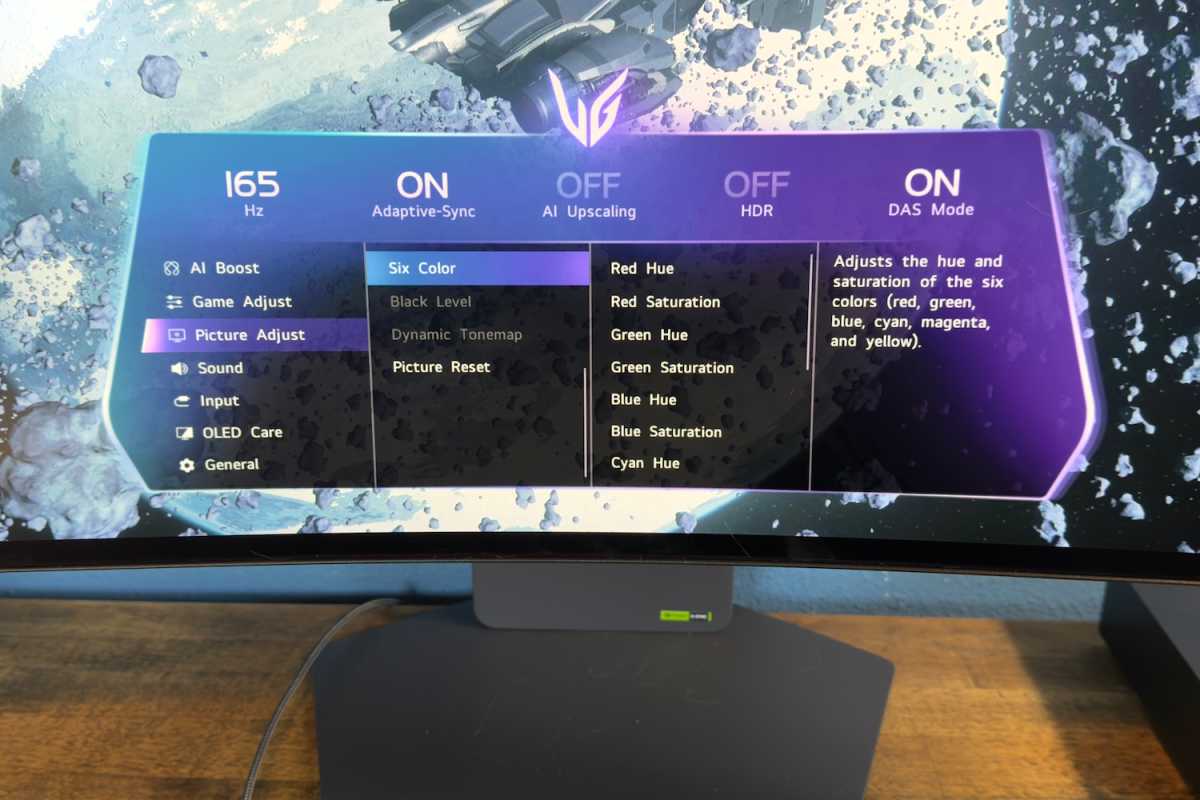
A joystick centered just behind the LG Ultragear Evo GX9’s chin is used to navigate the on-screen menus. It’s responsive and the on-screen menus are logically arranged. The range of image quality options is a bit lacking, however. In particular, I don’t like that the monitor has vague descriptions of gamma and color temperature settings (such as “Mode 1”) instead of targeting precise gamma and color temperature values.
LG makes some fuss over the monitor’s AI features, but they’re not great.
The AI upscaling mode claims that it can enhance content to improve detail and clarity, but if it had any impact, I struggled to see it. I tried several different forms of low resolution content—images, 720p video, and games running at half native resolution—and never saw any improvement from the AI upscaling feature.
Matthew Smith / Foundry
LG’s AI image optimization, on the other hand, was actively annoying. When I set up the monitor I quickly noticed that the display’s color temperature shifted at random. This, it turned out, is caused by the AI image optimization feature. I recommend that you turn it off.
LG offers several software utilities including LG Switch (to manage different video sources) and LG calibration studio. They cover the basics but feel disjointed. LG unfortunately lacks a unified display manager like that provided by Asus, Dell/Alienware, Acer, and a few other brands.
Other features include picture-and-picture and picture-in-picture modes, flicker-free and color-weakness modes, and OLED care, though the Evo GX9 notably lacks the automatic brightness reduction and/or display sleep features that some new OLEDs use to manage panel burn-in. While I don’t think that’s a big issue, I am disappointed by its absence given the GX9’s high price.
If you want a big, immersive display for racing games, simulation titles, MMORPGs, etc. , the Evo GX9 is a good choice.
LG Ultragear Evo GX9 audio
Speakers are built in to the LG Ultragear Evo GX9, but they’re not amazing. They provide a respectable maximum volume and work fine for less complex audio, whether that’s a podcast or a round of Vampire Survivors. However, they’re quickly overwhelmed by the bass in more demanding audio sources like music, movies, and games with a complicated audio presentation. The sound comes across as thin and tinny and detail is lost in the low end.
Still, the speakers are at least present, which isn’t guarantee even among expensive monitors. I wouldn’t rely on them as my only source of audio but you might find them adequate if you mostly use a headset but on rare occasion want to listen to something via speakers.
LG does provide an AI audio optimization feature, but much like the AI image optimization, it’s bad. The audio optimization feature often made the audio sound badly compressed. I noticed this most when dialogue was spoken over other loud noises or music. Perhaps the intent is to make dialogue easier to hear, but I don’t think it works. Fortunately, the AI audio optimization ca be turned off.
LG Ultragear Evo GX9 image quality
The LG Ultragear Evo GX9’s overall connectivity and feature set is a bit weak for the price, but for most shoppers it’s image quality that will determine whether the monitor is a buy or a pass.
Matthew Smith / Foundry
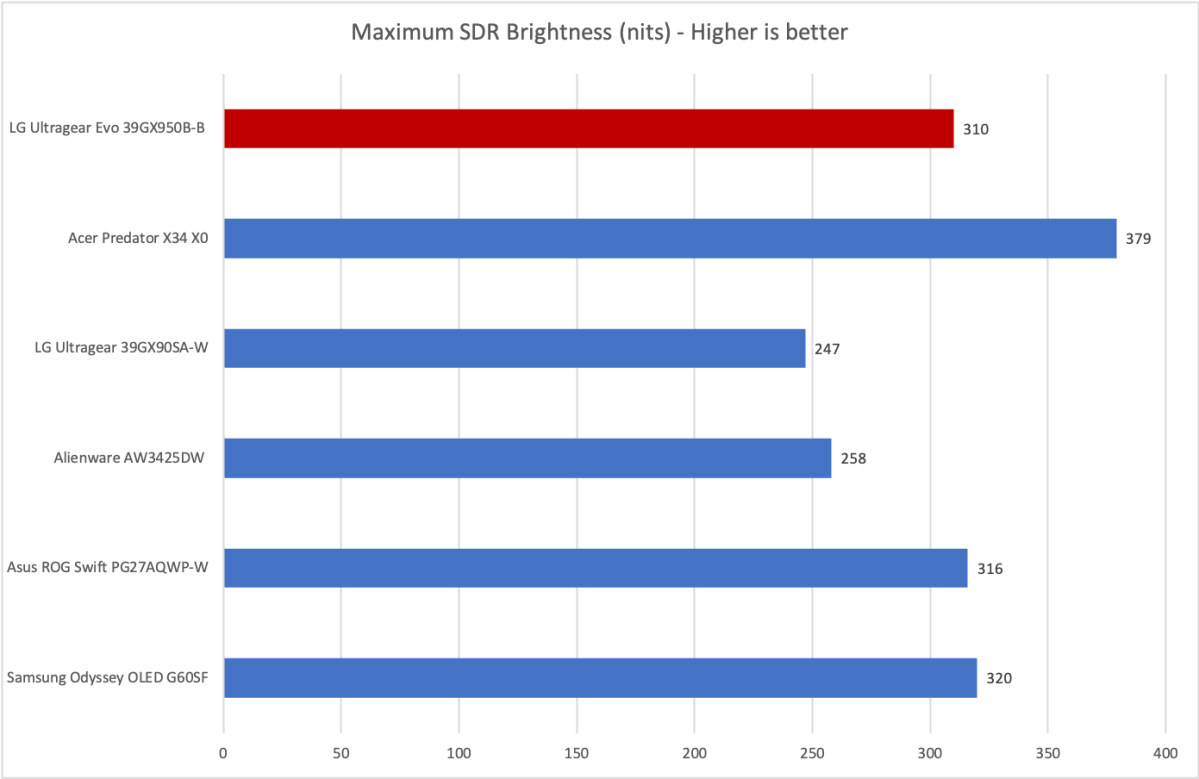
First up is brightness, where the Evo GX9 reaches a respectable sustained maximum SDR brightness of 310 nits. Though it’s not the brightest OLED, it’s a long ways from the dimmest. A brightness of 310 nits is more than enough for use in a room with good light control.
However, the monitor can still look slightly dim in a room with sunlit windows. Fortunately the issue is somewhat mitigated by the monitor’s matte finish. This is particularly important for a curved monitor, because curved monitors have a tendency to amplify sources of glare that are behind the user. The Evo GX9 greatly reduces this issue.
Matthew Smith / Foundry
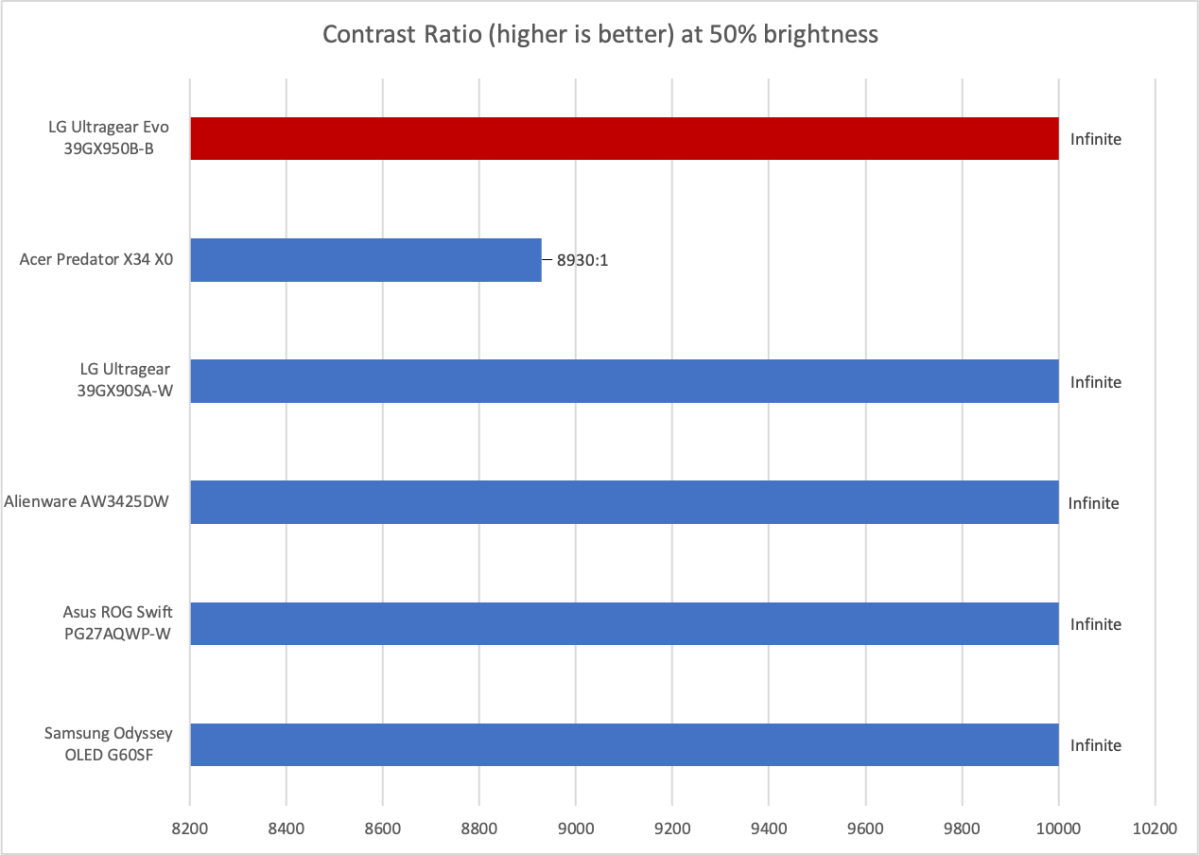
Excellent contrast is assumed for an OLED monitor, and the Evo GX9 is no exception. It offers a great sense of depth, deep black levels, and an overall engaging image. It’s not special in these areas, however. OLED monitors offer these traits as a rule.
What about the Acer Predator X34 X0? It’s a Mini-LED monitor, so it’s not capable of matching OLED on contrast. This goes to show that even Mini-LED, which is generally as good as it gets for contrast from an LED backlight monitor, still can’t compete with OLED contrast.
Matthew Smith / Foundry
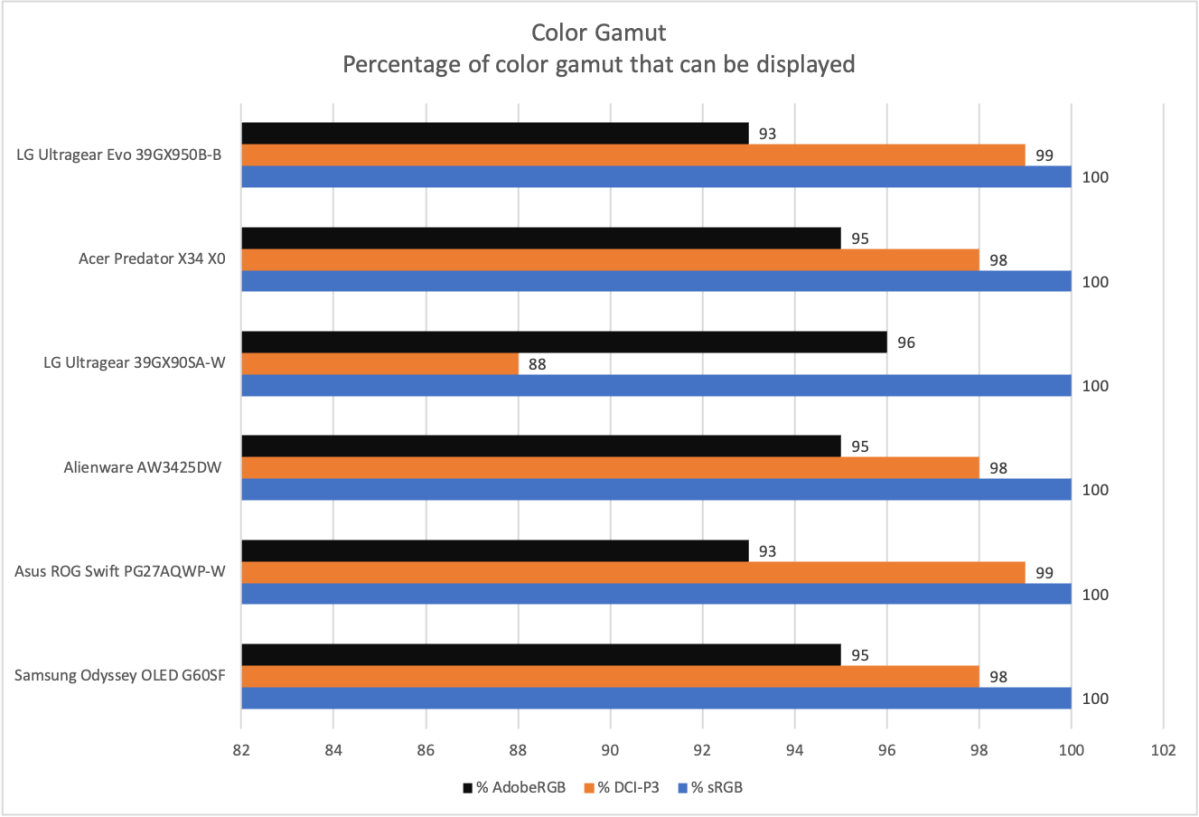
Next up is color gamut. The Evo GX9 once again does well here with coverage of 100 percent of sRGB, 99 percent of DCI-P3, and 93 percent of AdobeRGB. As the graph shows, these values are generally competitive with other OLED displays. QD-OLED monitors like the Samsung Odyssey OLED G60SF tend to do a little worse in DCI-P3 and a little better in AdobeRGB, but this is splitting hairs. For most people, including a lot of creative professionals, all of these monitors offer a vivid image with plenty of color coverage.
Matthew Smith / Foundry
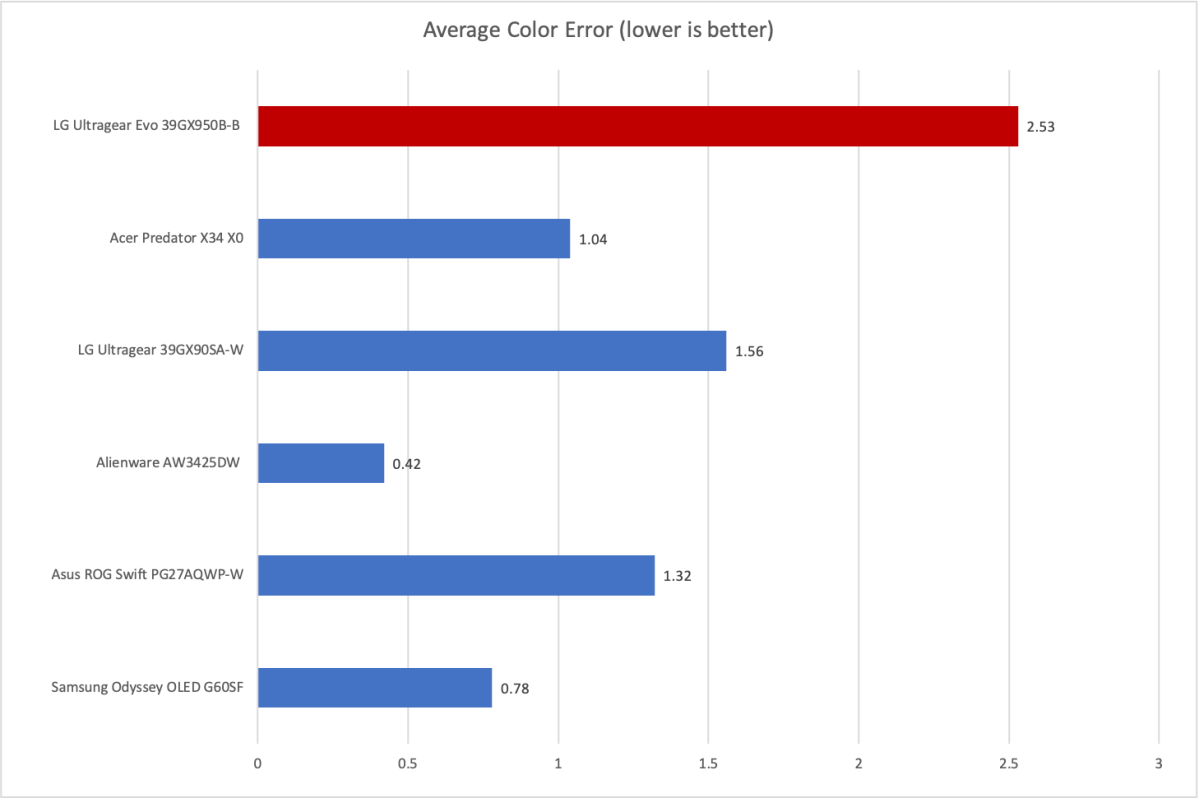
Color accuracy, on the other hand, is a bit of a wrinkle for the Evo GX9. An average color error of 2.53 is still fairly decent overall, but as the graph shows, monitors of this caliber (and price) tend to offer more accurate color and some monitors, like the Alienware AW3425DW, are exceptionally accurate out of the box.
The Evo GX9’s gamma, on the other hand, was solid with an on-target default gamma curve of 2.2. That indicates the image looks about as bright as it should, and it’s notable because OLED monitors can sometimes skew towards 2.3, which causes them to look a shade darker than they should.
Color temperature, on the other hand, came in at 6700K with the GX9 at 50 percent brightness. This is a bit cooler than it should be, and it’s noticeable, though not glaring. The color temperature skews cooler as the monitor becomes brighter and warmer as brightness is reduced, though it was still at 6600K with the monitor set to its minimum brightness.
Sharpness is a big part of the Evo GX9’s story, and also a big positive. The Evo GX9 has a native resolution of 5120×2160 which, across the 39-inch ultrawide panel, works out to a pixel density of 143 pixels per inch.
That’s not as sharp as a 27-inch 4K monitor, but it beats a typical 34-inch OLED ultrawide with 3440×1440 resolution (which have roughly 110 pixels per inch) and absolutely demolishes older 39-inch OLED ultrawides with that same resolution (which have just 96 pixels per inch).
The upshot is that the Evo GX9 looks extremely sharp in nearly all situations, from games to the Windows desktop. Yes, I can see some aliasing and pixelation if I lean in towards the display, but it’s not readily visible at the distance I typically sit from the monitor (which, in this case, is about three feet).
LG Ultragear Evo GX9 HDR image quality
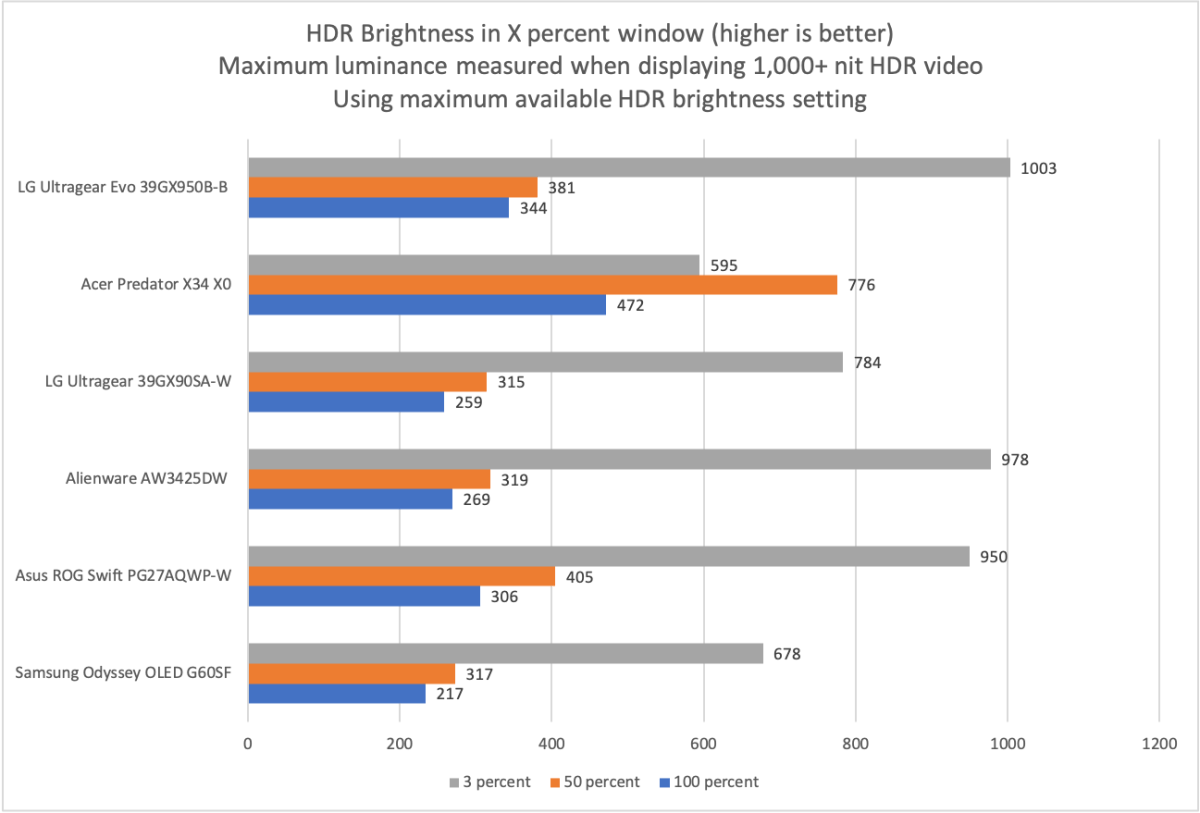
The LG Ultragear Evo GX9 supports HDR10 and is VESA DisplayHDR True Black 500 certified. Indeed, that arguably undersells it, because the Evo GX9 can deliver up to just over 1,000 nits of brightness.
Matthew Smith / Foundry
That value was recorded in a 3 percent window, meaning only 3 percent of the display was lit. This is the level of brightness you might see when an explosion momentarily lights up the display, and it’s towards the high end of what I’ve recorded from an OLED monitor.
But there’s more to the story than that, as the Evo GX9 was also brighter than most competitors at the 50 percent and 100 percent windows. That means the Evo GX9 tends to be brighter than competitors in all situations.
On a final note, the Evo GX9 includes an HDR brightness adjustment. That means you can turn down the HDR brightness if desired. This feature is becoming more common, but it’s still far from universal, and I find it’s often essential. HDR content is rarely created with a computer monitor in mind, and content can at times become overwhelmingly bright.
LG Ultragear Evo GX9 motion performance
Motion performance is arguably a bit of a weak spot for the LG Ultragear Evo GX9. The monitor can offer a refresh rate up to 165Hz at 5120×2160 resolution, which isn’t bad.
However, I must admit I’ve been a little spoiled by my recent reviews of ultra-high-refresh monitors like the Asus ROG Swift PG27AQWP-W, which can hit 540Hz (or 720Hz at 720p). The Evo GX9’s motion clarity is great for what it is, but at the end of the day a 165Hz refresh rate will always look far more blurred and less precise than a monitor that can hit 240Hz, 360Hz, 480Hz, or beyond.
Perhaps for that reason, the LG Ultragear Evo GX9 supports a dual-mode feature that can reduce the resolution to 2560×1080 in exchange for a refresh rate of 330Hz. Honestly, I think this feature is a bust. The reduction in resolution is obvious and motion clarity is noticeably improved, but it’s still not going to match the best OLEDs for motion clarity.
While I may sound a bit down on the Evo GX9’s motion clarity, the reality is less harsh. If I were spending my own money, I’d buy a lower-refresh ultrawide like the Evo GX9 over a higher-refresh widescreen any day of the week. Still, it’s something to keep in mind before you press the buy button.
Should you buy the LG Evo GX9?
The LG Ultragear Evo GX9 is lovely. Wonderful. Excellent. Awesome. The 39-inch 5K2K panel isn’t perfect, but it hits most of the right marks. For me, this is exactly the right size, and it delivers on all the aspects of image quality I care about most. The monitor looks equally great playing an older SDR game, like Final Fantasy XIV, and a newer HDR game, like Forza Horizon 6.
That’s not to say it’s perfect. The $1,799.99 MSRP is an obvious obstacle that will keep many shoppers from pulling the trigger. That price would feel easier to tolerate if the Evo GX9 was jam-packed with features, but in some areas it’s lacking and some features that are included, like the AI image upscaling and optimization, fail to deliver any value.
Still, the Evo GX9 is an easy monitor to recommend, and it’s among the best gaming monitors available right now. If you want a big, immersive display for racing games, simulation titles, MMORPGs, or any other game that benefits from a lot of display real estate, the Evo GX9 is a good choice.
This articles is written by : Nermeen Nabil Khear Abdelmalak
All rights reserved to : USAGOLDMIES . www.usagoldmines.com
You can Enjoy surfing our website categories and read more content in many fields you may like .
Why USAGoldMines ?
USAGoldMines is a comprehensive website offering the latest in financial, crypto, and technical news. With specialized sections for each category, it provides readers with up-to-date market insights, investment trends, and technological advancements, making it a valuable resource for investors and enthusiasts in the fast-paced financial world.