Are Microsoft’s core productivity apps — Word, Excel, and PowerPoint — endangered by the rise of AI?
That’s the point that Bloomberg and its sources addressed in coverage this week, noting that Microsoft is being buffeted by AI disruption as its stock plunges. “Whether Microsoft Word or Excel will be rendered obsolete by AI remains to be seen,” said Jack Ablin, chief investment strategist at Cresset Wealth Advisors, which owns the stock, according to Bloomberg.
“We don’t know what the environment is going to look like in a few years, which opens up very real questions like, will we even use a Microsoft suite anymore?” Keith Fitz-Gerald, principal at the Fitz-Gerald Group, added.
Welcome to PCWorld’s newsletter, Smart Mode! The focus of this newsletter is productivity: from software to hardware to peripherals, all with the idea to get what you need to get done, efficiently.
I’m your host, Mark Hachman, covering the productivity tips, tools, and trends that you need to know about, both from within PCWorld and beyond. If you want the latest issue in your inbox each week, just sign up right here.
Microsoft’s productivity apps have historically been designed to help you organize, format and massage ideas into actionable results. But now, with an added injection of AI, Microsoft wants Word, PowerPoint, and Excel to actually generate those results for you, via Copilot.
The trouble is external AI applications like ChatGPT and Claude can already do what CoPilot does in various capacities. And they can do that without the need for Microsoft applications — let alone subscriptions! — at all.
So, could millions upon millions of users simply toss Word, PowerPoint, and Excel overboard? If Microsoft users start to realize what AI applications can do, then yes.
Take a look at the menu options for Word: Most of them simply relate to formatting and layout. But today you can ask ChatGPT to format your straight-text notes into beautiful documents. Indeed, these days Word isn’t much more than a scratchpad with a file format that everyone uses.
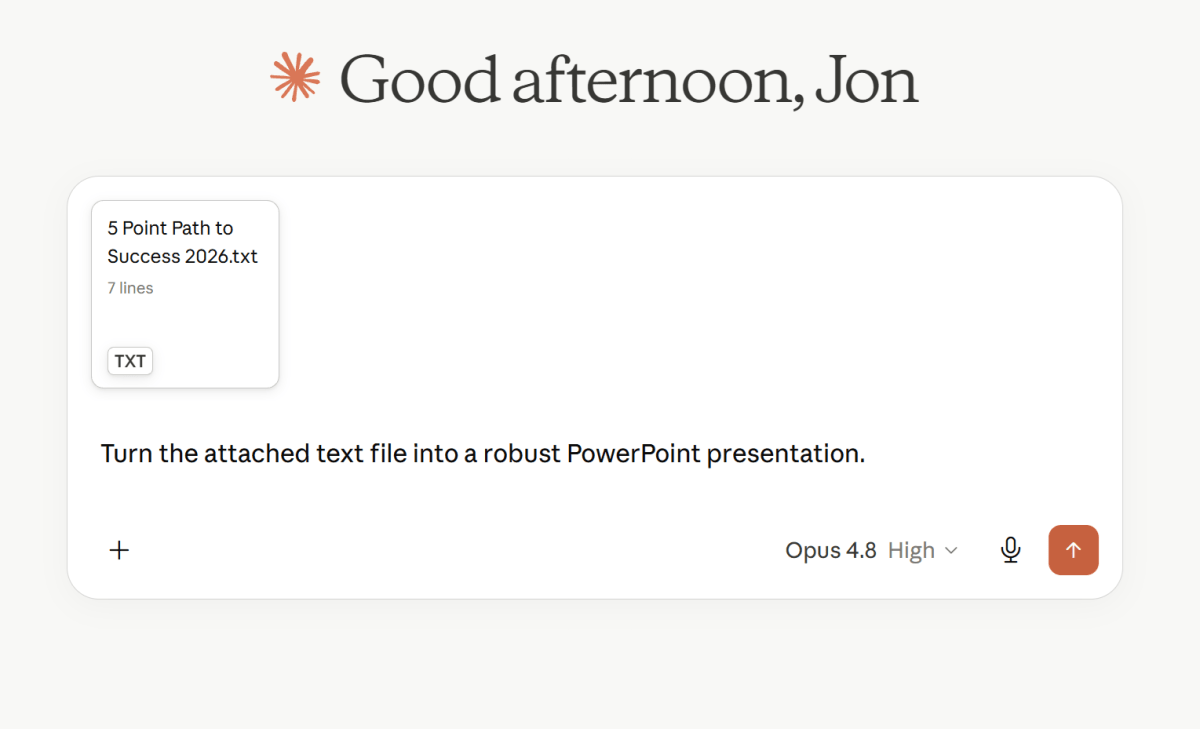
AI chatbots also shine in content synthesis, and this puts PowerPoint at risk. One of the strengths that Microsoft touts is Copilot’s ability to ingest multiple documents and create a PowerPoint from it. But what Microsoft doesn’t acknowledge is that other AI applications can do the same thing, and many organizations are already leaning on Claude and its competitors for just that task.
Foundry
Even Excel isn’t immune. One of the things keeping business users on Excel is the vast connective tissue of linked spreadsheets. You adjust a value and changes ripple across shared documents. But what users have asked for from Excel — and Microsoft has delivered — is deeper analysis of trends and what actions to take as a result. Connecting these dots is one of AI’s strengths. But, again, that AI doesn’t have to be authored by Microsoft.
Copilot itself hasn’t done Microsoft any favors in the AI race. User complaints, or simply apathy, run rampant, and a quick survey of our office reveals no one uses Copilot — and we’re PCWorld for Pete’s sake. And while million of users have grown up with the Office apps, is anyone really a “fan” of them? Feature creep has given Word, PowerPoint, and Excel extremely heavy, often indecipherable interfaces, while the LLMs are basically just single-field chatbots.
Microsoft’s 365 Family plan currently costs $12.99 per month. Anthropic’s Claude Pro Plan, to use one example, costs $20 per month. That’s $7 more, but you can do so much more with a general LLM, and the tailwinds are on AI’s side.
In productivity news
- Speaking of Microsoft 365/Office apps, beware an unexpected end of support if you bought Office apps from the Microsoft Store. Does this feel dumb to you? It does to me.
- I may address this a bit more in a future newsletter, but here’s a sneak peek: Intel’s budget Wildcat Lake platform (the Intel Core Series 3 chips) aren’t all that. And what looks good by comparison? Qualcomm.
- Our review of PDF Editify: It’s an average though affordable PDF editor.
- Windows Central is reporting that the Surface Go and Surface Laptop Go are dead. Each device always seemed like a study in compromise, asking the question, How many shortcomings can you tolerate for a smaller device? (My Surface Laptop Go 3 review explains more.) Given that Panos Panay took a lot of the hardware design innovation with him to Amazon, I’m not surprised to see these go. But I’m still mildly surprised that Microsoft planned a Surface Laptop Ultra. (The direct WC link seems to be timing out.) No comment from Microsoft on this.
- AMD’s Ryzen AI 400 is not impressing me as a processor for productivity laptops. The latest metric where it falls short is battery life.
- Our tip on optimizing RAM usage within Windows feels a bit like the days of optimizing HIMEM.SYS, doesn’t it?
Productivity tip of the week
Determine what time of day you’re most productive, and schedule tasks accordingly, recommends Melanie Chinchilla, a clinical psychologist at Approach Therapy, according to this Today segment. For most people, this means what tasks can I get away with doing, or not doing, during that 2 PM post-lunch crash? For me, I tend to do better scheduling quick, purposeful tasks in the morning and lengthier, more thoughtful tasks in the afternoon.
Thanks for reading!
Thanks for tuning in to this edition of Smart Mode, PCWorld’s newsletter devoted to helping you make the most of your life, smartly. Sign up and have it sent to your inbox every Thursday!
This articles is written by : Nermeen Nabil Khear Abdelmalak
All rights reserved to : USAGOLDMIES . www.usagoldmines.com
You can Enjoy surfing our website categories and read more content in many fields you may like .
Why USAGoldMines ?
USAGoldMines is a comprehensive website offering the latest in financial, crypto, and technical news. With specialized sections for each category, it provides readers with up-to-date market insights, investment trends, and technological advancements, making it a valuable resource for investors and enthusiasts in the fast-paced financial world.