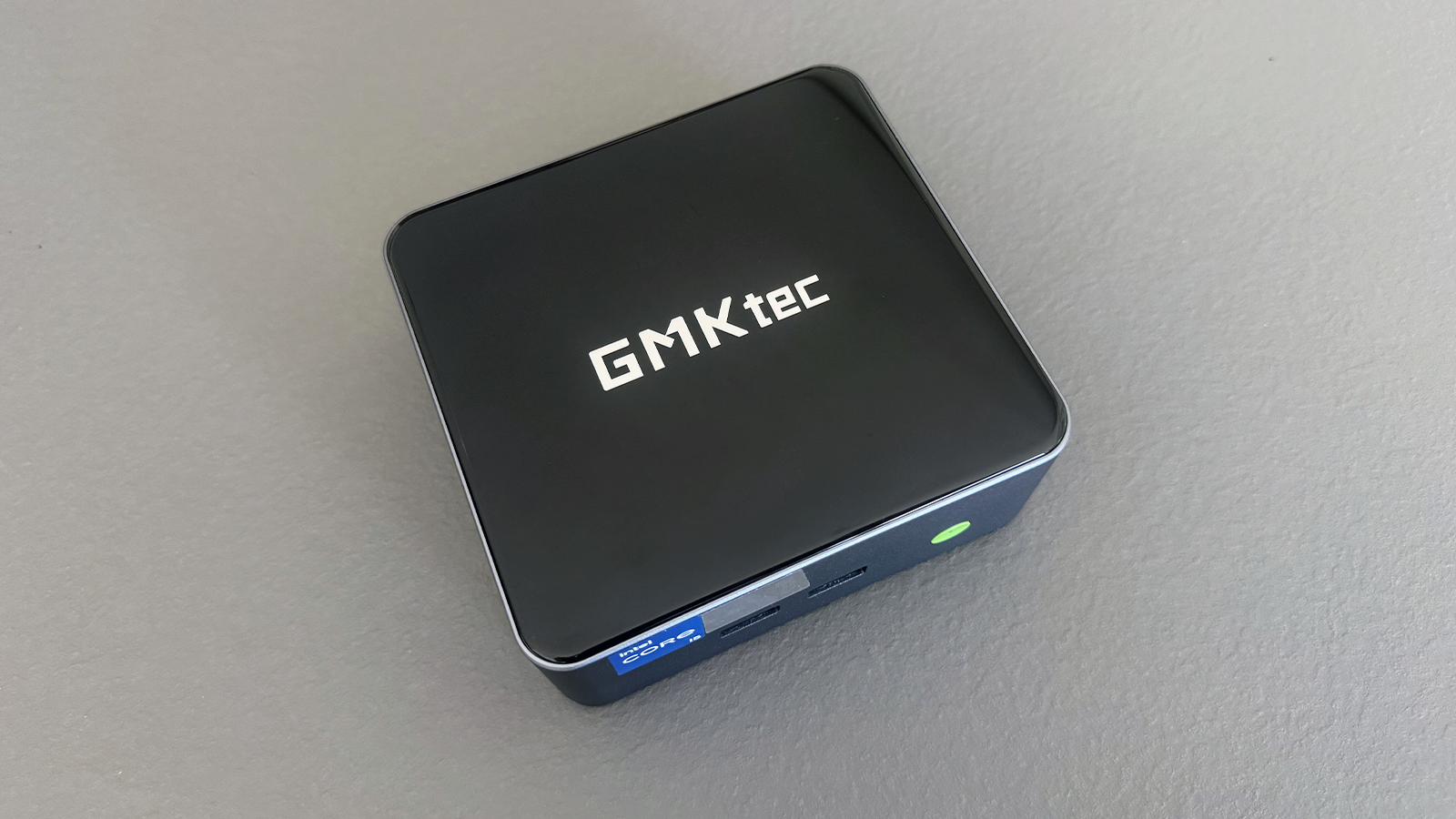
At a glance
Expert’s Rating
Pros
- High-quality aluminium casing and quiet cooling system
- 12 cores and 16 threads provide plenty of headroom for multitasking
- Three 4K displays simultaneously via two HDMI ports and USB-C
- Two M.2 slots allow for storage expansion in the terabyte range
- 2.5Gbit LAN, Wi-Fi 6, and Bluetooth 5.2 for stable network connections
Cons
- The 2023 processor is starting to show its age
- Weak Iris Xe graphics and no dedicated NPU
- No USB-C on the front panel
Our Verdict
The GMKtec M3 Pro is a solid office computer with decent multithreaded performance, a generous range of ports, and a high-quality chassis. However, the platform is showing its age: When it comes to graphics and AI performance, the latest Core Ultra and Ryzen AI models are clearly ahead.
Price at time of review
This value will show the geolocated pricing text for product undefined
Best Price Today
Price When Reviewed
679.99
Best Prices Today: GMKtec M3 Pro


Mini PCs are increasingly finding their way onto desks and into living rooms. They are replacing traditional desktop computers, operate quietly, and consume little power. With the NucBox M3 Pro, GMKtec is launching a model that relies on tried-and-tested technology: a 12-core 13th-generation Intel Core processor, a wide range of connectivity options and flexible storage options. We’ve tested the device extensively and show what it’s capable of — and where it reaches its limits.
Christoph Hoffmann
GMKtec M3 Pro design and build quality
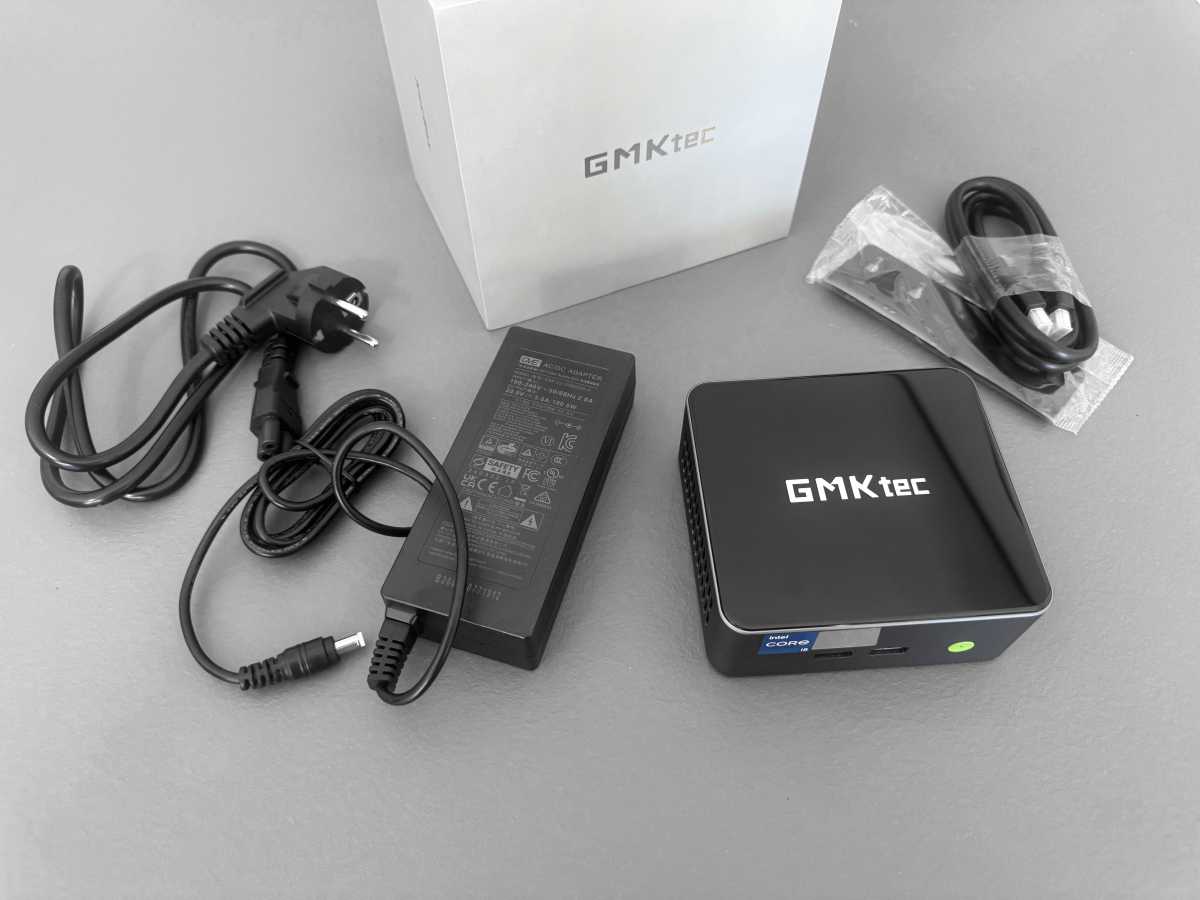
For the M3 Pro, GMKtec has opted for a CNC-milled and sandblasted aluminium casing. The whole unit feels thoroughly sturdy and is neatly finished. A visual highlight is the tempered glass lid with a laser-engraved logo, which lends the simple cube a slightly more sophisticated design. The downside of the glass lid is that dust and fingerprints are quickly noticeable.
Christoph Hoffmann
Measuring 5 × 5 × 2 inches and weighing around 17 ounces, the mini PC is pleasantly compact. Its volume is around 0.83 litres, which is standard for this class of device. It takes up hardly any space on the desk, and if you wish, you can tuck it almost completely away behind the monitor.
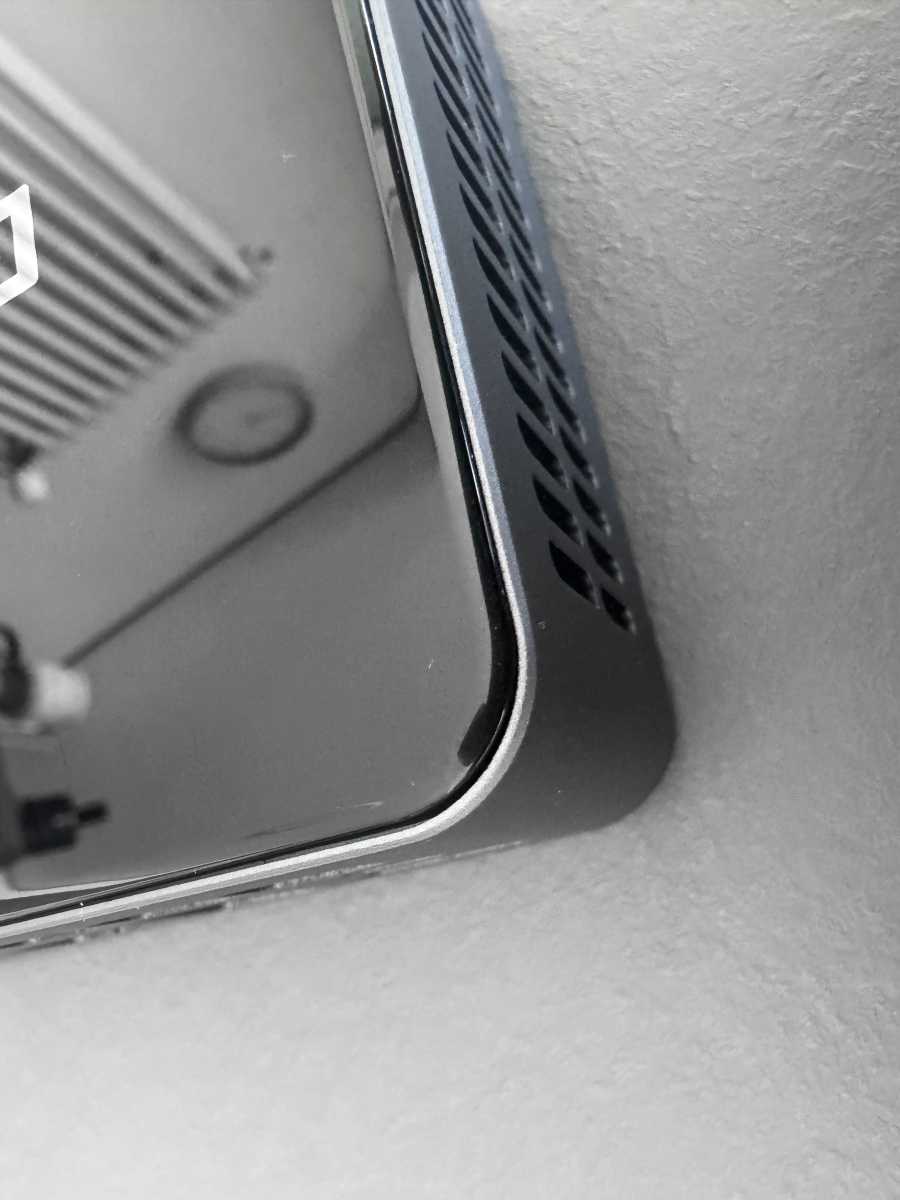
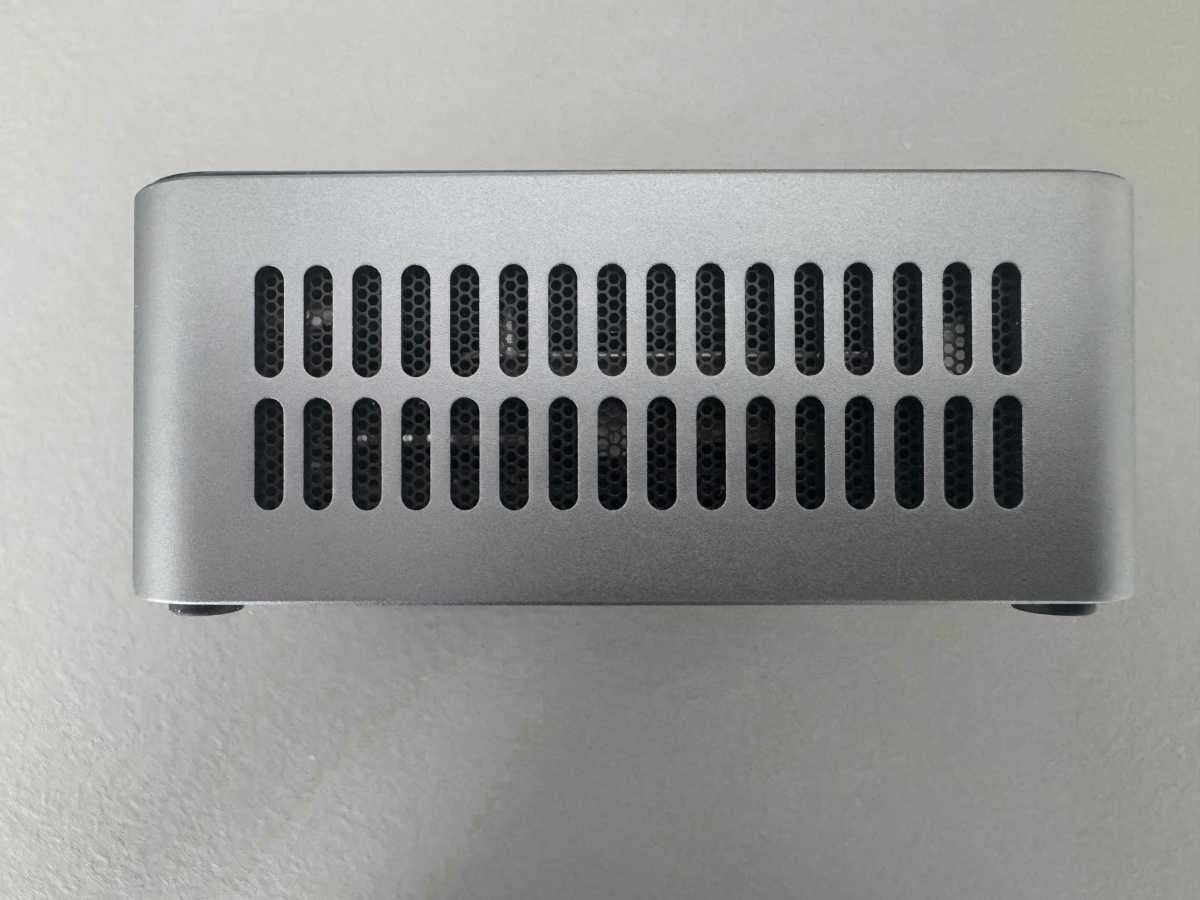
The cooling system inside consists of a copper heat pipe and a turbine fan. The principle is that air is drawn in at the sides and expelled at the rear.
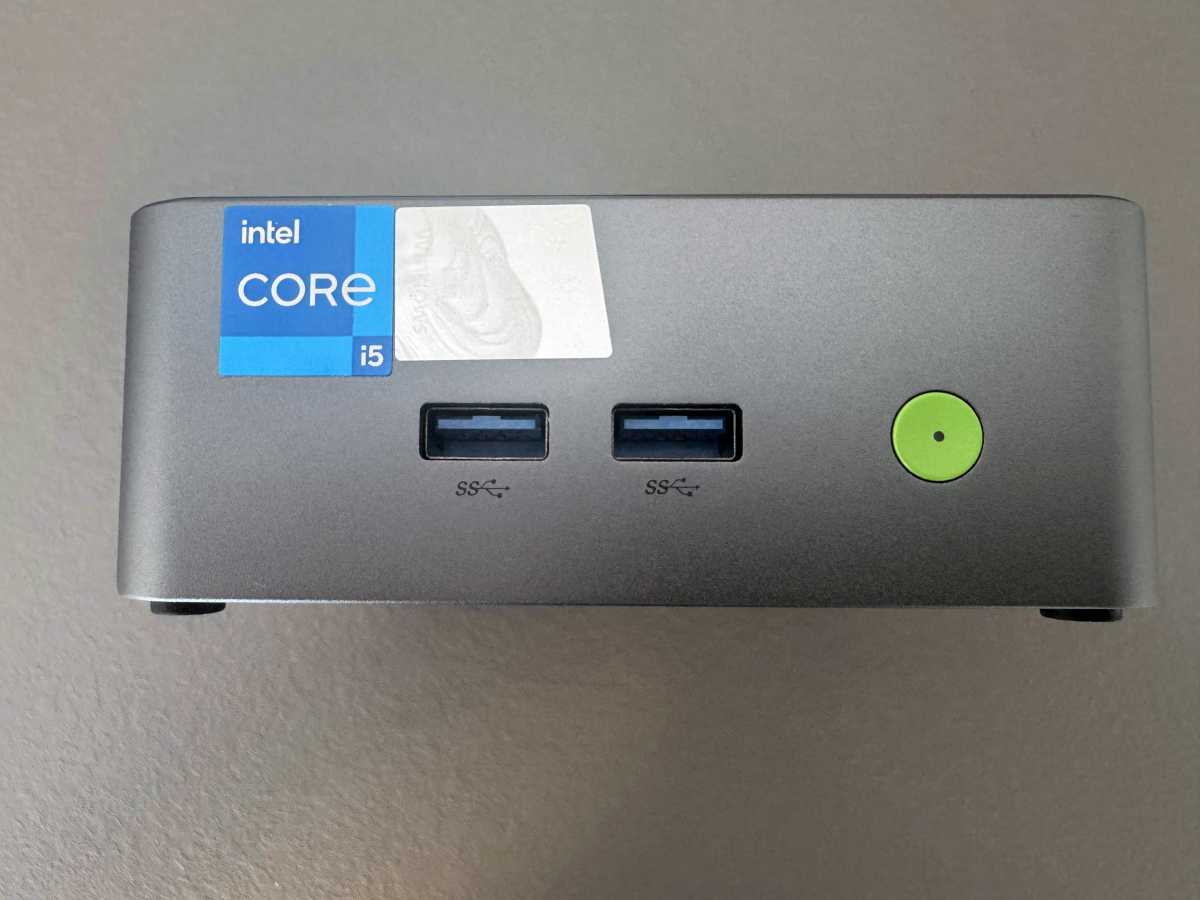
There are actually plenty of ports: On the front are two USB-A ports and the green-illuminated power button.
Christoph Hoffmann
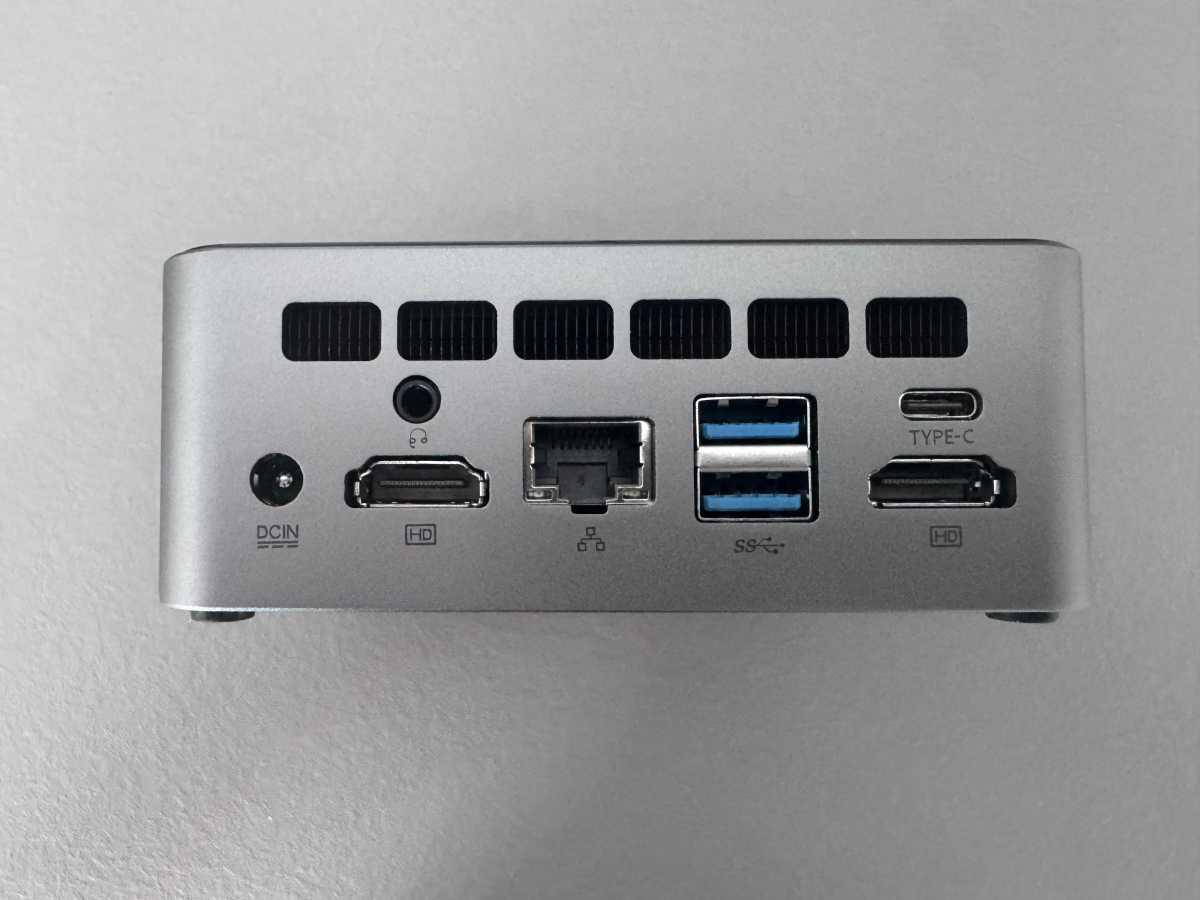
The rear panel houses the power socket, a headphone jack, two HDMI outputs, the LAN port, two further USB-A sockets, and a USB-C port with video output.
Christoph Hoffmann
One criticism in everyday use: For frequently swapped-in devices such as USB-C sticks, external SSDs, or a smartphone, an additional USB-C port on the front would have been much more convenient. As it is, you have to reach round the back of the PC every time you want to connect a modern USB-C device.
Interesting: GMKtec uses this case for the entire M3 range. It’s used in the base model with the Core i5-12450H, as well as in the M3 Plus (i9-12900HK) and M3 Ultra (i7-12700H). With the new M3 Pro, the manufacturer is now switching to a 13th-generation processor for the first time, while retaining the familiar chassis exactly as it is.
GMKtec has paid close attention to detail too: The edges where the top and bottom shells meet are neatly sanded, and the side ventilation slots show no burrs. The rubber feet on the underside ensure a non-slip grip while also dampening slight vibrations from the fan.
Christoph Hoffmann
GMKtec M3 Pro specifications
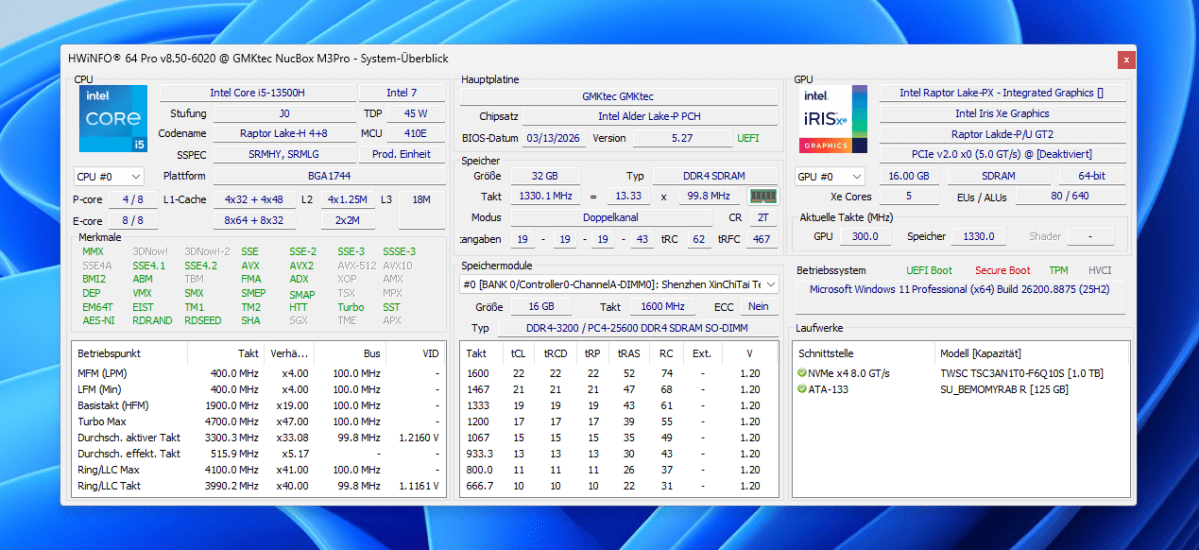
At the heart of the M3 Pro is the Intel Core i5-13500H. This processor from the Raptor Lake H generation features four performance cores and eight efficiency cores. That adds up to 12 cores and 16 threads, with a maximum clock speed of up to 4.7GHz. With a base power consumption of 45 watts, the CPU places considerable demands on the compact cooling system.
Christoph Hoffmann
Graphics processing is handled by the integrated Intel Iris Xe with 80 execution units and a clock speed of up to 1.45GHz. As it does not have its own dedicated graphics memory, it dynamically utilizes the standard system memory.
Our test unit was equipped with 32GB of DDR4 RAM in dual-channel mode, split across two 16GB modules. Although GMKtec also offers a cheaper 16GB variant, anyone requiring more capacity will save on future upgrade costs by opting for the 32GB version. The system supports up to 64GB.
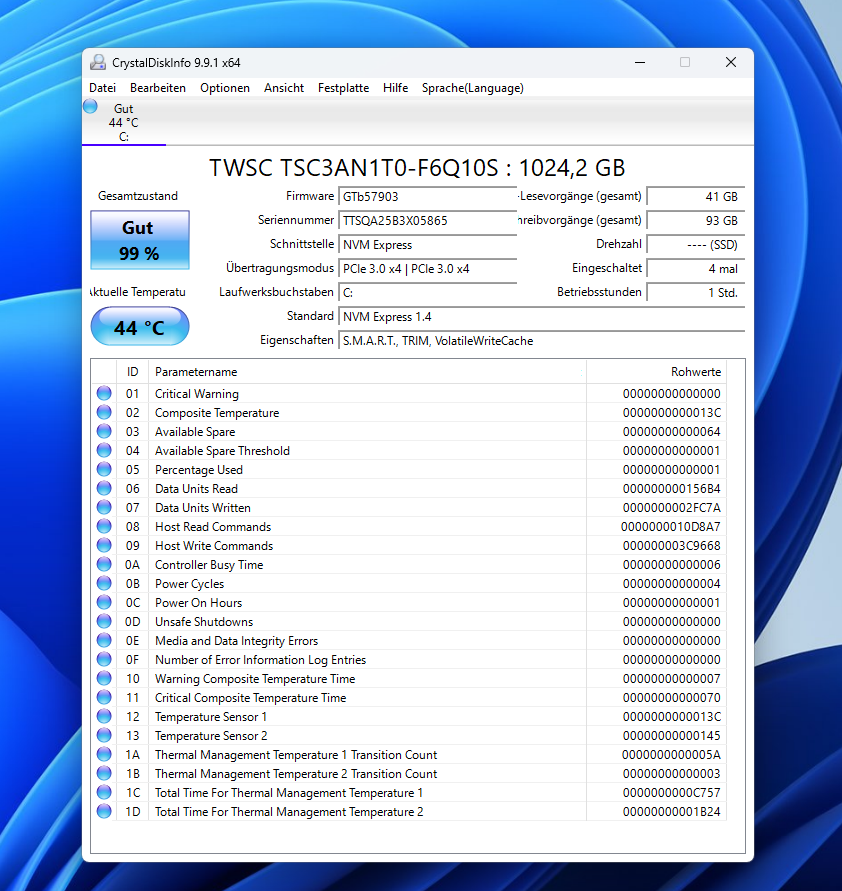
For storage, a 1TB NVMe SSD is installed, connected via PCIe 3.0 with four lanes. Handy: A second M.2 slot in the more compact 2242 format accommodates a further SATA or NVMe SSD.
Christoph Hoffmann
The M3 Pro is well equipped in terms of connectivity: Wired connections are provided by fast 2.5Gbit LAN via an Intel controller, while Wi-Fi 6 and Bluetooth 5.2 are available wirelessly via an on-board RealTek module.
Monitors can be connected via two HDMI sockets and the USB-C port (with DisplayPort support). This allows up to three 4K screens to be used simultaneously.
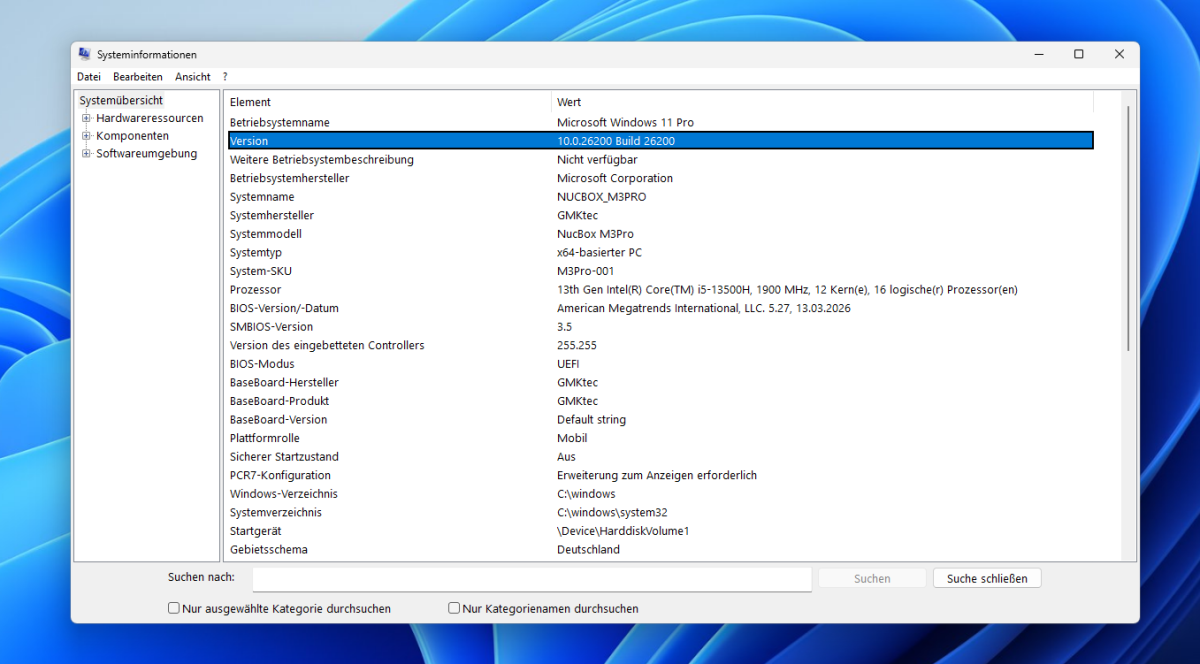
Windows 11 Pro is pre-installed as the operating system (version 25H2, Build 26200.8875 in our test) — the system was therefore up to date and ready for immediate use.
Christoph Hoffmann
It is puzzling that Secure Boot was disabled by default. Buyers should enable the feature in the UEFI and then check whether Windows has installed the latest Secure Boot certificates.
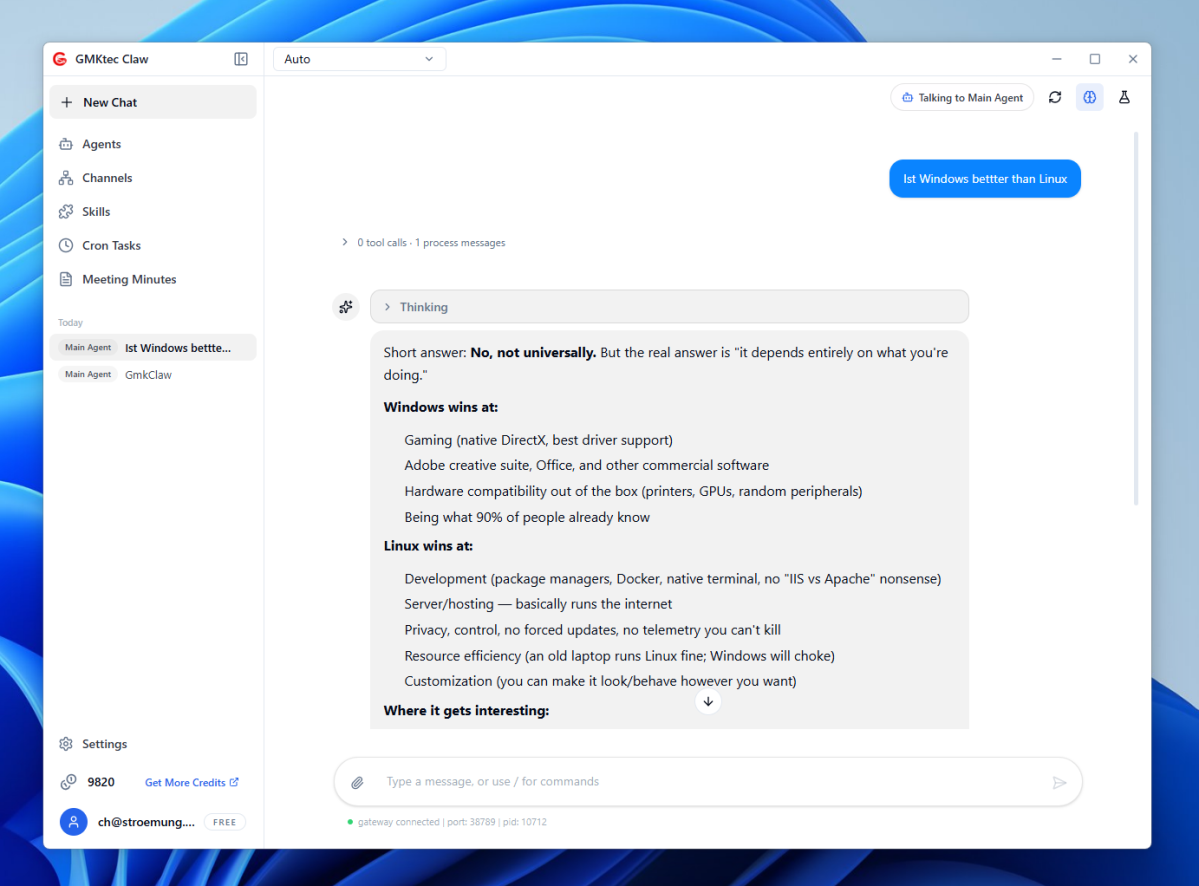
In addition, GMKtec includes its own AI software. Via a so-called ‘Model Hub,’ language models such as Gemma or Qwen can be downloaded directly to the PC. An integrated chat assistant answers questions or helps with research. The whole process runs entirely locally — however, as the processor lacks its own NPU (neural processing unit), performance remains noticeably limited here, as the next section shows.
Christoph Hoffmann
Computing power
You can tell the Core i5-13500H is getting on a bit: The chip was unveiled in early 2023. Compared to the latest Core Ultra 200H and Ryzen AI platforms, the Core i5-13500H is notably lacking an NPU and significantly faster integrated graphics.
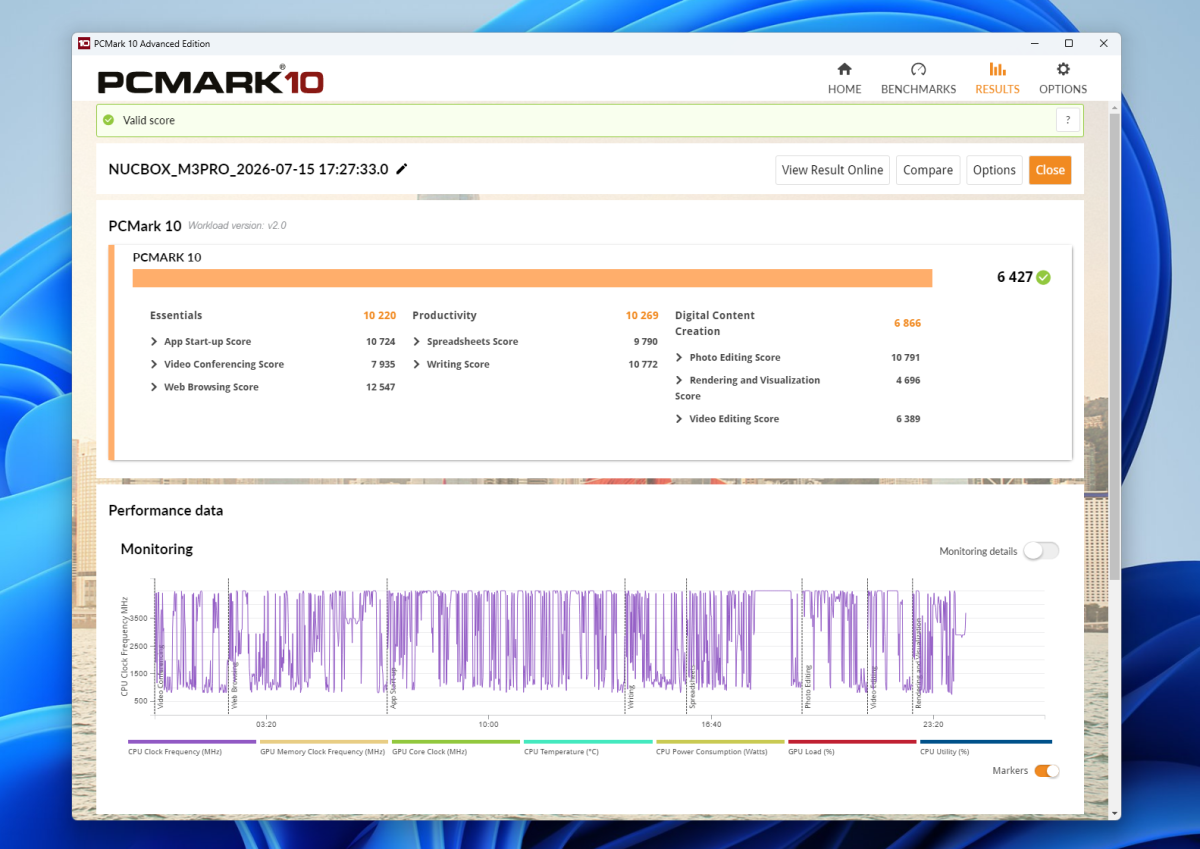
In PCMark 10, the M3 Pro scores a total of 6,427 points (10,220 in Essentials, 10,269 in Productivity). In everyday use, this translates into pleasantly snappy Windows performance: The mini PC handles Office tasks, video meetings, and extensive browsing with lots of tabs open with ease. For photo and video editing (Digital Content Creation), it scores a solid 6,866 points. This is easily sufficient for simple video editing, but the system struggles with complex 4K projects involving numerous effects.
Christoph Hoffmann
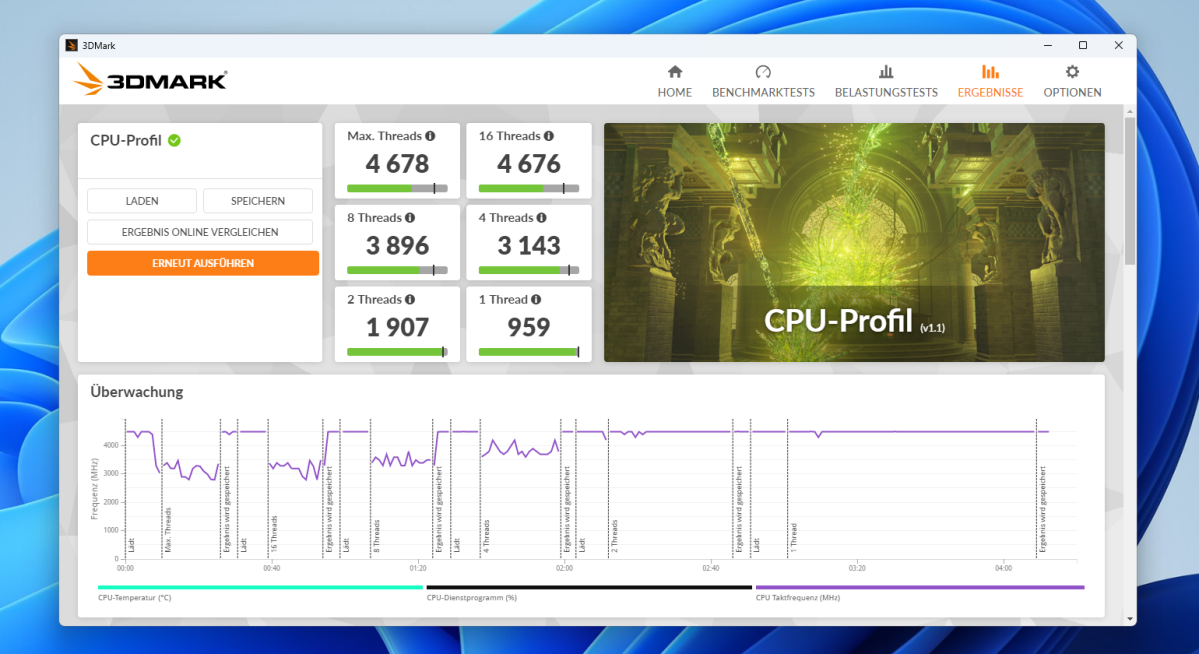
The 3DMark CPU Profile highlights the potential of the 12 cores: At maximum thread utilization, the Core i5 achieves 4,678 points, while in the single-core test it scores 959 points.
Christoph Hoffmann
By comparison, the more affordable Geekom A5 Pro with an AMD Ryzen 5 7530U falls noticeably short here, scoring just 3,977 points (multi-core) and 867 points (single-core).
Interestingly, in the PCMark 10 overall score, both computers are almost neck and neck (6,427 to 6,526 points for the Geekom), as office tasks are weighted more heavily here than the raw core count. When it comes to media processing, however, the M3 Pro clearly outperforms the Ryzen 5, scoring 6,866 to 5,371 points.
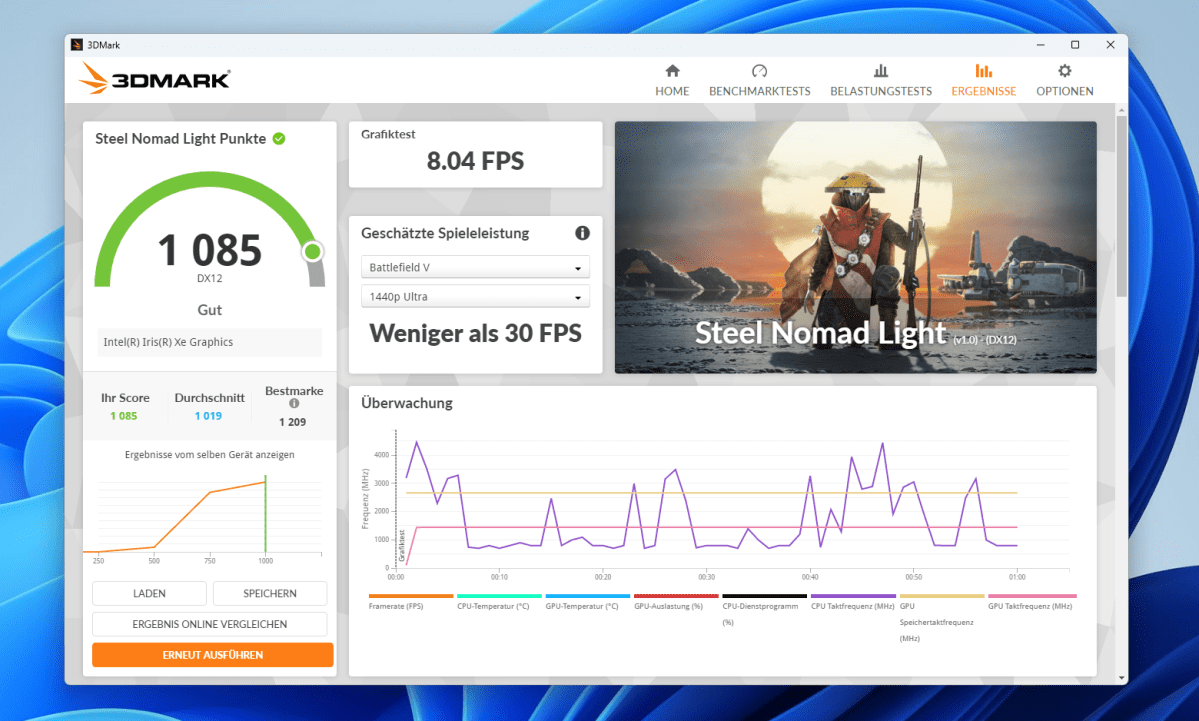
Don’t expect miracles from the integrated Intel Iris Xe. With 1,650 points in Time Spy and 1,085 points in Steel Nomad Light, it does perform better than the older Vega graphics in the Ryzen 5 7530U (1,181 and 960 points, respectively), but that’s not enough for modern games. In the Steel Nomad Light test, the system manages just 8 frames per second.
The performance estimated by 3DMark for Battlefield V remains below 30 fps at 1440p. The PC is still suitable for casual gamers, however: Older classics, graphically undemanding titles, emulators, and 4K video playback run without any issues.
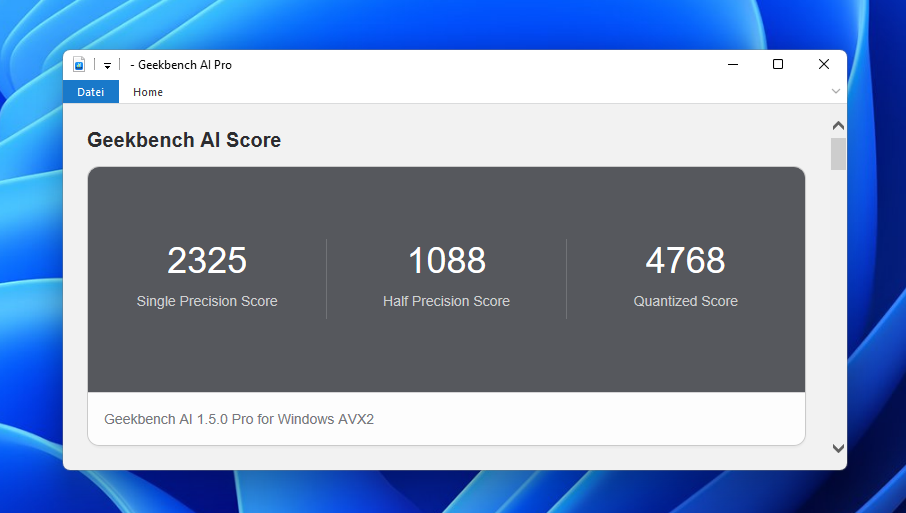
In the Geekbench AI test, the M3 Pro scored 2,325 points in the single-precision test and 4,768 points in the quantized test. This means it lags significantly behind newer processors. This is because the M3 Pro does not have a separate NPU (neural processing unit), which means that AI applications optimized for such hardware cannot utilize this type of accelerator.
Christoph Hoffmann
By way of comparison: A Geekom A7 Max with a Ryzen 9 7940HS scores 7,365 points in the quantized test, while a more recent Geekom IT15 with a Core Ultra 9 285H even manages 8,005 points.
While the GMKtec’s processing power is sufficient for initial experiments with small, local language models or simple image filters, the system lacks a dedicated NPU and a more powerful integrated GPU for more demanding local AI applications.
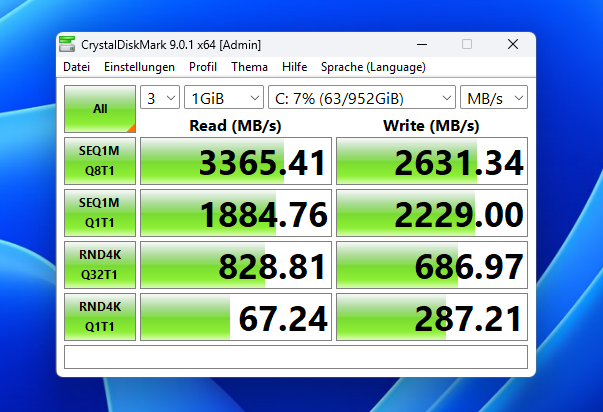
The SSD achieves 3,365MB/s read and 2,631MB/s write speeds, putting it on a par with fast PCIe 3.0 drives. This is perfectly adequate for quick system boots and smooth everyday use, but the SSD isn’t setting any records.
Christoph Hoffmann
As a compact office computer, for running multiple monitors or as an energy-efficient home server, the M3 Pro remains a solid and reliable choice. However, anyone looking to play games or seeking performance for modern AI tools will quickly reach the limits of this platform.
Noise and power consumption
For cooling, GMKtec relies on a combination of a copper heat pipe and a turbine fan. When idle or performing light office tasks, the fan remains virtually inaudible from a distance of 19.6 inches. It is only under sustained full load — such as during video conversion or computationally intensive multitasking — that it revs up significantly. This produces a clearly audible but steady fan noise.
When switched on and idling, the GMKtec M3 Pro consumes around 10 watts. During system startup, power consumption briefly rises to around 33 watts. Under heavy processor load, total power consumption temporarily exceeds 50 watts.
Should you buy the GMKtec M3 Pro?
The GMKtec M3 Pro impresses with a high-quality chassis, a wide range of connectivity options and computing power that is more than sufficient for office use. Twelve cores and 16 threads provide noticeable headroom for multitasking, while support for three 4K displays and the fast 2.5Gbit LAN make it an interesting option for home offices and small network services.
The biggest drawback remains the older platform. The Core i5-13500H is three years old, and its graphics performance and AI speed lag significantly behind current Core Ultra and Ryzen AI models. For those looking solely at Office applications, streaming, and multi-monitor setups, this offers a well-rounded package at a price starting from around $ for the 32GB configuration tested. Gamers and users with ambitious AI projects would be better off opting for newer platforms such as the Geekom IT15 or the latest Ryzen AI systems.
Technical specifications
- Processor: Intel Core i5-13500H (Raptor Lake-H), 12 cores (4 performance 8 efficiency cores), 16 threads, up to 4.7GHz Turbo, 45-watt base power, 18MB cache
- Graphics: Intel Iris Xe Graphics, 80 execution units, up to 1.45GHz, dynamic memory allocation
- RAM: 32GB DDR4-3200 (2 × 16GB, dual-channel) in the test unit; configurations with 16 or 32GB available; expandable up to 64GB
- Storage: 1TB NVMe SSD (PCIe 3.0 x4), second M.2-2242 slot for SATA or PCIe 3.0 NVMe SSDs
- Ports: 4 × USB-A (USB 3.2), 1 × USB-C with DisplayPort functionality, 2 × HDMI, 3.5 mm jack, 2.5Gbit LAN
- Display support: Up to three 4K displays simultaneously
- Connectivity: Wi-Fi 6 (RealTek RTL8852BE), Bluetooth 5.2, 2.5Gbit LAN
- Operating system: Windows 11 Pro (Build 26200.8875, Version 25H2)
- BIOS: Version 5.27 dated 13 March 2026 (UEFI)
- Dimensions: 128.5 × 127 × 51 mm (W × D × H)
- Weight: Approximately 480 grams
- Volume: Approximately 0.83 liters
This articles is written by : Nermeen Nabil Khear Abdelmalak
All rights reserved to : USAGOLDMIES . www.usagoldmines.com
You can Enjoy surfing our website categories and read more content in many fields you may like .
Why USAGoldMines ?
USAGoldMines is a comprehensive website offering the latest in financial, crypto, and technical news. With specialized sections for each category, it provides readers with up-to-date market insights, investment trends, and technological advancements, making it a valuable resource for investors and enthusiasts in the fast-paced financial world.