
If you haven’t been following Android 17 QPR2 news, you might be unaware that a beta has been taking place for some time. Today, alongside the November Pixel Feature Drop, the Android team released Android 17 QPR2. These features are necessarily exclusive to just Pixel devices and you may seem many of them pop up on phones from other Android OEMs.
Inside is a bunch of sweet stuff. Deeper color/wallpaper customizations are available, new developer APIs to support backdrop blur & frosted glass effects are baked in, as well as new status bar, notification, and Quick Settings controls.
Below we have the highlights. For the full and complete breakdown, look here.
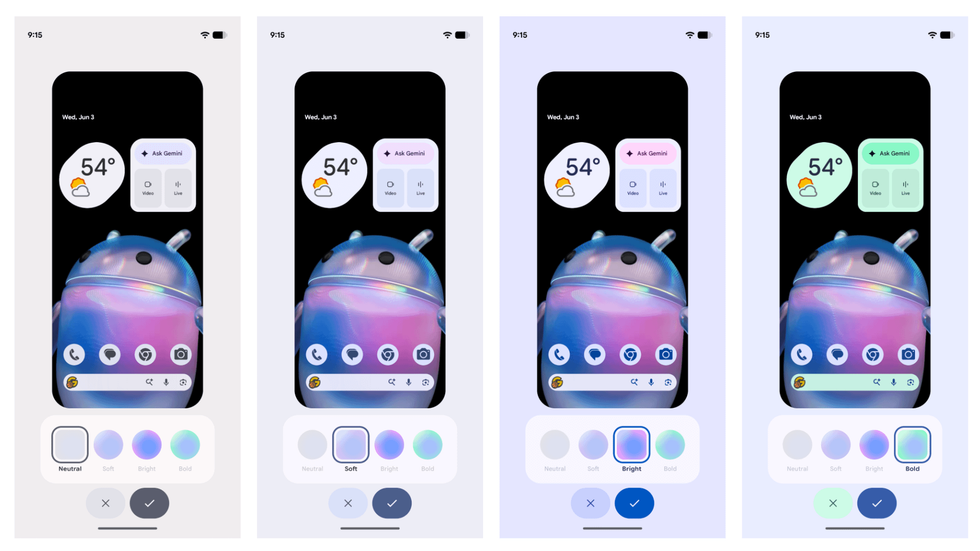
Expanded color theming: Users now have more granular control over color customization. You can now tap the color palette icon in the top right corner of the color picker to open a rainbow hue slider to pick a custom hue. You can also choose from four color intensity styles: Neutral, Soft, Bright, and Bold.
Also detailed, Android 17 QPR2 adds platform support for light and dark mode adaptive wallpapers, which allows compatible wallpaper collections to automatically switch between light and dark looks with your system theme.
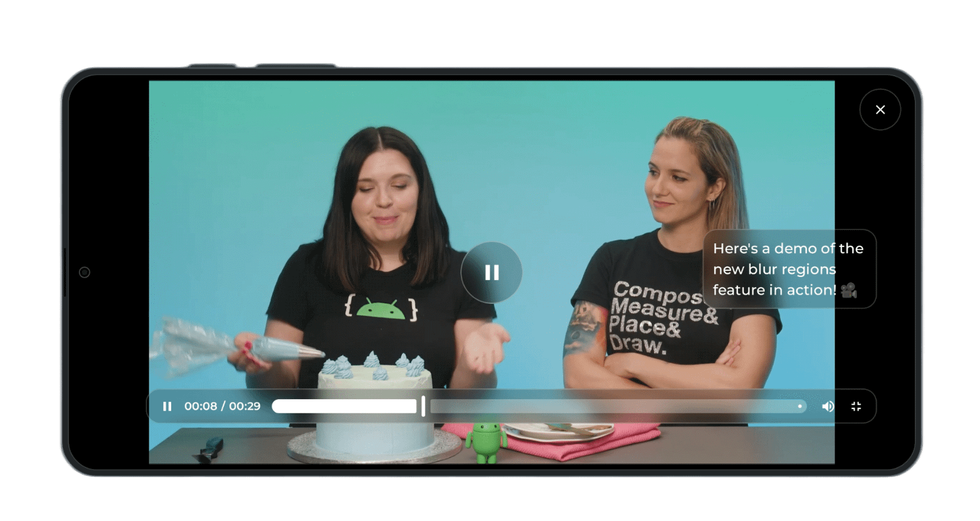
Backdrop blurring and frosted glass: Developers are getting new API access for adding in backdrop blurring and frosted glass effects, noticeable to users when consuming media or with captions enabled. You can see from the image above, this API should allow developers to essentially design better looking UIs, which can be enjoyed by all.
New status bar page: Accessible from Settings > Notifications > Status bar and Settings > System > Status bar, this change gives you control over what appears in the status bar at the top of your screen.
Under Notification icons, you can choose to show All (“Show all notification icons”, filling available empty space in the status bar), Priority only (“Show priority notifications only”), or None (“Show no notification icons”). Under System icons, you can individually toggle indicators for Battery percentage (“Show battery level”), Mute (“Show when device is muted”), and Vibrate (“Show when device is set to vibrate”).
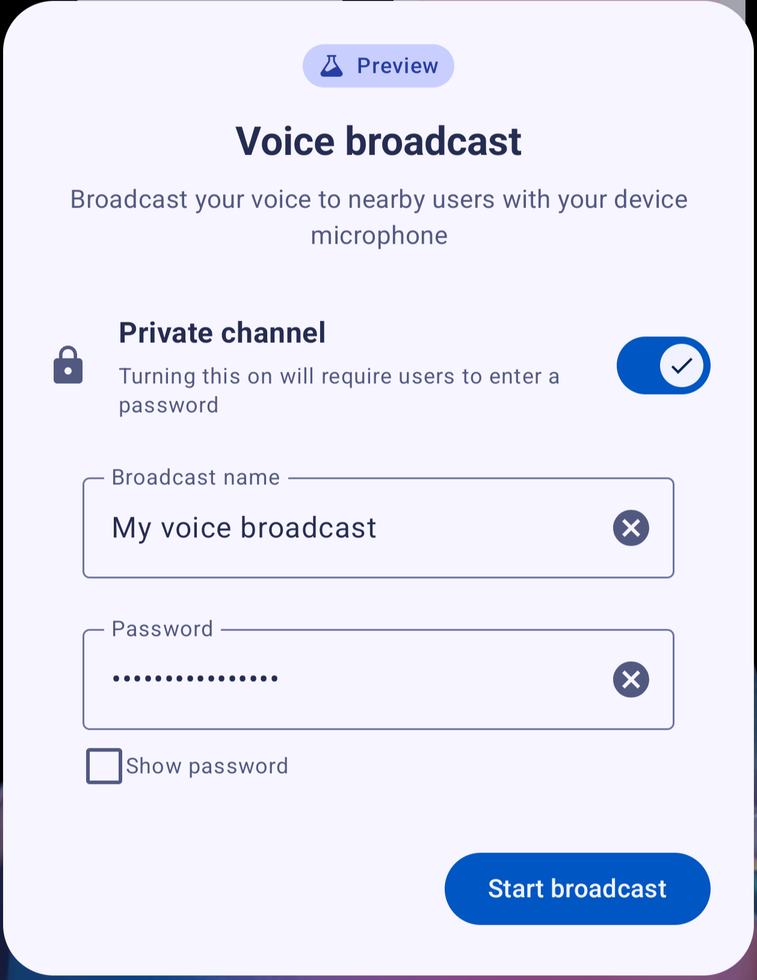
Expanded Auracast & Bluetooth LE Audio capabilities: This build intros a new Voice Broadcast feature (in preview) that lets users broadcast their voice from a phone’s microphone or wired headset over Auracast. Listeners can tune into the broadcast via Auracast-compatible headphones, hearing devices, or other compatible Android phones.
Users can quickly enable a broadcast from the Quick Settings panel. Before starting a voice broadcast, you can edit the broadcast name or toggle a “private channel” to protect the broadcast behind a password.
Improvements to Multitasking: For foldables, a new app handle is being introduced at the top of windows. With this, you can drag or tap this handle to seamlessly transition a full-screen app into split-screen mode, expand a split-screen or bubbled app back to full screen, or drag the handle to reposition floating bubbles. Additionally, app bubbles got a new “Move to fullscreen” shortcut when you tap Manage on an open bubble.
New “install apps” flow: Android 17 QPR2 is attempting to streamline the flow of installing an app from your browser, file manager, or basically anywhere that isn’t the app store. Thanks to a new system dialog, users will have three options when attempting to do so.
- Only this time: Grants the app temporary access to the “install apps” permission for the current app installation session and automatically revokes it once installation completes.
- Always allow: Grants the “install apps” permission to the requesting app so the user can install apps from that source without further prompts. This permission can be later revoked under Settings > Apps > Special app access > Install apps.
- Don’t allow: Denies permission and dismisses the dialog.
These are just the major things. These builds are always full of features, so be sure to check Google’s complete writeup via the link below. Let us know if you are particularly excited about anything specific.
Read the original post: Android 17 QPR2 Released for Pixel Devices!
This articles is written by : Nermeen Nabil Khear Abdelmalak
All rights reserved to : USAGOLDMIES . www.usagoldmines.com
You can Enjoy surfing our website categories and read more content in many fields you may like .
Why USAGoldMines ?
USAGoldMines is a comprehensive website offering the latest in financial, crypto, and technical news. With specialized sections for each category, it provides readers with up-to-date market insights, investment trends, and technological advancements, making it a valuable resource for investors and enthusiasts in the fast-paced financial world.