At a glance
Expert’s Rating
Pros
- Up to 20TB of capacity
- Far faster than an HDD when populated with an NVMe SSD
- Attractive retro design with RGB lighting
- Backup software included
Cons
- Extremely expensive, especially the 8TB capacity
- 10Gbps-like speed during real-world transfers
- HDD write speed when cache is exhausted
Our Verdict
The Seagate FireCuda Forge offers great capacity and performs far faster than any plain hard drive once you install an NVMe SSD into its M.2 slot — mostly. With 40Gbps of USB4 bandwidth to play with, I was expecting more, and the pricing is challenging as well.
Price When Reviewed
This value will show the geolocated pricing text for product undefined
Best Pricing Today
Price When Reviewed
8TB: $700 I 20TB:
Best Prices Today: Seagate FireCuda Forge
The high cost of NAND — and consequently, SSDs — has breathed new life into the hard drive market. Witness the pace of Seagate’s recent releases (X Vault, One Touch), which now include the FireCuda Forge reviewed here.
The Forge incorporates a NVMe SSD slot (user-supplied) to provide fast caching for the hard drive inside. Okay, it’s not strictly a hard drive, but within the scope of the capacity-per-dollar discussion, it’s certainly adjacent.
Alas, despite running the 40Gbps USB4 protocol, the Forge performed somewhere between what we expect from 10Gbps and 20Gbps drives — at best. It also slowed to hard drive speeds when SSD cache ran out far sooner than expected.
Add to that some challenging pricing, and my feelings are distinctly tepid after the initial enthusiasm generated by the concept and specs.
Read on to learn more, then see our roundup of the best external drives for comparison.
What are the Seagate FireCuda Forge’s features?
The Forge is a dual SATA HDD/M.2 NVMe SSD enclosure using the 40Gbps USB4 protocol that looks much like the previously reviewed FireCuda X Vault.
Size is around 9-inches long, by a little over 5.75-inches wide, by a smidge less than 2.5-inches tall. Weight is right around 3 pounds with an SSD inside, and the smallish AC adapter with an assortment of international pin options adds only 5 ounces to the equation.
The primary difference between the similarly styled drives is that the X Vault runs solely off of bus power (15 watt minimum), while the Forge requires said AC adapter. Not surprising given the dual drives and unknown power requirements of a user-provided SSD.
As to that….The Forge ships pre-populated with either an 8TB or 20TB hard disk drive (HDD), but you’re on your own for the NVMe SSD. Remember that when I get to pricing.
Note that Seagate recommends a DRAM-enabled SSD, but sent me the FireCuda 530R, which is a host memory buffer (HMB) design, aka DRAM-less. Testing indicated that this made little difference.
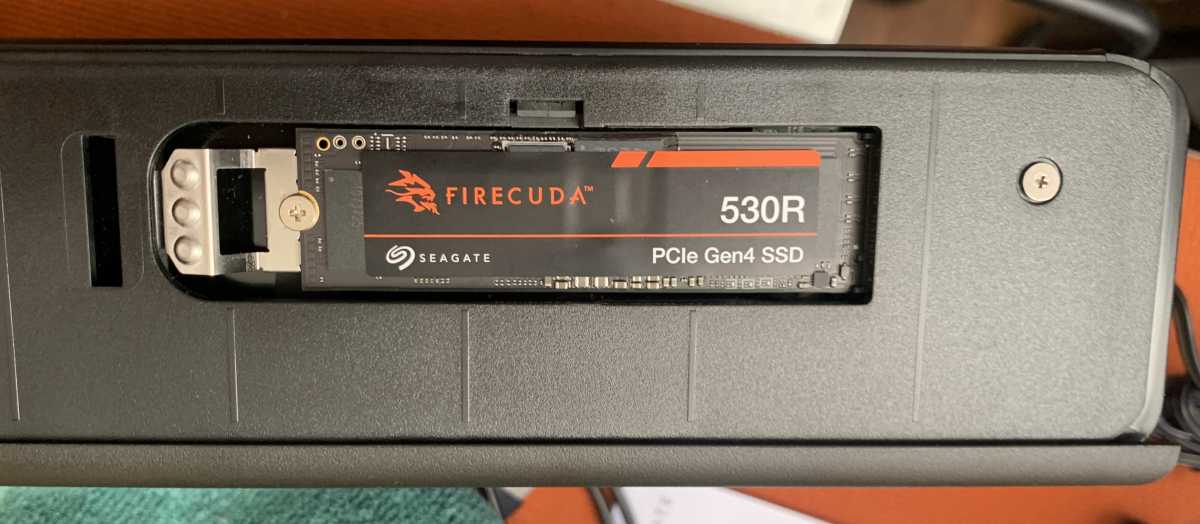
You access the SSD slot by removing four small hexagonal bolts (a tool is provided) from the bottom of the unit and sliding off the shell. The M.2 slot is on the left side of the main body and the SSD screws down (a suitable screw is provided — in a separate tiny baggie for some reason). Two self-adhering thermal pads are included, though there’s only one slot — a spare if you change SSDs and the first is damaged.
Seagate’s Toolkit software which provides backup, mirroring (sync), firmware upgrades, and RGB configuration is available for download at the company’s site. Toolkit’s backup is automated and self-starting, though you can configure it any way you like. It will back up local data to local media, but there’s no support for network locations.
The SeaTools utility is also available and offers low-level info on any Seagate drives on your system.
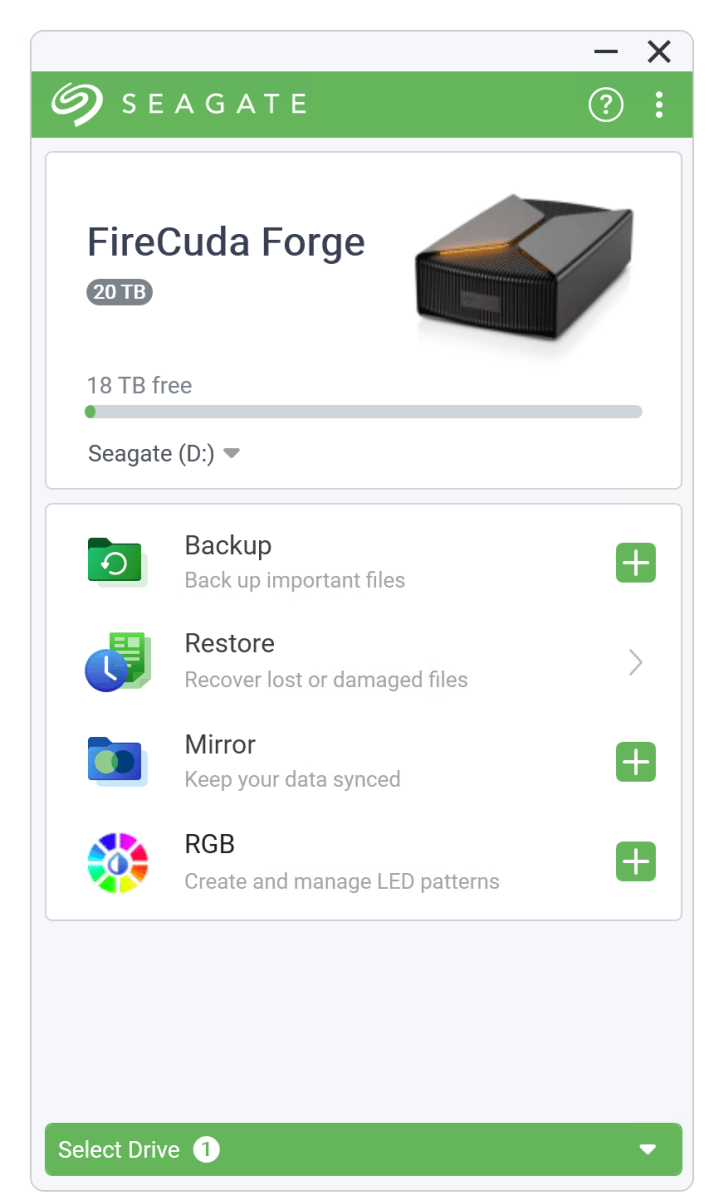
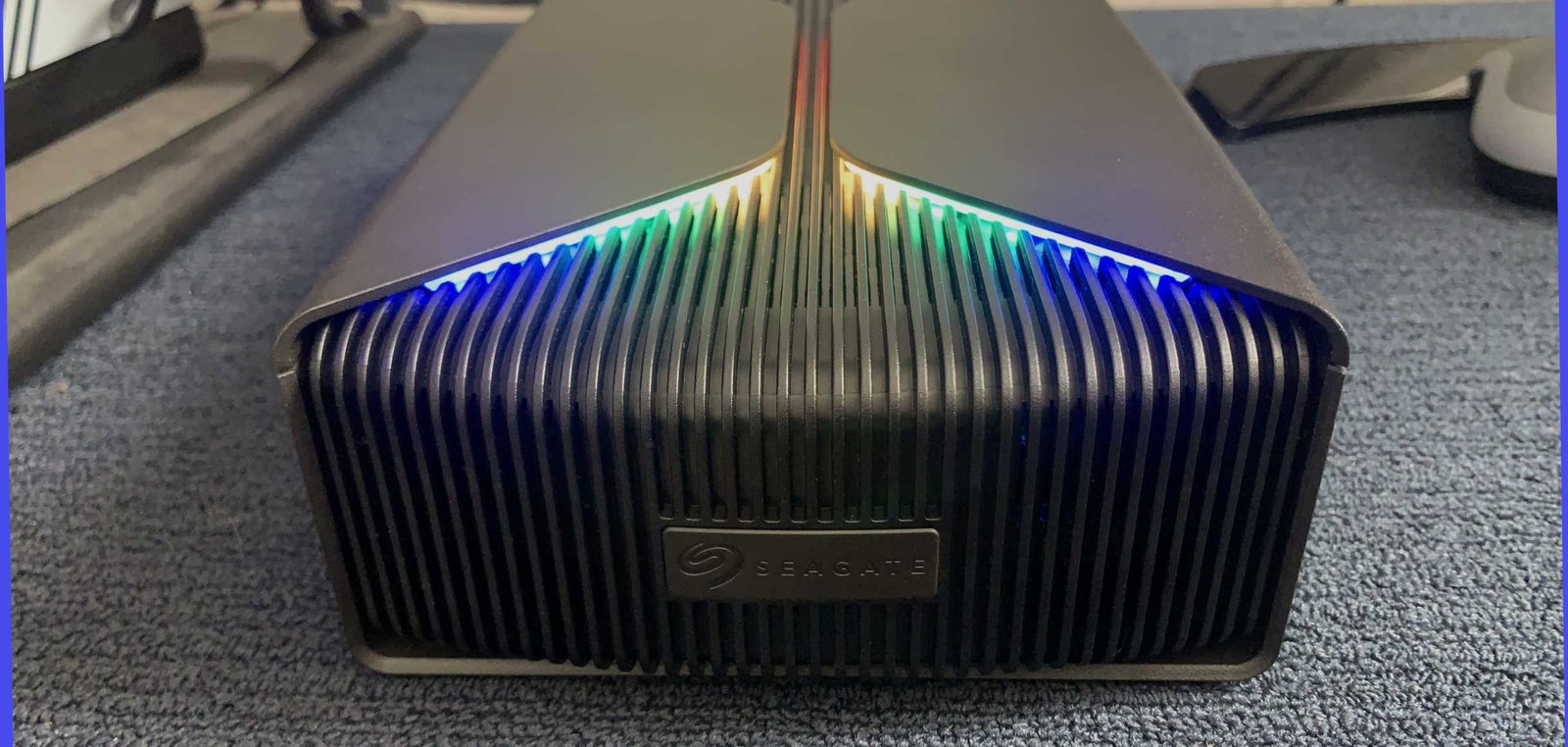
You’ll notice the RGB section in the Toolkit interface image above. As shown in the main photo for this article, the FireCuda Forge indeed offers configurable RGB lighting that peeks out subtly from underneath the flaps/wings/arms/roof that adorns the top of the enclosure. I’m not the biggest fan of RGB, but it did make reviewing and photographing the drive a bit more interesting.
Seagate warranties the Forge for two years. That’s limited, of course, by your not throwing it against a wall. There was no mention of data recovery in the data sheet, and it was a separate charge when I perused the drive on Seagate’s Amazon store. There is, however, a free two-month subscription to Adobe Creative Cloud.
How much does the Seagate FireCuda Forge cost?
The 20TB version of the Forge that I tested comes in at a whopping $899. That’s a hefty premium, but not outrageously pricier (around $250, or 23 percent more) than a plain 20TB external HDD.
However, the 8TB model is considerably more than twice the $299 that the aforementioned and similarly styled X Vault costs at the same capacity. Excuse me? And keep in mind you’ll still need an NVMe SSD to the tune of $130 (512GB) to $300 (2TB) for the improved performance.
Upon seeing the price of the 8TB unit, I instantly started thinking of ways to create my own SSD/HDD combos. Truth be known, I already have implemented one in the form of local SSDs that are backed up across my network to HDDs in NAS boxes — devices that also offer a ton of additional functionality.
A 8TB FireCuda X Vault, a 1TB external SSD, and Windows File History/Robocopy or other software to transfer the files? There are also ways to tier storage in Windows. Just sayin’.
How fast is the Seagate FireCuda Forge?
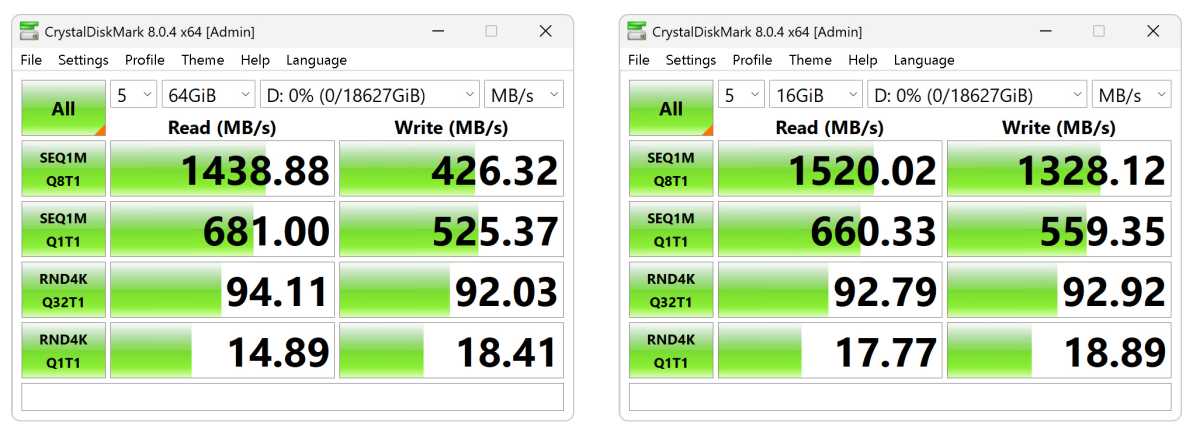
While far faster than a plain hard drive, the Forge never reached the 2.5GBps reading / 2GBps writing that the company suggests. One might consider the 1.5GBps reading / 1.4GBps writing that it achieved in the synthetic benchmarks a ballpark to predicted performance. One might not.
However, the Forge was definitely left standing outside the turnstiles when it came to real-world transfers, maxing out at around 1GBps reading and 550MBps writing. Before you ask, the unit was indeed enumerated at 40Gbps USB4 and the Stornvme driver was in use by Windows.
Those numbers were still enough to dominate the competing Thunderbolt 3 OWC Gemini (with two SATA SSDs), 10Gbps TerraMaster D8 Hybrid 2 combo NVMe/HDD RAID (which uses the SSDs separately rather than caching), and Seagate’s own single-HDD Fire Cuda X Vault.
I included the X Vault to show just how much faster the Forge is than a single hard drive. None of the drives mentioned are exact matches; the Forge is the first SSD-caching enclosure that I’ve tested.
The Forge’s numbers, as good as they are compared to a hard drive, weren’t exactly what I was expecting from the Seagate’s “Ragnar X/Alkemi” technology. 40Gbps USB4 enclosures with a NVMe SSD inside normally border 4GBps during sequential transfers.
As the Forge is essentially writing first to its SSD, that’s what I anticipated. No dice. Also, given the 2TB FireCuda 530R that Seagate sent me to install, I didn’t expect the further drop I experienced during the 450GB write test. (Maybe Seagate should’ve spelled Alchemy properly?)
I tested the 530R on its own and while it slowed down during the 450GB write, it only dropped to 1.2GBps — that’s far faster than what I saw with it inside the Forge.
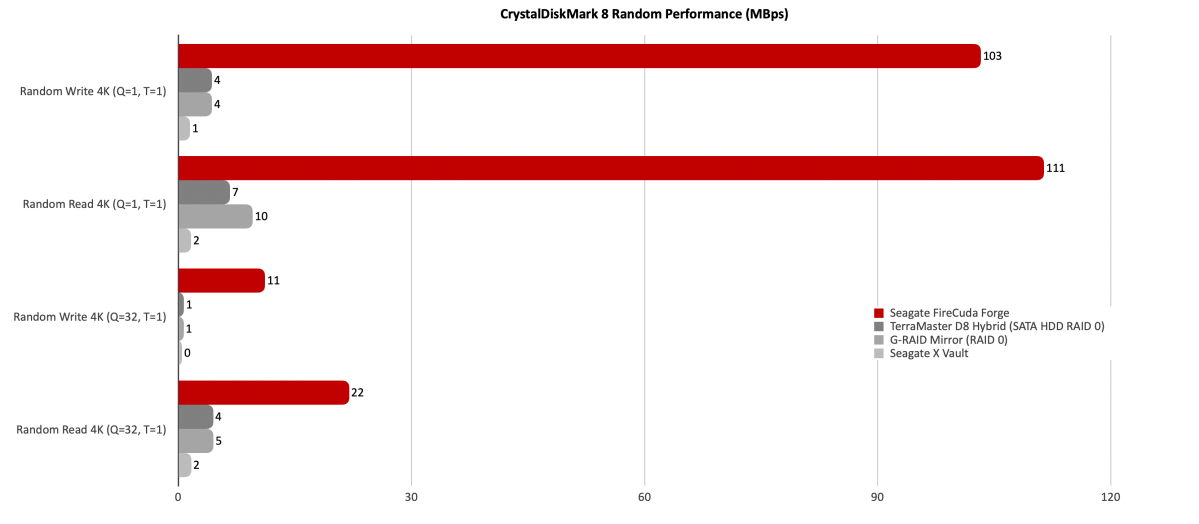
Bewilderment and snark aside, the Forge’s CrystalDiskMark 8 numbers present a compelling performance story compared to plain hard drives.
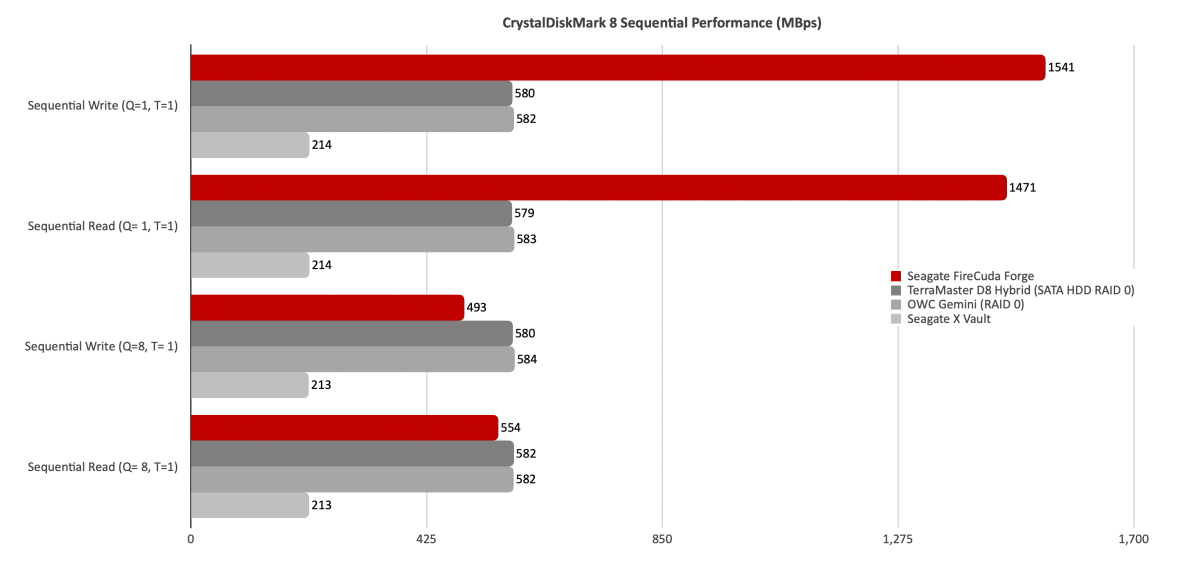
While RAID boxes might compete in sequential throughput in a couple of tests with the Forge, it blows them away in 4K responsiveness. Big time.
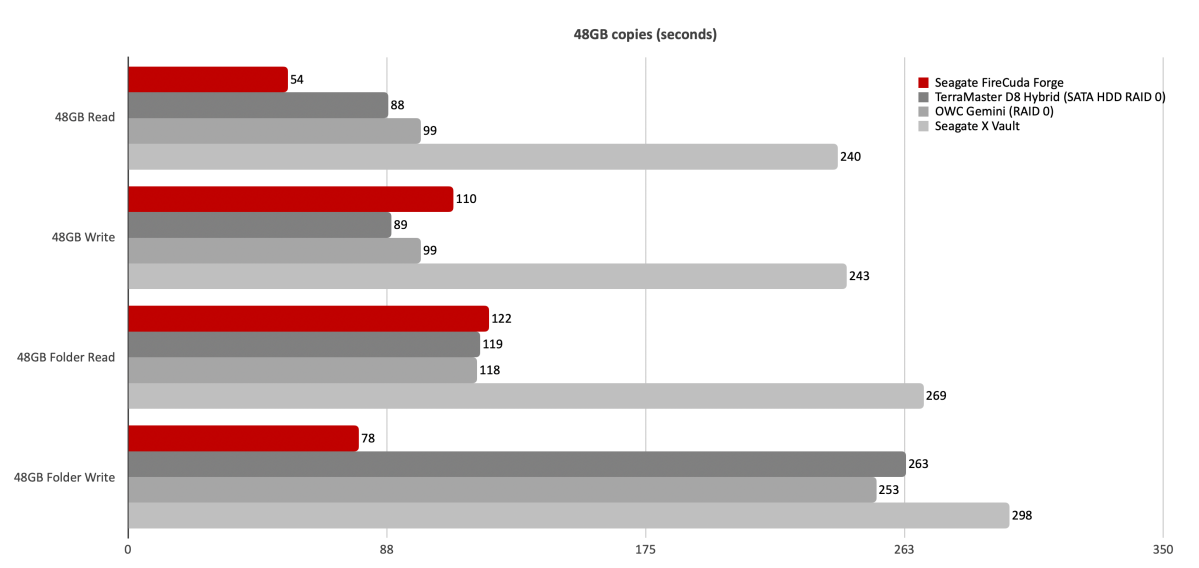
When I switched to the 48GB transfer tests, the Forge’s read speed dropped, but remained relatively sprightly at around 1GBps. Alas, writing dropped to 550MBps at its peak.
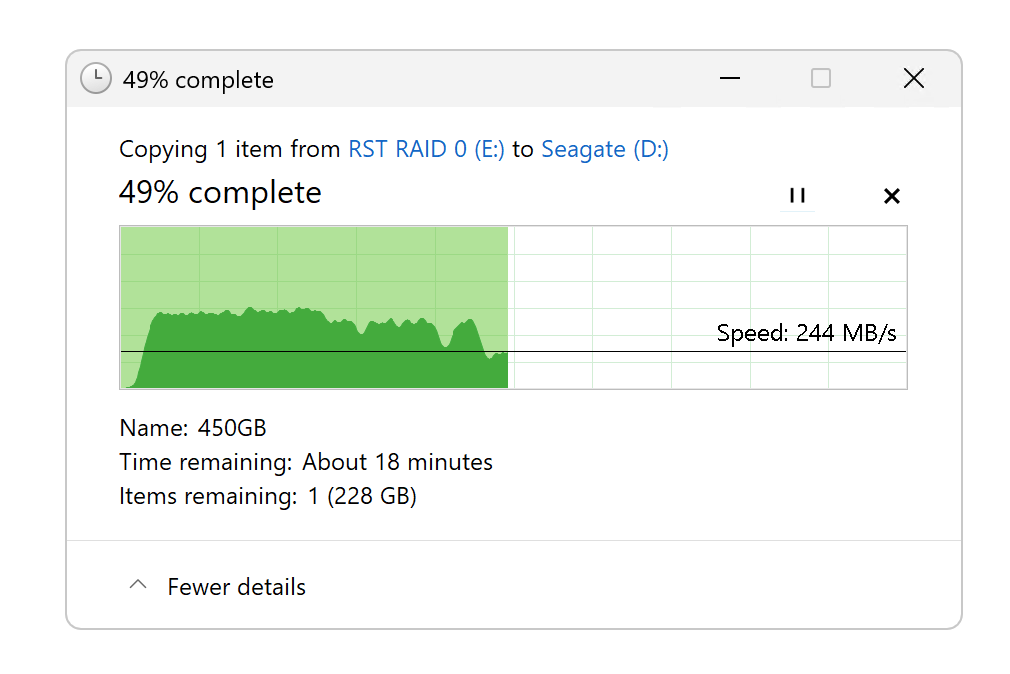
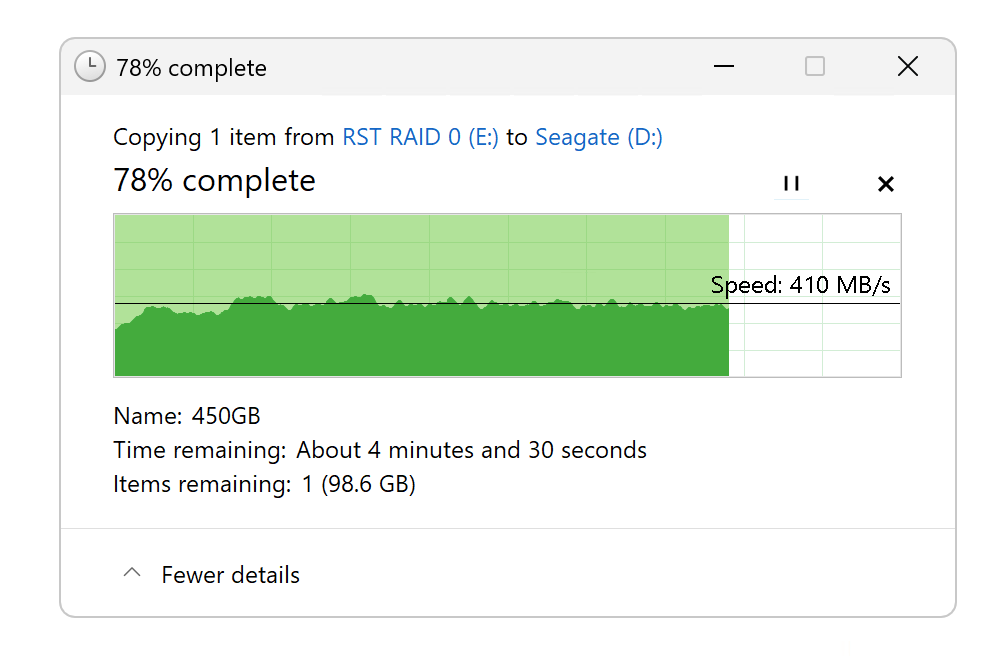
Eventually, at around the 220GB mark of the 450GB write, write speed fell even further to 200- to 250MBps. Yup, hard drive. This was far sooner than I envisioned, given a 2TB SSD. As previously noted, I wasn’t expecting a drop at all.
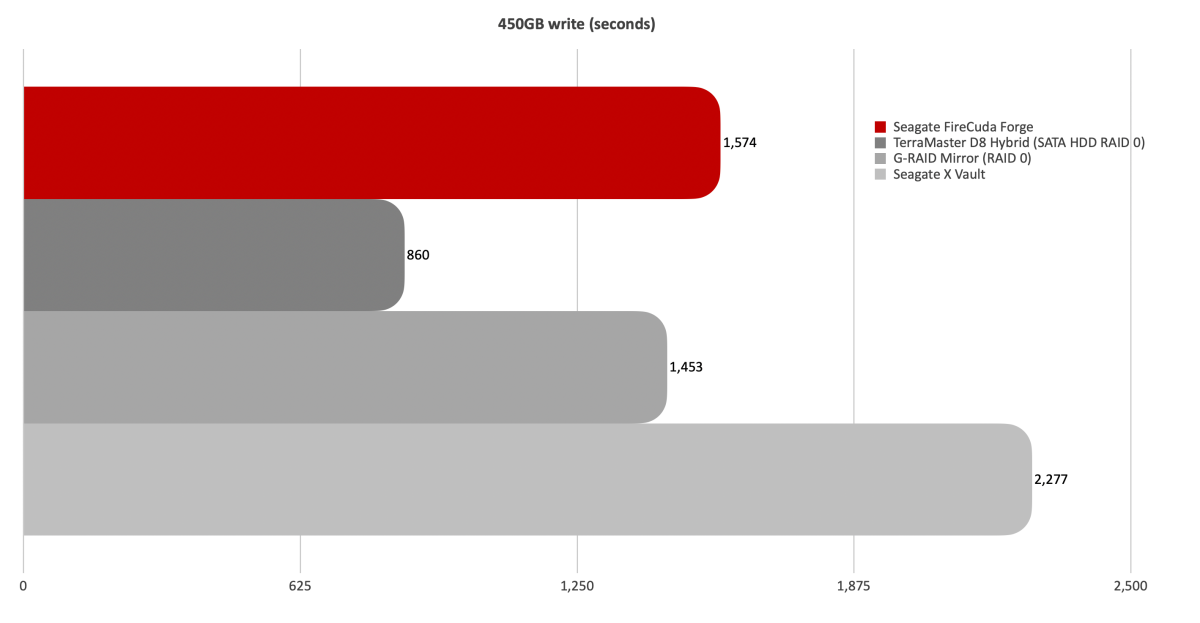
Below is the graphic evidence that the Forge started writing at HDD speeds (modern types can reach 275MBps) well before it could fill the 2TB 530R, or exhaust its secondary cache.
Being curious, I also ran some tests with a DRAM-laden Kingston Renegade G5 PCIe 5.0 SSD to see if its greater 4TB capacity and DRAM made a difference. Note that there’s a blurb on the Amazon product page saying capacity doesn’t increase performance. That the SSDs were only given a 1.2GB partition, that’s somewhat true. However…
The 450GB write never slowed down to HDD speed with the Kingston installed, likely due to more secondary cache. Otherwise the CrystalDiskMark 8 numbers remained essentially the same.
To see if less capacity inhibited performance I also threw an older 256GB Samsung 980 Pro (with DRAM) in the Forge. Obviously it couldn’t complete the 450GB write, but the synthetic read number was actually better. Alas, the sequential write speed with our normal 64GiB data set tanked to 426MBps.
With a smaller 16GiB data set the write number was about the same as with the larger SSDs. This again indicates that nowhere near the entire SSD is being used for caching, as the 980 Pro doesn’t slow down at all writing 64GiB of data in our test bed.
I tried running the Forge without an SSD. Why anyone would do that is a good question. Like I said, I’m curious. The Forge showed up as a 3MB unformatted partition. Apparently, the SSD is required.
The Forge showed up as TRIM-able in Windows’ Optimize utility, though whether the command is passed on the SSD I’m not certain. Formatting the Forge can take quite a while, though that’s normal with a hard drive involved. Also as of my testing, it took longer than normal for Windows to enumerate the Forge upon boot or connection. Minor issues to be sure.
Note that the Forge will not function without the SSD. Why you’d buy the Forge and not install an SSD would be a mystery. But if you win one in a raffle — you should know that.
While the Forge might not offer nearly the performance that USB4 and NVMe are capable of, it’s a vast improvement over a plain external hard drive. That said, I’d like to see more of the SSD’s capacity utilized before it offloads or switches to the HDD during super-long write operations.
As the Forge is very new, that might just happen via a firmware update such as the one that was available post initial testing. Retesting showed no difference in this particular (1.32) update.
Should you buy the Seagate FireCuda Forge?
If you’re looking for both SSD-like performance and HDD capacity, the Forge indeed delivers it. But darn if you’re not paying a pretty penny for the experience — an adventure you can recreate on your own. I’d consider the 20TB model, but skip the 8TB unless you have money to burn.
How we test external drives
Drive tests currently utilize Windows 11 24H2, 64-bit running off of a PCIe 4.0 Samsung 990 Pro in an Asus ProArt Z890 Creator WiFi (PCIe 4.0/5.0) motherboard. The CPU is a Core Ultra i5 225 feeding/fed by two Crucial 64GB DDR5 4800MHz modules (128GB of memory total).
Both 20Gbps USB and Thunderbolt 5 are integrated into the motherboard and Intel CPU/GPU graphics are used. Internal PCIe 5.0 SSDs involved in testing are mounted in a Asus Hyper M.2 x16 Gen5 adapter card.
We run the CrystalDiskMark 8.04 (and 9), AS SSD 2, and ATTO 4 synthetic benchmarks (to keep article length down, we only report one) to find the storage device’s potential performance, then a series of 48GB and 450GB transfers tests using Windows Explorer drag and drop to show what users will see during routine copy operations. The far faster FastCopy is also used to show the transfer speeds that are actually possible.
A 20GBps two-SSD RST RAID 0 array on the aforementioned Asus Hyper M.2 x16 Gen5 is used as the second drive in our transfer tests. Formerly the 48GB tests were done with a RAM disk serving that purpose.
Each test is performed on a NTFS-formatted and newly TRIM’d drive so the results are optimal. Note that in normal use, as a drive fills up, performance may decrease due to less NAND for secondary caching, as well as other factors. This issue has abated somewhat with the current crop of SSDs utilizing more mature controllers and far faster, late-generation NAND.
Note that our testing MO evolves and these results may not match those from previous articles. Only comparisons inside the article are 100% valid as those results are gathered using the current hardware and MO.
This articles is written by : Nermeen Nabil Khear Abdelmalak
All rights reserved to : USAGOLDMIES . www.usagoldmines.com
You can Enjoy surfing our website categories and read more content in many fields you may like .
Why USAGoldMines ?
USAGoldMines is a comprehensive website offering the latest in financial, crypto, and technical news. With specialized sections for each category, it provides readers with up-to-date market insights, investment trends, and technological advancements, making it a valuable resource for investors and enthusiasts in the fast-paced financial world.