At a glance
Expert’s Rating
Pros
- Sturdy design
- Comfortable keyboard
- IR camera for facial recognition
Cons
- Only 8GB of RAM
- Low GPU performance
- Doesn’t ship with a USB-C charger
Our Verdict
The Lenovo IdeaPad Slim 3i is a value-focused budget laptop that doesn’t impress at its price point. You shouldn’t buy a laptop with 8GB of RAM in 2025, especially if it costs around $500.
Price When Reviewed
This value will show the geolocated pricing text for product undefined
Best Pricing Today
Price When Reviewed
$699
Best Prices Today: Lenovo IdeaPad Slim 3i


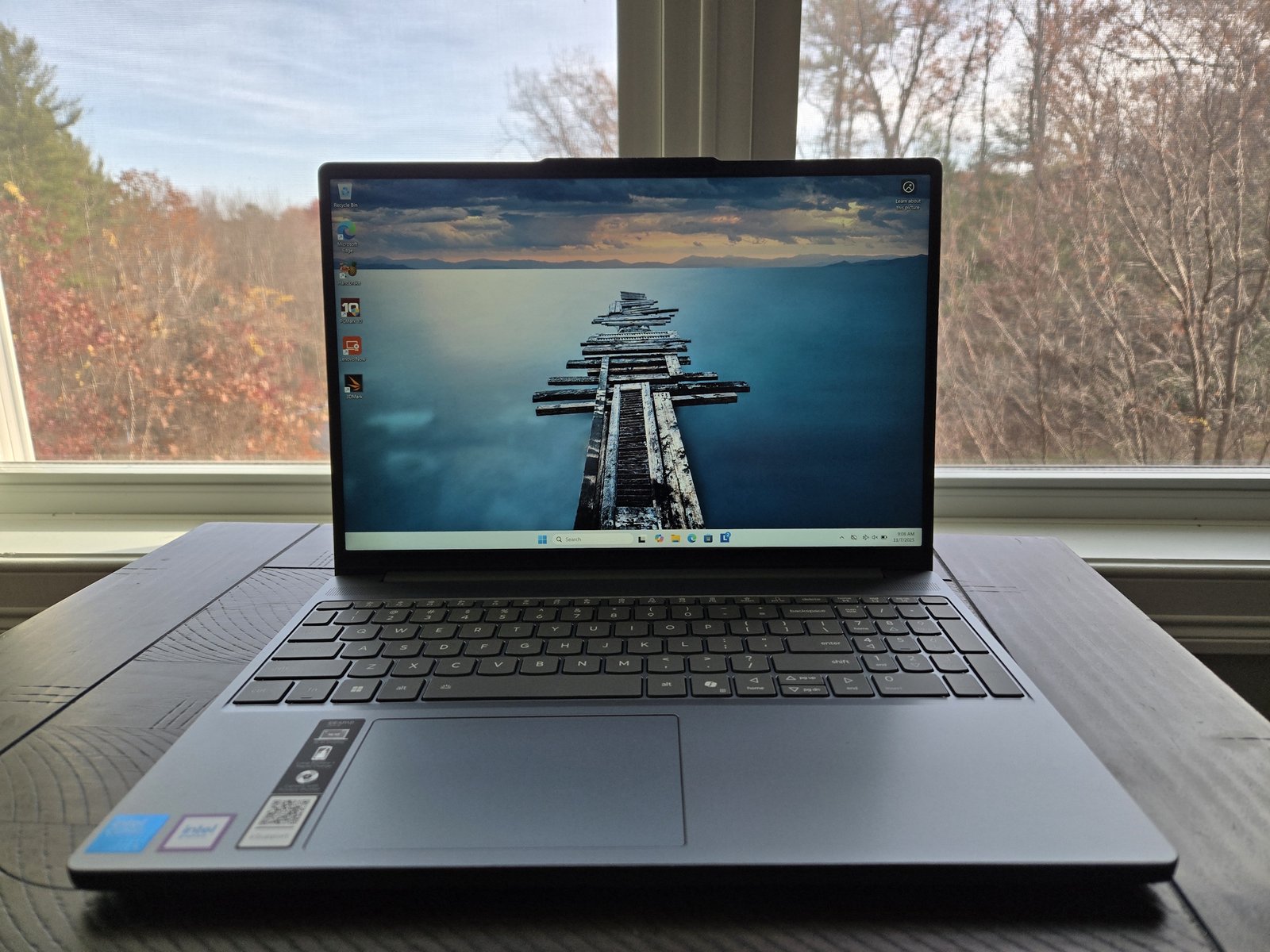
The Lenovo IdeaPad Slim 3i is a 15.3-inch budget laptop that ships with just 8GB of RAM in the configuration we reviewed. Budget laptops always come with tradeoffs, but Lenovo made the wrong ones here. At an “estimated value” of $699 — $479 on sale at the time I was finishing this review — neither price makes sense.
This machine has a dated CPU, a plastic chassis, and a dim display. Those are normal drawbacks on a budget laptop. But the 8GB of RAM will be a huge problem when using Windows and modern apps over the next few years. Other configurations offer more RAM, but they’ll be more expensive. You can spend a similar amount of money and get better performance. This machine does have a touchscreen, but it’s hard to see how useful it is on this laptop.
Lenovo IdeaPad Slim 3i: Specs
The Lenovo IdeaPad Slim 3i has an Intel Core 5 210H CPU, which is based on Intel’s older Raptor Lake architecture. It’s a dated architecture and it’s on the slower side. It uses more power and generates more heat than newer CPUs.
While Windows works with 8GB of RAM, you’re going to see some “swapping” if you have lots of browser tabs or applications open. It’s going to be this computer’s biggest bottleneck, and it is not normal at this price point.
This machine does have an empty RAM slot so you can add more memory, but the average budget laptop buyer isn’t going to bother. You can spend a similar amount of money and get a laptop that comes with 16GB of RAM.
- Model: Lenovo IdeaPad Slim 3i 15IRH10R (83K4000QUS)
- CPU: Intel Core 5 210H
- Memory: 8GB DDR5-4800 RAM
- Graphics/GPU:
- NPU: None
- Display: 15.3-inch 1920×1200 IPS display with 60Hz refresh rate and touchscreen
- Storage: 512GB PCIe Gen4 SSD
- Webcam: 1080p webcam
- Connectivity: 1x USB Type-C (USB 5Gbps), 2x USB Type-A (USB 5Gbps), 1x HDMI 1.4, 1x combo audio jack, 1x SD card reader, 1x power connector
- Networking: Wi-Fi 6, Bluetooth 5.2
- Biometrics: IR camera for facial recognition
- Battery capacity: 60 Watt-hours
- Dimensions: 13.52 x 9.43 x 0.74 inches
- Weight: 3.59 pounds
- MSRP: $699 as tested ($479 on sale at time of review)
The Lenovo IdeaPad Slim 3i feels too compromised. Even being charitable and accepting the current $479 sale price as this laptop’s real price, I can’t recommend a machine that only has 8GB of RAM in 2025 when 16GB has become standard.
Lenovo IdeaPad Slim 3i: Design and build quality
Foundry / Chris Hoffman
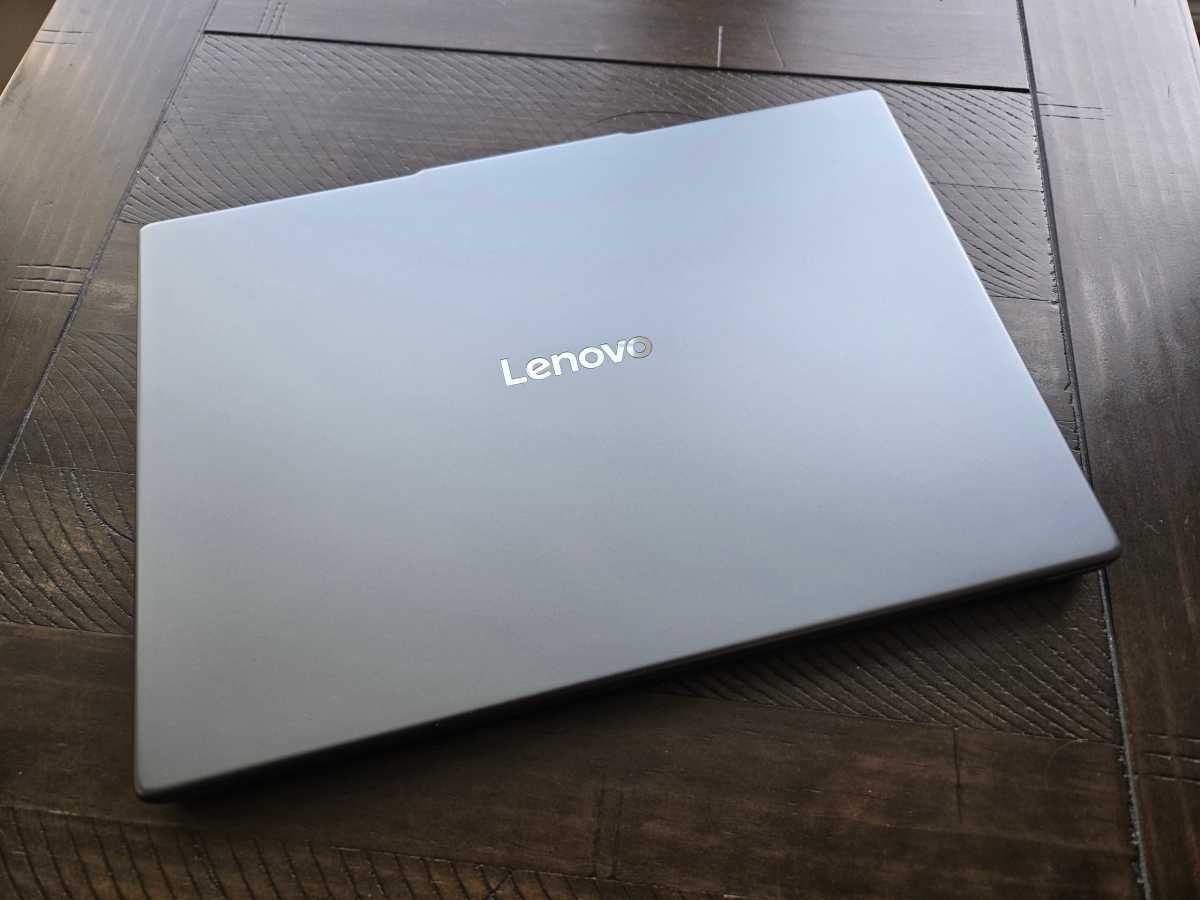
The Lenovo IdeaPad Slim 3i has a chassis made of plastic. This isn’t premium metal, but it feels sturdy enough — budget laptops have advanced by leaps and bounds over the past few years. The design in “Luna Gray” looks like many other Lenovo laptops. Lenovo has a consistent design language, and it’s hard to tell which Lenovo laptop is which from a distance. In other words, it doesn’t “look” like a budget laptop.
The hinge is solid and doesn’t move much as you type, and the build quality is reasonable for a budget machine.
Lenovo IdeaPad Slim 3i: Keyboard and trackpad
Foundry / Chris Hoffman
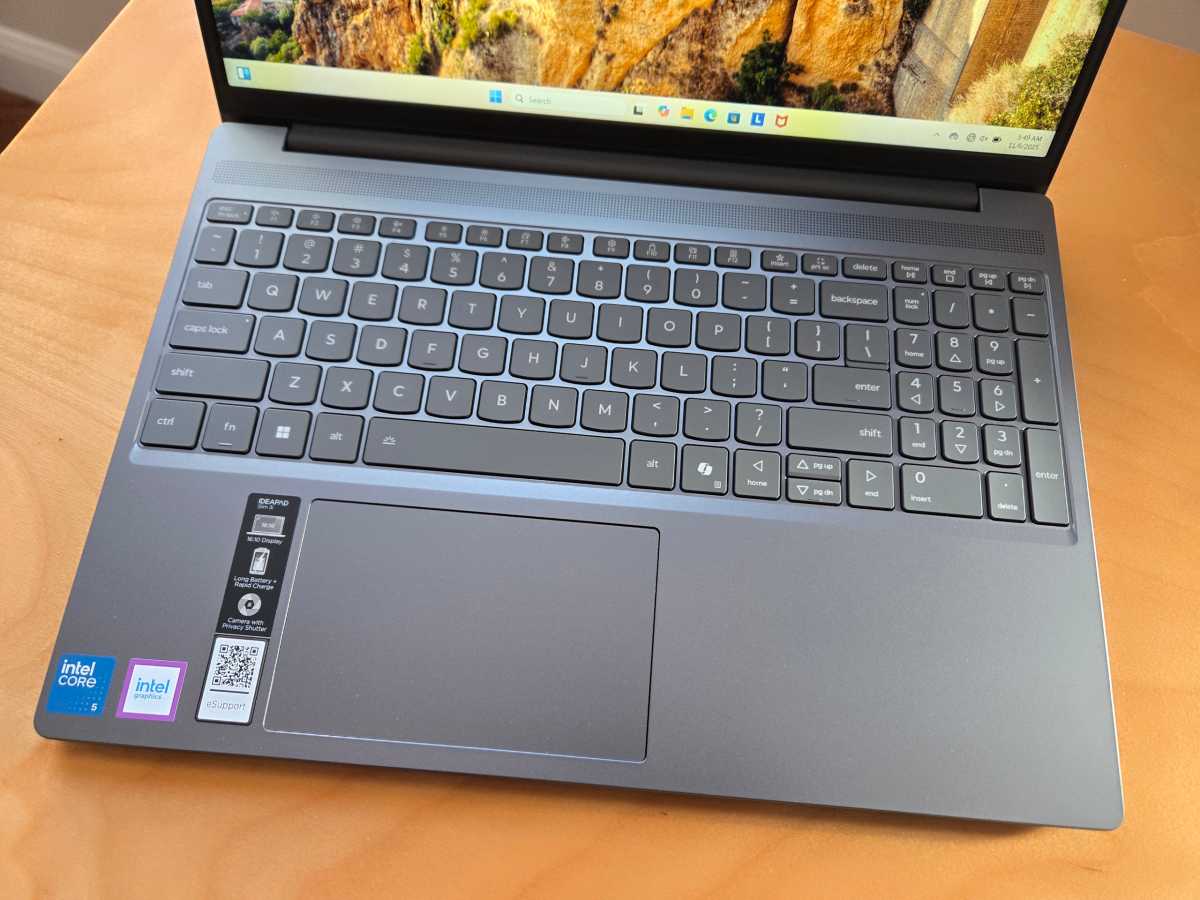
The Lenovo IdeaPad Slim 3i has a full-size keyboard complete with a number pad and white backlighting. It feels comfortable to type on, and I can type on it at high speeds for long periods of time.
The trackpad also feels good. It’s a good size, and it’s responsive when you drag your finger over the surface. The click-down action feels a tad clunky and loud, but it’s better than many budget laptops I’ve used.
Overall, the keyboard and trackpad are strengths at this price point. If you’re looking for a laptop on a budget and plan to do a lot of typing, this machine could be a great fit if you can find a version with more RAM at a discount.
Lenovo IdeaPad Slim 3i: Display and speakers
Foundry / Chris Hoffman
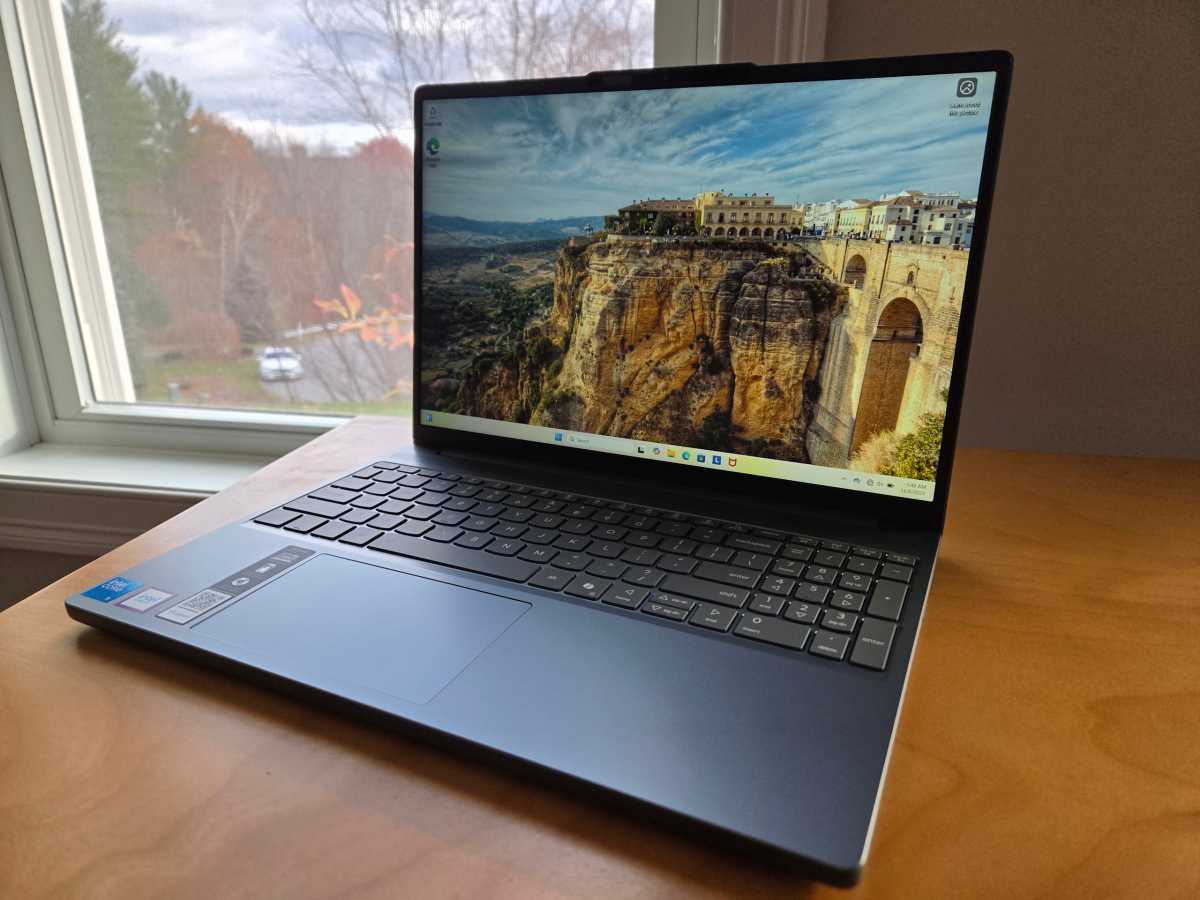
This machine has a 15.3-inch 1920×1200 IPS display with a standard 60Hz refresh rate. The resolution is reasonable, but the color accuracy is middling.
This display is dim: At up to 300 nits of brightness, it’s about as dim as you can find on a modern laptop. A brighter display would be easier to use in challenging lighting conditions and produce more vivid colors.
This machine has a touchscreen, and it’s unusual. It has a matte anti-glare coating. Most touchscreens are glossy, shiny glass. On the one hand, it’s great to see the anti-glare surface here because a glossy surface would result in more reflections.
On the other hand, I doubt you’ll want to use the touchscreen much — it just doesn’t feel great to drag your finger over a normal matte laptop display surface instead of a smooth glass surface, and it’s difficult to fully clean fingerprints off this type of surface.
This machine has speakers that get loud enough, and they don’t have any noticeable distortion. That’s pretty good for a budget laptop, but the audio quality isn’t particularly impressive: It’s flat and without much noticeable bass.
Lenovo IdeaPad Slim 3i: Webcam, microphone, biometrics
Foundry / Chris Hoffman
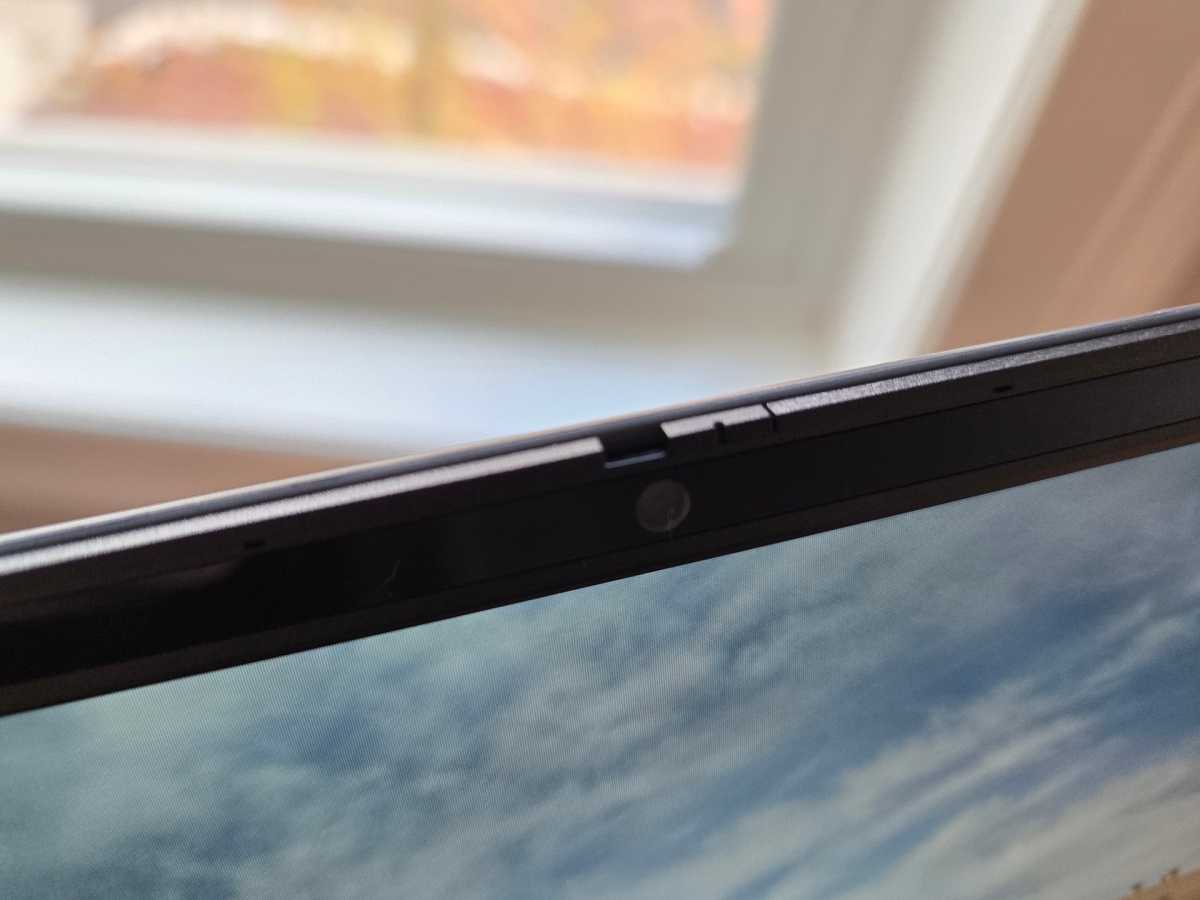
The Lenovo IdeaPad Slim 3i has a 1080p webcam. It produced a picture with too much noise in a daylit room without optimal lighting. It was also quite pale and not particularly lifelike. Lenovo does include a physical webcam shutter switch, which is nice to see.
This machine has a microphone setup that does a good job of cancelling background noise, but the audio it picks up isn’t particularly crisp. It isn’t the ideal laptop for video meetings, but it will do fine in a pinch.
This machine has an IR camera, so you can sign into Windows with your face. Just open the laptop and Windows Hello will spot you and sign you in. Some budget laptops ship without biometric hardware.
Lenovo IdeaPad Slim 3i: Connectivity
Foundry / Chris Hoffman
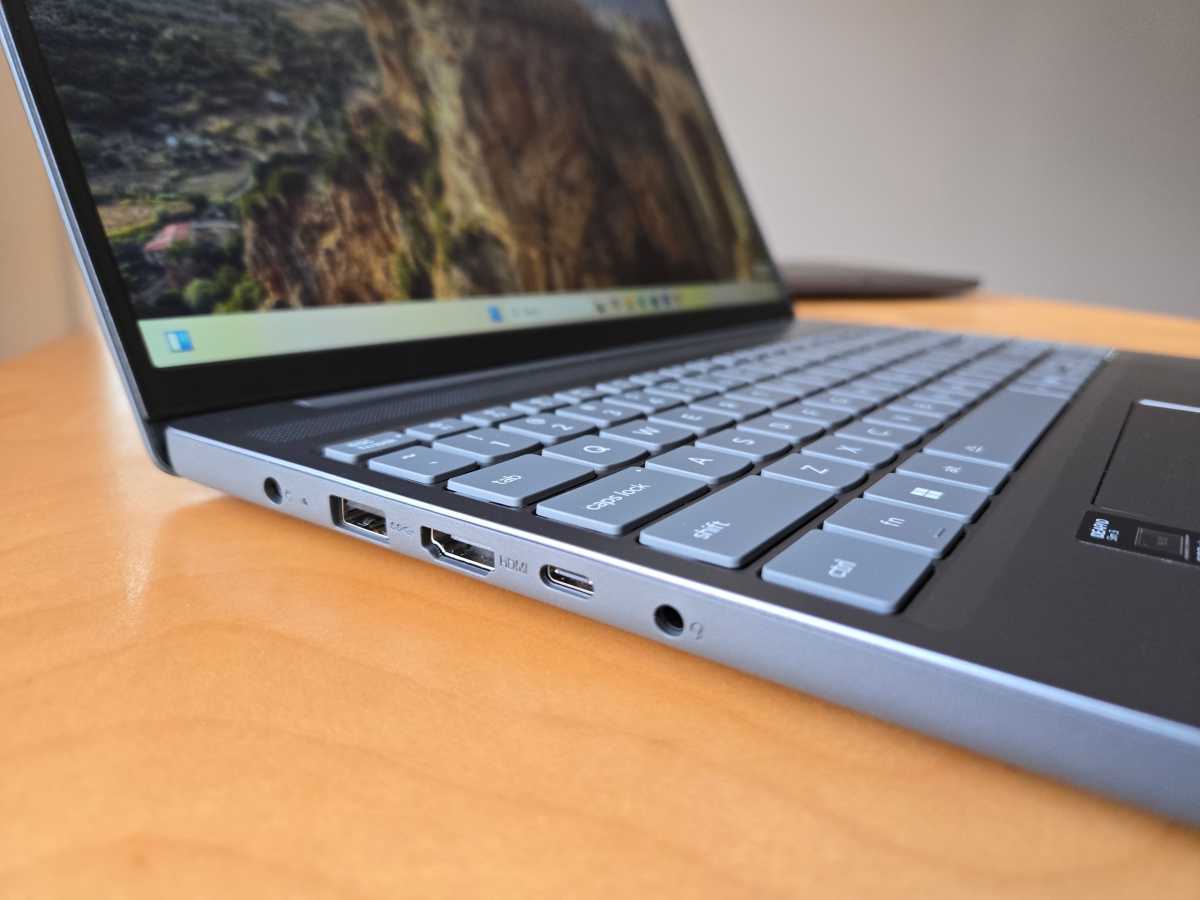
The Lenovo IdeaPad Slim 3i has a good selection of ports, although they’re a bit on the lower end: No Thunderbolt, USB4, or HDMI 2.1.
On the left side of this laptop, you’ll find a USB Type-C port (USB 5Gbps), an HDMI 1.4 port, a combo audio jack, a USB Type-A port (USB 5Gbps), and a barrel-style power connector port.
On the right side, there’s a second USB Type-A port (also USB 5Gbps) and an SD card reader.
It’s good to see a reasonable number of ports, but I wish Lenovo had shipped a second USB-C port rather than a barrel-style power connector. You can still charge this machine with USB-C if you bring your own charger, but you’ll need a dongle to plug more than one USB-C device in.
For wireless connectivity, this machine supports Wi-Fi 6 and Bluetooth 5.2. It would’ve been nice to see at least Wi-Fi 6E. It’s serviceable, but it’s not particularly forward-looking hardware when Wi-Fi 7 is already available. It’s another part of the machine that feels dated.
Lenovo IdeaPad Slim 3i: Performance
The Lenovo IdeaPad Slim 3i delivered acceptable performance in day-to-day tasks. Intel’s Core 5 210H is slower than modern CPUs, and it also uses more power and generates more heat, which means you’ll hear the fans spinning up more when doing anything demanding.
The worst problem — the 8GB of RAM — doesn’t show up in these benchmarks, but it will drag down performance if you open a lot of browser tabs. This represents typical PC use in 2025.
As always, we ran the Lenovo IdeaPad Slim 3i through our standard benchmarks to see how it performs.
Foundry / Chris Hoffman
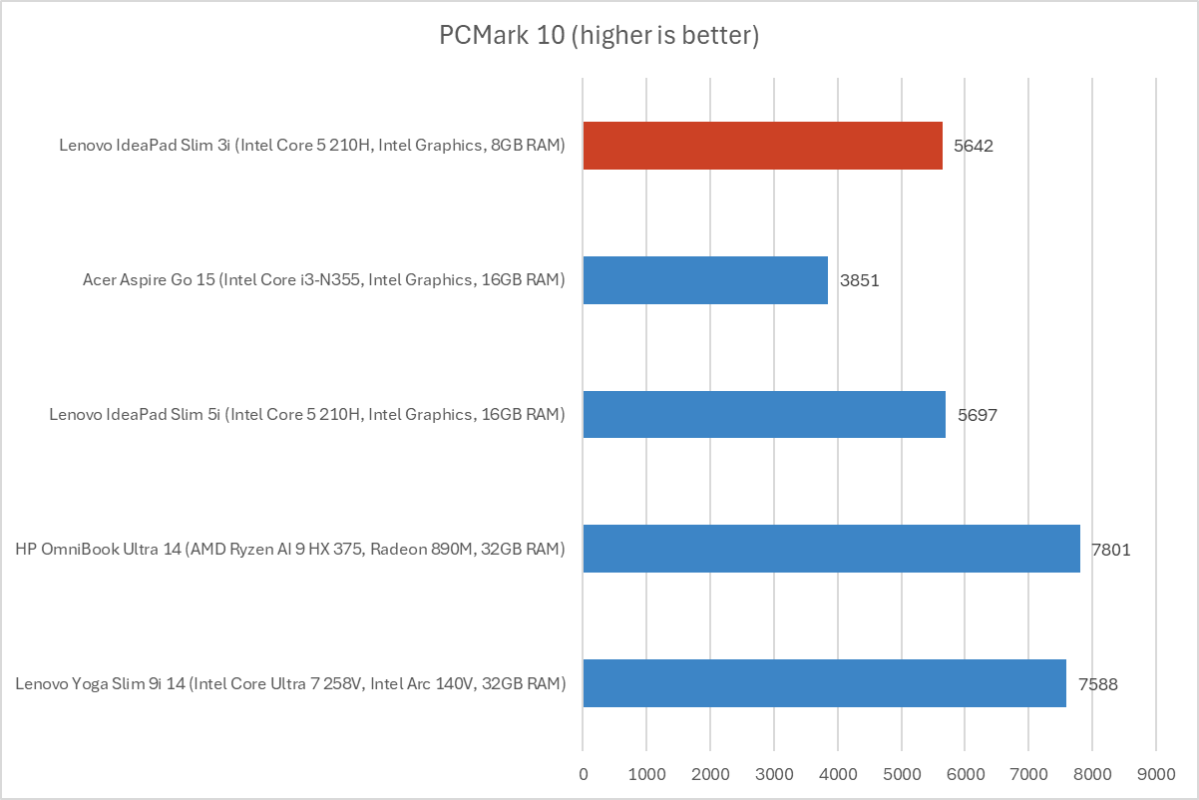
First, we run PCMark 10 to get an idea of overall system performance. The Lenovo IdeaPad Slim 3i delivered an overall PCMark 10 score of 5,642. That’s better than the even-slower CPU in the Acer Aspire Go 15, but that machine has a lower price and delivers 16GB of RAM.
Foundry / Chris Hoffman
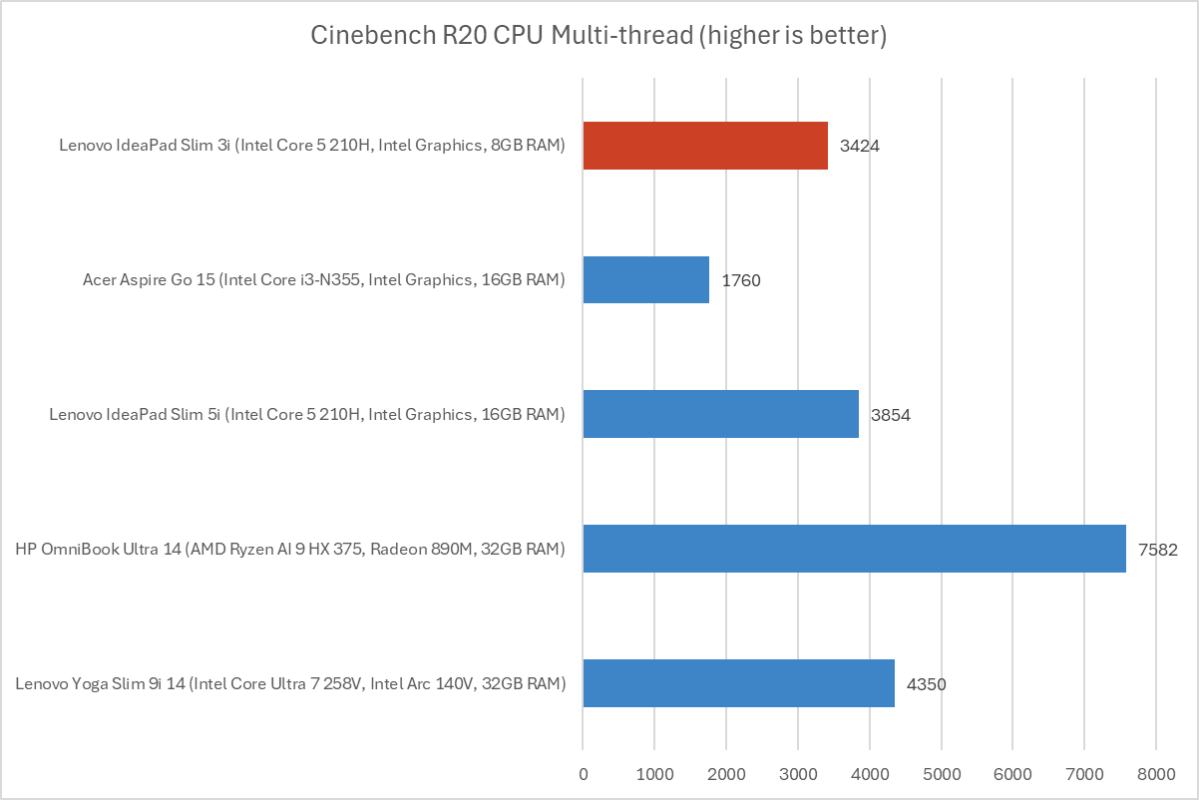
Next, we run Cinebench R20. This is a heavily multithreaded benchmark that focuses on overall CPU performance. It’s a quick benchmark, so cooling under extended workloads isn’t a factor. But, since it’s heavily multithreaded, CPUs with more cores have a huge advantage.
The multithreaded score of 3,424 shows how this CPU compares to other chips from Intel and AMD.
Foundry / Chris Hoffman
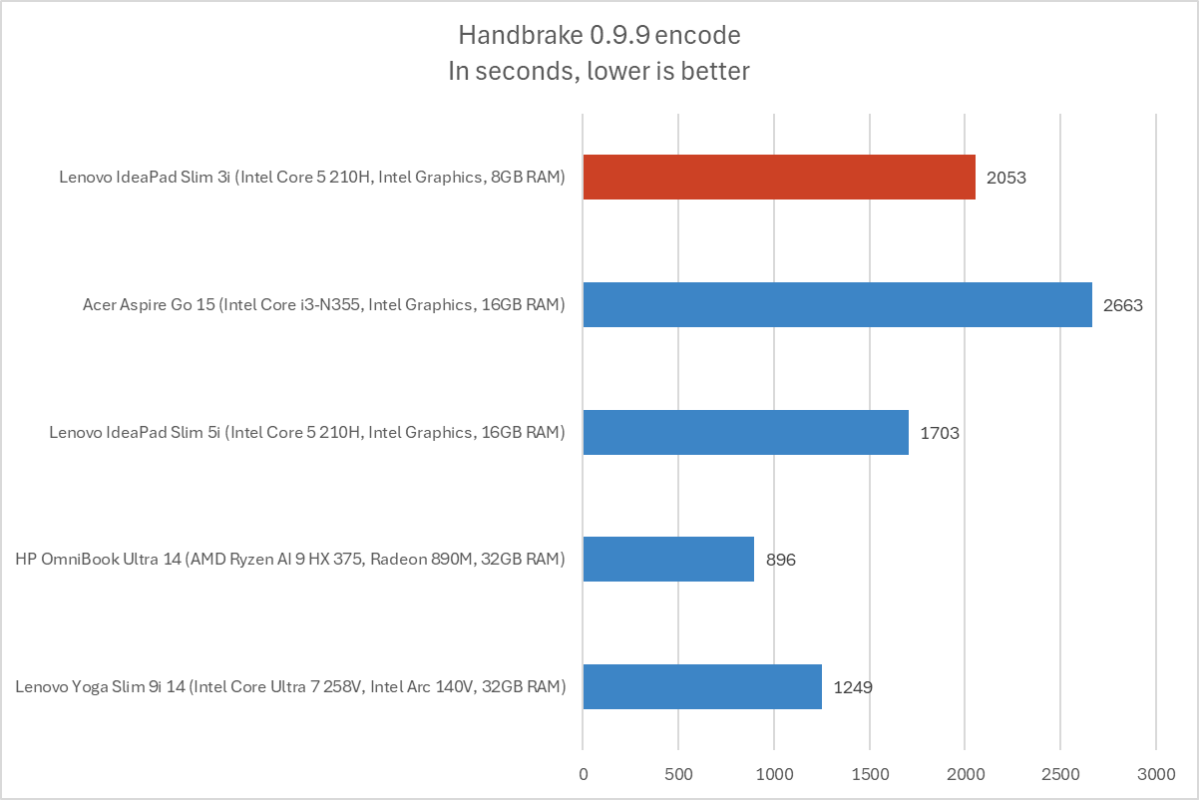
We also run an encode with Handbrake. This is another heavily multithreaded benchmark, but it runs over an extended time. This demands the laptop’s cooling kick in, and many laptops will throttle and slow down under load.
The Lenovo IdeaPad Slim 3i completed the encode process in 2,053 seconds, which is more than 34 minutes. That’s not particularly impressive, but this isn’t the kind of machine you’d buy for extended CPU-heavy compute tasks.

Foundry / Chris Hoffman
Next, we run a graphical benchmark. This isn’t a gaming laptop, but it’s still good to check how the GPU performs. We run 3DMark Time Spy, a graphical benchmark that focuses on GPU performance.
With an overall 3DMark Time Spy score of 1,072, this machine delivered poor integrated graphics performance. Laptops with modern hardware, especially Intel’s own Lunar Lake chips, but also AMD and Qualcomm hardware, often have passable integrated graphics you can actually use to play games.
This is a big deal because casual PC users may want to run a few simple PC games. With this kind of GPU performance, you won’t want to play even low-end games on this machine.
Overall, the Lenovo IdeaPad Slim 3i was usable, but it didn’t impress in our benchmarks.
Lenovo IdeaPad Slim 3i: Battery life
The Lenovo IdeaPad Slim 3i has a 60 Watt-hour battery, and the choice of an Intel Core 5 210H CPU based on an older architecture means it’s going to be a little power hungry. This isn’t a PC for long battery life away from an outlet.

Foundry / Chris Hoffman
To benchmark the battery life, we play a 4K copy of Tears of Steel on repeat on Windows 11 with airplane mode enabled until the laptop suspends itself. We set the screen to 250 nits of brightness for our battery benchmarks, which means we had to crank this laptop’s display brightness way up. This is a best-case scenario for any laptop since local video playback is so efficient, and real battery life in day-to-day use is always going to be less than this.
The Lenovo IdeaPad Slim 3i lasted an average of 582 minutes before suspending itself. That’s under 10 hours in an idealized benchmark, which isn’t impressive for a laptop in 2025. It won’t make it through an eight-hour workday, which is a shame when so many laptops are now showing seriously impressive battery life.
Lenovo IdeaPad Slim 3i: Conclusion
The Lenovo IdeaPad Slim 3i feels too compromised. Even being charitable and accepting the current $479 sale price as this laptop’s real price, I can’t recommend a machine that only has 8GB of RAM in 2025 when 16GB has become standard. Decisions like the inclusion of a touchscreen are strange. This isn’t the ideal touchscreen laptop, especially without a glass surface.
You can get versions of this laptop with more RAM, but they’ll be even more expensive. At 16GB of RAM and with a deep sale price, you may get some serious value out of this machine. The core design here is a fine budget PC. But the compromises don’t make sense at this price.
This articles is written by : Nermeen Nabil Khear Abdelmalak
All rights reserved to : USAGOLDMIES . www.usagoldmines.com
You can Enjoy surfing our website categories and read more content in many fields you may like .
Why USAGoldMines ?
USAGoldMines is a comprehensive website offering the latest in financial, crypto, and technical news. With specialized sections for each category, it provides readers with up-to-date market insights, investment trends, and technological advancements, making it a valuable resource for investors and enthusiasts in the fast-paced financial world.