
In 2026, figuring out how to watch baseball is more confusing than ever.
MLB teams are switching channels on cable and satellite TV as regional sports networks collapse, while new companies are carving up the rights for games on national television. New streaming services are also coming online for watching in-market games without blackouts, even as ESPN has introduced more complications for watching out-of-market games on MLB.TV.
I can’t make the situation any simpler, but as someone who covers the streaming space pretty closely, I can at least lay out the options in a way that makes sense. Here’s how to navigate the baseball streaming options as opening day approaches:
Step 1: Determine whether you’re in-market or out-of-market
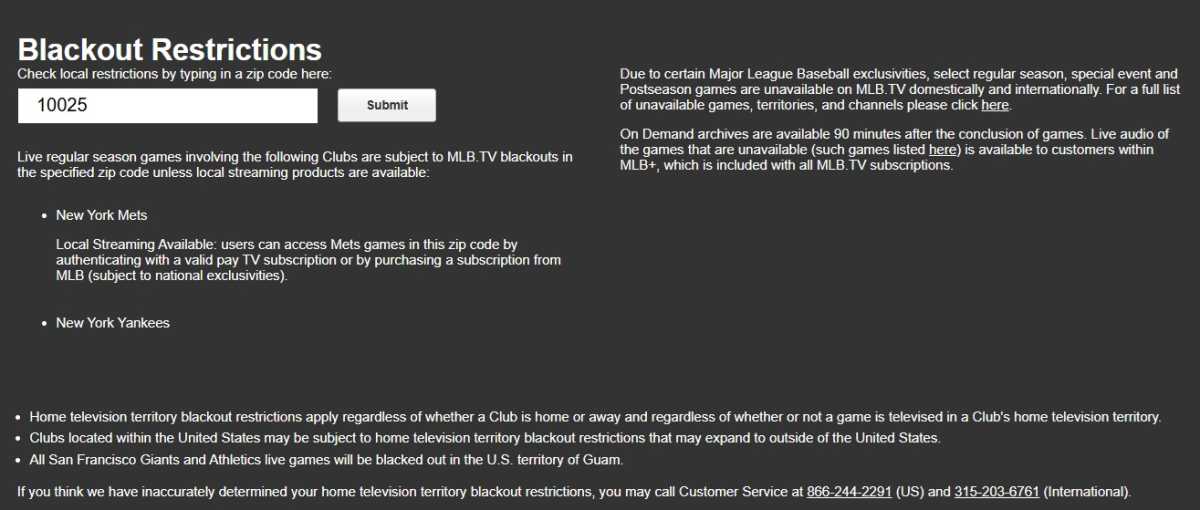
MLB.TV’s blackout checker
Jared Newman / Foundry
How you’ll watch MLB games in 2026 depends largely on where your favorite team plays. To figure out which teams are in-market, I suggest entering your zip code on MLB’s Blackout Restrictions page.
- If the team you want to watch appears in the results, you will need an in-market streaming option to watch them. Head to “Step 2” below.
- If your team does not appear in the results, they are considered out-of-market and you will need MLB.TV to watch them. Skip over to “Step 3” instead.
Step 2: Find your in-market MLB streaming options
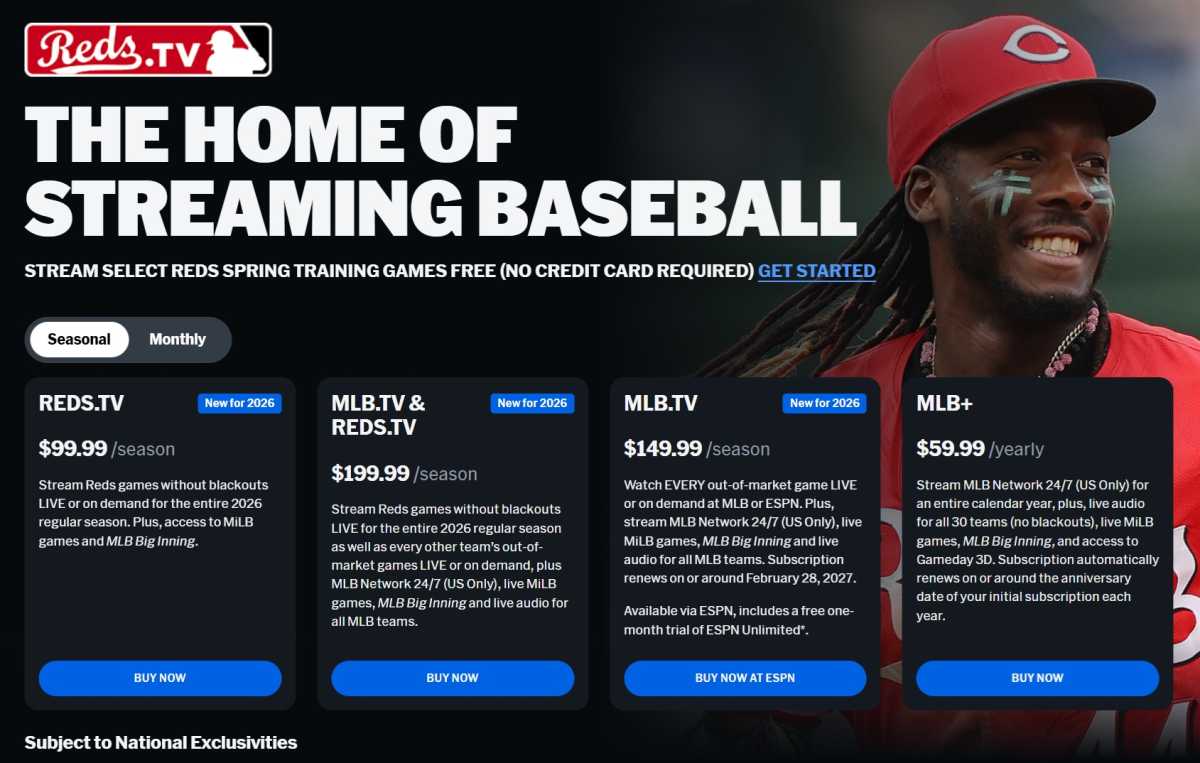
The Reds.TV sign-up page
Jared Newman / Foundry
If the team you want to watch is in-market, you have two options for watching without a cable or satellite TV package:
- Sign up for a live TV streaming service that carriers your local team’s channel.
- Sign up directly to your team’s standalone streaming plan or regional sports streaming service.
The latter option is especially confusing because every team is handling standalone subscriptions differently. Some are partnering with the league on “Club.TV” packages, others are tied to existing regional sports networks, while others still have spun up their own networks to produce and distribute games.
To make things simpler, here’s a chart listing all 30 MLB teams, their corresponding pay TV channels, the live TV streaming services that carry those channels, and the options for standalone streaming.
If you’re having trouble reading the chart on this page, you can also load the Google Sheets version:
| Team | Sports Network | Included with … | Standalone plans |
|---|---|---|---|
| Arizona Diamondbacks | Diamondbacks TV | DirecTV, Fubo | DBacks.tv ($20/mo or 100/yr) * |
| Athletics | NBC Sports California | DirecTV, Fubo, YTTV, Hulu Live TV | Athletics.TV ($120/yr) * $18/mo add-on w/ Peacock |
| Atlanta Braves | BravesVision | DirecTV, Fubo | Braves.TV (Price TBA) |
| Baltimore Orioles | MASN | DirecTV, Fubo | MASN+ ($100/season or $180/yr) |
| Boston Red Sox | NESN | DirecTV, Fubo | NESN 360 ($30/mo or $240/yr) Annual plan includes 4 Red Sox tickets |
| Chicago Cubs | Marquee Sports Network | DirecTV, Fubo | Marquee Sports Network ($20/mo) |
| Chicago White Sox | CHSN | DirecTV, Fubo | CHSN ($20/mo) $30/mo or $350/yr w/ Bulls and Blackhawks |
| Cincinnati Reds | Reds TV | DirecTV, Fubo | Reds.TV ($20/mo or $100/yr) * |
| Cleveland Guardians | Guardians TV | DirecTV, Fubo | CleGuardians.TV ($20/mo or $100/yr) * |
| Colorado Rockies | Rockies TV | DirecTV, Fubo | Rockies.TV ($20/mo or 100/yr) * |
| Detroit Tigers | Detroit SportsNet | DirecTV, Fubo | Detroit SportsNet ($20/mo or $190/yr) |
| Houston Astros | Space City Home Network | DirecTV, Fubo | SCHN+ ($20/mo or $200/yr) |
| Kansas City Royals | Royals TV | DirecTV, Fubo | Royals.TV ($20/mo or $100/yr) * |
| Los Angeles Angels | Angels TV | DirecTV, Fubo | Angels.TV ($20/mo or $100/yr) * |
| Los Angeles Dodgers | SportsNet LA | DirecTV | SNLA+ ($30/mo or $200/yr)Free with Spectrum internet + mobile |
| Miami Marlins | Marlins TV | DirecTV, Fubo | Marlins.TV ($20/mo or $100/yr) * |
| Milwaukee Brewers | Brewers TV | DirecTV, Fubo | Brewers.TV ($20/mo or $100/yr) * |
| Minnesota Twins | Twins TV | DirecTV, Fubo | Twins.TV ($20/mo or $100/yr) * |
| New York Mets | Primary: SportsNet NY Secondary: WPIX |
SNY: DirecTV, Hulu WPIX: DirecTV, Fubo, Hulu, YTTV |
SNY ($25/mo, $125/season*, or $150/yr) WPIX games OTA only |
| New York Yankees | Primary: YES Network Secondary: Prime Video |
DirecTV, Fubo (YES only) | Gotham Sports ($120/season Yankees-only) $175/yr with Nets, $300/yr with MSG |
| Philadelphia Phillies | NBC Sports Philadelphia | Fubo, YTTV, Hulu Live TV | Phillies.TV ($25/mo or $170/season) * $25/mo add-on w/ Peacock |
| Pittsburgh Pirates | SportsNet Pittsburgh | DirecTV, Fubo | SNP 360 ($22/mo or $100/season) |
| San Diego Padres | Padres TV | DirecTV, Fubo | Padres.TV ($20/mo or $100/yr) * |
| San Francisco Giants | NBC Sports Bay Area | DirecTV, Fubo, YTTV, Hulu Live TV | Giants.TV ($20/mo or $120/season) * $18/mo add-on w/ Peacock |
| Seattle Mariners | Mariners TV | DirecTV, Fubo | Mariners.TV ($20/mo or $100/yr) * |
| St. Louis Cardinals | Cardinals TV | DirecTV, Fubo | Cardinals.TV ($20/mo or $100/yr) * |
| Tampa Bay Rays | Rays TV | DirecTV, Fubo | Rays.TV ($20/mo or $100/yr) * |
| Texas Rangers | Rangers Sports Network | DirecTV, Fubo | Victory+ ($150/season) Free OTA on Fridays |
| Toronto Blue Jays | Sportsnet | – | SportsNet+ ($20/mo or $180/yr) |
| Washington Nationals | Nationals TV | DirecTV, Fubo | Nationals.TV ($20/mo or $100/yr) * |
You can sign up for DirecTV or Fubo via these links. Unfortunately, these services still won’t carry nationally-televised games on channels like ESPN and streaming services like Apple TV. More on those options in Step 4 below.
Step 3: Understand out-of-market MLB streaming options (and beware of ESPN Unlimited)
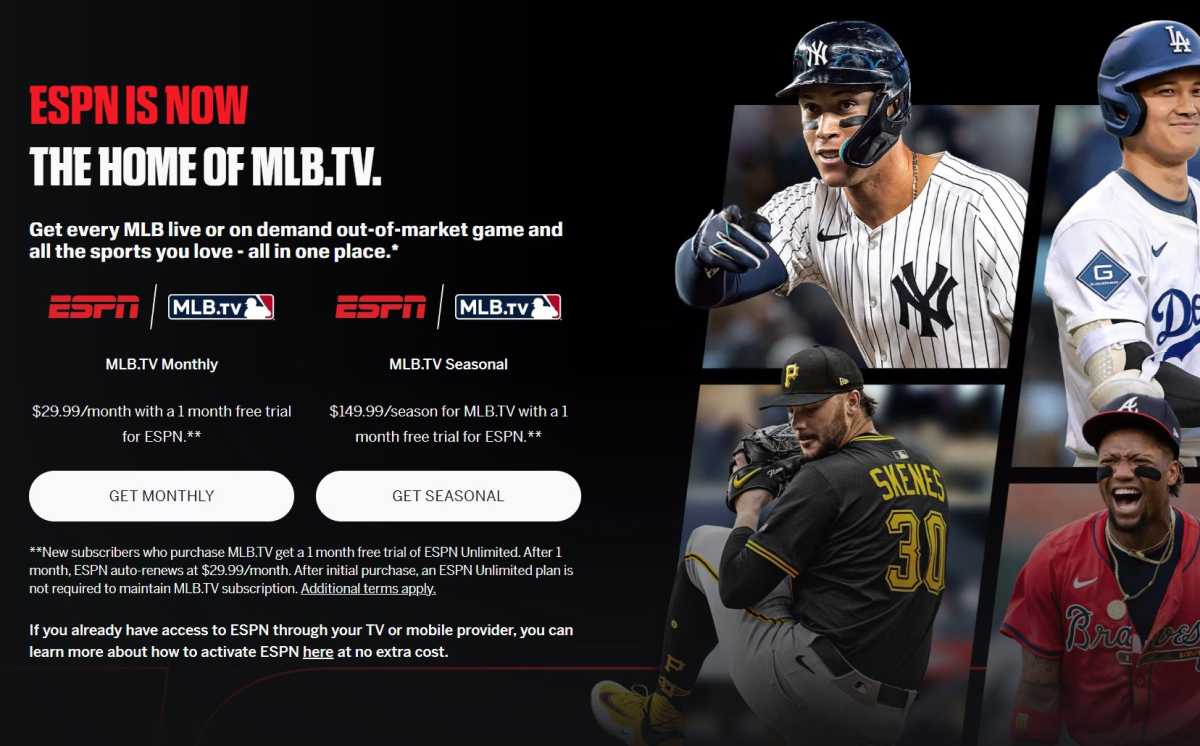
MLB.TV’s out-of-market coverage now comes with a mandatory ESPN Unlimited trial for new subscribers.
Jared Newman / Foundry
What if you want to watch a team that doesn’t play where you live? That’s where MLB.TV comes in. This long-running service provides access to all out-of-market games except those that are nationally televised. (See Step 4 below.)
Some options to be aware of:
- The main MLB.TV package, which covers all out-of-market teams, costs $20 per month or $150 for the season.
- Some teams offer discounted bundles with MLB.TV for both in-market and out-of-market teams. These are marked with asterisks in my chart above.
- MLB.TV also offers single-team plans for watching one team that does not play where you live. These plans range from $100 to $130 per season, depending on team.
- Once again, T-Mobile customers can get MLB.TV for free this year. You’ll have to redeem the offer between March 24 and March 30.
Unfortunately, ESPN has made this once-simple service needlessly more complicated in 2026.
Now that ESPN owns MLB.TV, it’s requiring every new subscriber for its all-teams package to take a free trial of ESPN Unlimited, which is an entirely separate $30 per month service that carries ESPN’s cable channels. You don’t need ESPN Unlimited to maintain an MLB.TV subscription, but you’ll have to start a trial for it when you sign up. This slimy behavior on ESPN’s part will almost certainly result in some folks paying $30 per month extra for MLB.TV by accident.
So here’s my advice: After signing up for MLB.TV, immediately cancel the ESPN Unlimited subscription. You’ll still get the free trial, but you won’t get auto-billed at the end.
Note that the mandatory ESPN trial does not apply to the single-team plans, the T-Mobile offer, or the in-market “Club.TV” packages covered in Step 2 above. If you’re renewing MLB.TV from a previous season, you’re exempt from ESPN’s sneaky trial tactics as well.
Step 4: Think about nationally-televised games
Regardless of whether you have an in-market streaming plan or MLB.TV for out-of-market games, you’ll still have to contend with nationally-televised games. Here’s what you need to know:
- ESPN will carry 30 exclusive games in 2026. So far it has only released a schedule for four of them.
- Fox and FS1 will carry 85 games in 2026 and has published its full schedule.
- NBCUniversal will carry more than 60 games in 2026, more than 40 of which will be Peacock exclusives. (The rest will simulcast on NBC.) Here’s the schedule.
- TBS will carry weekly MLB games on Tuesdays. Here’s the first-half schedule.
- Apple TV will carry two games on Friday nights. Here’s the first-half schedule.
Watching all of these games without a pay TV package would require some combination of ESPN Unlimited ($30 per month), Fox One ($20 per month), Peacock Premium ($11 per month), HBO Max’s ad-free plan ($17 per month), and Apple TV ($13 per month). That approach is probably unwise for all but the biggest baseball fans.
Some alternative strategies to consider instead:
- Consider some sports-centric live TV services that are cheaper than a full pay TV bundle. These can cover ESPN, Fox, FS1, NBC, and TBS.
- Note that you can bundle Apple TV and Peacock for $15 per month, only $2 per month more than Apple TV alone.
- You can also bundle ESPN Unlimited and Fox One for $40 per month, saving $10.
- If you only need Apple TV for a game or two, consider a 30-day free trial instead.
- Only dip into these services for a month when they’re carrying a high-stakes game you care about. Immediately cancel after signing up to avoid being auto-billed for an ongoing subscription.
- Vote with your wallet and just skip these games entirely. The vast majority will still be on your in-market service or MLB.TV for out-of-market viewing.
Answers to common questions
Are there blackouts on the Club.TV packages, such as Reds.TV and Mariners.TV?
No, these are in-market options that provide the same telecast you’d get from a cable or satellite TV provider. Nationally televised games (for instance, on ESPN or Apple TV) will not be available, but these are not blackouts as there won’t be a local telecast in most cases.
Do the Club.TV packages cover both home and away games?
Yes. Again, these are the same telecasts you’d get from a cable or satellite TV provider.
Does MLB.TV cover both home and away games?
If your team plays outside the area where you live, you’ll get both their home and away games, with one major exception: Games against your local, in-market team have blackout restrictions. For instance, if you live in Cincinnati and sign up for MLB.TV to watch the Yankees, games between the Yankees and Reds will be blacked out, both at home and on the road. There’s no way around that but to pay for a month of Reds.TV.
What if I want to watch two in-market teams, like the Angels and Dodgers in Los Angeles, or the Yankees and Mets in New York?
Sadly you’ll have to sign up for both teams’ in-market options, or pick a live TV streaming service that carries both of their respective networks. This is your punishment for not picking a side.
Couldn’t I just use a VPN to watch in-market games through MLB.TV?
You can try, but expect hassles. In my experience, this required a lot of jumping through hoops on TV devices, and the VPN itself will cost extra. There’s also no guarantee that MLB.TV won’t block you, in which case you’ll have wasted the costs of both an MLB.TV subscription and the VPN.
I hope all this was helpful. Got more questions? Sign up for my Cord Cutter Weekly newsletter and send me a reply, and I’ll do my best to help.
This articles is written by : Nermeen Nabil Khear Abdelmalak
All rights reserved to : USAGOLDMIES . www.usagoldmines.com
You can Enjoy surfing our website categories and read more content in many fields you may like .
Why USAGoldMines ?
USAGoldMines is a comprehensive website offering the latest in financial, crypto, and technical news. With specialized sections for each category, it provides readers with up-to-date market insights, investment trends, and technological advancements, making it a valuable resource for investors and enthusiasts in the fast-paced financial world.