
Today, we take office software suites for granted. But in the 1970s, you were lucky to have a typewriter and access to a photocopier. But in the early 1980s, IBM rolled out PROFS — the Professional Office System — to try to revolutionize the office. It was an offshoot of an earlier internal system. The system would hardly qualify as an office suite today, but for the time it was very advanced.
The key component was an editor you could use to input notes and e-mail messages. PROFS also kept your calendar and could provide databases like phonebooks. There were several key features of PROFS that would make it hard to recognize as productivity software today. For one thing, IBM terminals were screen-oriented. The central computer would load a form into your terminal, which you could fill out. Then you’d press send to transmit it back to the mainframe. That makes text editing, for example, a very different proposition since you work on a screen of data at any one time. In addition, while you could coordinate calendars and send e-mail, you could only do that with certain people.
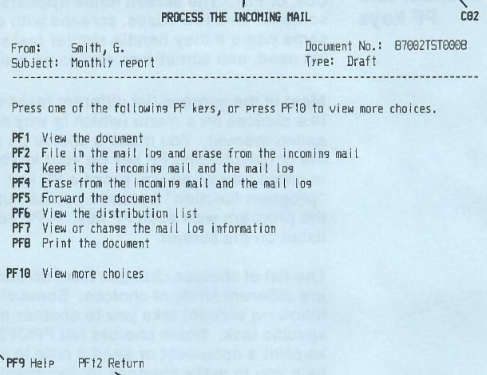
In general, PROFS connected everyone using your mainframe or, perhaps, a group of mainframes. In some cases, there might be gateways to other systems, but it wasn’t universal. However, it did have most of the major functions you’d expect from an e-mail system that was text-only, as you can see in the screenshot from a 1986 manual. PF keys, by the way, are what we would now call function keys.
The calendar was good, too. You could grant different users different access to your calendar. It was possible to just let people see when you were busy or mark events as confidential or personal.
You could actually operate PROFS using a command-line interface, and the PF keys were simply shorthand. That was a good thing, too. If you wanted to erase a file named Hackaday, for example, you had to type: ERASE Hackaday AUT$PROF.
Styles
PROFS messages were short and were essentially ephemeral chat messages. Of course, because of the block-mode terminals, you could only get messages after you sent something to the mainframe, or you were idle in a menu. A note was different. Notes were what we could call e-mail. They went into your inbox, and you could file them in “logs”, which were similar to folders.
If you wanted something with more gravitas, you could create documents. Documents could have templates and be merged with profiles to get information for a particular author. For example, a secretary might prepare a letter to print and mail using different profiles for different senders that had unique addresses, titles, and phone numbers.
Documents could be marked draft or final. You had your own personal data storage area, and there was also a shared storage. Draft documents could be automatically versioned. Documents also received unique ID numbers and were encoded with their creation date. Of course, you could also restrict certain documents to certain users or make them read-only for particular users.
More Features
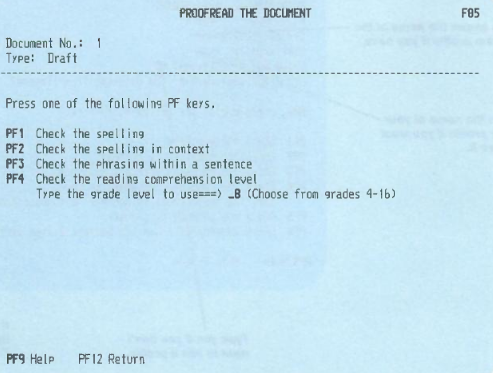
PROFS could remind you of things or calendar appointments. It could also let you look up things like phone numbers or work with other databases. The calendar could help you find times when all participants were available. PROFS could tie into DisplayWrite (at least, by version 2) so it could spell check using custom or stock dictionaries. It also looked for problematic words such as effect vs. affect and wordy phrases or clichés.
The real game changer, though, was the ability to find documents without searching through a physical filing cabinet. The amount of time spent maintaining and searching files in a typical pre-automation business was staggering.
You could ask PROFS to suggest rewrites for a certain grade level or access a thesaurus. This all sounds ordinary now, but it was a big innovation in the 1980s.
Of course, in those days, documents were likely to be printed on a computer-controlled typewriter or, perhaps, an ordinary line printer. But how could you format using text? This all hinged on IBM’s DisplayWriter word processor.
Markup
Today we use HTML or Markdown to give hints about rendering our text. PROFS and DisplayWriter wasn’t much different, although it had its own language. The :p. tag started a paragraph. You could set off a quotation between :q. and :eq. Unnumbered lists would start with :ul., continue with :li., and end with :eul. Sounds almost familiar, right? Of course, programs like roff and WordStar had similar kinds of commands, and, truthfully, the markup is almost like strange HTML.
The Whole Office
IBM wanted to show people that this wasn’t just wordprocessing for the secretarial pool. Advanced users could customize templates and profiles. Administrators could tailor menus and add features. There were applications you could add to provide a spreadsheet capability, access different databases, and gateway to other systems like TWX or Telex.
It is hard to find any demonstrations of PROFs, but a few years ago, someone documented their adventure in trying to get PROFS running. Check out [HS Tech Channel’s] video below.
History and Future
Supposedly, the original system was built in the late 1970s in conjunction with Amoco Research. However, we’re a little suspicious of that claim. We know of at least three other companies that were very proud of “helping IBM design PROFS.” As far as we could ever tell, that was a line IBM sales fed people when they helped them design a sign-in screen with their company name on it, and that was about it.
The system would go through several releases until it morphed into OfficeVision. As PCs started to take over, OfficeVision/2 and OS/2 were the IBM answer that few wanted. Eventually, IBM would suggest using Lotus Notes or Domino and would eventually buy Lotus in 1995 to own the products.
Scandal
One place that PROFS got a lot of public attention was during the Iran-Contra affair. Oliver North and others exchanged PROFS notes about their activities and deleted them. However, deleting a note in PROFS isn’t always a true deletion. If you send a note to several people, they all have to delete it before the system may delete it. If you send a document, deleting the message only deletes the notification that the document is ready, not the document.
Investigators recovered many “deleted” e-mails from PROFS that provided key details about the case. Oddly, around the same time, IBM offered an add-on to PROFS to ensure things you wanted to delete were really gone. Maybe a coincidence. Maybe not.
On Your Own
If you want to try to build up a new PROFS system, we suggest starting with a virtual machine. If anyone suggests that wordprocessing can’t get worse than DisplayWriter, they are very wrong.
This articles is written by : Nermeen Nabil Khear Abdelmalak
All rights reserved to : USAGOLDMIES . www.usagoldmines.com
You can Enjoy surfing our website categories and read more content in many fields you may like .
Why USAGoldMines ?
USAGoldMines is a comprehensive website offering the latest in financial, crypto, and technical news. With specialized sections for each category, it provides readers with up-to-date market insights, investment trends, and technological advancements, making it a valuable resource for investors and enthusiasts in the fast-paced financial world.