
At a glance
Expert’s Rating
Pros
- Four display ports that eliminate extra cables
- Absolutely stable
- Tons of legacy USB-A ports
Cons
- Four simultaneous 4K display outputs are possible only in some scenarios
- Just one USB-C port
- Poor charging
Our Verdict
One of the better full-featured Thunderbolt 4 docks, though its full capabilities are dependent upon your laptop’s hardware. Relatively affordable, too.
Price When Reviewed
This value will show the geolocated pricing text for product undefined
Best Pricing Today
Price When Reviewed
$330.99
Best Prices Today: StarTech.com Thunderbolt 4/USB4 Quad Display Docking Station


StarTech’s Universal USB4 & Thunderbolt 4 Docking Station (132N-TB4USB4DOCK) is an affordable monster of a Thunderbolt 4 docking station, supporting up to four 4K60 displays provided you have the right hardware. It also promises to save you a few bucks, as its massive port collection includes dedicated display ports.
Specifically, StarTech’s dock is in the vein of some of the flagship docks I’ve reviewed in the past, such as the Plugable TBT4-UDZ, known for its two groups of display ports, each with a DisplayPort and HDMI option. These display groups basically allow you to take an existing external monitor and its display cable and connect either the HDMI or DisplayPort. Other docks may force you into a specific configuration, forcing you to pay about $15 for a matching display cable. This doesn’t.
One difference between these two docks: Plugable’s option (featured on our list of the best Thunderbolt docks) was just slightly cheaper at press time, and allows you to mount it vertically with an included stand. Buying any Thunderbolt 4 dock with as many port options as this dock offers for about $250, though, is a nice deal in the tariff era. If you can find it for less, pat yourself on the back.
Physically, StarTech’s dock is of average size: a bit over 8 inches long, almost 4 inches deep, and 1.5 inches high. It appears to be made entirely of plastic. There’s nothing wrong with that, though you’ll probably find that it becomes warmer than one made of aluminum. That’s not really a problem, though the dock warms more than others I’ve tried.
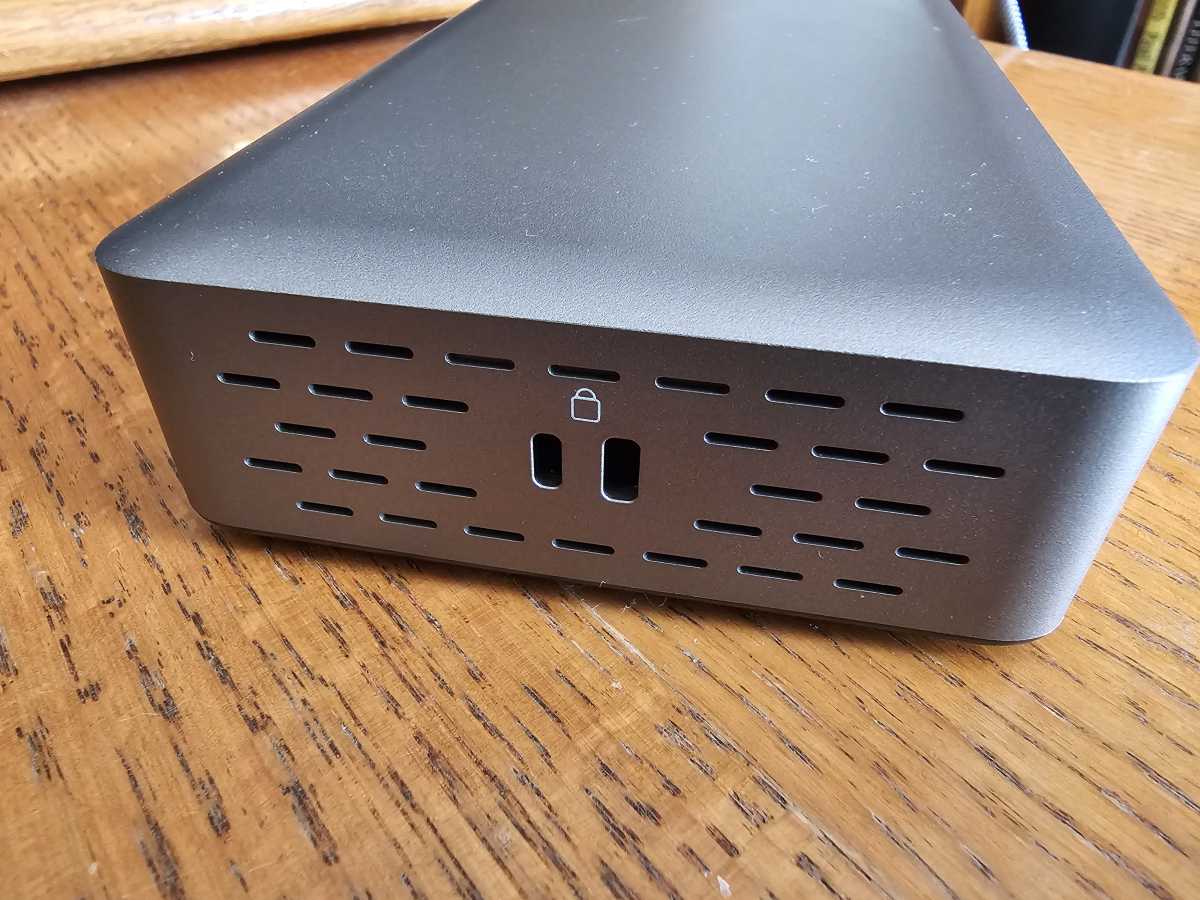
Though the dock appears to lack an active fan, there are small vents on either side of the dock itself which promote airflow and cooling. I also used the dock for a number of days, and the dock never crashed or even disconnected from the displays. On the contrary, it was totally stable on a variety of test laptops.
Mark Hachman / Foundry
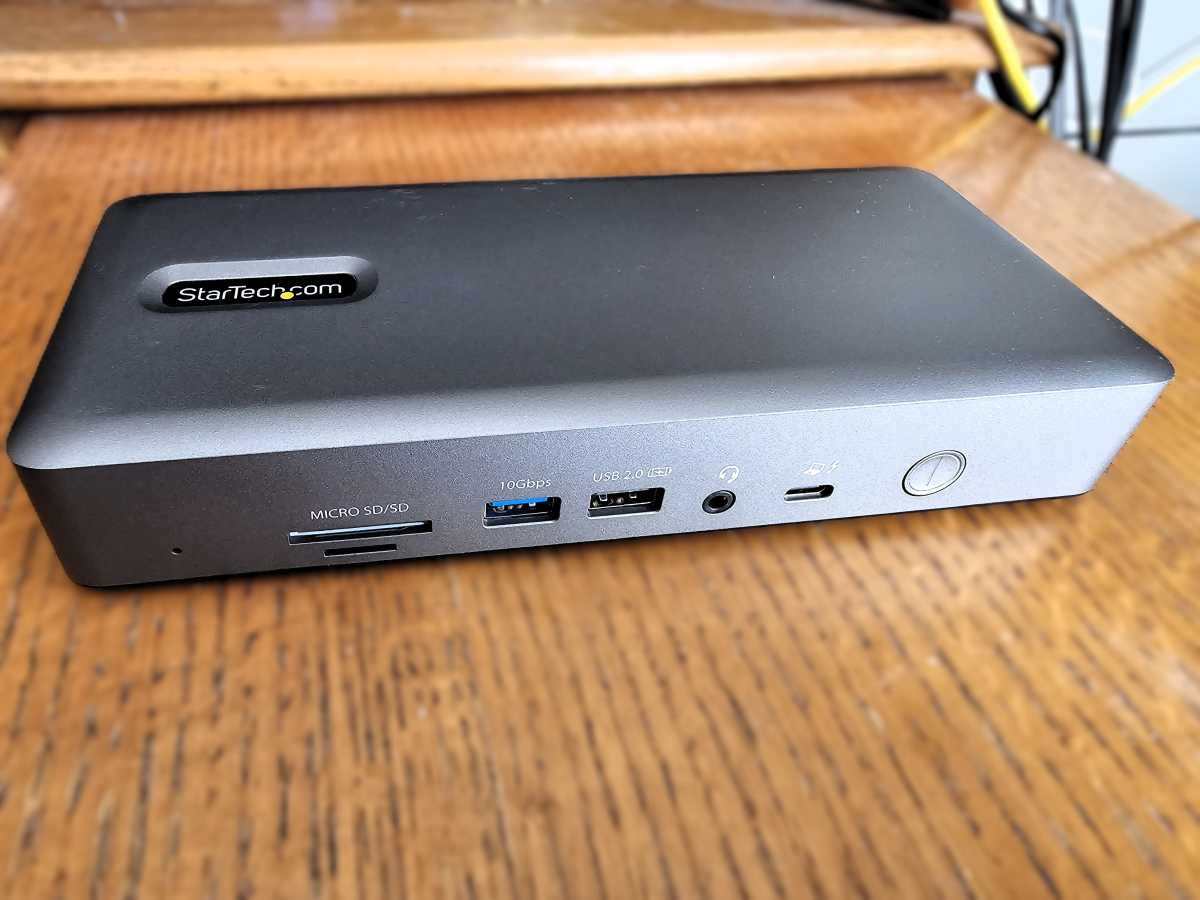
There are ports like crazy: the connection to the laptop is found on the front of StarTech’s dock, next to a 3.5mm audio jack. You’ll also find an older USB 2.0 USB-A port for a mouse, and a 10Gbps USB-A port next to it for a keyboard or webcam. The dock even includes an SD 4.0 UHS-II slot and a power button. StarTech also includes a 1-meter Thunderbolt 4 cable in the package, which is standard.
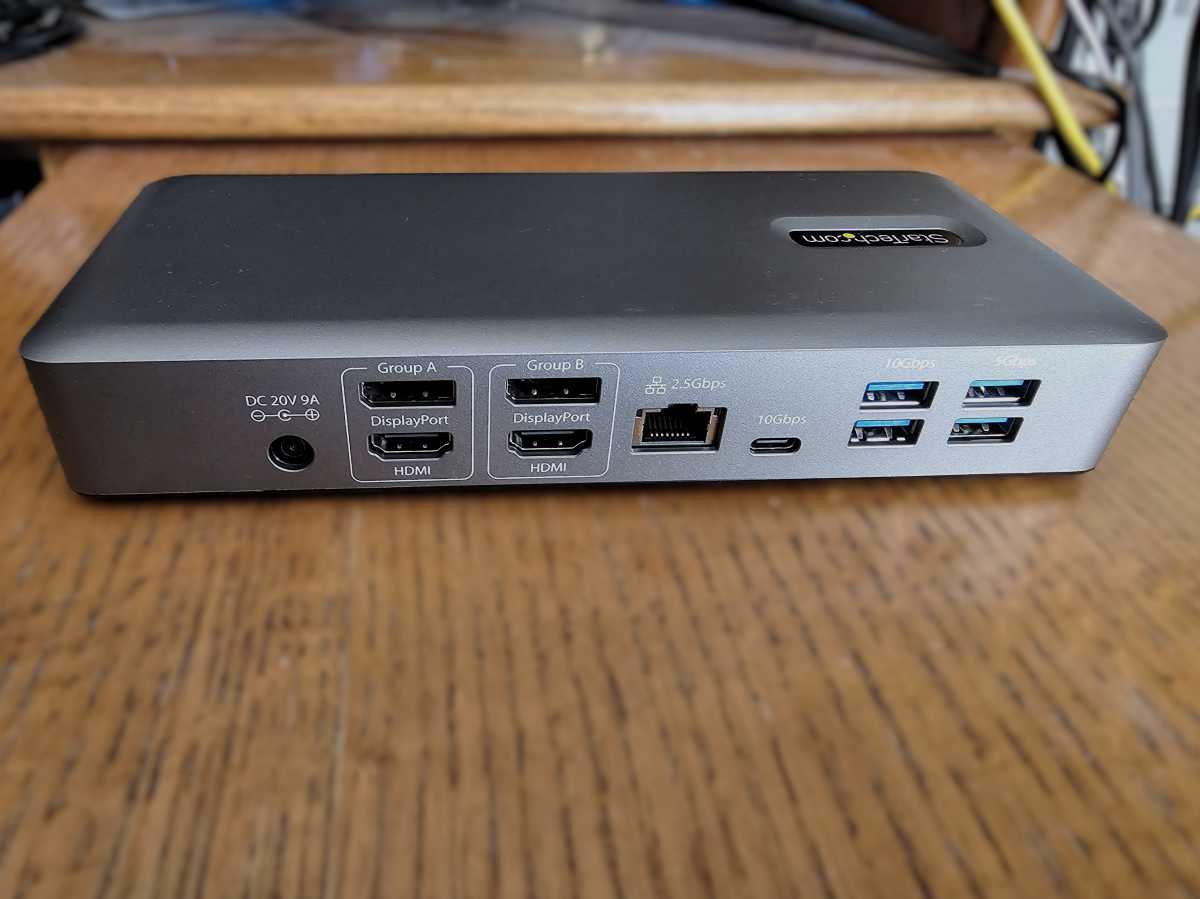
On the rear, the dock includes even more ports. To the right, two 5Gbps and two 10Gbps USB-A ports appear, perfect for legacy devices. Next to them is the dock’s only 10Gbps USB-C port. There is also a 2.5Gbps Ethernet port and the four display ports: two HDMI 2.1 ports and two DisplayPort 1.4 ports.
(All the Thunderbolt 4/USB4 name indicates is that this dock can be used with laptops with an Intel Core chip inside, as well as those with AMD Ryzen or Qualcomm Snapdragon processors. Intel notebooks typically include Thunderbolt ports; the others include USB4 ports. They’re essentially identical.)
StarTech’s Universal USB4 & Thunderbolt 4 Docking Station’s claims of offering four 4K display outputs at the same time are a little ambitious. Otherwise, this is a solid Thunderbolt 4 dock, well priced.
Still, there are two drawbacks: only the 132N-TB4USB4DOCK front USB-A port is dedicated for charging, and it only supplies 7.5W at most — far beneath the 40W most smartphones demand for fast-charging. This dock also includes gobs of legacy USB-A ports, but just one USB-C port supplying 4.5W of power. Still, it does pass along 90W of rated power to a laptop; most need 45W to 65W, but some require more. (Check your laptop manual.) StarTech’s manual says that the power button should include an LED, which should light green when power is applied; my review unit did not.
If this is too much flexibility, StarTech also ships a Thunderbolt 4/USB 4 Docking Station (TB4CDOCK) which I reviewed a few years ago. In place of dedicated display ports it uses Thunderbolt ports, making it closer to a hub than a dock. Still, it’s currently priced at about $199, an enormous price cut from its original $480 MSRP. It too suffers from power problems, but it’s about $50 cheaper.
Mark Hachman / Foundry
StarTech Universal USB4 & Thunderbolt 4 Docking Station: Performance
Four displays might be overkill for most users, and the math doesn’t really help, either.
Each 4K display requires about 12Gbps of bandwidth at a basic 4:4:4 color depth. Multiply that by four, and you exceed the 40Gbps that the Thunderbolt 4 spec allows for — and that’s without a gigabit plus of Ethernet and whatever bandwidth the peripherals require. That means that the dock virtually requires your laptop to support what’s known as Display Stream Compression, which compresses the available video bandwidth. So you’ll probably see better results with just two 4K/60Hz displays, which is what’s usually paired with a Thunderbolt 4 dock.
Mark Hachman / Foundry
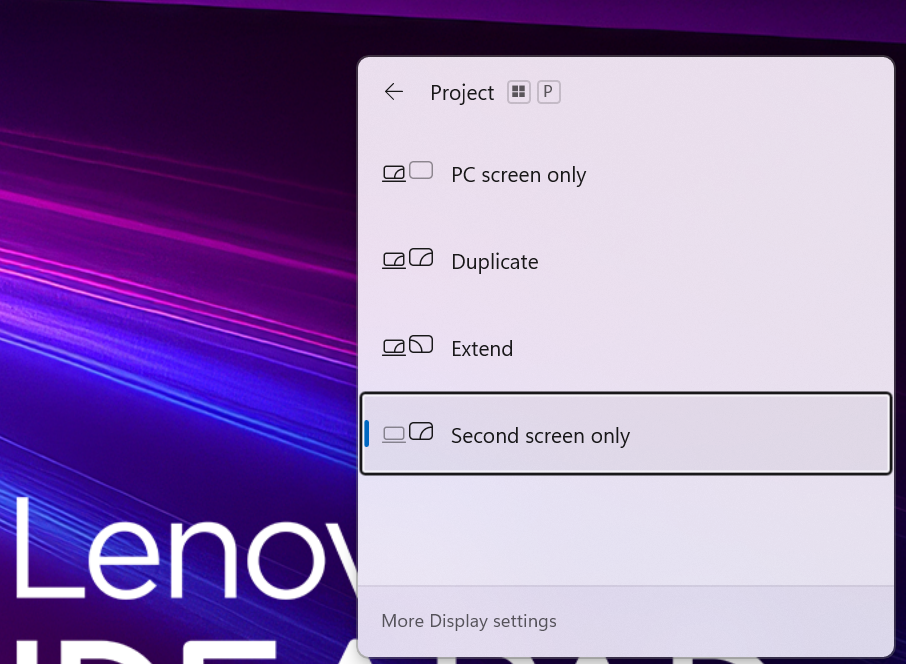
But I do have four 4K displays handy, so I connected them all. (When you do this, your laptop’s screen will be forced to blank and you’ll use the connected displays instead.) It wasn’t easy. Two 13th-gen Core notebooks lit up two or three displays, depending on the configuration and the resolution, but only a relatively brand-new Core Ultra Series 3 (Panther Lake) successfully turned on all four displays at 4K60 resolution.
To do so, I had to open the Display settings within Windows (the Windows key, plus P) and then set it for “second screen only.” That turned off my laptop’s display and lit all four external displays. So it’s possible, but steel yourself for some possible frustration, too.
Otherwise, this dock was rock solid: absolutely stable, and not all docks are.
I then tested the dock using our existing methodology for testing Thunderbolt docks.
StarTech says that I should get a maximum of 7.5 watts out of the front charging port, and the dock gave me 6.8 watts instead. Under load, the dock passed a solid 82.5 watts to my laptop, instead of a full 90 watts.
Mark Hachman / Foundry
The dock dropped 16 frames out of 10,000 on my 4K60 streaming test, which is passable, though not superb. When I tested a connected SSD using PCMark’s storage benchmark, the dock’s data transfer rate was 131.5MB/s, and 125.8MB/s while running the streaming test at the same time. That’s on par with the Plugable TBT-UDZ and the Satechi Thunderbolt 4 Dock Pro. The latter promises connectivity to four displays as well, though for substantially more.
When I copied a folder full of various files from the SSD to the desktop, it took 1 minute 4 seconds, then 1 minute 6 seconds while streaming. That’s on par with most other Thunderbolt 4 docks.
StarTech Universal USB4 & Thunderbolt 4 Docking Station: Conclusion
I’d buy it. At StarTech’s $275 MSRP, that’s within the range of a good Thunderbolt 4 dock, and at press time Lenovo was selling it for slightly less. I don’t find the heat worrisome, and the display ports make this a convenient buy.
I’m hesitant to recommend this as a quad 4K display dock, if only because the experience simply isn’t consistent across a variety of hardware. My old rule holds: use the latest laptop and pray. As a more conventional dual-4K Thunderbolt 4 dock, though, my support is much more full-throated. The one big exception is that some dock customers like a dock that can route some of its charging power to charge your phone. This dock doesn’t even come close.
Other docks, then, might ask you to pay $15 to $30 more for adapter/display cables. This dock won’t, but if you want to charge a phone you’ll have to use an existing charger or spend about the same amount for a separate charger. It’s a wash.
Is it the best Thunderbolt dock? No. I still keep an eye on our top Thunderbolt docking station picks, and I factor price in. StarTech delivers a solid product here, and one I’d recommend. I like it! But the lack of solid charging and issues achieving quad-display capability barely hold it back from an Editor’s Choice award. Barely. Otherwise, it’s solid.
This articles is written by : Nermeen Nabil Khear Abdelmalak
All rights reserved to : USAGOLDMIES . www.usagoldmines.com
You can Enjoy surfing our website categories and read more content in many fields you may like .
Why USAGoldMines ?
USAGoldMines is a comprehensive website offering the latest in financial, crypto, and technical news. With specialized sections for each category, it provides readers with up-to-date market insights, investment trends, and technological advancements, making it a valuable resource for investors and enthusiasts in the fast-paced financial world.