At a glance
Expert’s Rating
Pros
- Thunderbolt 5
- Targus includes adapter cables in the box!
- Thunderbolt Share support
- Relatively stable
- No thermal issues
- Solid and well-made
Cons
- Triple display support only for Thunderbolt 5 laptops
- Expensive
Our Verdict
If you own a Thunderbolt 5 laptop, this dock is a pricey but appropriate solution. For someone with a Thunderbolt 4 laptop, it’s probably worth looking for a cheaper alternative.
Price When Reviewed
This value will show the geolocated pricing text for product undefined
Best Pricing Today
Price When Reviewed
$399.99
Best Prices Today: Targus Thunderbolt 5 Triple Video Docking Station
No one likes to be disappointed with a purchase. If you own a laptop with a mainstream Thunderbolt 4 port inside it, I’m afraid you may well be.
The Targus Thunderbolt 5 Triple Video Docking Station with 140W EPR Power Delivery (also called the DOCK230) is what it says on the box, though this dock has a twist: You can connect three displays using the dock’s built-in Thunderbolt ports, or else connect to a second laptop via a technology called Thunderbolt Share. Because Intel requires a specific license to use this technology, this is a rare feature that Targus has included.
But as I’ll talk about below, the “triple display” feature only works with a Thunderbolt 5 laptop, which really undercuts this dock’s value.
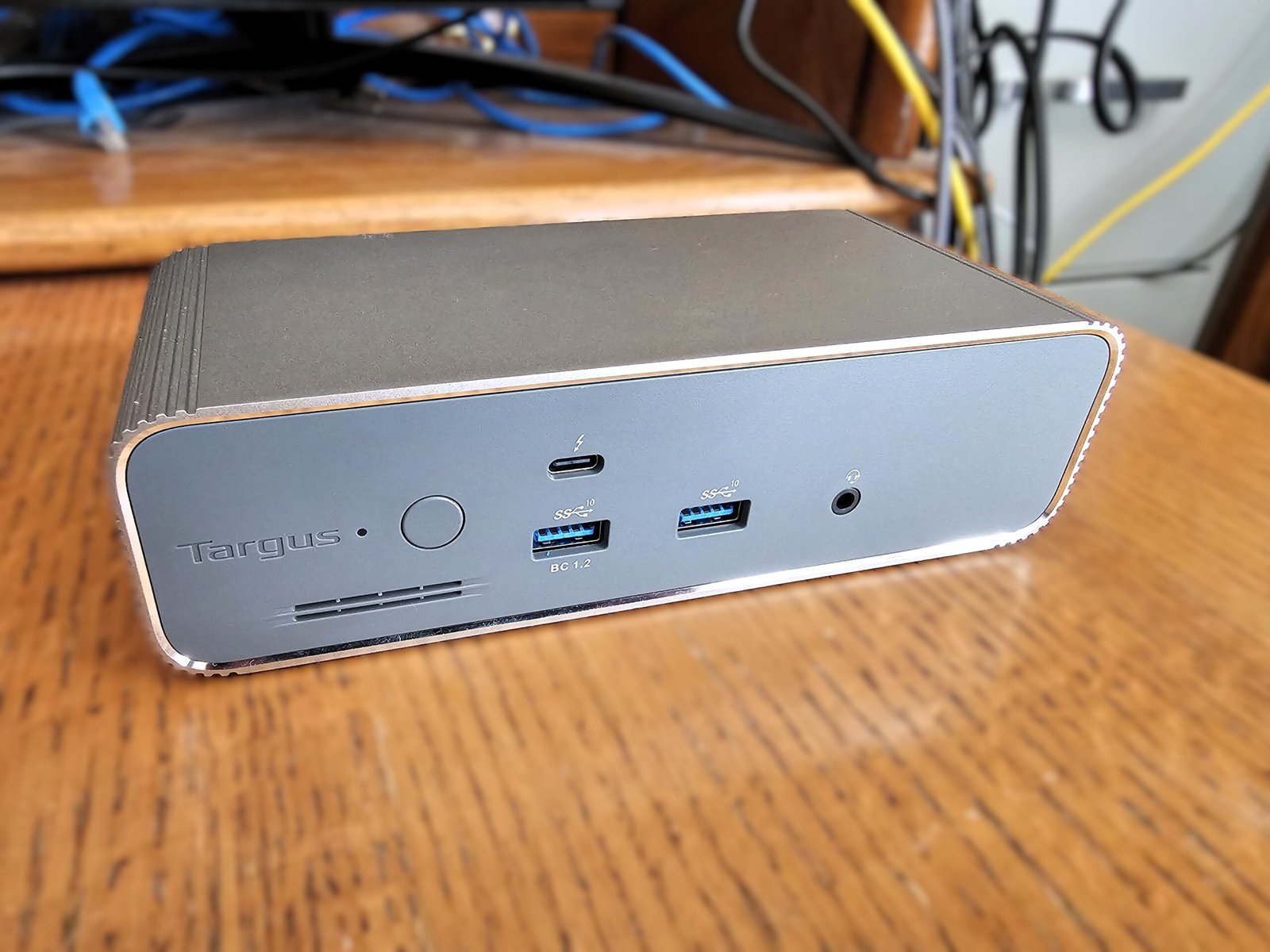
This Targus dock is an almost literal brick: It weighs 2.33 pounds, according to Targus, and measures 7 x 3 x 2 inches, made of sturdy aluminum. Some docks, including Thunderbolt 5 docks, include active cooling fans to cool the dock itself. This one does not, although there are tiny air vents on the front and back. All of the heat simply radiates away, without issue, through the entirety of the dock’s metal construction. The dock’s rounded edges aren’t designed to allow it to sit vertically, though there are small rubber feet to keep the device stable.
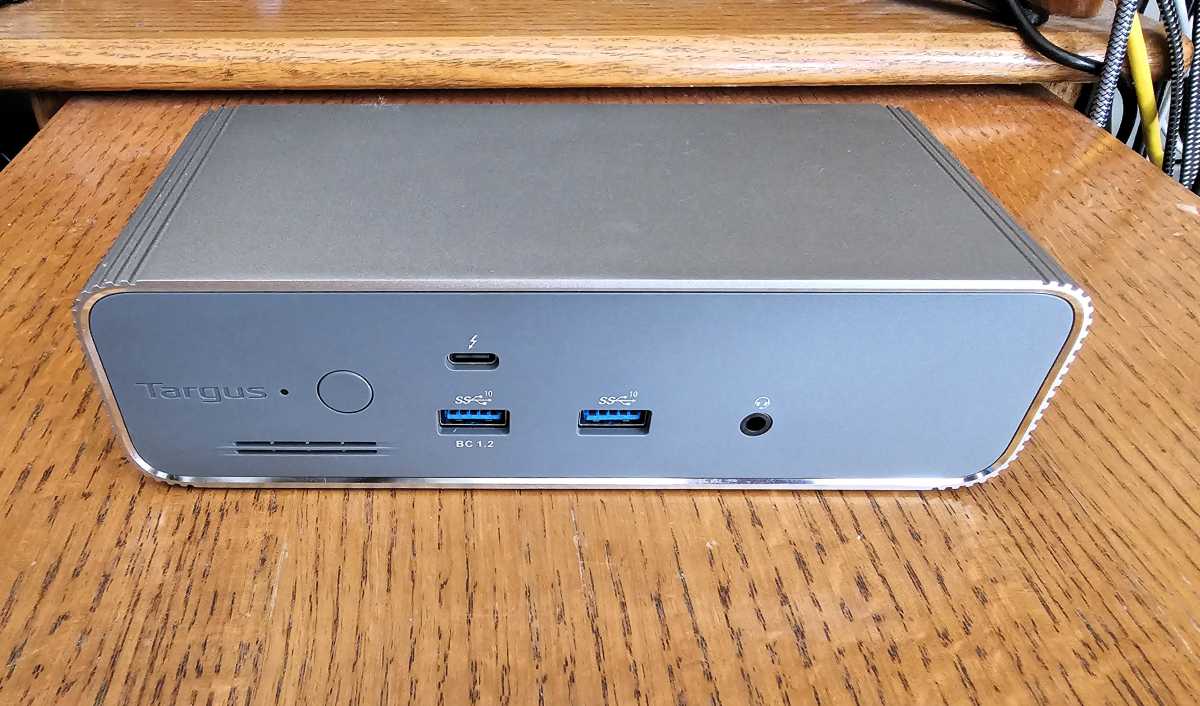
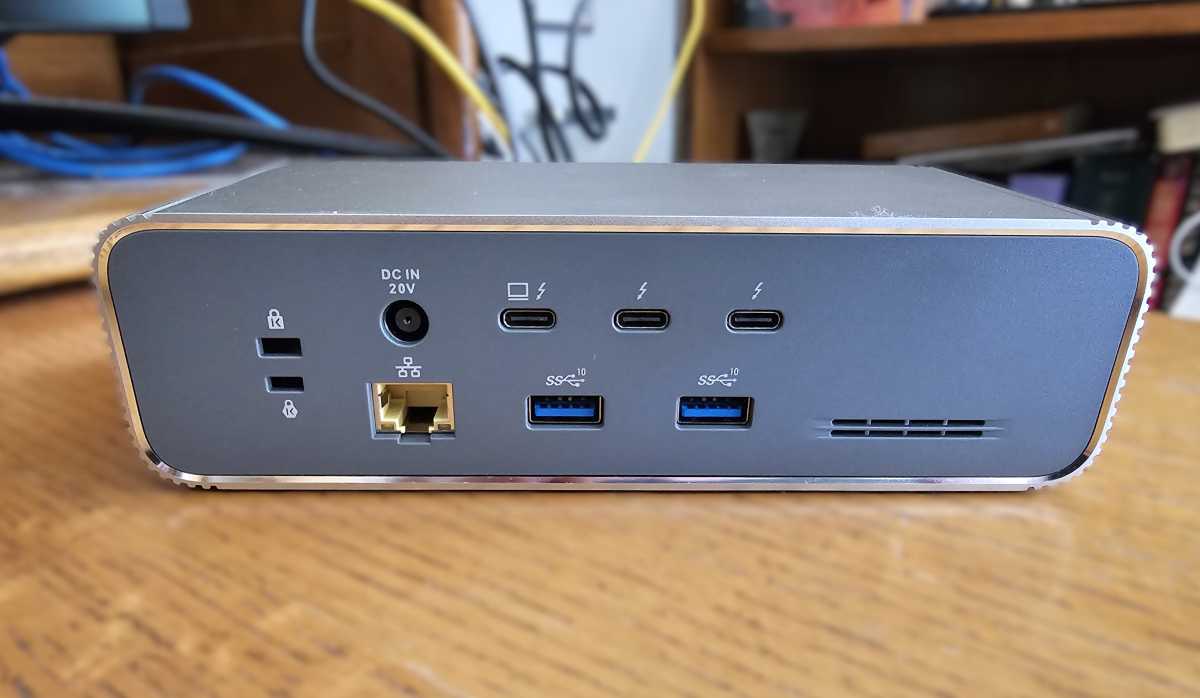
On the front of the dock sits two 10Gbps USB-A ports; only the left-hand one supports charging, and Targus doesn’t specify how much power it provides. There’s also a power button and 3.5mm jack. If the dock is connected to a laptop via one of the rear ports, the dock is rated to supply 100W to the laptop. That leaves 15W of power to pass through the only other front-mounted port, which is a USB-C connection with Thunderbolt capabilities. Put another way, I’d use that port for charging a smartphone, if it’s available, and leave the others alone.
On the rear of the dock are two more Thunderbolt 5 ports, plus the Thunderbolt connection to the laptop. There are two more 10Gbps USB-A ports, a 2.5Gbps Ethernet connection, power input, and a pair of lock slots — both standard and a nano slot.
Mark Hachman / Foundry
Targus includes a 1-meter passive Thunderbolt 5 cable inside the box, which is standard.
Targus Thunderbolt 5 Triple Video Docking Station: Features
Thunderbolt 3 and 4 docks tend to build in either HDMI or DisplayPort display ports, or both. Thunderbolt 5 docks believe in a world where USB-C/Thunderbolt displays exist, and typically include USB-C (Thunderbolt 5) outputs instead. If your display lacks the appropriate USB-C port, that can force you to fork over an additional $20 or so per display for an adapter cable.
Targus classily includes a pair of 2-meter Thunderbolt-to-HDMI adapter cables in the box, helping offset its MSRP. That’s a really nice gesture, and extremely rare.
Mac users and those who own laptops with a Thunderbolt 5 port will find something to like with this Targus dock. Most PC users, however, should seek out cheaper docks that more closely match the capabilities of their hardware.
This Targus dock is a Thunderbolt 5 dock, which is something like the 3DTV of the Windows PC I/O market. On paper, Thunderbolt 5 offers 80Gbps bidirectionally, and 120Gbps in a single direction if necessary. Unfortunately, a stubborn lack of Thunderbolt 5-compliant Windows laptops (thanks, Intel) makes Thunderbolt 4 the most cost-effective technology at the moment, at least for Windows users. Apple Macs run Thunderbolt 5 from the client Mac through to the display, however, making this dock a more appropriate choice for that market.
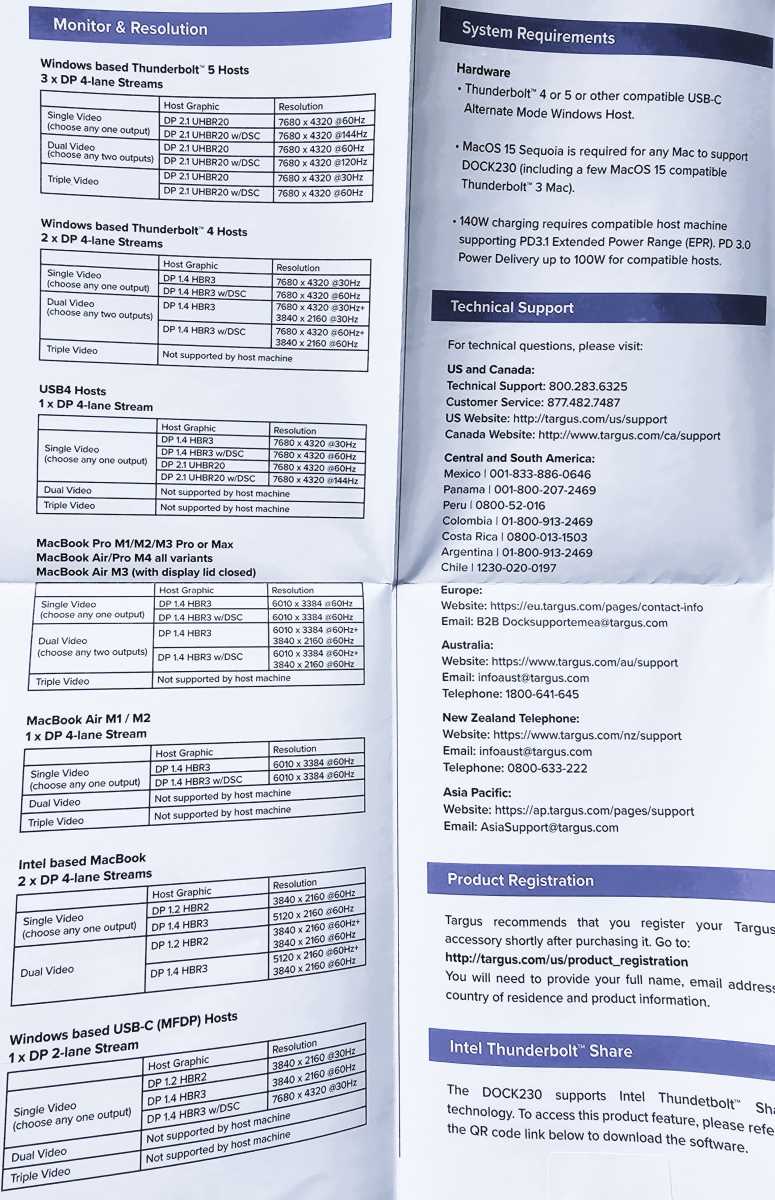
The problem is that the complexities of your laptop’s hardware change what this dock can offer you. In general, an up-to-date laptop offers you the best experience. But Targus is so concerned that it even provides a lengthy table of what you can expect by platform, specifically in regards to the displays that you’ll be able to connect to this dock. Windows users really need concern themselves with just the top two tables, but still — there’s a lot of variation. There’s a gotcha in there, too, which I’ll talk about later.
Mark Hachman / Foundry
Do I really think you should spend $399.99 on a Thunderbolt dock for a Windows PC when a $250 Thunderbolt 4 dock would be a better use for your money? I don’t. But we can be assured that Thunderbolt 5 will eventually become mainstream on Windows PCs, and overspending now to future-proof your PC remains a viable choice.
This puts me in an admitted bind. I’ve had Thunderbolt 5 laptops in place in the past, with the expectation that they would become ubiquitous in 2026. That’s not the case, and my existing Thunderbolt 4 test bed can’t push this dock to its limits.
With that said, I can and did run our normal battery of tests, which happens to include an OWC Envoy Ultra, a manufacturer-supplied Thunderbolt 5 SSD that we can use for testing.
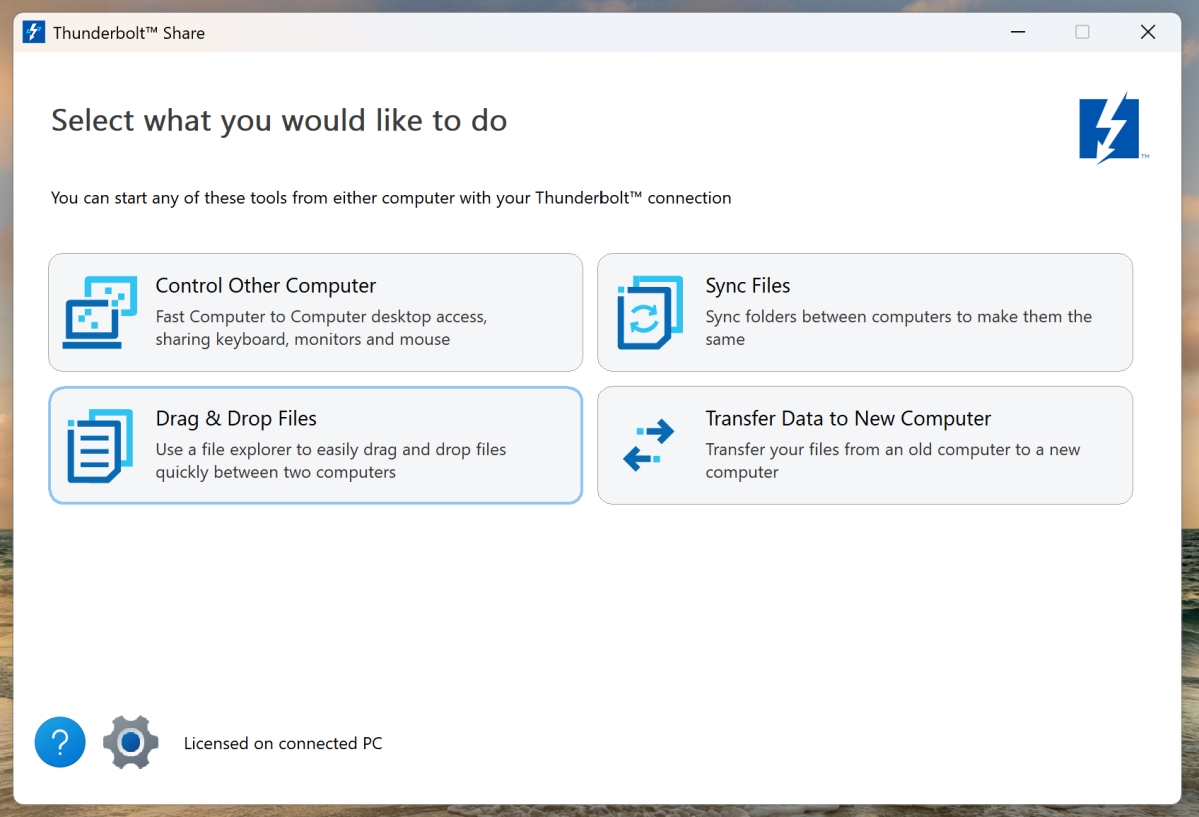
The addition of Thunderbolt Share isn’t something that many docks offer. Intel requires a special license to use the technology, which always struck me as simply a dumb way to chase revenue. In a Thunderbolt Share arrangement, there are two Thunderbolt-equipped laptops and an intermediary dock; just one of those devices must carry a Share license, which this dock does.
Mark Hachman / Foundry
(My late colleague Gordon Mah Ung walked through the features of Thunderbolt Share in a video, showing how it transfers files in a snap and can be used to control another PC.
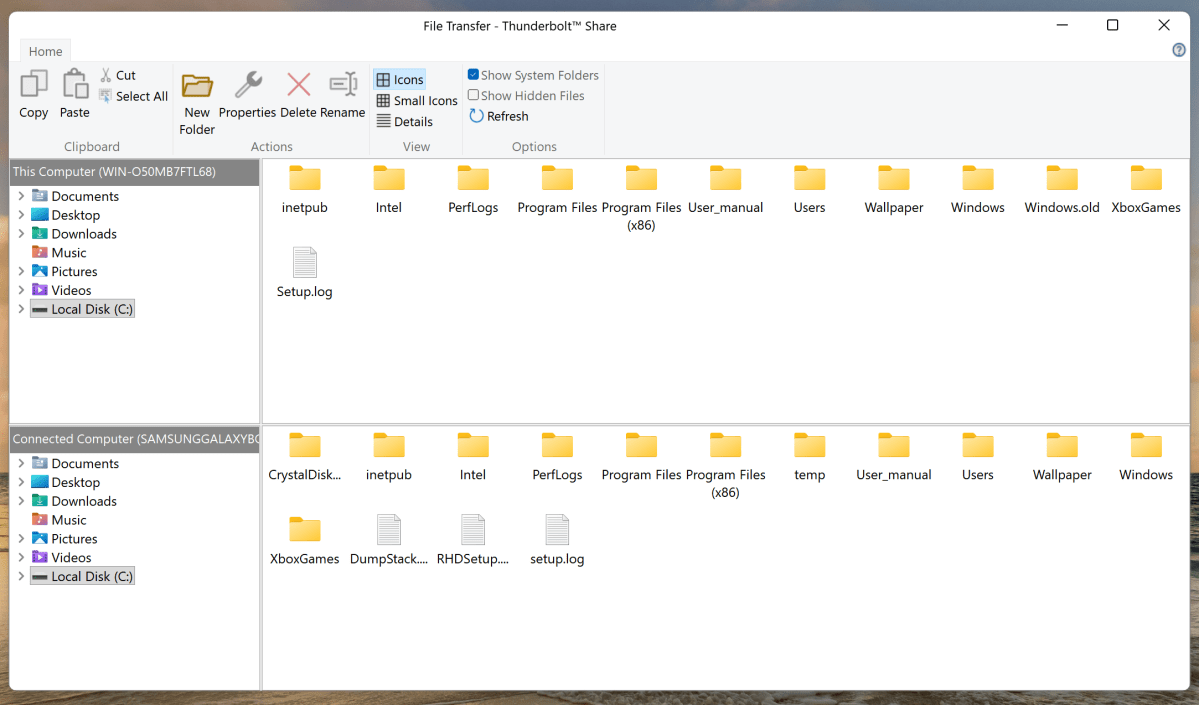
You’ll need to download the Share software via a link Targus provides in the manual. I had no issues transferring files back and forth and using one laptop to control another. However, the software feels somewhat dated, and the interface must be manually refreshed to show changes in the files. This is Intel’s fault, though, and not that of Targus.
Mark Hachman / Foundry
Thunderbolt Share does transfer data faster than an external SSD, though not by much. I’ll explain more, below.
Targus Thunderbolt 5 Triple Video Docking Station: Performance
Triple video docking station, huh? Well, not really, unless you have a Thunderbolt 5-equipped laptop.
The photo of the manual earlier was the tipoff: You can only connect three displays if you have a Thunderbolt 5 port on your laptop — and at a whopping 7680×4320 resolution, too. On my TB4 test machine, two displays connected stably. But three? Nope, even after trying a variety of laptops, old and new. Many other docking stations allow you to connect three displays, even with Thunderbolt 4 ports. Look on our list of the best Thunderbolt docks for those.
Otherwise, this Targus dock demonstrated good stability in my time with it, which lasted a few days. It wasn’t perfect, however, and one of my two monitors lost connection about once daily across three days. The dropout was just a second or two, which was noticeable though not particularly disruptive.
Keep in mind, however, that the lack of Thunderbolt 5 laptops also impedes my ability to test. I was able to borrow a laptop from a manufacturer last year, but ran into stability issues. I tested this dock using a number of laptops equipped with Thunderbolt 4 ports instead. It’s simply up to Intel and AMD to build in Thunderbolt 5 and USBV2 ports, respectively, to help enable this market.
From a power perspective, the dock delivered about 92 watts to my laptop while under load, and 11.9W from a secondary Thunderbolt port. Most devices deliver a few watts under their rated amounts, so in this regard, the Targus dock is no different than others in its class.
I continued testing according to my Thunderbolt dock testing methodology, which requires me to then examine how well the dock transfers data while streaming and other tasks. With a Thunderbolt 4 docking station, that’s a maximum of 40Gbps; with a Thunderbolt 5 dock like this one, up to 80Gbps (and even 120Gbps in some cases) is the maximum. That’s difficult to achieve without high-speed, high-definition displays. For now, those are more common with the Mac platform, and displays like the Studio Display XDR, which boasts a 5K resolution and 120Hz refresh rate along with a TB5 interface.
Mark Hachman / Foundry
The Targus Thunderbolt 5 Triple Video Docking Station dropped five frames out of 10,000, which is perfectly acceptable. I then connected my test 10Gbps SSD to the drive, and measured its performance: 140MB/s by itself, and 135MB/s while streaming in the background. Both of those are at the top of their class for a Thunderbolt 4 dock.
Thunderbolt 5, however, opens up a wealth of possibilities. For one thing, you can connect a Thunderbolt 5 SSD to this dock. Doing so pushed the SSD throughput to 331MB/s, a bit more than double the performance of the first drive. The Targus dock substantially underperformed other docks I’ve connected to the TB5 drive, like the Razer Thunderbolt 5 Dock Chroma I recently tested. However, I tested that dock with a different laptop, one that used a Thunderbolt 5 connection. I have to assume that the faster interface boosted the throughput.
It’s also worth noting that a few Thunderbolt 5 docks also either offer an empty internal M.2 slot or supply their own SSD, as with the Sonnet Echo 13 Thunderbolt 5 dock. The price soars ($479 at press time) but Sonnet’s integrated SSD pushed performance up to 662MB/s. That’s 4.7 times the performance of the other dock for about $70 more, if lightning-quick external storage matters to you.
I also copy a folder of files from the SSD to the desktop. That took a normal 1 minute, 8 seconds by itself and 1 minute, 26 seconds while streaming, a little poky. Remember, though, that Thunderbolt Share is an option, and when I connected my test laptop to the dock and another test laptop, the file transfer took 1 minute, 2 seconds. Does Share pay for itself? No, but it’s handy.
Should you buy the Targus Thunderbolt 5 Triple Video Docking Station?
As a Windows user, you’re largely limited to laptops with Thunderbolt 4 connections. That pushes a Thunderbolt 5 dock — and a pricy one — a little out of reach for most people. The runner-up in my list of the best Thunderbolt docks is a Thunderbolt 5 docking station, but it’s under $300.
Support for three displays, additional adapter cables, and the useful though still niche Thunderbolt Share technology certainly justify a bit of the additional cost — well, if you own a Thunderbolt 5 laptop. But for me, this dock is priced too high for what it offers to the majority of Windows PC users. I just think that most users will prefer something a bit more aligned with their hardware and their budget.
This articles is written by : Nermeen Nabil Khear Abdelmalak
All rights reserved to : USAGOLDMIES . www.usagoldmines.com
You can Enjoy surfing our website categories and read more content in many fields you may like .
Why USAGoldMines ?
USAGoldMines is a comprehensive website offering the latest in financial, crypto, and technical news. With specialized sections for each category, it provides readers with up-to-date market insights, investment trends, and technological advancements, making it a valuable resource for investors and enthusiasts in the fast-paced financial world.