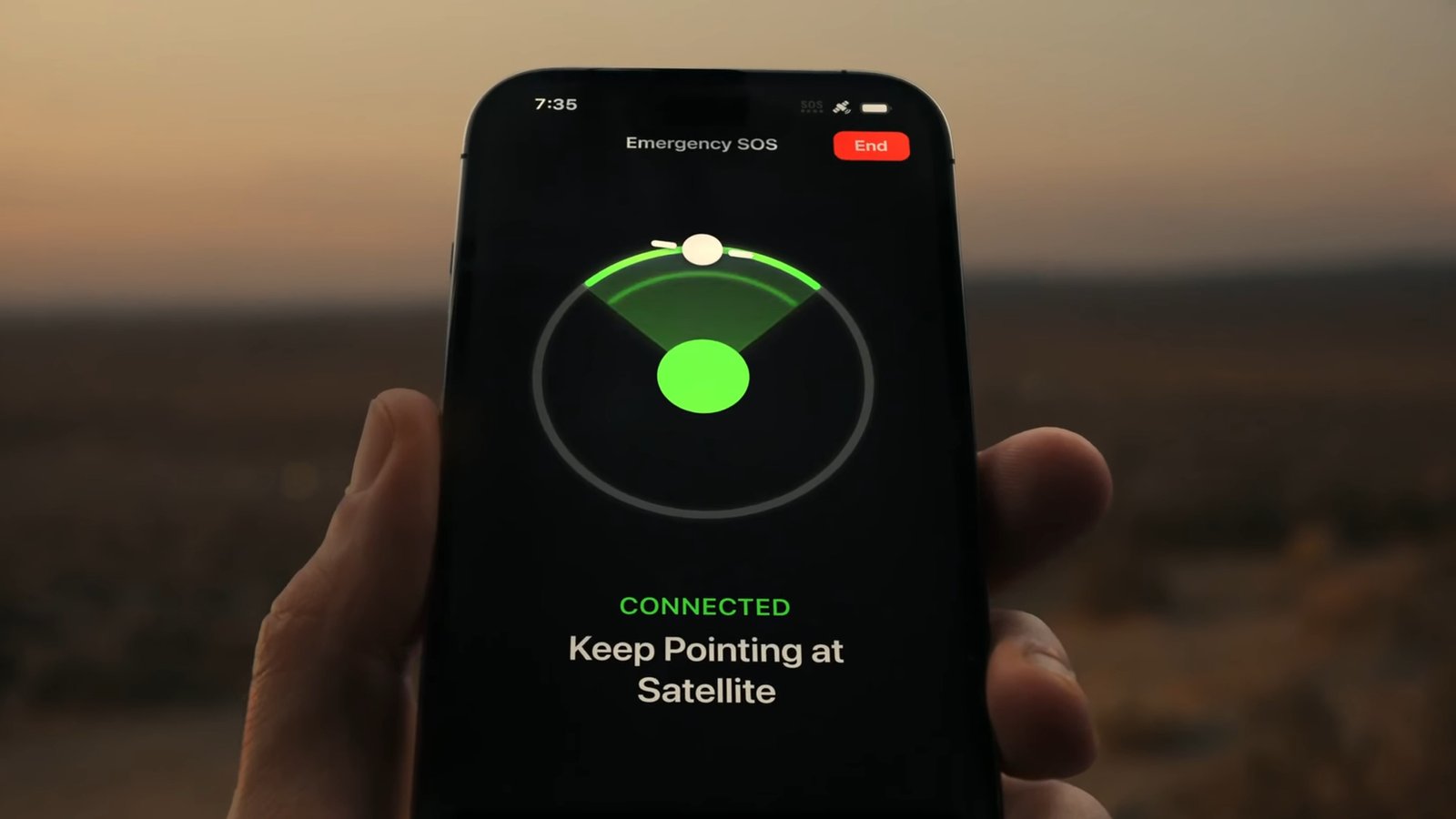
This week, an avalanche killed eight people who were on a backcountry skiing expedition on Lake Tahoe. One person is also missing, but presumed dead. This story is tragic, but, miraculously, six members of the group survived the disaster. According to the New York Times, those skiers were rescued thanks to a standard iPhone feature, Emergency SOS via satellite, which let them connect to emergency services from where they were trapped by snow.
If you have an iPhone, you probably have this feature available to you, as well. Better yet, it’s not hard to activate in the event of an emergency, though it doesn’t hurt to know exactly how it works ahead of time. This isn’t the first time Emergency SOS via satellite was credited with saving lives during disasters, and knowing about it now could potentially save your life in a future emergency.
What is Emergency SOS via satellite?
You might be familiar with your iPhone’s Emergency SOS feature—you may have even set it off accidentally when clicking the buttons too many times in a row. Emergency SOS makes it easy to quickly dial 911 in the event of an emergency.
But Emergency SOS via satellite is different. This feature connects you to emergency services when you’re in an area with no cellular service. Where a typical 911 call would route through your carrier’s network, Emergency SOS via satellite connects your call or message to the nearest satellite above your head. That means, so long as conditions are right, you’re able to contact emergency services from basically anywhere in the world, regardless of whether that area is covered by cell networks.
Of course, since communications are being routed via satellite, the experience is much different than a standard cellular connection. Apple says that in “ideal conditions” with a clear sky, it might take 30 seconds for messages to send. Less ideal conditions, say, if your view of the sky is blocked by trees, could slow a message down to 60 seconds or more.
Apple first launched this feature with the iPhone 14, but since iOS 18, you’ve been able to text anyone via satellite. The principle is the same, but you can reach out to friends and family rather than 911. If there’s an emergency, but not one you need police, fire fighters, or EMTs for, this can connect you to close friends no matter where you are.
How to use Emergency SOS via satellite
To connect to satellite with your iPhone, you’ll need an iPhone 14 or later. You’ll also need to be running iOS 16.1 in the U.S. and Canada, though other regions have their own software requirements. The feature is currently available in the following countries: Australia, Austria, Belgium, Canada, France, Germany, Ireland, Italy, Japan, Luxembourg, Mexico, the Netherlands, New Zealand, Portugal, Spain, Switzerland, the UK, and the U.S.
You won’t have the option to connect to satellite services when you have a connection, either cellular or wifi. Instead, the option appears when you have no service. Once this happens, iOS’ Connection Assistant will ask if you want to connect to satellite. If you miss the prompt, you can launch it from the Cellular tile in Control Center, or from Settings > Satellite.
Once the Connection Assistant launches, it’ll walk you through connecting to your nearest satellite, including with on-screen visuals, but here’s the gist: You’ll need to be outside with as clear a view of the sky as you can. Apple says that “light” to “medium” foliage from trees could slow down messages, while “dense” foliage, hills, mountains, or tall structures could prevent connection at all.
Apple says you can hold your iPhone as you usually would—no need to point it at the sky—but you may be instructed to move left or right depending on the location of the satellite. Apple also says the connection might not work in places above 62° latitude, which includes northern parts of Alaska.
Once connected, the first thing you should do is try calling 911. The call might go through even over satellite, but if it doesn’t, you’ll find the option to send an “Emergency Text.” Tap this option, then choose the appropriate services (roadside assistance or emergency services.). You can also open the Messages app, text 911, then choose “Emergency Services.” Here, tap “Report Emergency,” then answer questions when prompted to describe the situation you’re in. You can also choose to automatically notify emergency contacts that you contacted 911. From here, your iPhone shares all this information, along with your location, remaining iPhone battery life, and Medical ID (if set up), with responders.
Is Emergency SOS via satellite free?
Yes! (For now.) Since its launch, Emergency SOS via satellite has been free to use, though Apple officially says that the feature is free for two years after an iPhone is activated. The company pushed back that deadline for iPhone 14 and iPhone 15 users last year, so no iPhone has actually had to pay for the feature yet. The company might continue to push it back, or begin charging, but there’s no word on pricing at this time.
It’s worth noting T-Mobile has its own satellite feature, as well. If you have the service, and an iPhone 13 or later, you could use their satellite connectivity services instead.
This articles is written by : Nermeen Nabil Khear Abdelmalak
All rights reserved to : USAGOLDMIES . www.usagoldmines.com
You can Enjoy surfing our website categories and read more content in many fields you may like .
Why USAGoldMines ?
USAGoldMines is a comprehensive website offering the latest in financial, crypto, and technical news. With specialized sections for each category, it provides readers with up-to-date market insights, investment trends, and technological advancements, making it a valuable resource for investors and enthusiasts in the fast-paced financial world.