Recently, a new way of stealing Facebook login info came to light—hackers using fake windows within your browser to imitate legitimate pop-up windows for sign-in. Called browser-in-browser (BitB) attacks, this form of phishing puts a novel spin on a long-standing hack.
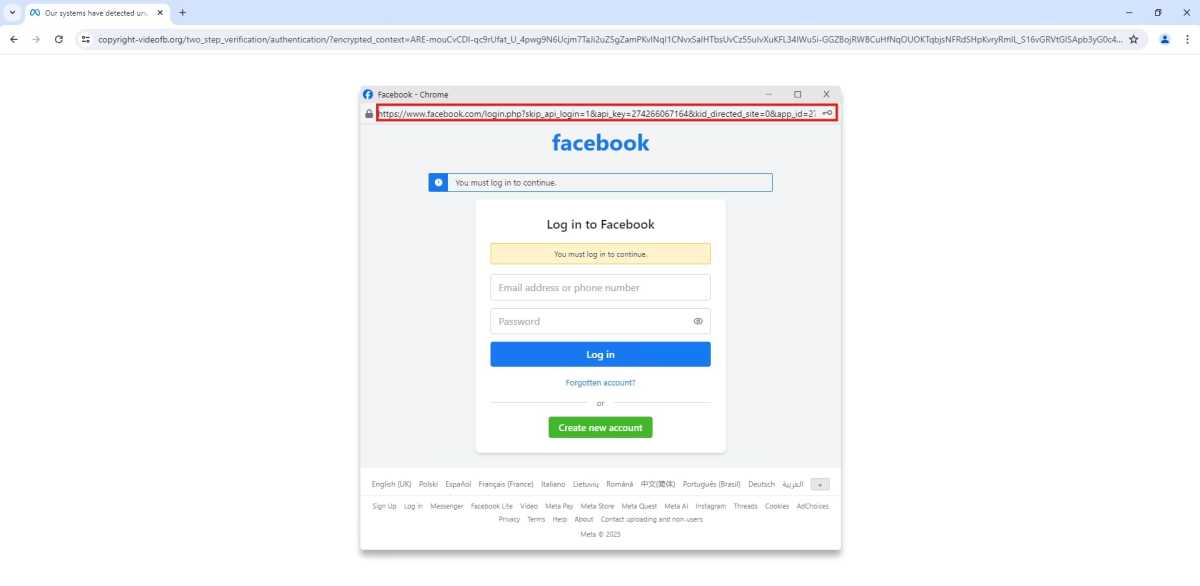
First documented by security expert mr.d0x in 2022, this style of attack involves a compromised or bogus website spawning what appears to be a login window. Instead, it’s actually an element generated within the existing browser tab designed to look like a realistic sign-in window for the service, complete with a spoofed (visually faked) display of the legitimate login web address. If a user then submits their credentials through the form, a bad actor can seize control of the account, or collect the data to sell or use for future attacks.
Because BitB attacks have only picked up steam in the last six months—and because they so closely imitate genuine details like a legitimate URL in an address bar and even CAPTCHA tests—they can be hard to spot immediately. Heck, I cover this topic, and at a quick glance, the false login pop-up looks pretty real. The giveaway in the example screenshot is actually in the main window’s URL.
So how do you avoid falling for this trap? A few ways, some already familiar security advice:
- Always sign into a website directly. Navigate to the login page yourself, in a fresh browser tab.
- The window won’t leave the boundaries of your browser tab. This is the easiest screening method—you try to move the pop-up “window” outside of the browser tab. If it’s genuinely a second window, you’ll be able to separate the two. (You can also check your Windows taskbar to confirm, too.)
- Use a password manager. These services will only offer to fill in your credentials on websites that match the one saved alongside your password.
- Enable two-factor authentication. If you ever get tripped up by a phishing attack, this second login checkpoint can sometimes stop a bad actor from stealing your account. (It’s not a guarantee, though, as phishing sites can successfully use 2FA codes if you accidentally share one, too.)
- Use passkeys whenever possible. Passkeys have a twofold advantage. First, they’re tied to the website they’re created for, so even if you try to use one with a fake site, it won’t work. Second, they can help signal you’re on a fake page, if it doesn’t offer you the option to log in with your passkey. (Unfortunately, Facebook only allows passkey logins on mobile, so this wouldn’t apply to this latest attack.)
Of these tips, moving a pop-up around to see if it can be separated from the original browser tab is a new habit to develop—yet another thing to remember in the ever-shifting methodologies used by attackers. My advice? It’s simplest to always log into a site using browser tabs and windows you opened yourself, using a passkey. For most people, that means fewer specific strategies to memorize, even as you keep up with the latest news.
This articles is written by : Nermeen Nabil Khear Abdelmalak
All rights reserved to : USAGOLDMIES . www.usagoldmines.com
You can Enjoy surfing our website categories and read more content in many fields you may like .
Why USAGoldMines ?
USAGoldMines is a comprehensive website offering the latest in financial, crypto, and technical news. With specialized sections for each category, it provides readers with up-to-date market insights, investment trends, and technological advancements, making it a valuable resource for investors and enthusiasts in the fast-paced financial world.