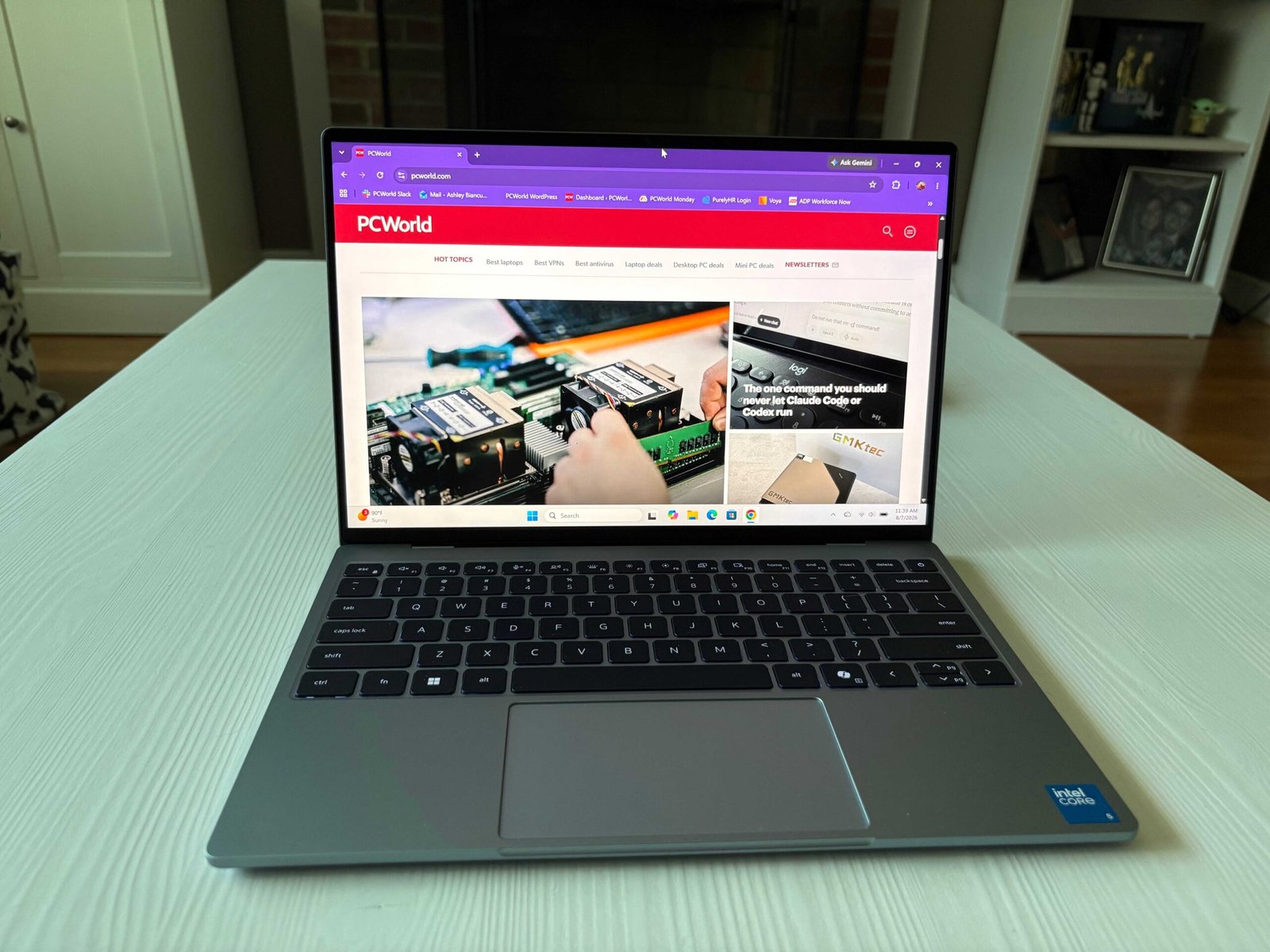
At a glance
Expert’s Rating
Pros
- Premium design
- Color-rich display (thinner bezels)
- USB-C charging on both sides
- Comfortable, backlit keyboard
Cons
- Shorter battery life
- No USB-A or HDMI ports
- No physical webcam privacy shutter
Our Verdict
Dell’s XPS 13 is a compelling budget laptop, even if it falls just slightly behind the MacBook Neo.
Price When Reviewed
This value will show the geolocated pricing text for product undefined
Best Pricing Today
Price When Reviewed
$699.99
Best Prices Today: Dell XPS 13

When the MacBook Neo emerged from the waters like Excalibur, I was taken aback. I never thought I’d ever see a budget-friendly MacBook… and yet here we are! One of the best things about it is that it doesn’t feel cheap. That’s hard to do at $699.99.
And now we’ve got a new competitor that’s chasing after the same star: the Dell XPS 13. Does it succeed? The XPS 13 does a lot of things right, and I think it sets a high new standard for Windows budget laptops going forward. That said, the MacBook Neo still outshines it in some pretty big ways.
Dell XPS 13: Specs
- CPU: Intel Core 5 320 (Wildcat Lake)
- GPU: Intel Graphics
- RAM: 8GB
- Storage: 512GB SSD
- Display: 13.4-inch 2560×1600 30-120Hz touch display
- Battery: 52 Whr
- Weight: 2.2 pounds
- Ports: 2 USB-C
- Price: $699.99
Dell XPS 13: Build quality, design
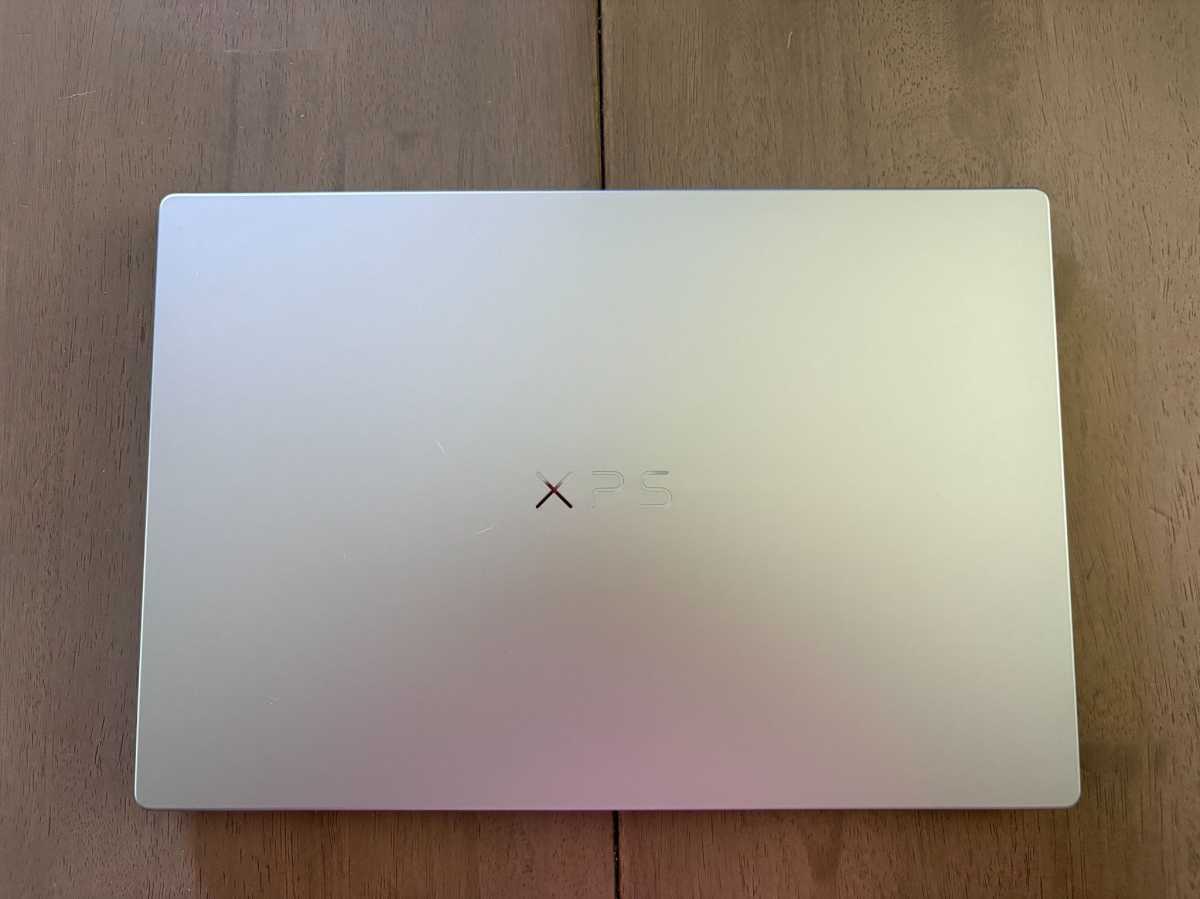
I would’ve never known the XPS 13 is a budget laptop from feel alone—the aluminum chassis is sturdy and there’s zero flex in the lid. It also weighs less than the Neo at 2.2 pounds (the Neo is about 2.7 pounds).
As for the design, it’s very clean and minimalistic like the MacBook Neo’s. That’s a style a lot of people prefer. I liked the mirror-like letters that made up Dell’s XPS logo in the center of the lid. They were so reflective I couldn’t get a clear shot of them with my iPhone because they blend into the light silver colorway. It’s elegant looking, like Celine Dion in a Dior gown or something.
As far as durability and aesthetics go, I’d say the XPS 13 and Neo are pretty even steven here.
Dell XPS 13: Keyboard, touchpad
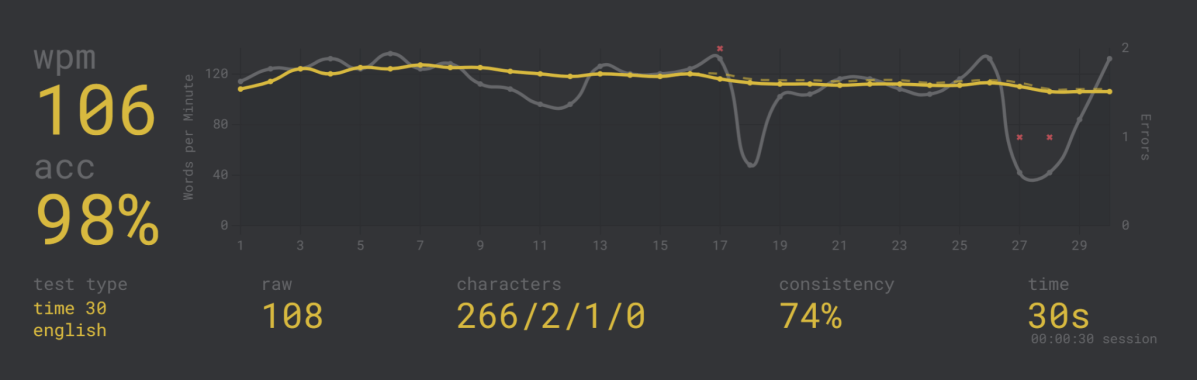
The keyboard isn’t anything fancy. Just a traditional QWERTY. The keys are evenly spaced, though. In Monkeytype, I averaged about 106 words-per-minute, which is about where I land on my regular keyboard.
But what I really like is the white backlight, which is something the Neo actually lacks. I have a strange habit of keeping all my lights off in the summer (it’s just too damn hot!), so I like being able to look down and see the keys (even when I’m being a weirdo and sitting in near-darkness).
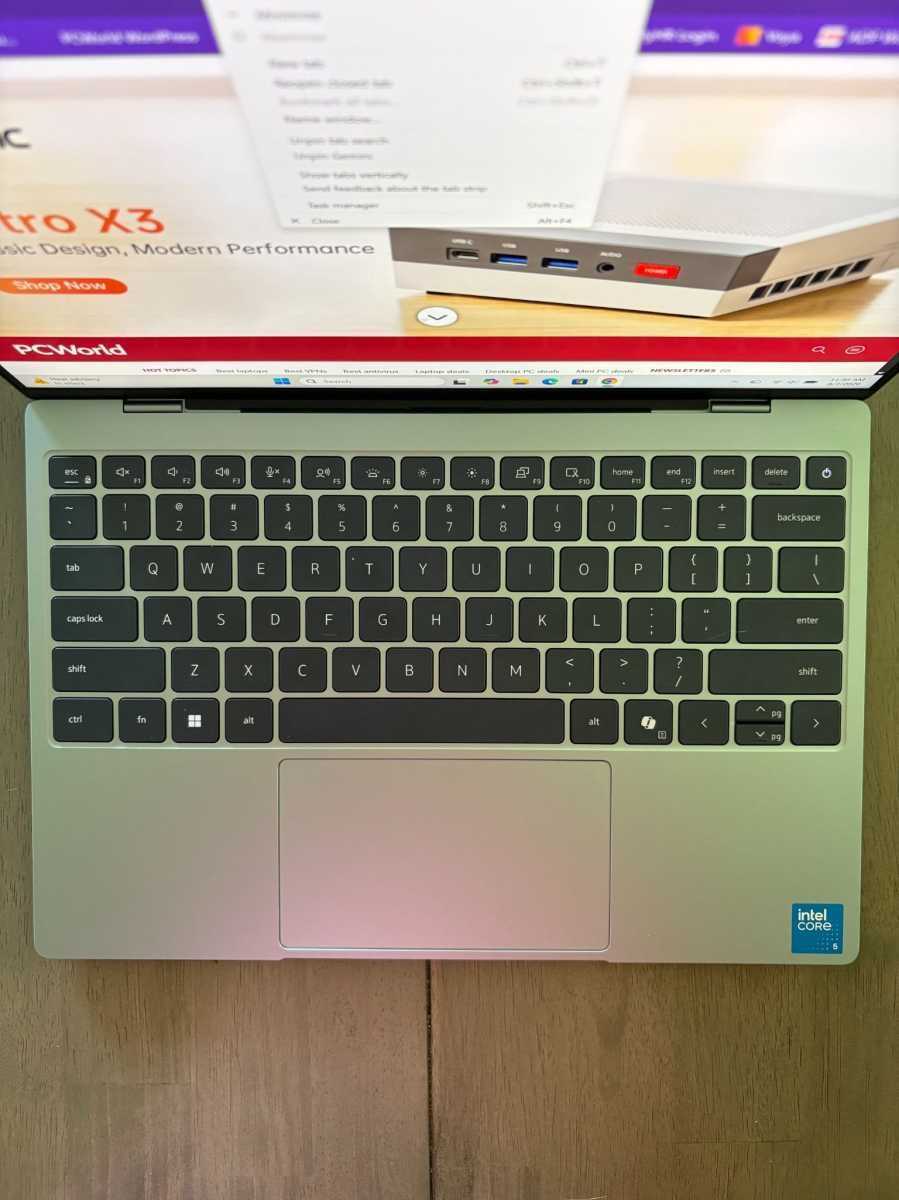
The glass precision touchpad is nice, too. It didn’t blow my mind or anything, but I also couldn’t find many (if any) faults with it. It also followed my movements just fine. I never noticed it dragging behind.
Dell XPS 13: Display, audio, webcam

The display is where the XPS 13 really wowed me. That’s because you just don’t see many color-rich displays at this price point.
The 13.4-inch touch-enabled 2560×1600 display is pretty colorful, even though it’s not an OLED panel. Scenes from the 1981 film Excalibur were a real treat to watch, especially when Helen Mirren was on and rocking that purple veil. The bezels are also thinner than the Neo’s, which earns points from me. I prefer the screen-to-screen look anyway, and that’s exactly what the XPS 13 is doing here.
The speakers were a nice surprise once I got over the jump scare. When I fired up a music video on YouTube, I found myself quickly scrambling for the volume button. The volume slider wasn’t anywhere near its maximum, either! That said, I was (pleasantly) surprised by how punchy the sound was. This laptop isn’t very big. The MacBook Neo delivers a superb audiovisual experience despite its low price tag, and the Dell XPS 13 matches it blow-for-blow.
The 1080p webcam is fine for your average Zoom call, but I wish there was a physical privacy shutter. It’s such a small thing, but it goes a long way if you’re the kind of person that really values your privacy.
Dell XPS 13: Ports
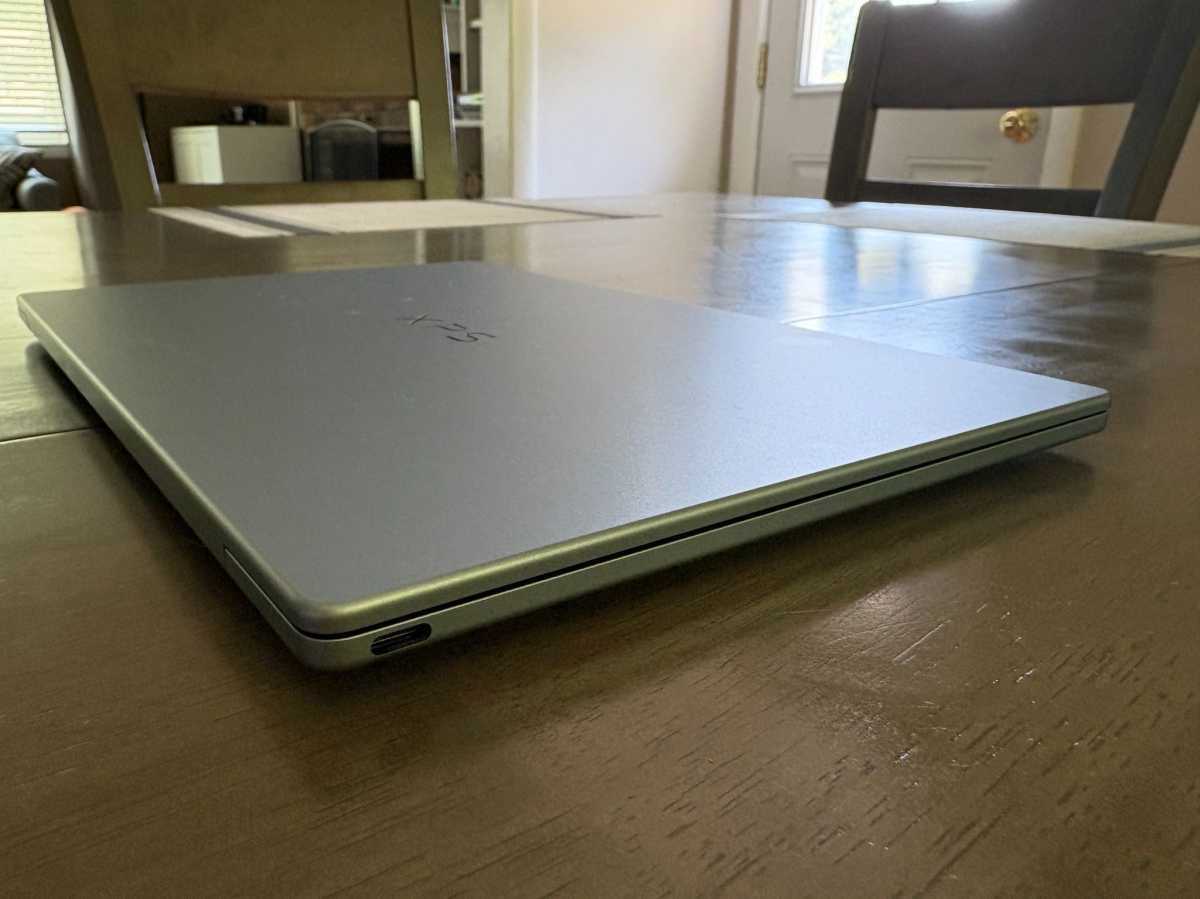
I was very happy to find that Dell supports USB-C charging on both sides (thank goodness). I don’t like awkwardly winding cables behind desks and I’m sure you don’t either. (My colleague Michael Crider has strong feelings on this topic, and I couldn’t agree more). I guess the real trade-off here is there’s no USB-A and HDMI. You’ll have to bring a dongle with this one.
Dell XPS 13: Performance
In day-to-day use, the XPS 13 felt consistently responsive. One day, while downloading UL Procyon and a Steam game simultaneously, I had no trouble chatting with my husband on Discord and scrolling through my friend’s story on Instagram. Nothing felt sluggish, which is exactly what I like to see in a productivity laptop.
The benchmark results reinforce those impressions. A 6,491 score in UL Procyon’s Office Productivity test shows it can handle productivity workloads, while a Cinebench 2026 multi-core score of 1,407 confirms the XPS’s got some CPU power for some multitasking. It’s not a gaming laptop or a content creation machine, but it can handle the daily stuff.
Now let’s compare the XPS 13’s PCMark 10 score to other Intel chips. (PCMark 10 measures how well a laptop handles day-to-day workloads, by the way!)
- Dell XPS 13 ($699.99 at MSRP): Intel Core 5 320 (Wildcat Lake)
- Acer Aspire AI 14 AI ($699.99 at MSRP): Intel Core Ultra 5 226V (Lunar Lake)
- Lenovo IdeaPad Slim 3 ($769 at MSRP): Intel Core 5 210H (Raptor Lake)
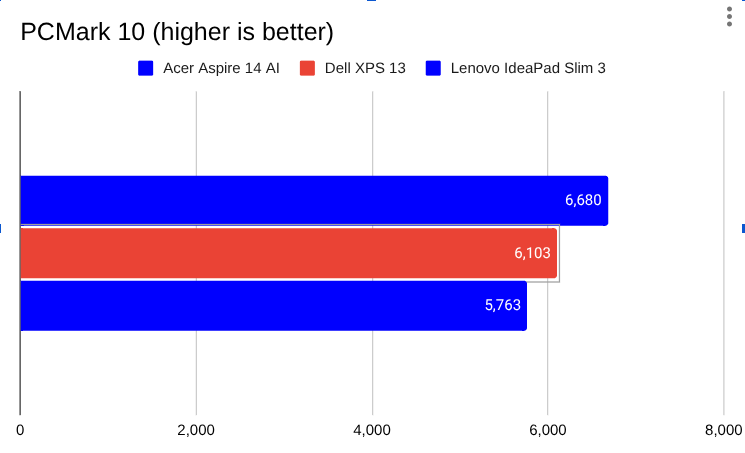
Here we see the Dell XPS 13 (6,103) pulling ahead of the Lenovo IdeaPad Slim 3 (5,763). That’s not too surprising because the Slim 3’s got an older Raptor Lake chip. But the more interesting story here is the performance gap between the XPS 13 and Acer Aspire 14 AI (6,680). Here, you can see the XPS 13’s performance is competitive with the Aspire 14 AI’s Intel Lunar Lake chip. The Aspire 14 AI is faster, but I doubt you’d notice much difference between the two in real-world use.
Now let’s see how the XPS 13 stacks up against the MacBook Neo in Geekbench 6, which is a cross-platform benchmark.
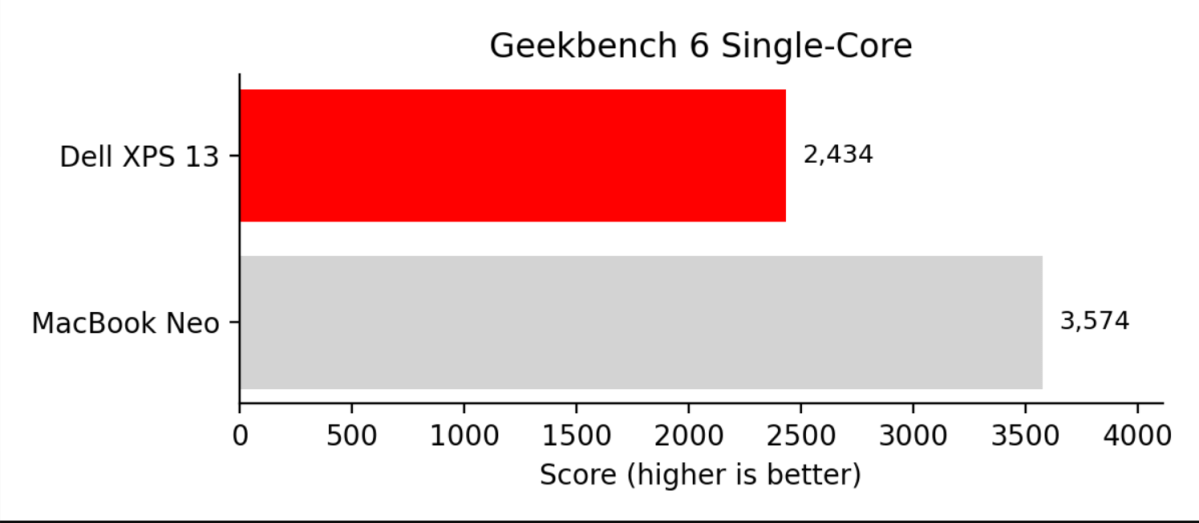
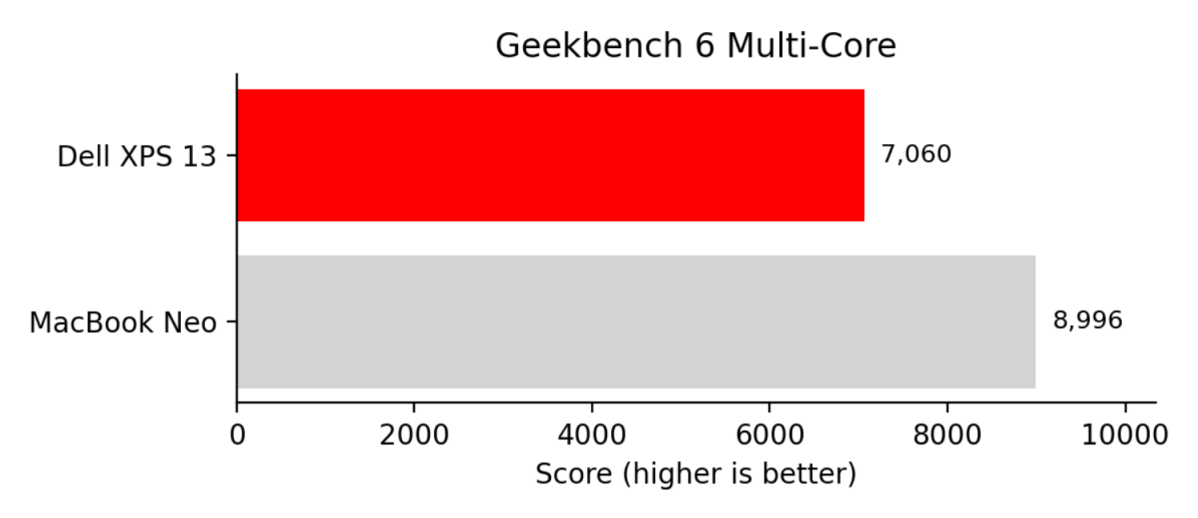
The Neo scored 3,574 in single-core performance and 8,996 in multi-core. The XPS 13 managed 2,434 and 7,060, respectively. The Neo is clearly faster in both tests, and it isn’t close.
Out of curiosity, I tried playing Big Walk, a new game from the folks that made Untitled Goose Game. It’s hardly a demanding AAA title, but I “played” it on Low graphics. And by play I mean I mostly tooled around in the tutorial area ringing cow bells.
Let me be abundantly clear here. The XPS 13 is not a gaming machine nor was it intended to be. I don’t expect much in that arena and I don’t think you should, either. It’s just nice to know it’s possible to boot up a lightweight game when the mood calls for it.
Dell XPS 13: Battery life
The whole battery life thing had me scratching my head a bit. Especially the first two runs.
Across two separate runs of UL Procyon’s office productivity battery benchmark, the XPS consistently lasted just six hours and 10 minutes. I calibrated the display to 200 nits before testing and reran the benchmark just to be sure. Honestly? I expected better endurance.
Since I’m not one to give up, I reran the test three times. On the third try, I turned off Wi-Fi mode and enabled Airplane Mode as a way to shut down any background processes. This time the laptop reached nine hours and six minutes. A more promising result, for sure, but that’s with the Wi-Fi switched off. It just goes to show you how much background processes can impact endurance.
And this is another area where the Neo’s got the XPS 13 beat. My colleague Roman Loyola over at Macworld squeezed a little over 13 hours out of the Neo. That’s a much better result. But it’s worth noting that Macworld typically drops the brightness down to 150 nits during their battery benchmark. PCWorld drops it down to 200. That’s not a massive difference, but brightness does have some impact on battery life. Usually there’s more to the story than just that, though.
Dell XPS 13: Conclusion
The Dell XPS 13 is a good budget laptop, but the crown remains (for now) affixed to the MacBook Neo’s head.
The XPS 13 still makes a compelling case, though. It’s important to not lose sight of that. You’re getting a lightweight laptop with a gorgeous display and a comfortable keyboard–that’s an incredible deal for just $699.99, especially if you’re not totally sold on switching to macOS.
But if I were to pick between the two, I’d lean towards the MacBook Neo. It’s got a longer runtime and better productivity performance.
This articles is written by : Nermeen Nabil Khear Abdelmalak
All rights reserved to : USAGOLDMIES . www.usagoldmines.com
You can Enjoy surfing our website categories and read more content in many fields you may like .
Why USAGoldMines ?
USAGoldMines is a comprehensive website offering the latest in financial, crypto, and technical news. With specialized sections for each category, it provides readers with up-to-date market insights, investment trends, and technological advancements, making it a valuable resource for investors and enthusiasts in the fast-paced financial world.