
For some time now, there have been complaints across various online forums about how the popular VLC Media Player takes several seconds (sometimes half a minute!) to start up. The problem occurs regardless of size or the type of media file you wish to play. There’s also some unfounded accusations against the VideoLan developers; one often reads claims that Microsoft is deliberately slowing down the open-source media player.
However, this theory is contradicted by the fact that this problem only affects some Windows computers. For instance, on one of my PCs running Windows 10, this “moment of silence” when launching VLC has been noticeable for some time. But on a Windows 11 PC, the problem doesn’t occur. Reports from affected users on Reddit suggest the question of whether the issue lies with Windows 10 or 11 misses the crux of the problem. There must be another cause.
One thing the affected computers seem to have in common is that Microsoft Defender, which protects against malware, is active. There are no known reports of similar issues with other antivirus software. The VideoLan developers, led by Jean-Baptiste Kempf, have also accused Microsoft on X/Twitter of being responsible for the slowdown. There has not yet been an official response from Microsoft.
Investigations have revealed that, following an update a few weeks ago, Microsoft Defender has been placing the VLC Player’s plug-in cache (plugins.dat) in quarantine, which causes the program to boot slowly. A faulty Defender signature update (version 1.455.50.0) and the Windows Update KB5121003 are said to be responsible. Microsoft released the latter as part of its patch on August 11th and it has caused a host of problems ever since. However, the VLC Media Player’s start-up issue has, in some cases, been around for quite a while.
Workaround for VLC Media Player
To make VLC Media Player start normally again (usually within a second), reset the plug-in cache. You don’t even have to edit the registry or delete files manually. Instead, you can either reinstall VLC Media Player or instruct the program itself to regenerate the cache. To do this, use vlc-cache-gen.exe.
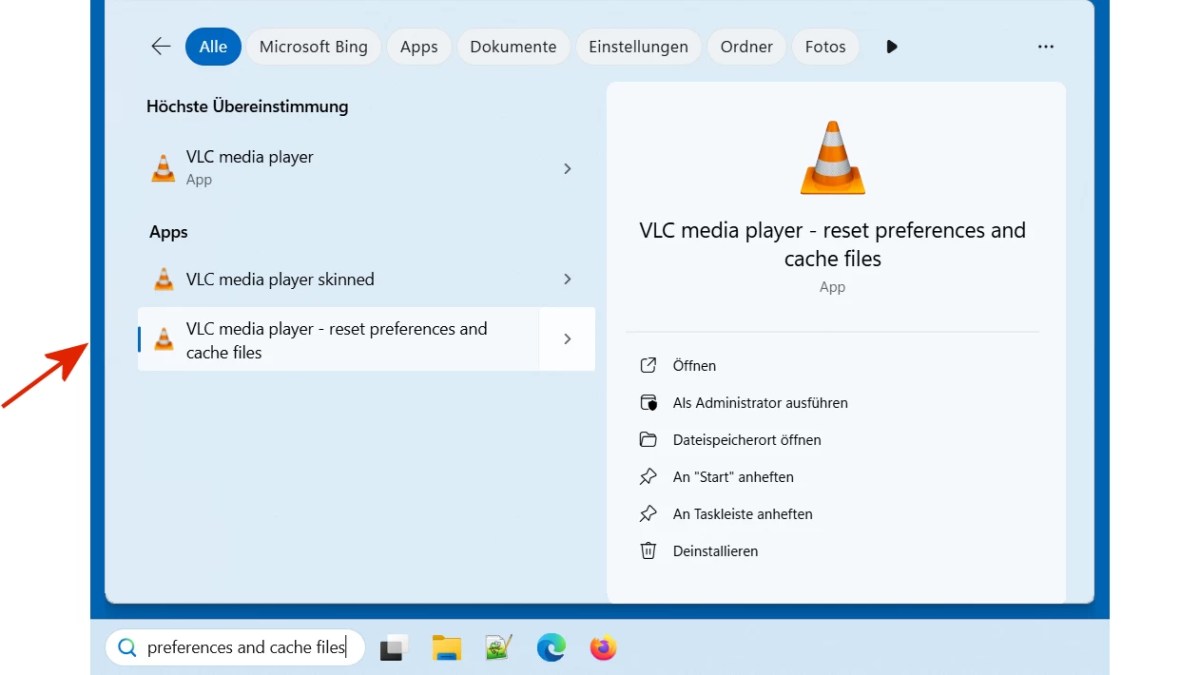
Click on the search icon (magnifying glass) in the bottom left-hand corner and type VLC in the search box. The top result should be VLC media player – reset preferences and cache files. Click on this and run it–this will reset the settings and cache.
fz
By the way, since Microsoft hasn’t released a fix for Defender yet, the problem might reoccur. To prevent this, set an exclusion in Defender for VLC Media Player. This basically tells Defender not to scan the directory for malware. This does involve a certain risk, especially if you didn’t download the VLC Media Player from the manufacturer’s website.
To set the exclusion in Microsoft Defender, go to the following in Windows 10:
Settings Windows Security Virus & Threat Protection Virus & Threat Protection Settings > Manage Settings Exclusions Add or remove exclusions {User Account Control security prompt} ≫ Add exclusion ≫ Folder >> Select the folder C:Program FilesVideoLANVLCplugins.
In Windows 11, the procedure is similar:
Settings Privacy and Security Windows Security > Then continue as described above
This articles is written by : Nermeen Nabil Khear Abdelmalak
All rights reserved to : USAGOLDMIES . www.usagoldmines.com
You can Enjoy surfing our website categories and read more content in many fields you may like .
Why USAGoldMines ?
USAGoldMines is a comprehensive website offering the latest in financial, crypto, and technical news. With specialized sections for each category, it provides readers with up-to-date market insights, investment trends, and technological advancements, making it a valuable resource for investors and enthusiasts in the fast-paced financial world.