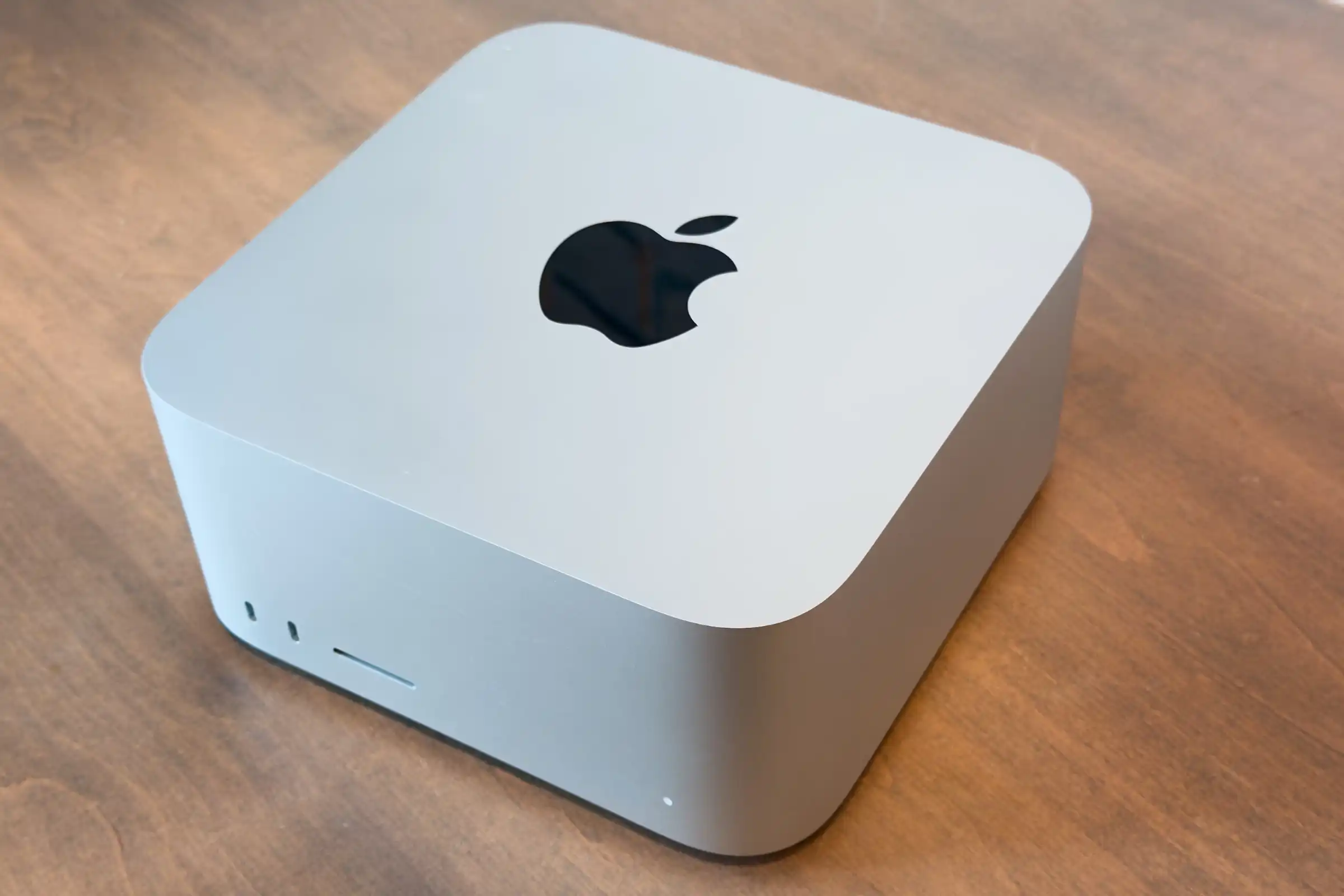

At a glance
Expert’s Rating
Pros
- Dramatic SSD speed boost
- Enhanced external display support
Cons
- RAM and SSD are not user upgradeable
Our Verdict
The Mac Studio’s SSD speed improvement is so dramatic that even if you bought an M4 Max or M3 Ultra Mac Studio–the previous models–you should consider upgrading to the M5 Max Mac Studio. Plus, the external display support is expanded. Sure it’s expensive, but if you want the best Mac ever made, accept no substitute.
Price When Reviewed
This value will show the geolocated pricing text for product undefined
Best Pricing Today
Price When Reviewed
$2,499
Best Prices Today: Apple Mac Studio (M5 Max, 2026)


With the M5 Max Mac Studio, there’s good news, and there’s great news. The good news is that it offers faster CPU processing and graphics. It’s a marginal boost over the previous generation, but faster is always good. The great news is that the improved SSD speed that was introduced with the M5 MacBook Pro comes to Apple’s top Mac.
The faster SSD is such a big deal that if you’re in a production environment and you invested in an M4 Max or M3 Ultra Mac Studio, you should seriously consider upgrading, even if the prices are higher. Time is money, and an investment in the current Mac Studio will be money well spent. Here’s our in-depth review of the M5 Max Mac Studio.
Editor’s note: This review originally published on Macworld.com.
M5 Max Mac Studio: Our model’s specifications
The Mac Studio is available in two standard configurations: A $2,499 model with an M5 Max chip (18-core CPU, 32-core GPU) and 36GB of RAM, and a $5,499 model with an M5 Ultra chip with 96GB of RAM. Customers can customize their purchase by adjusting the number of CPU and GPU cores, and add more memory and SSD storage.
This review focuses on the M5 Max Mac Studio with a chip upgrade, additional RAM, and a larger SSD. Here are the specs of our review unit:
- CPU: M5 Max with 18 cores (6 super cores, 12 performance cores), 16-core Neural Engine
- GPU: 40 cores
- Memory: 128GB unified memory (614GBps memory bandwidth)
- Storage: 4TB SSD
- Ports: 4 Thunderbolt 5/USB-C; 10Gb ethernet; 2 USB-A (USB 3); HDMI 2.1; 3.5mm audio; 2 USB-C; SDXC Card slot
- Networking: Wi‑Fi 7 (802.11be); Bluetooth 6; Threads; 10Gb ethernet
- Weight: 6 pounds (2.7 kg)
- Dimensions: 3.7 x 7.7 x 7.7 inches (9.5 x 19.7 x 19.7 cm)
- Price (as tested): $6,899/£6,899/CA$10,099/AU$10,899
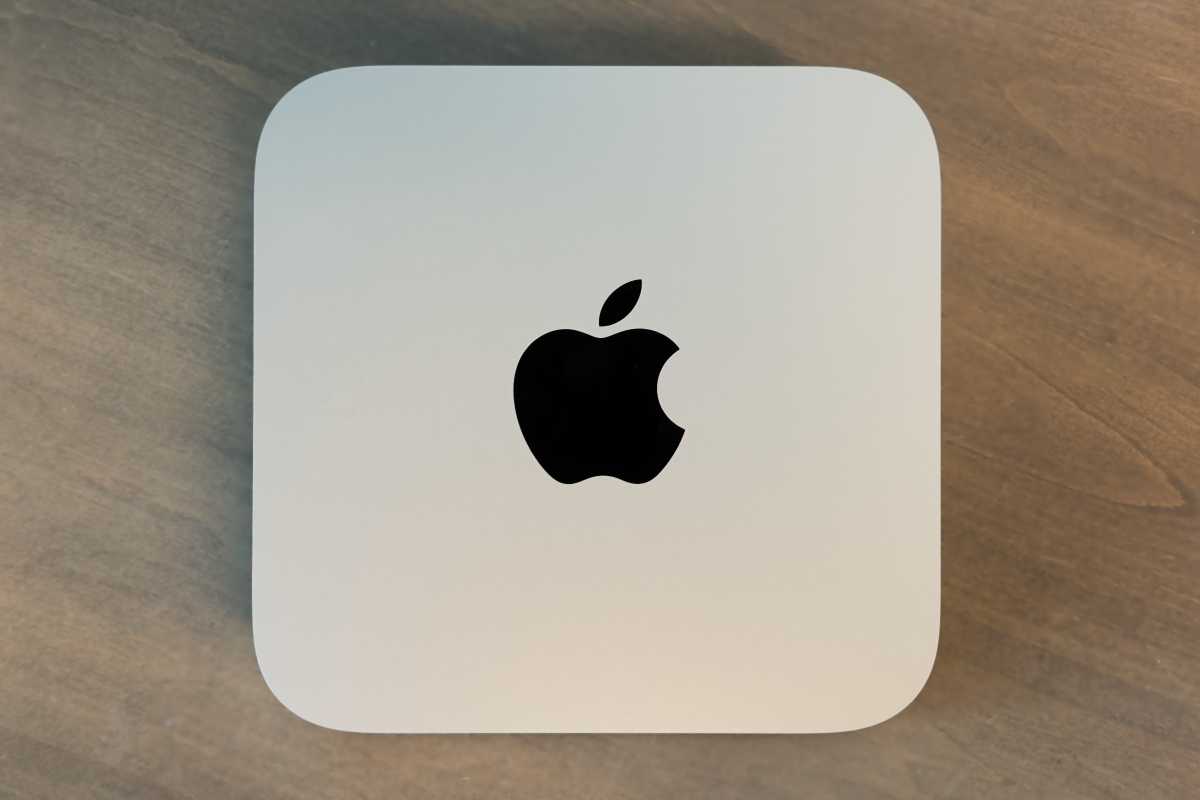
The Mac Studio design reamins unchanged from its introduction in 2022.
Fundry
M5 Max Mac Studio: Performance
The odd M4 Max and M3 Ultra offerings Apple had with the previous Mac Studio were due to Apple skipping a generation with its Ultra chips. This time around, Apple decided that the M5 series would have an Ultra chip, so you can get either an M5 Max or M5 Ultra.
The $2,499 M5 Max Mac Studio comes standard with an 18-core CPU (6 super cores, 12 performance cores), a 32-core GPU, 36GB of unified memory, and a 512GB SSD. However, this CPU is essentially fixed at 36GB of RAM; if you want more, you must upgrade to the 18-core CPU/40-core GPU, which technically costs $300 but actually adds $600 to the price when the cost of the 48GB RAM upgrade is factored in. It can further be upgraded to 64GB ($400) or 128GB ($2,000).
This review looks at the M5 Max option with an 18-core CPU, a 40-core GPU, 128GB of RAM, and a 4TB SSD, which adds $4,400 the price of the Mac Studio. More about the pricing at the end of this review.
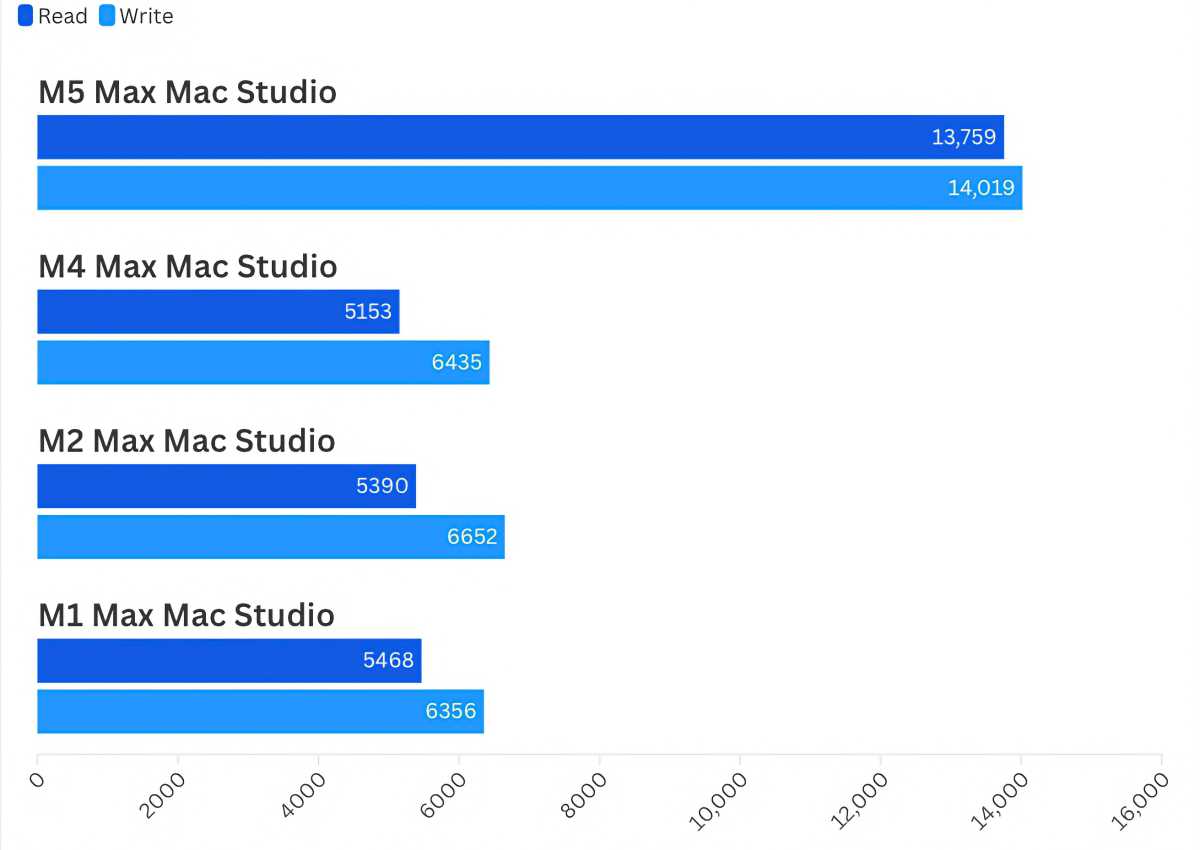
Blackmagic Disk Tests
Foundry
Typically, we start our reviews by looking at overall performance with Geekbench, and then we work our way through more specific aspects. But the SSD performance is so overwhelmingly good, it’s the story here. I mean, this chart doesn’t look correct, does it? Apple improved SSD performance with the M5 chip series, and we’ve seen big improvements in the M5 MacBook Pro. It’s finally come to the Mac Studio–it’s almost a shame that we had to wait so long. This is one of the key reasons why you should upgrade from another Mac Studio, even if you bought one this year. It’s a difference you’ll definitely feel.
Geekbench 7
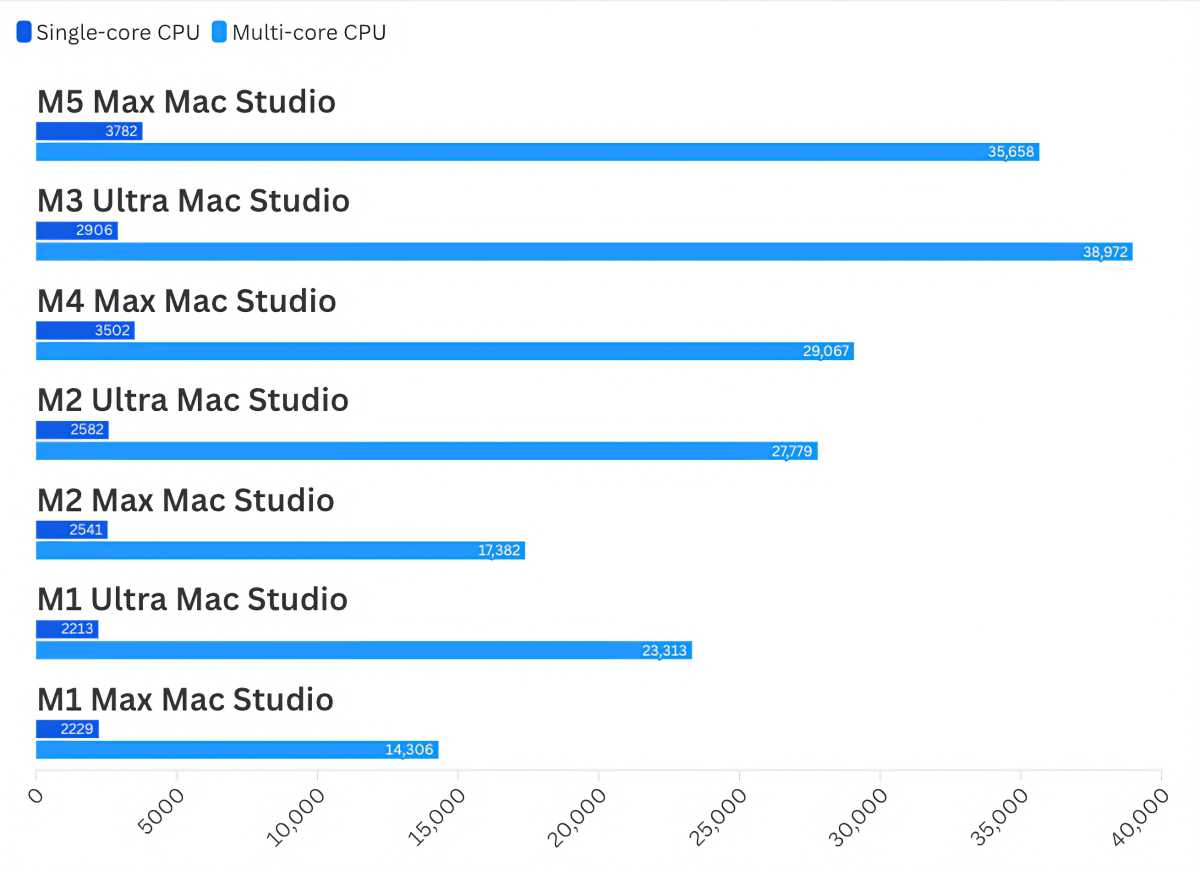
Results are expressed as Geekbench scores. Higher scores/longer bars are faster.
Foundry
Geekbench 7 was released just this year; it’s a general-purpose benchmark tool for gauging performance. The previous-generation M3 Ultra is faster than the M5 Max in multi-core CPU testing, but only by 9 percent. The difference between the M5 Max and the M4 Max that it replaces is more substantial at 22 percent.
The M5 Max’s Single-core CPU results are 8 percent faster than those of the M4 Max. We’ve seen improvements of 8 to 10 percent from generation to generation, so that result remains consistent.
Geekbench 6
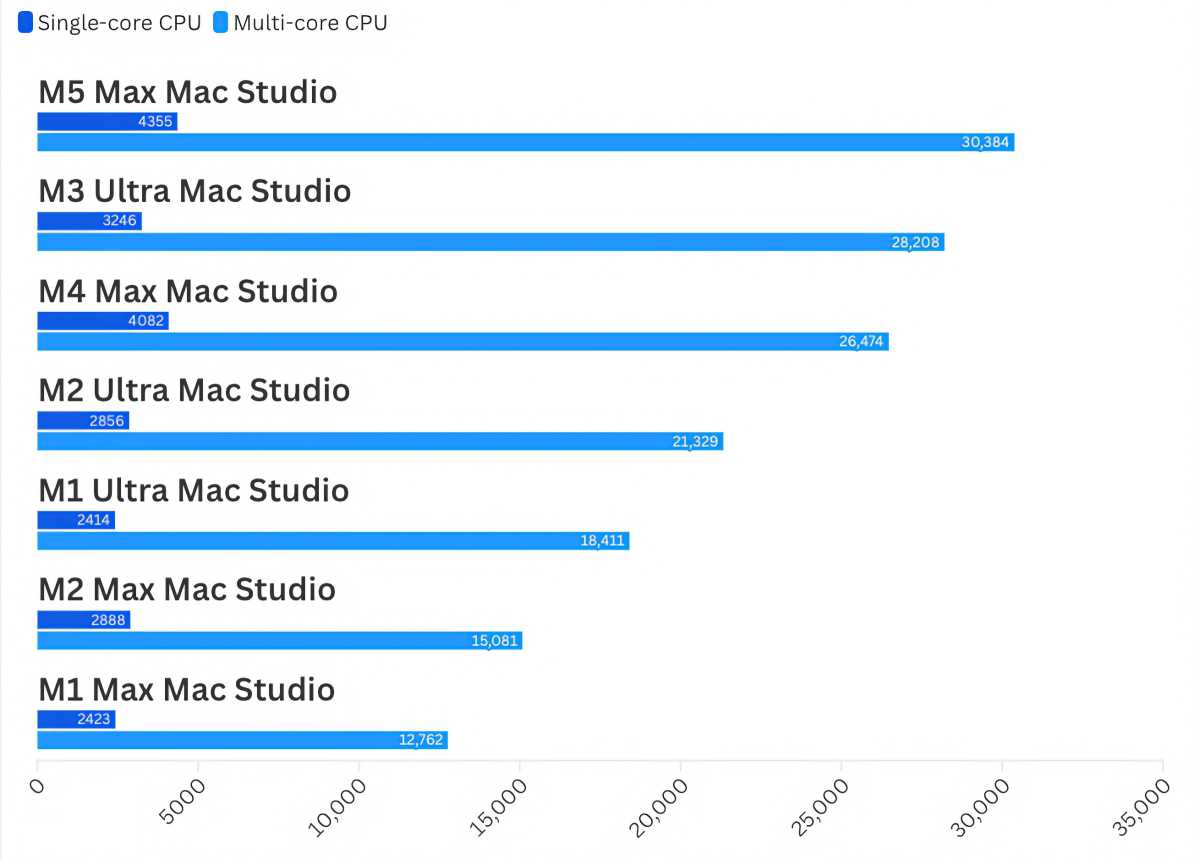
Results are expressed as Geekbench scores. Higher scores/longer bars are faster.
Foundry
Since Geekbench 7 is pretty new, we tested with Geekbench 6 for reference. Here, the M5 Max beats the M3 Ultra, but the margin is only 7 percent in the Multi-core tests–a difference you may not notice.
Cinebench 2026
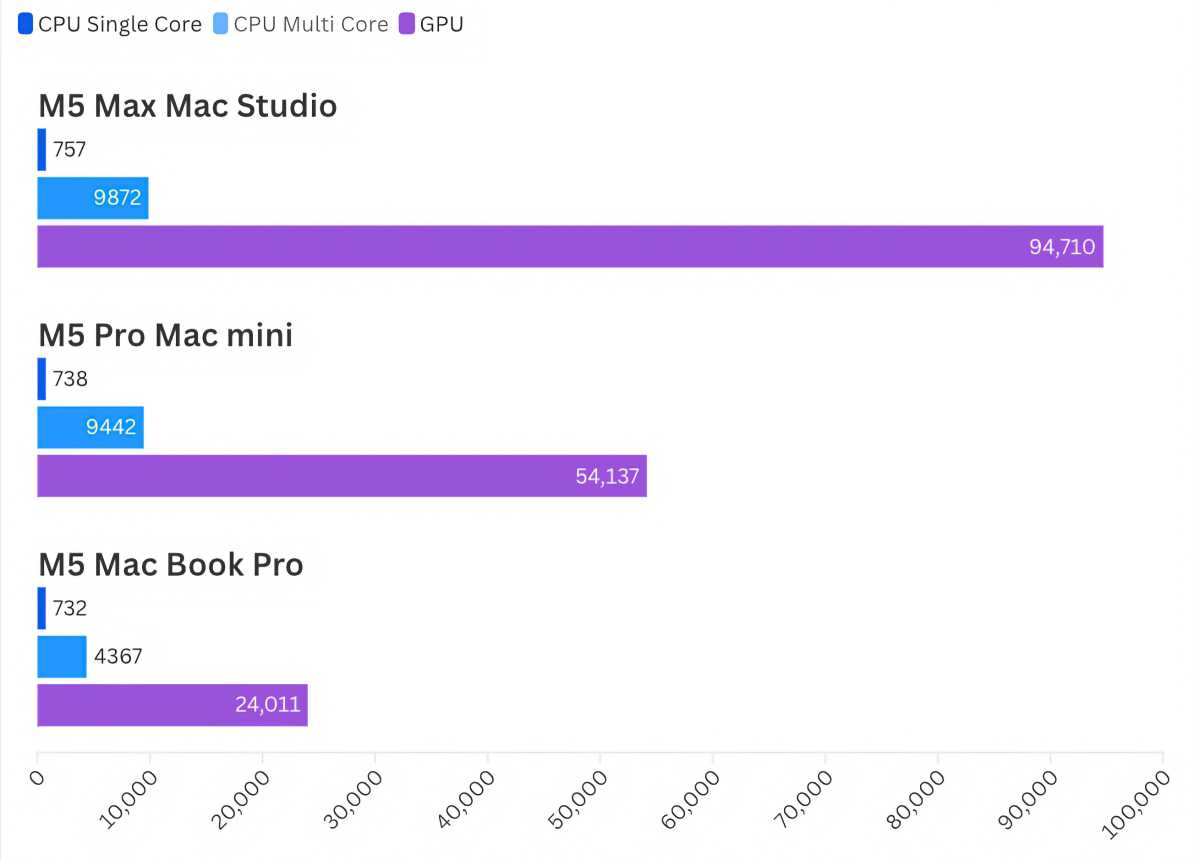
Results are expressed as Cinebench scores. Higher scores/longer bars are faster.
Foundry
Maxon also has a benchmark tool that tests more strenuously than Geekbench. Unfortunately, we don’t have data from older Mac Studios, so the results here are presented with the M5 Pro Mac mini and the M5 MacBook Pro. Still, you can get a sense of how much and improvement you can experience if you move up the chip series.
Cinebench 2024
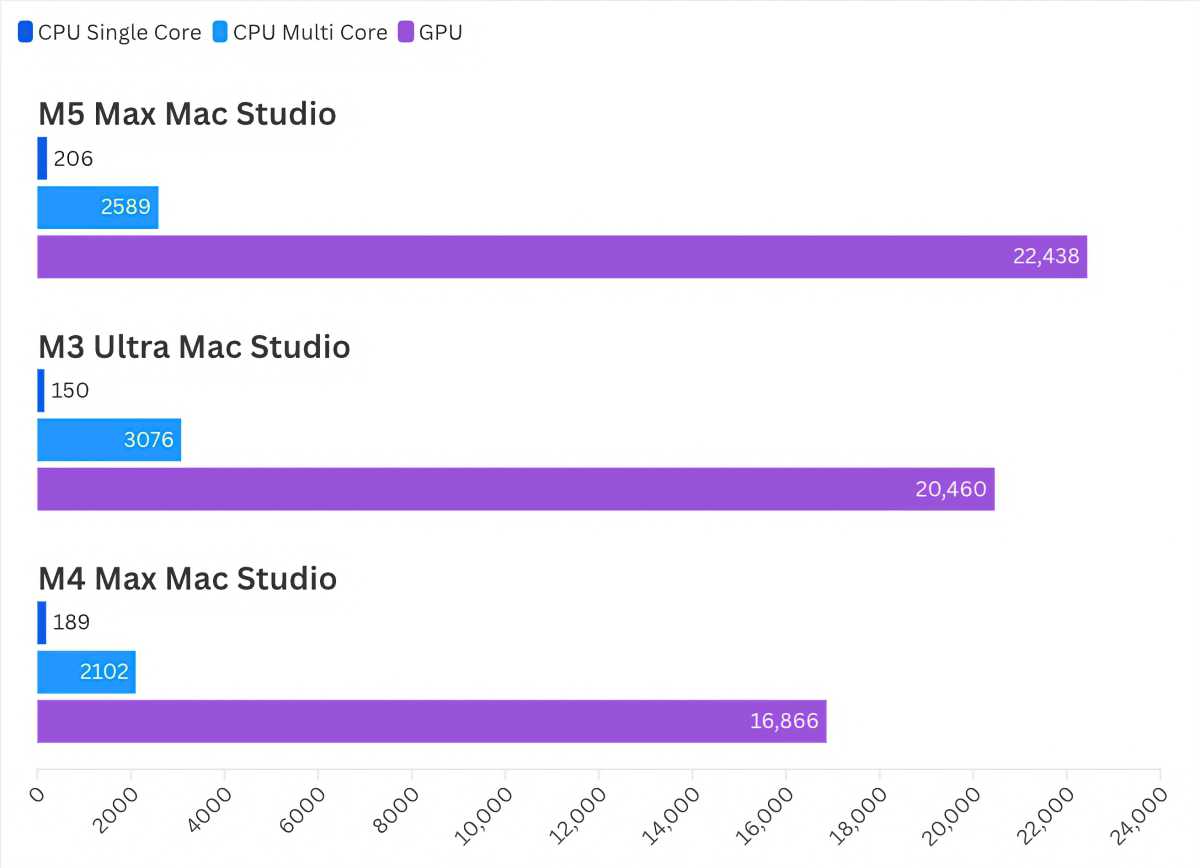
Results are expressed as Cinebench scores. Higher scores/longer bars are faster.
Foundry
We do have Cinebench 2024 results from the previous Mac Studio lineup, and the M5 Max provides a 10 percent GPU boost over the M3 Ultra. The GPU improvement over the M4 Max is a more noticeable 33 percent.
Geekbench AI Neural Engine
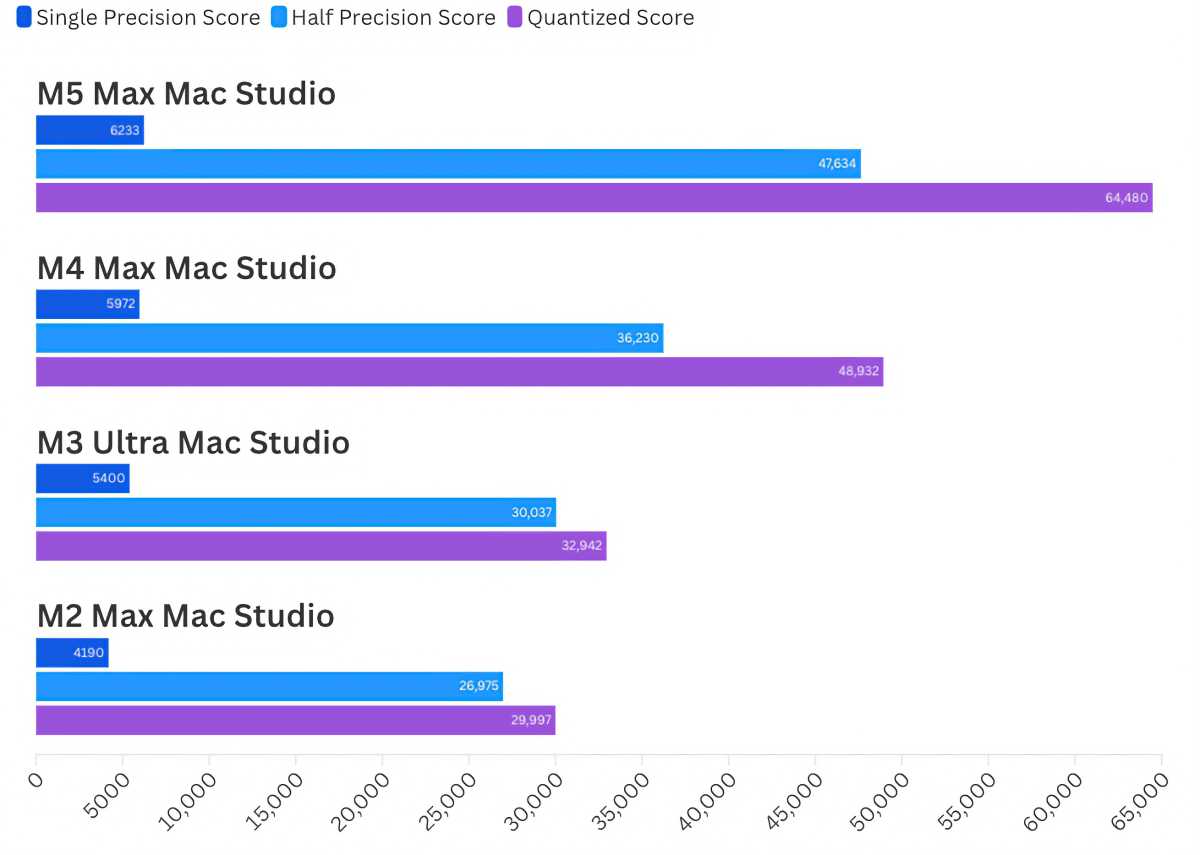
Results are expressed as Geekbench scores. Higher scores/longer bars are faster.
Foundry
Geekbench AI GPU
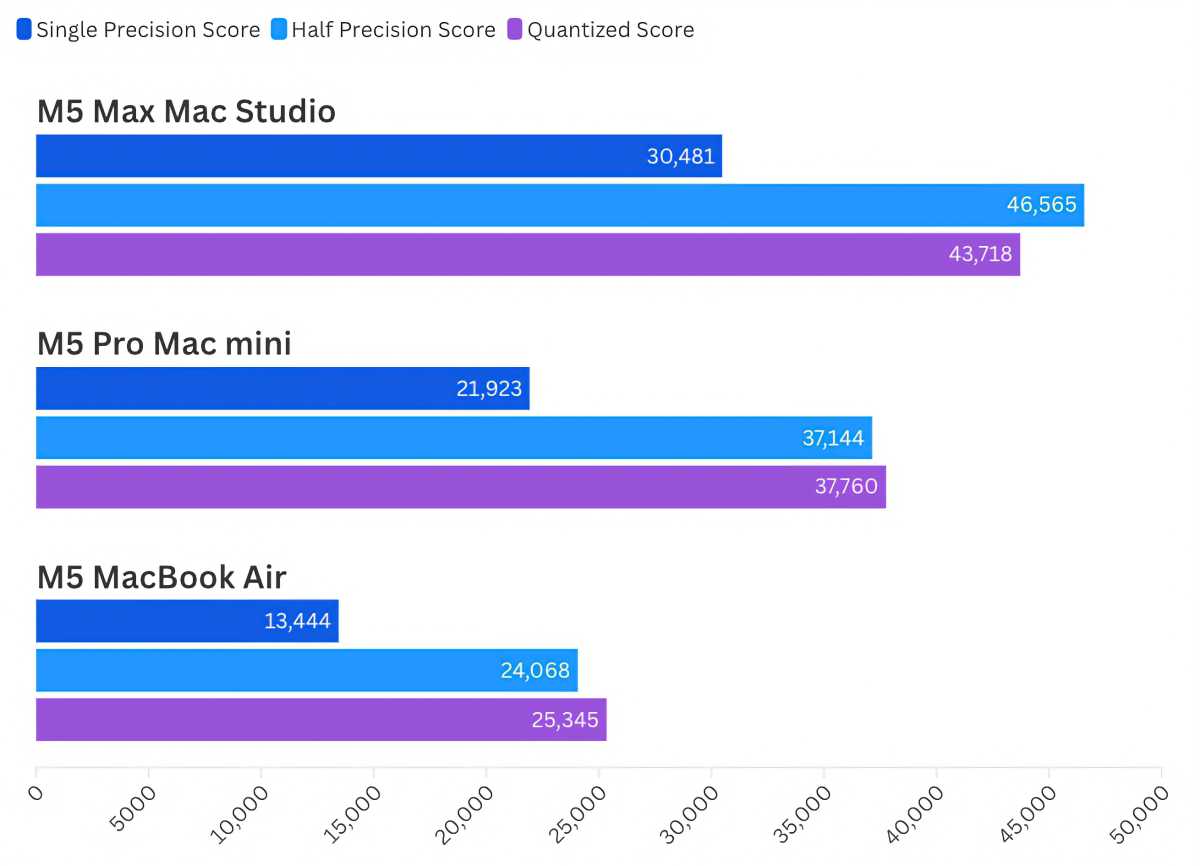
Results are expressed as Geekbench scores. Higher scores/longer bars are faster.
Foundry
The Mac Studio has become extremely popular for AI development. Our benchmark records don’t go that far back with this test, so we’ve included other M5 chips for reference. The M5 Max’s Neural Engine offers a vast improvement over the M4 Max and the M3 Ultra–that a boon for AI developers.
One thing to consider with the Mac Studio and AI is the RAM configuration. To get more than 36GB of RAM, you need to upgrade from the base M4 Max chip, which bumps the price by at least $600, as I outlined earlier.
iMovie video export
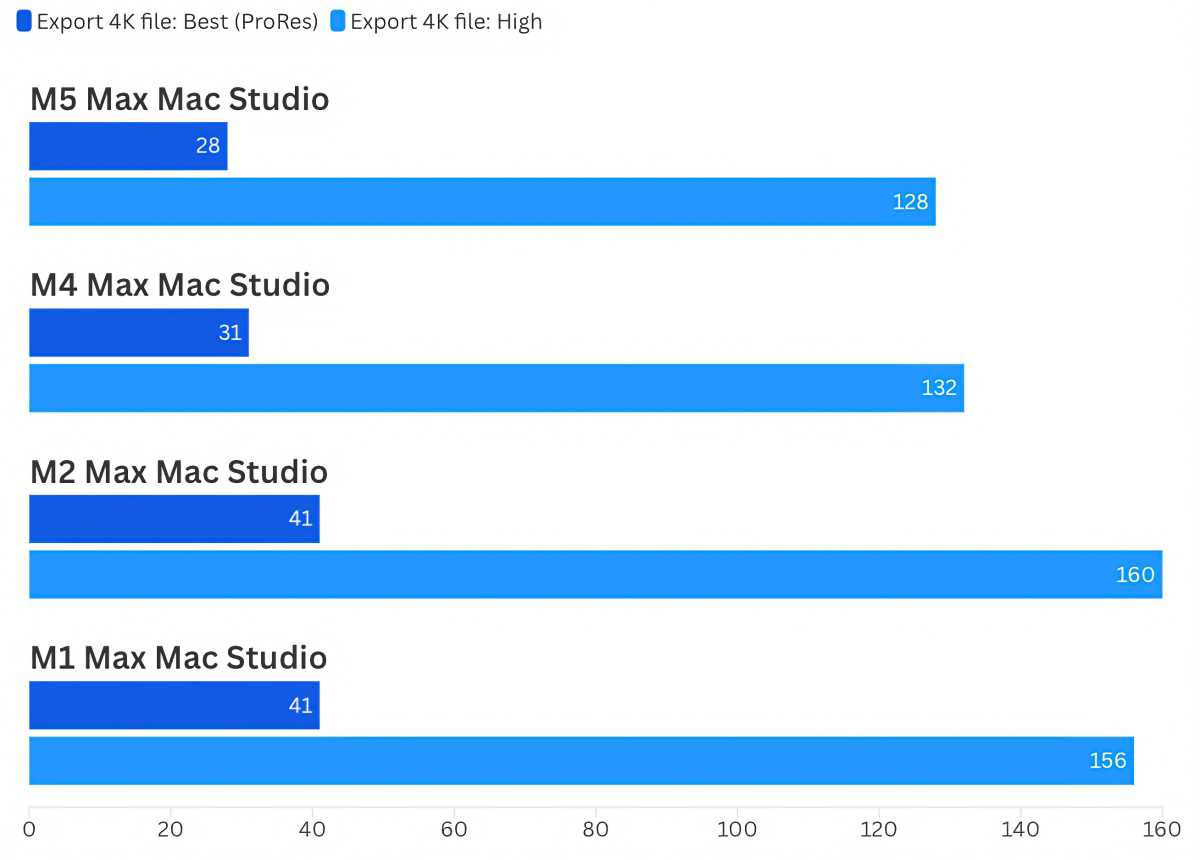
Results are times in seconds. Lower times/shorter bars are faster.
Foundry
The speed gain that the M4 Max had over the M2 Max Mac Studio was much more significant than the one we see between the M4 Max and M5 Max. Keep in mind that the previous comparison actually skips a chip generation since Apple didn’t make an M3 Max Mac Studio.
Handbrake video encode
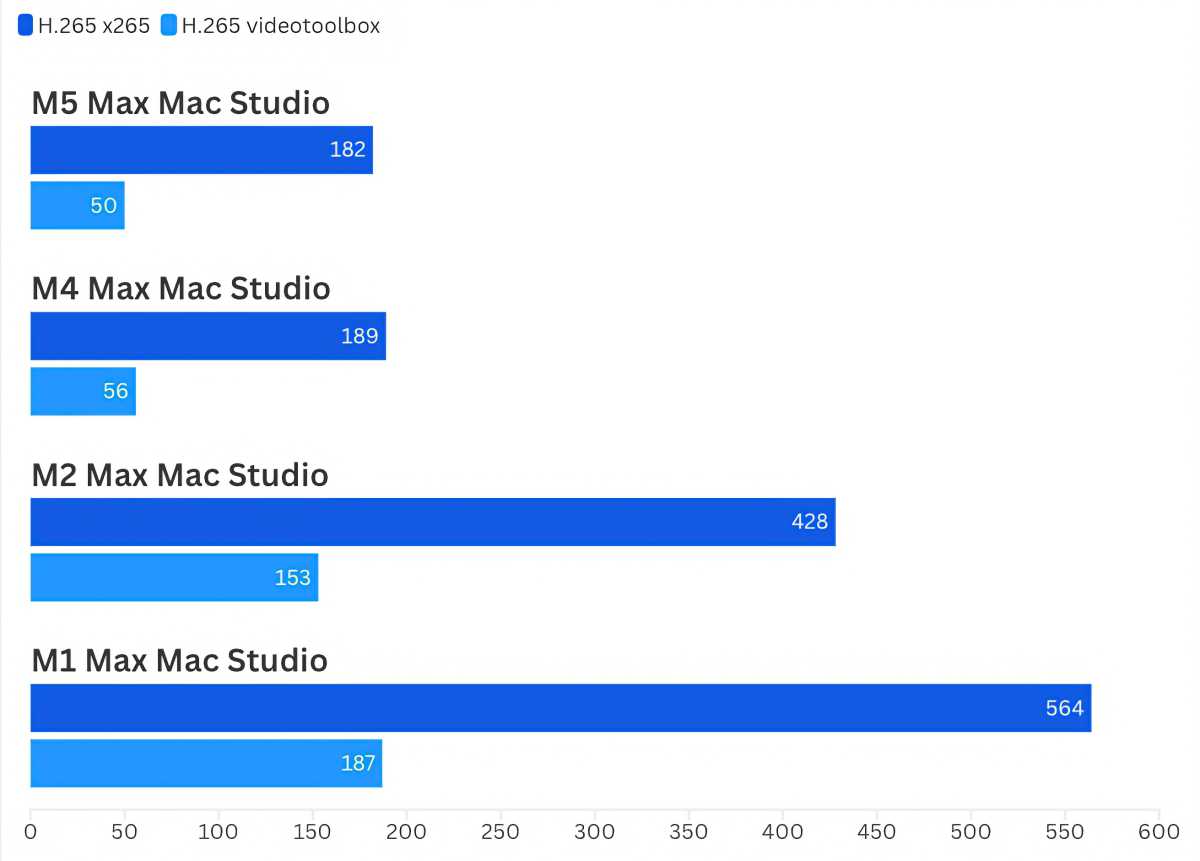
Results are times in seconds. Lower times/shorter bars are faster.
Foundry
Another test where the difference between the M4/M5 Max and M2 Max are drastic. The change is much more dramatic when you do not use hardware acceleration.
Geekbench 7 Compute
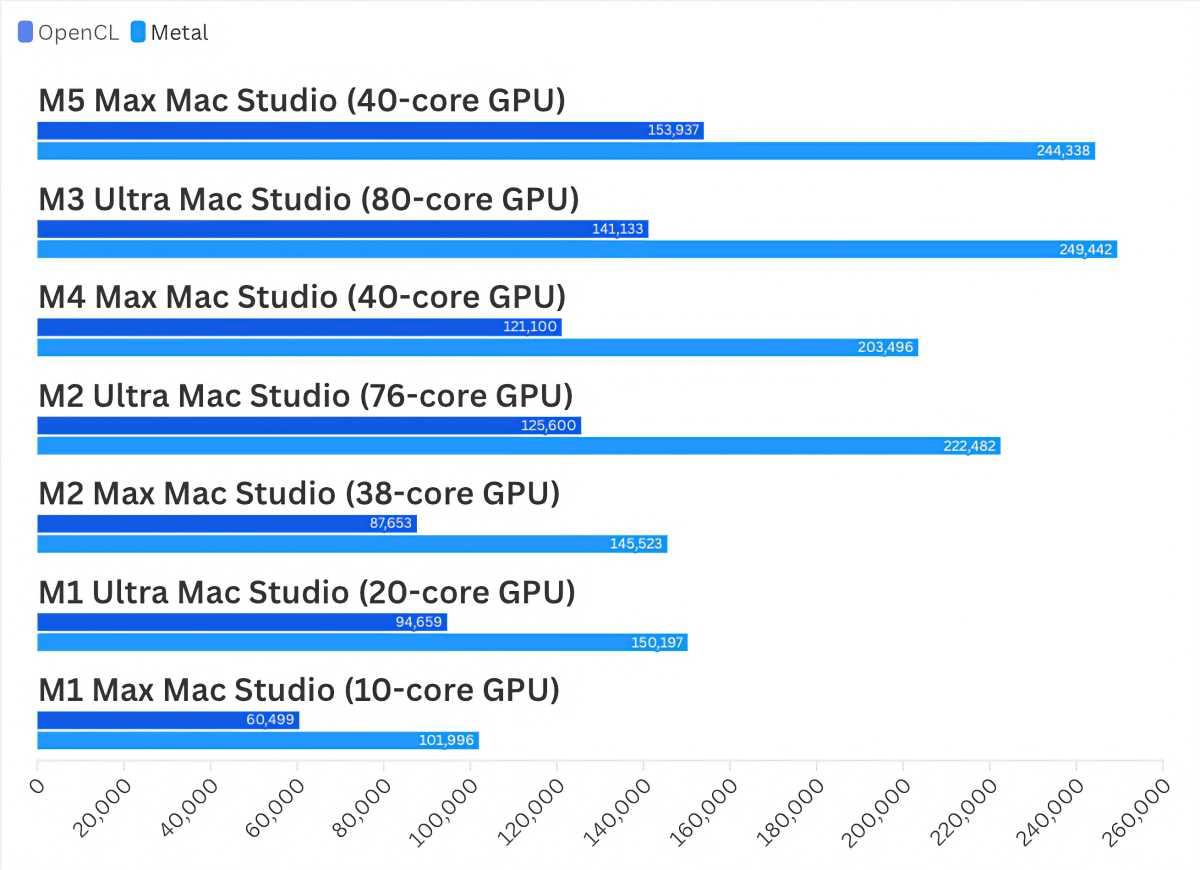
Results are expressed as Geekbench scores. Higher scores/longer bars are faster.
Foundry
The M3 Ultra posts faster Metal scores in Geekbench 7’s Compute test, but it has a CPU with twice as many core (80 versus the M5 Max’s 40-cores).
Geekbench 6 Compute
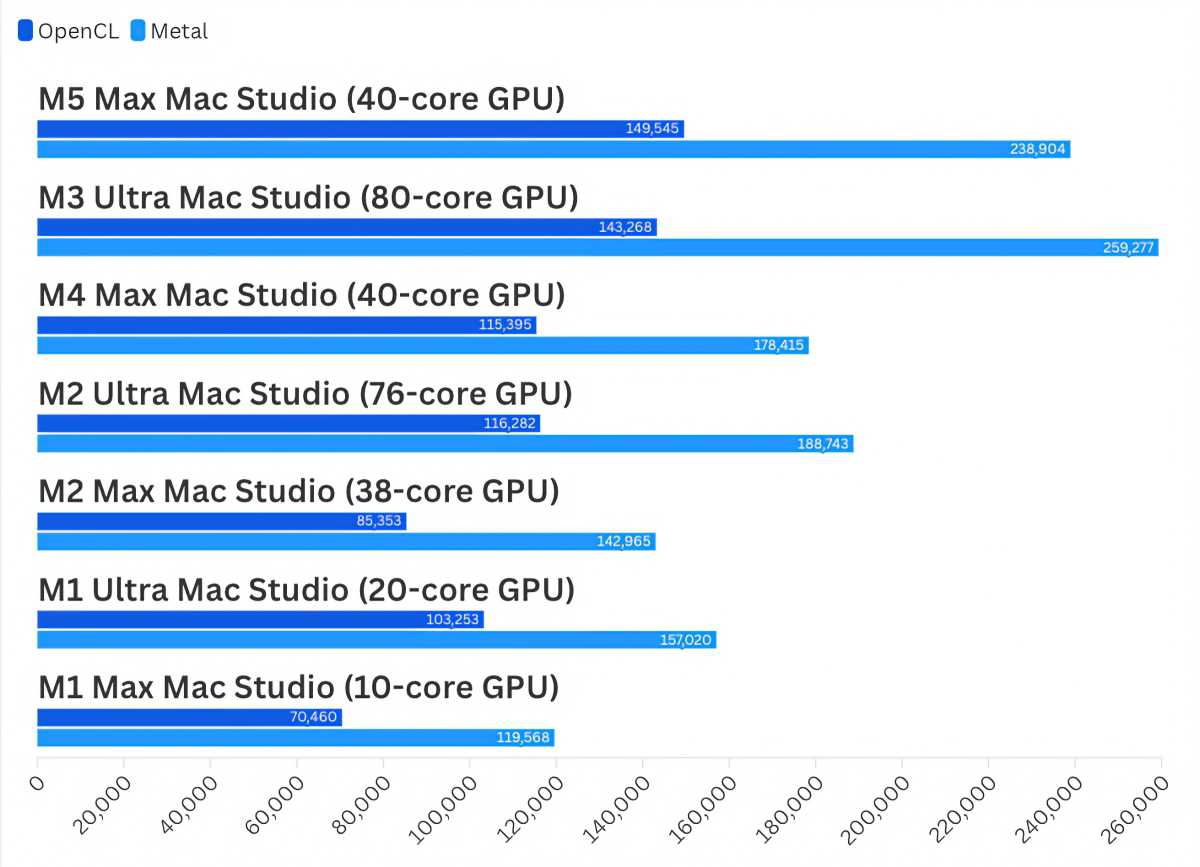
Results are expressed as Geekbench scores. Higher scores/longer bars are faster.
Foundry
With Geekbench 6, the M3 Ultra shows a more significant lead over the M5 Max, but again, it’s an 80-core GPU against a 40-core CPU.
Video game benchmarks
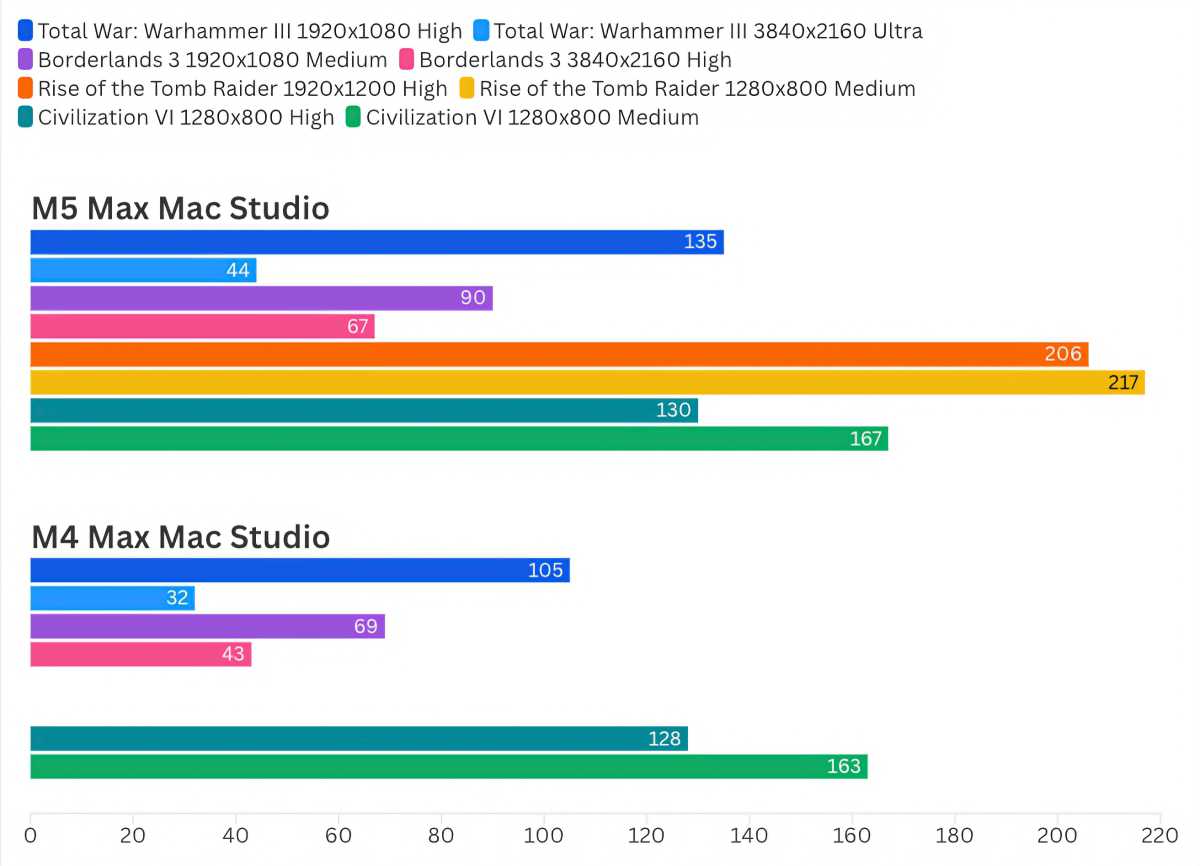
Results are frames per second. Higher rates/longer bars are faster.
Foundry
We saw frame rate boosts of 30 percent or more in Total War: Warhammer III and Borderlands 3. Our results with Civilization VI, an older game, were flat.
In all, the multi-core CPU improvements are a tad bit more than the typical increase of 15 percent (or so) that we’ve seen between generations, with the M5 Max showing a boost of 20 percent or more over the M4 Max in many of our tests.
If the CPU performance isn’t enough to convince you to upgrade, then take a look at the GPU, where the M5 Max even outperforms the M3 Ultra. Combine that with the SSD improvement, and what we have is proof that Apple can continue to offer significant progress with its chips to make the cheaper Mac Studio a compelling machine atop the Mac lineup.
M5 Max Mac Studio: Thunderbolt 5 ports
Apple upgraded the Thunderbolt ports to Thunderbolt 5 with the previous Mac Studio, so those same ports are on the current model. The throughput is 80Gbps that can go up as high as 120Gbps, but you need a Thunderbolt 5 cable and a supported device to reach those top speeds.
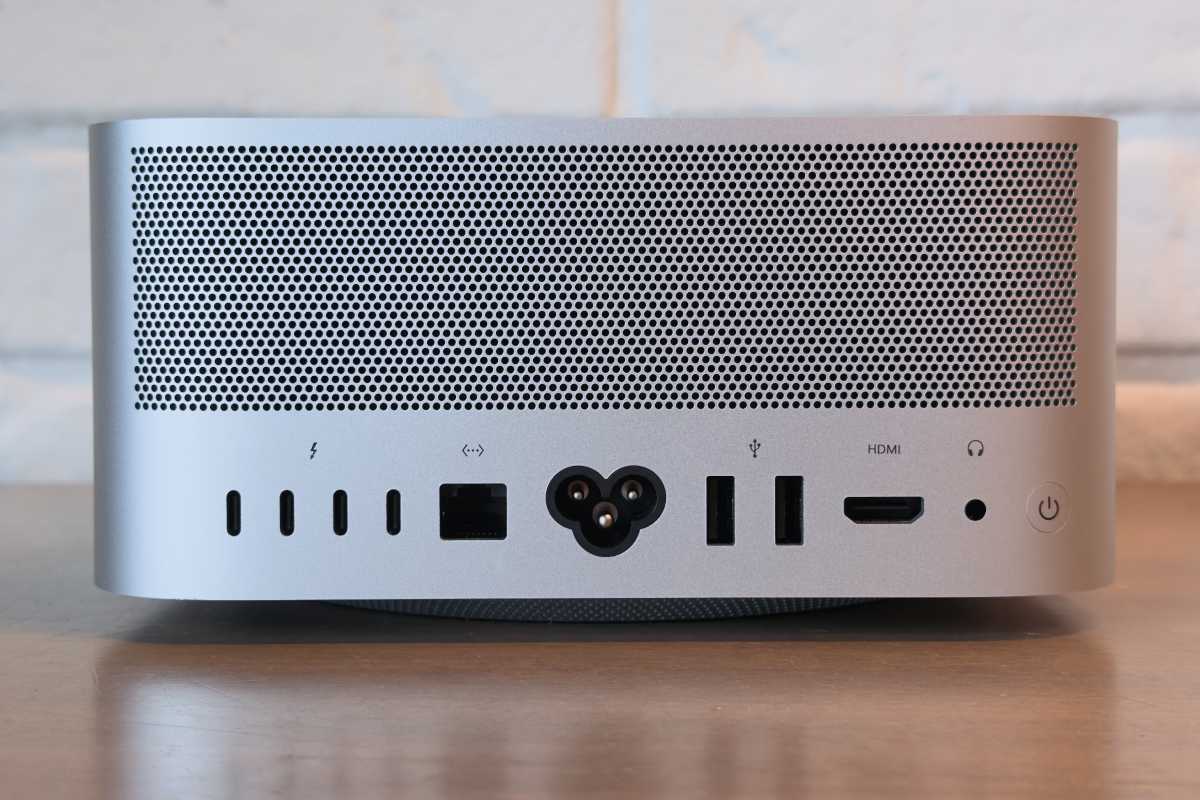
Mac Studio rear ports.
Fundry
The M5 Max Mac Studio supports up to five displays, four over Thunderbolt at 6K/60Hz or 4K/165Hz, and one connected to the HDMI port at 5K/60Hz. The M5 Max Mac Studio also can drive three displays, with two displays at 8K/60Hz or 5K/120Hz or 4K/240Hz, and a third HDMI display at 5K/60Hz. These supported specs are improved over the M4 Max Mac Studio, so the new Mac Studio’s display support gets a boost.
M5 Max Mac Studio: Same ol’ good stuff
This iteration of the Mac Studio is a chip upgrade and nothing much else (besides the boosted display support, which is tied to the chip.) The design is the same as it has been since the Mac Studio’s introduction in 2022, and it’s not likely to change for a long while. The port configuration is also the same, and the keyboard, mouse, and display are sold separately.
Speaking of display, Apple did release new displays earlier this year, though you might be able to find something comparable to Apple’s $1,499 Studio Display–it’s not a bad display, it’s just that it’s quite pricey. The Studio Display XDR is also expensive, but it’s the display that professionals who demand top-notch color and image quality will want.
M5 Max Mac Studio: Price
Except for its non-upgradeable design, there hasn’t been a “catch” with the Mac Studio until now. That catch is the higher price. The base M5 Max model starts at $2,499, a $500 increase over the M4 Max Mac Studio, but no more expensive that it was after Apple hiked prices in June. However, the Ultra Mac Studio went up in price again. In June, Apple increased the M3 Ultra Mac Studio’s starting price from $3,999 to $5,299, and now Apple has raised the starting price of the M5 Ultra another $200 to $5,499.

Apple increased the Mac Studio price last June, and made more price increases with this new release.
Foundry
These are steep increases, enough to make anyone pause, even if you’re using a model from the M2 generation. If you feel like you can’t ever get enough speed, then you won’t blink at the higher prices. Others might want to wait. But I think these higher prices aren’t going to go down, even if the supply chain shortages that cause them eventually get resolved. These prices are the new normal, so some Mac buyers will need to reset their personal upgrade cycles.
Should you buy the M5 Max Mac Studio?
If you’re a Mac Studio user, you need a fast Mac. Apple’s improvements to the SSD are so compelling that even if you have an M4 Max or M3 Ultra Mac Studio, you should consider upgrading. Yes, it’s a pricey proposition, but your workflow will notice the improvement. But if you have a older Mac Studio and working with AI, you could wait for the next generation, because future M-series chips promise to have better AI capabilities. In that case, waiting isn’t a bad idea.
However, like I said, the Mac Studio is a pricey proposition, and if you’re an individual professional whose means of offsetting the cost of purchase aren’t as immediate as, say, someone in a bigger production house, then continue to enjoy your current Mac Studio investment. If you’re new to the Mac Studio, I recommend buying a current model over an older M4 Max or M3 Ultra Mac Studio. The faster SSD is worth it alone.
This articles is written by : Nermeen Nabil Khear Abdelmalak
All rights reserved to : USAGOLDMIES . www.usagoldmines.com
You can Enjoy surfing our website categories and read more content in many fields you may like .
Why USAGoldMines ?
USAGoldMines is a comprehensive website offering the latest in financial, crypto, and technical news. With specialized sections for each category, it provides readers with up-to-date market insights, investment trends, and technological advancements, making it a valuable resource for investors and enthusiasts in the fast-paced financial world.