At a glance
Expert’s Rating
Pros
- Lightweight and sturdy aluminium casing
- Very long battery life
- Plenty of ports, including Gigabit LAN
- Comfortable typing experience and backlit keys
- Quiet and efficient cooling
Cons
- Only 8 GB of soldered-on RAM
- Dull display
- Low CPU and graphics performance
Our Verdict
The Chuwi UniBook is a well-built, portable laptop with good battery life and connectivity. That said, its 8GB of RAM and mediocre display hold it back.
Price at time of review
This value will show the geolocated pricing text for product undefined
Best Price Today
Best Prices Today: Chuwi UniBook
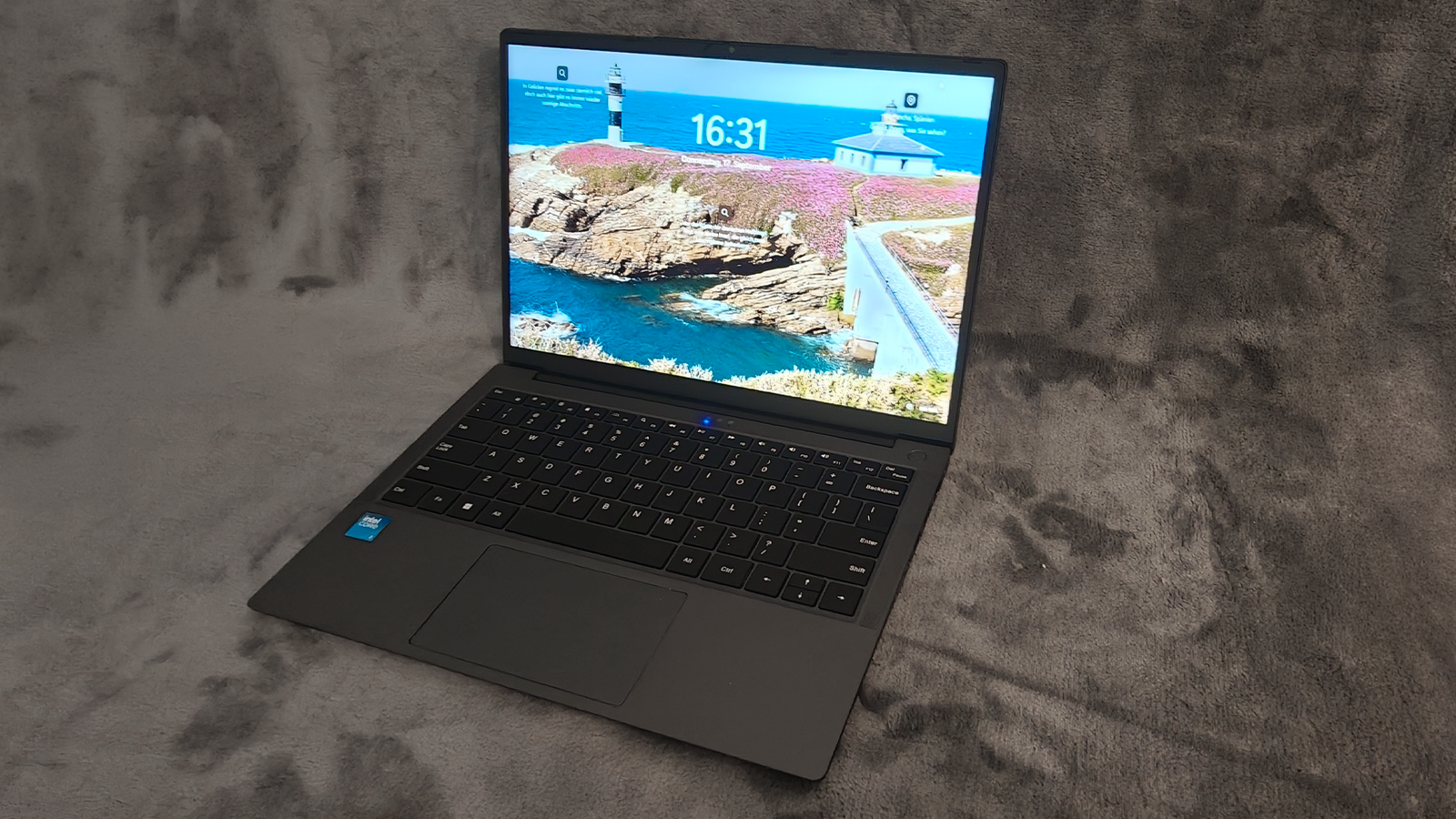
With the UniBook, Chuwi is introducing Intel’s affordable Wildcat Lake platform. At $449, the 14-inch laptop focuses on practicality rather than raw performance. Its key strengths are its lightweight form factor and wide selection of ports. The 8GB of RAM, however, raises questions about how it handles multitasking and more demanding tasks.
Christoph Hoffmann
Chuwi UniBook: Design and build quality
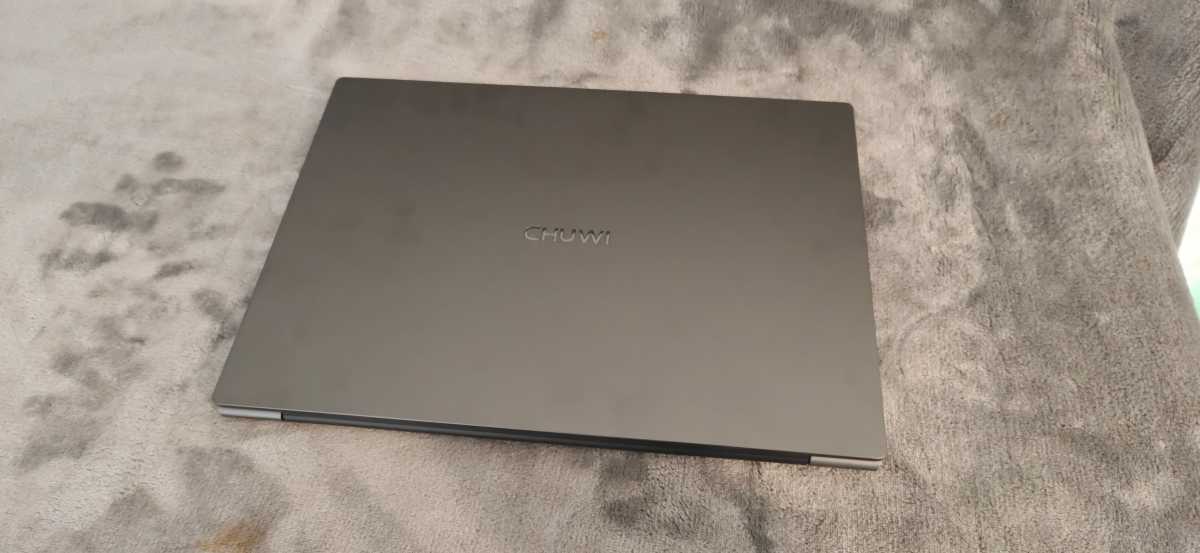
The dark grey UniBook has an understated look and feels significantly more substantial than its price would suggest. The lid, keyboard bezel, and underside are made from an anodized aluminum alloy. The matte surfaces show fingerprints only some fingerprints. Our test unit is neatly assembled. We found no sharp edges, uneven gaps, or creaking joints. The lid bends slightly in the middle, but remains stable during normal use. Even the keyboard yields only a little under firm pressure.
Measuring 12.38 × 8.70 × 0.65 inches, the UniBook takes up barely more space than a sheet of A4 paper. Chuwi states its weight as 2.65 pounds. This makes it significantly more portable than the MSI Modern 15, which, at 14.13 × 9.49 × 0.79 inches and 3.86 pounds, takes up more space in your bag. The compact 65-watt USB-C power adaptor also fits in well with the portable design.
Christoph Hoffmann
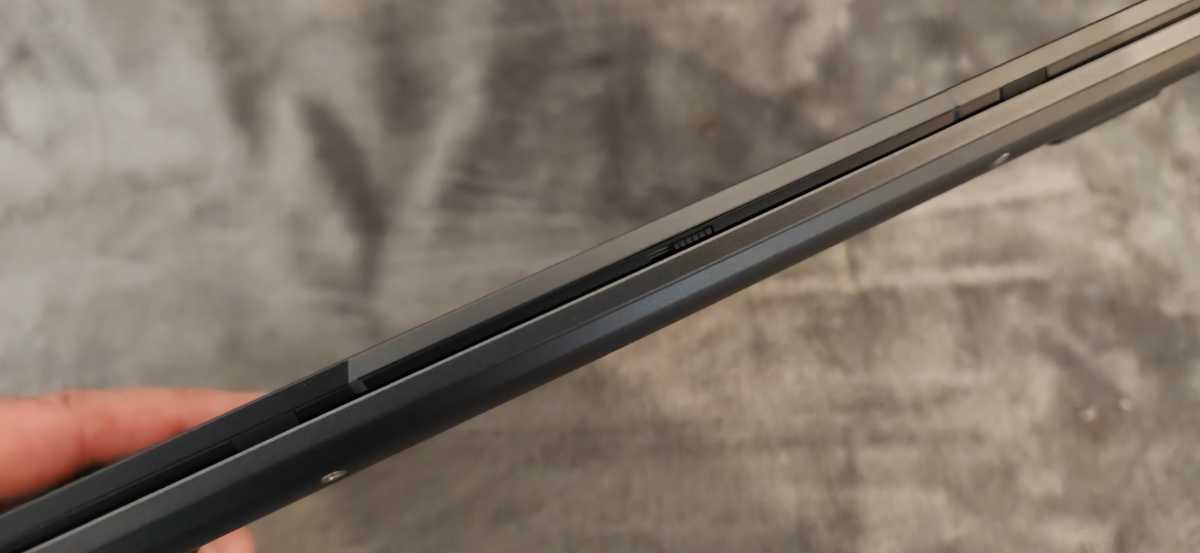
The hinge holds the screen securely in place and allows for an opening angle of 180 degrees. However, the base is too light to open with one hand.
Christoph Hoffmann
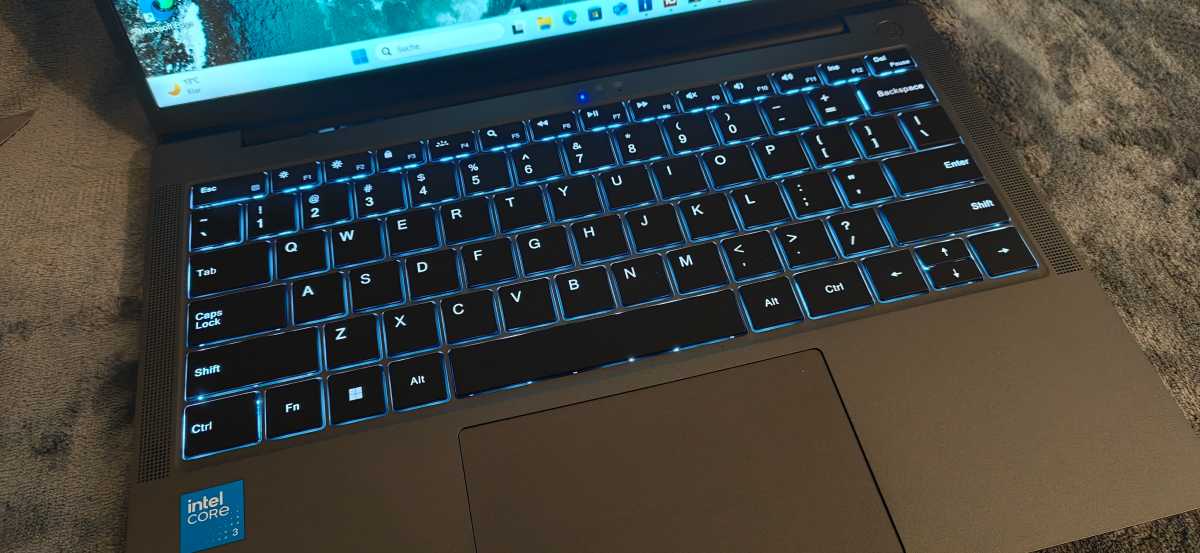
The backlit chiclet keyboard makes good use of the width of the chassis. The keys offer a clear actuation point and sufficient travel for longer texts. Two brightness levels make typing in dark environments easier. The backlighting shines through noticeably at the edges of the keys in places. Our test unit also features a US QWERTY layout without dedicated keys for umlauts and the ß. Prospective buyers should therefore check which keyboard layout the laptop comes with before purchasing. Due to the 14-inch format, there is no numeric keypad. The arrow keys are on the small side, but the rest of the layout remains clear and uncluttered.
Christoph Hoffmann
The touchpad measures approximately 12 × 7 centimeters. Its smooth surface responds precisely to movements. Clicks work across almost the entire surface, though they feel firmer at the top edge.
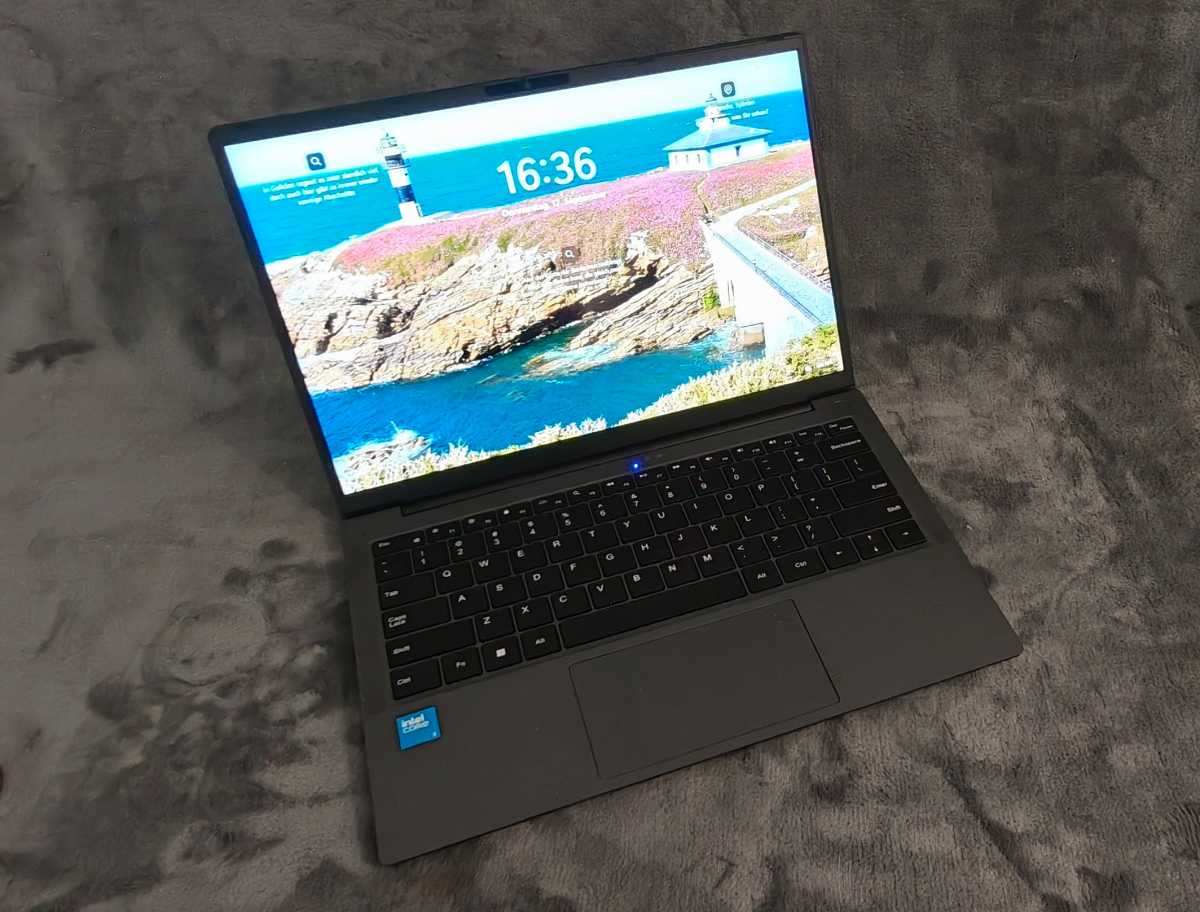
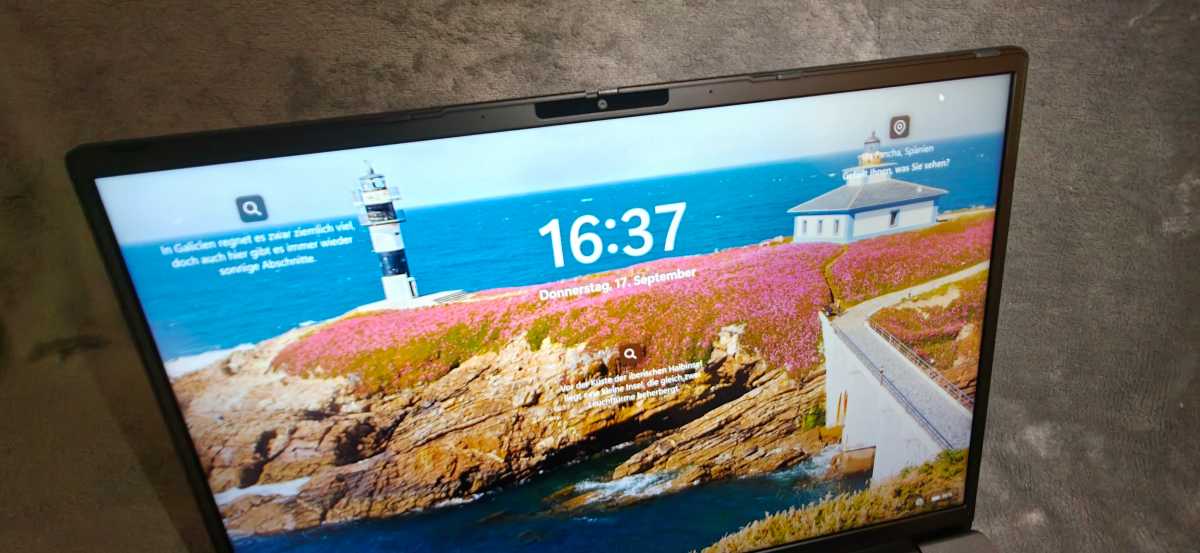
The matt 14-inch screen has a resolution of 1920×1200 pixels in the practical 16:10 aspect ratio. This provides more vertical space for documents than a standard Full HD panel. Text appears sharp, whilst IPS technology ensures consistent viewing angles. The refresh rate is 60 hertz. This is sufficient for Office and video streaming. However, photos look noticeably washed-out and color-accurate editing is out of the question. Outdoors, there is a lack of brightness reserve.
Christoph Hoffmann
The matt finish is a welcome feature, as it reduces distracting reflections. The display does not flicker. However, with dark images, the backlight shines through slightly at the edges.
Overall, Chuwi delivers impressive build quality. However, the UniBook does not match the torsional rigidity and build quality of more expensive premium devices.
Windows 11 Pro 10.0.26200 is pre-installed. Chuwi has omitted unnecessary additional programs, so the system appears tidy once set up.

Christoph Hoffmann
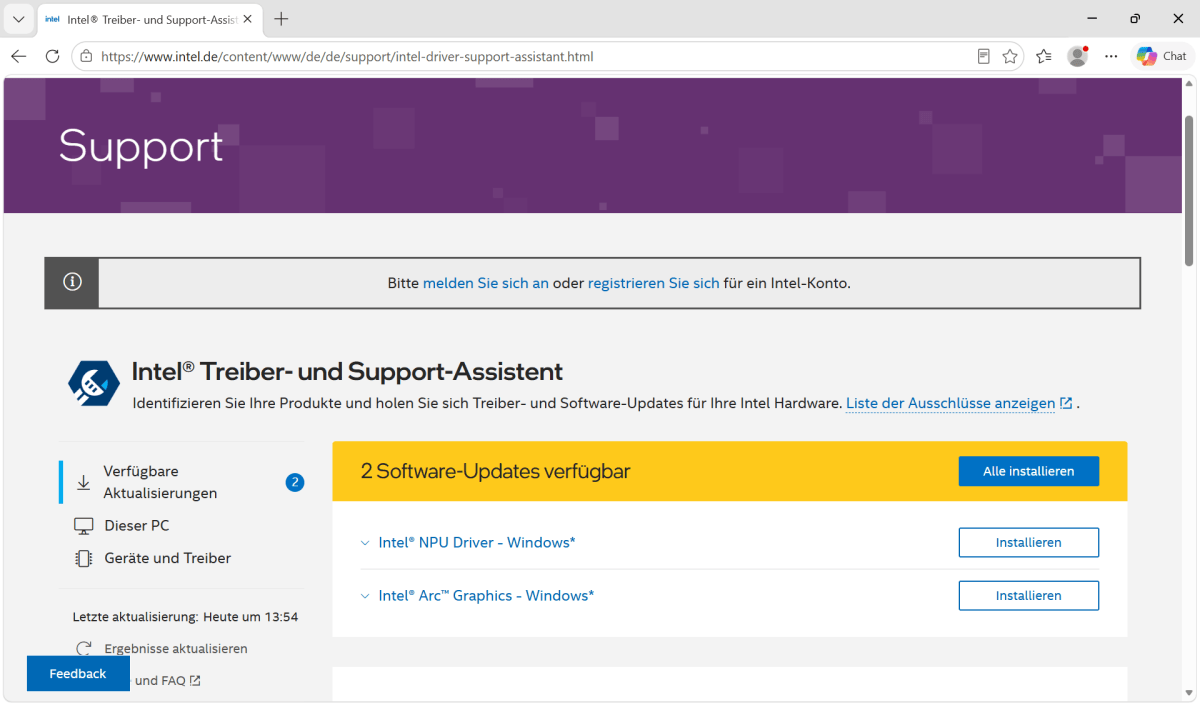
On our test unit, not all Intel components were correctly configured after the Windows setup. We had to install the available chipset, graphics and NPU drivers separately. Some of these are found by the Intel Driver and Support Assistant.
Christoph Hoffmann
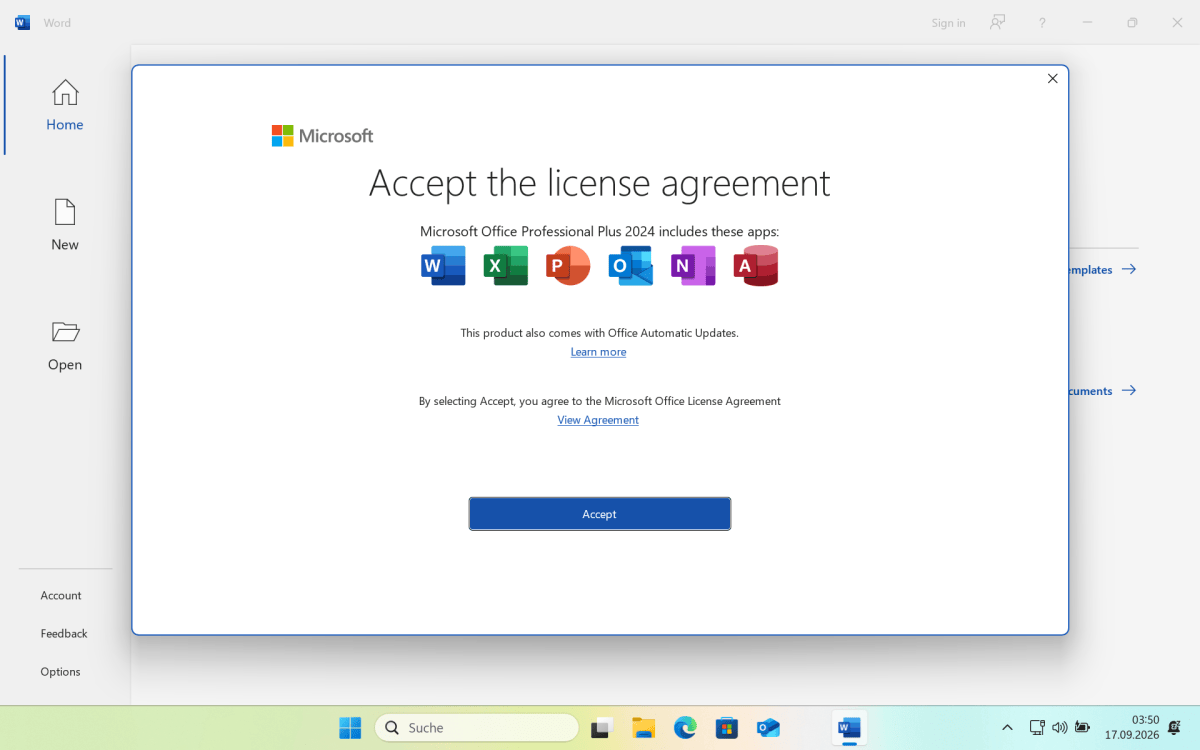
Microsoft Office Professional Plus 2024 is already pre-installed. The package includes Word, Excel, and PowerPoint. An additional Microsoft 365 subscription is not required to use it.
Christoph Hoffmann
Chuwi UniBook: Webcam, microphone, biometrics
The 722p webcam produces soft images with little detail. It’s adequate for occasional video conferences, but not for high-quality recordings. A mechanical slider covers the camera when required. An integrated microphone is also available for voice calls. T
he stereo speakers are loud enough, but the sound is thin and lacking in bass. Headphones are recommended for films and music.
Christoph Hoffmann
Biometric login is not possible. The UniBook has neither a fingerprint sensor nor an infrared camera for Windows Hello. To unlock the device, you must use a PIN, password, or an external security key.
Chuwi UniBook: Connectivity
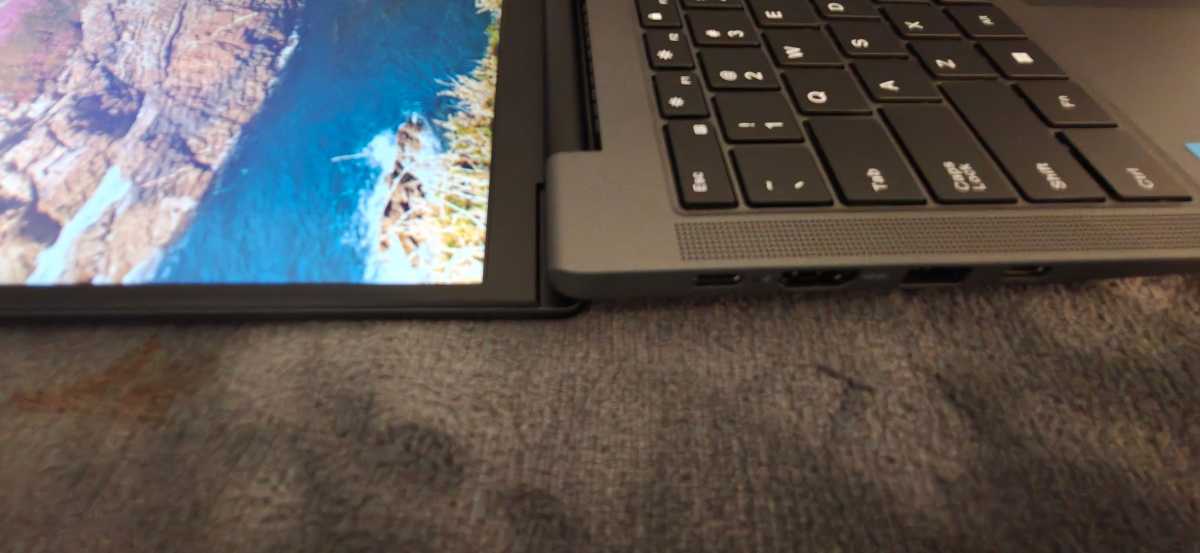
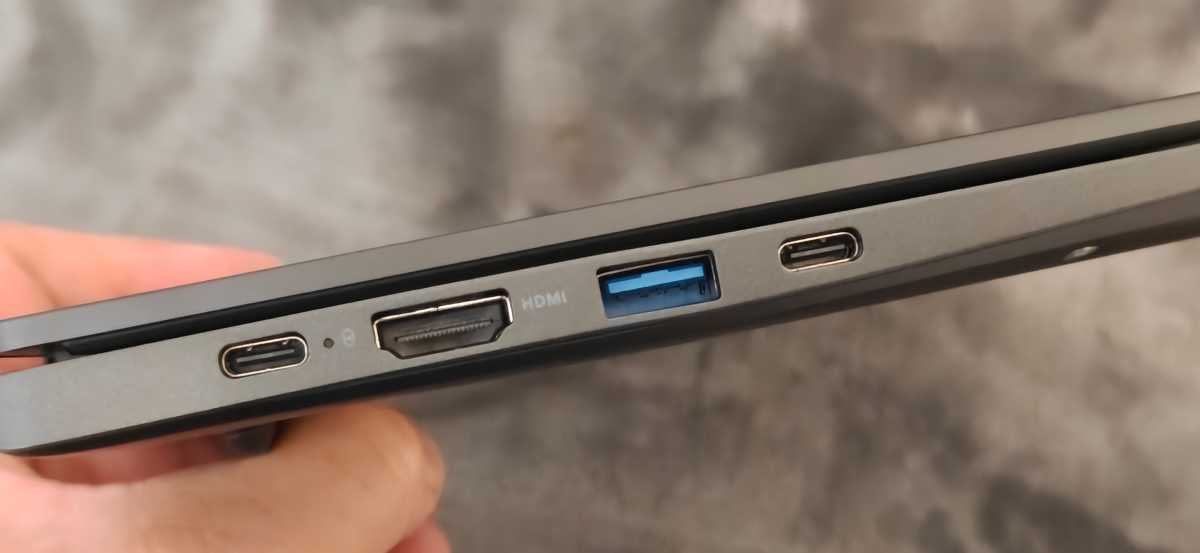
In terms of ports, the UniBook outperforms many of its competitors. On the left-hand side are two USB-C ports with USB 3.2 Gen 1, DisplayPort output, and Power Delivery. There’s also an HDMI 1.4b port and a USB-A port with 5 Gbit/s.
Christoph Hoffmann
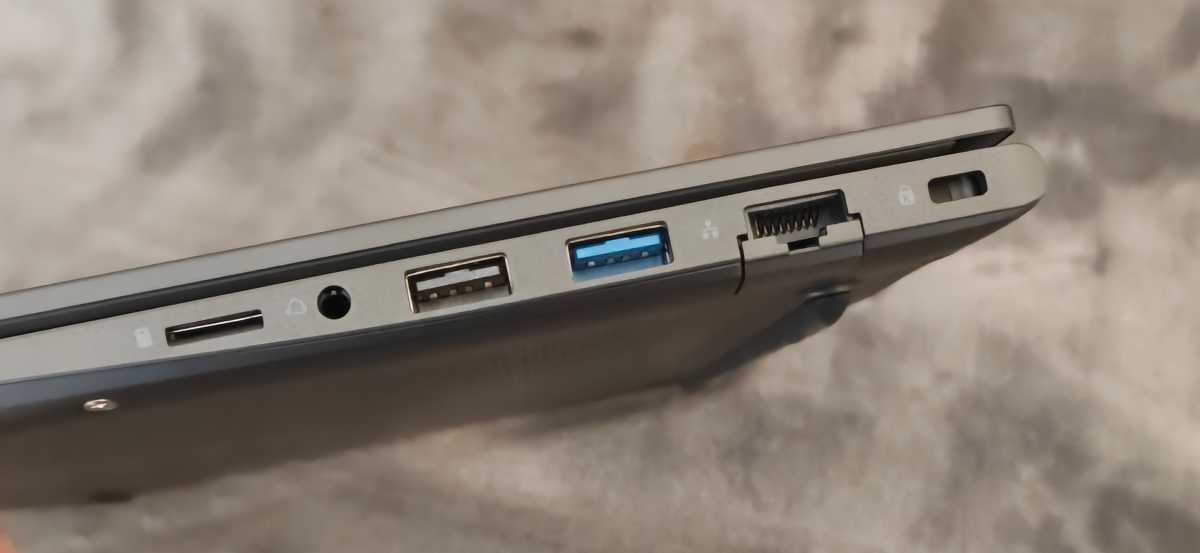
On the right-hand side, we find two further USB-A ports (one of which supports USB 2.0 only), a micro-SD card reader, Gigabit LAN, and a 3.5-millimetre jack. Both USB-C ports can charge the laptop and power a 4K display at 60 Hertz via HDMI. A maximum of 4K at 30 Hertz is possible.
Christoph Hoffmann
The Realtek RTL8852BE module supports Wi-Fi 6 and Bluetooth 5.2. High data transfer rates are possible on compatible Wi-Fi networks, though Wi-Fi 6E is not supported. The wired Realtek interface delivers 1 Gbit/s. The fold-out network port is a nice feature, especially if you work from home.
Chuwi UniBook: Performance
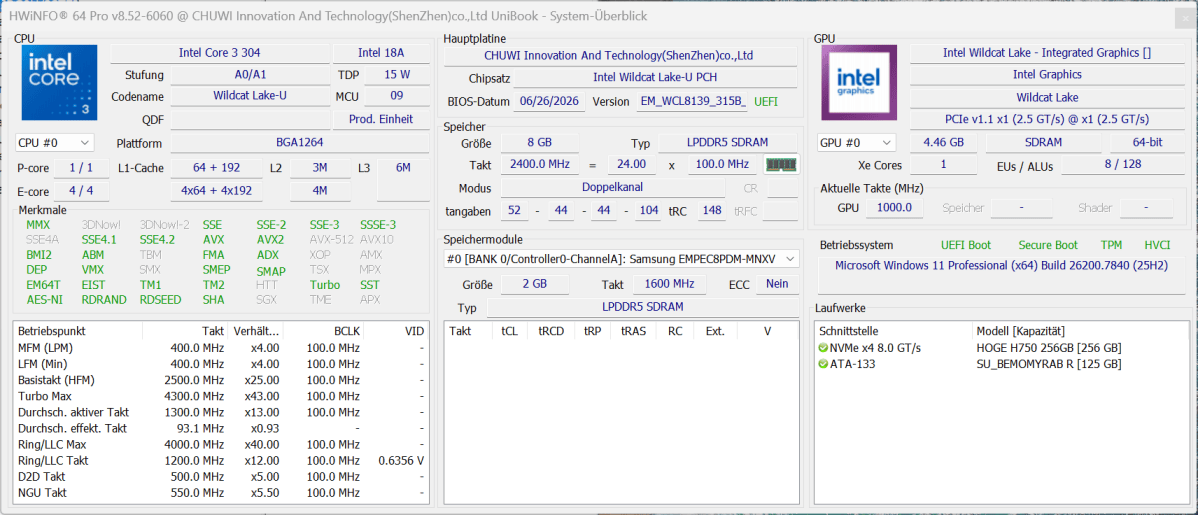
The UniBook is powered by Intel’s Core 3 304 from the Wildcat Lake series. The 15-watt chip combines a fast performance core with four energy-efficient cores, as well as five threads. The maximum clock speed is 4.3 GHz, and the L3 cache is 6 MB. The processor is manufactured using the Intel 18A process. The architecture is modern, but the limited expansion options place tight constraints on performance.
Christoph Hoffmann
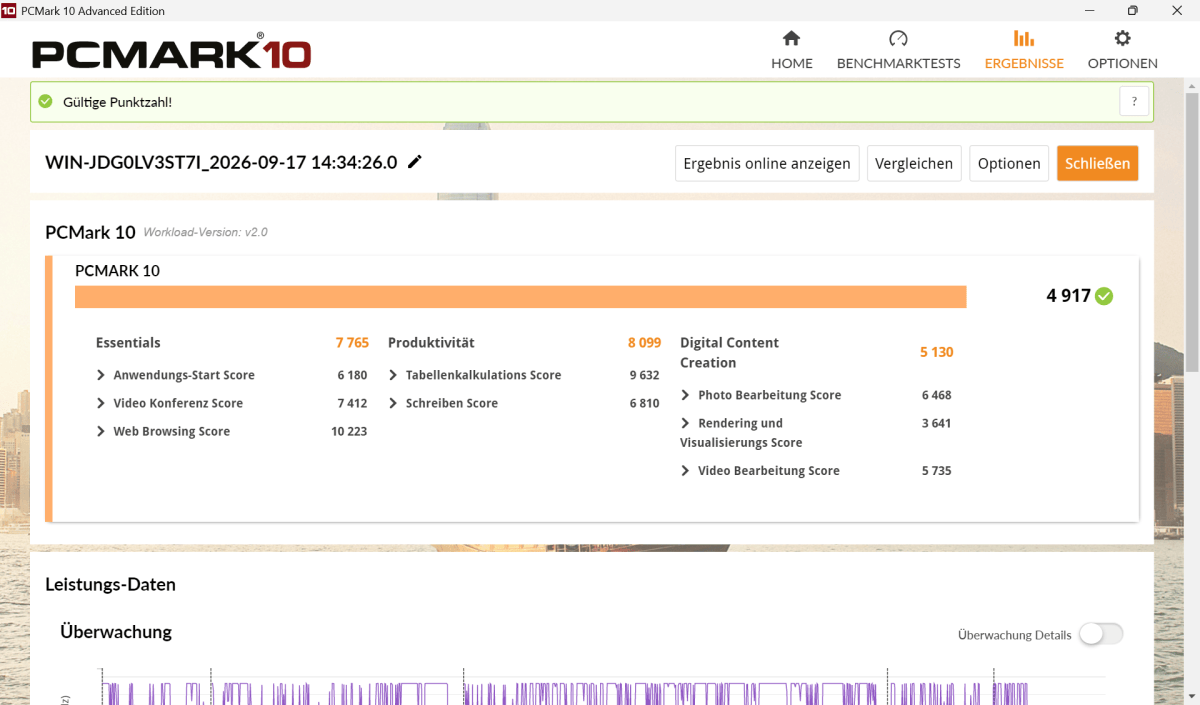
In PCMark 10, the laptop scored 4,917 points. The sub-scores of 7,765 points for basic functions and 8,099 points for productivity show that web browsers, Word, and spreadsheets run smoothly.
For digital content creation, the score drops to 5,130 points. Programs launch quickly, but running several large applications pushes the 8 GB of LPDDR5 RAM to its limits. Unfortunately, the RAM is soldered in place and cannot be upgraded. Anyone using lots of browser tabs, Microsoft Teams, and image-editing software simultaneously should expect short delays.
Christoph Hoffmann
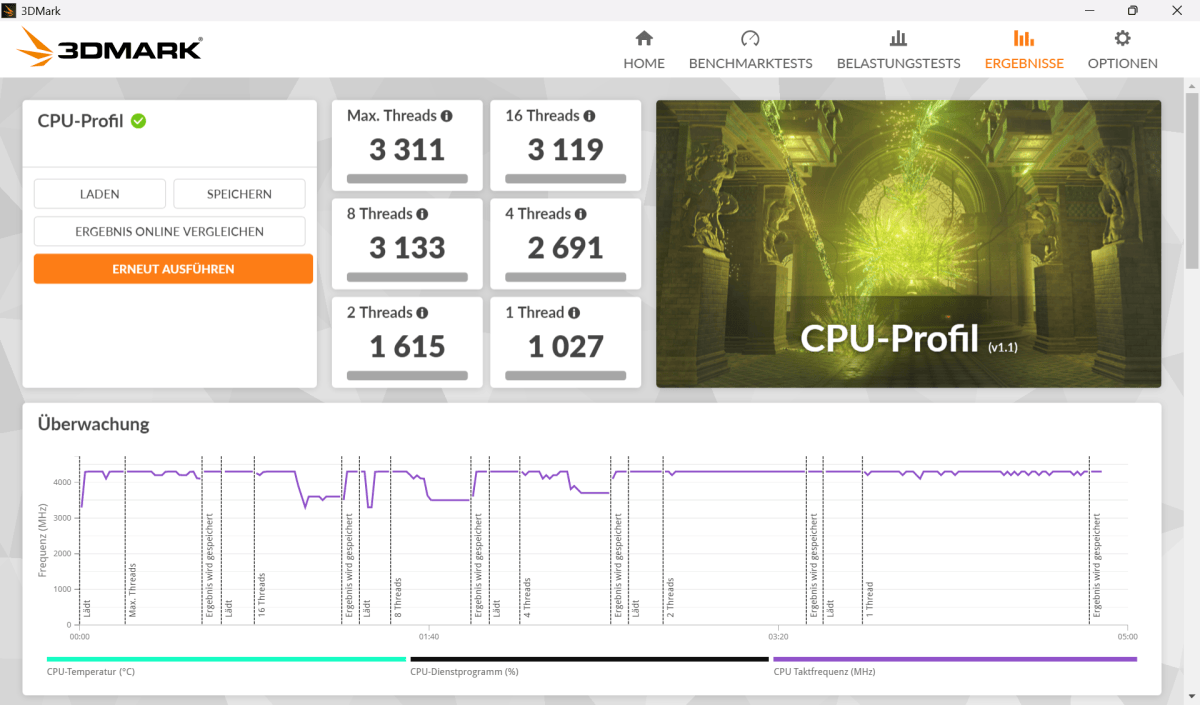
The 3DMark CPU Profile confirms the unbalanced core configuration. A single thread scores 1,027 points, while two threads reach 1,615 points. With four threads, the score is 2,691 points and the maximum score is 3,331 points.
The single P-core responds quickly, but during prolonged rendering or video conversion, additional powerful cores are needed. The UniBook is best suited for Office tasks, research, and media playback. Software development, large RAW projects, and video rendering require more patience.
Christoph Hoffmann
The integrated Intel graphics uses just one Xe3 core running at up to 2.3 GHz. Its performance is sufficient for navigating Windows’ interface and video playback.
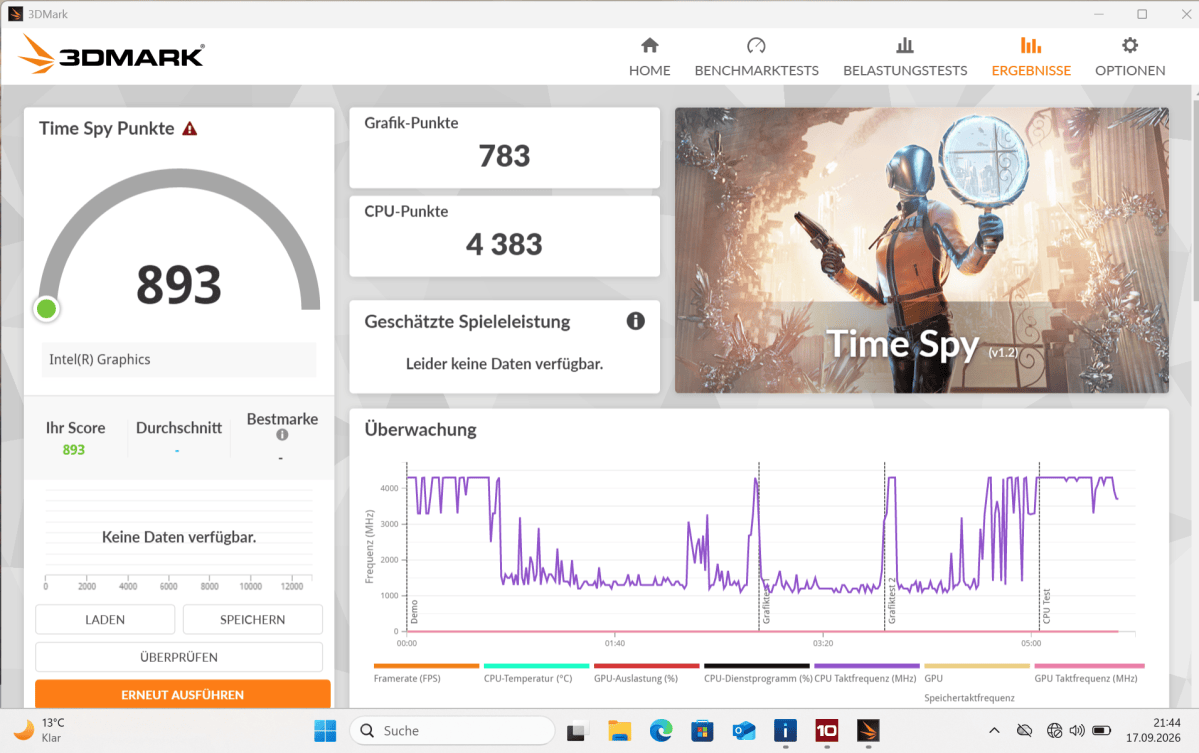
In 3DMark Time Spy, the UniBook scores 893 points, although 3DMark flags the result with a warning. The graphics score is 783 points, while the CPU score is 4,383 points. Despite the lack of validation, the result suggests that the graphics performance is likely sufficient only for older or less demanding games.
Christoph Hoffmann
Demanding games run too slowly, even at 1080p. Newer 3DMark tests wouldn’t run because the graphics unit lacks hardware ray tracing and other DirectX 12 Ultimate features. According to the manufacturer, the NPU achieves 15 TOPS. This is sufficient for individual local AI functions, but does not meet the requirements of a Copilot Plus PC.
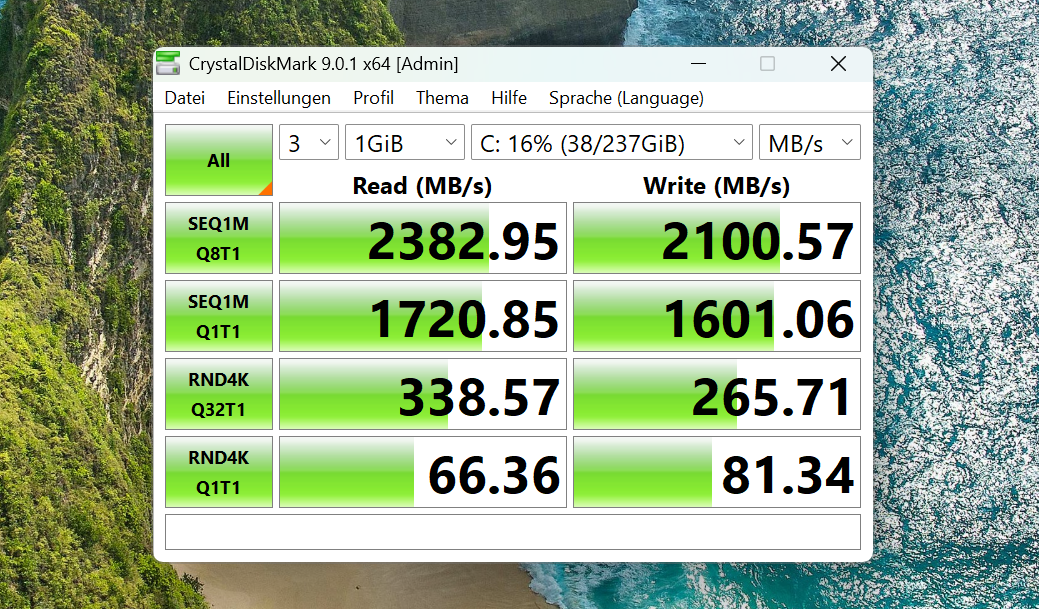
The 256 GB HOGE H750 NVMe SSD uses PCIe 3.0. CrystalDiskMark records sequential read speeds of 2,383 MB/s and write speeds of 2,101 MB/s. That’s respectable for a budget laptop. Around 237 GB is available after formatting, though Windows reduces the available space further. The M.2-2280 SSD can be swapped for a larger PCIe 3.0 or PCIe 4.0 model. A second SSD cannot be installed.
Christoph Hoffmann
The MSI Modern 15’s Ryzen 5 7530U processor offers six cores and twelve threads. It performs noticeably faster on parallelized tasks and features more powerful Radeon graphics. Its RAM is also not upgradeable.
The UniBook, on the other hand, is more compact, lighter, and has longer battery life. If you prioritize value above all else, you’re better off with an affordable Ryzen 5 model. For commuters, the Chuwi offers a good balance between size, battery life, and connectivity options.
Chuwi UniBook: Battery life
The built-in lithium-polymer battery has a capacity of 53.38 Wh. In our battery test, with the display brightness set to 150 cd/m², the UniBook lasted around 13 hours and 40 minutes. At maximum brightness, the battery life drops to just under twelve hours. This is more than enough for a working day involving word processing, web browsing, and short video conferences.
In idle mode, we measured power consumption of around 2.5 to 4.8 watts, depending on the display brightness. Under typical load, consumption rises to around 18 watts. For short periods, it can reach just over 50 watts.
The included 65-watt power adaptor has plenty of headroom and can charge via either of the two USB-C ports. A charge level of around 60 percent can be reached after about an hour. The manufacturer’s claim of up to 20 hours, however, depends heavily on light use and low display brightness. In everyday use, 12 to 14 hours is more realistic.
Chuwi UniBook: Cooling, noise level
The UniBook actively cools the Core 3 304 with a single fan. When idle or during light office work, the fan often stops running. As a result, the notebook operates silently.
Short periods of heavy processing usually result in only a faint hum. Under full load, the noise level briefly rises to over 40 dB(A), but drops to around 30 dB(A) after the initial power surge. Compared to the MSI Modern 15, the cooling system seems more restrained, as the MSI fan is clearly audible under load.
The processor briefly draws up to 35 watts at the start of a task, allowing programs to launch quickly. After a few seconds, the firmware reduces power consumption to 15 watts to keep the laptop cool and quiet. As a result, computing performance drops during longer tasks such as rendering.
Christoph Hoffmann
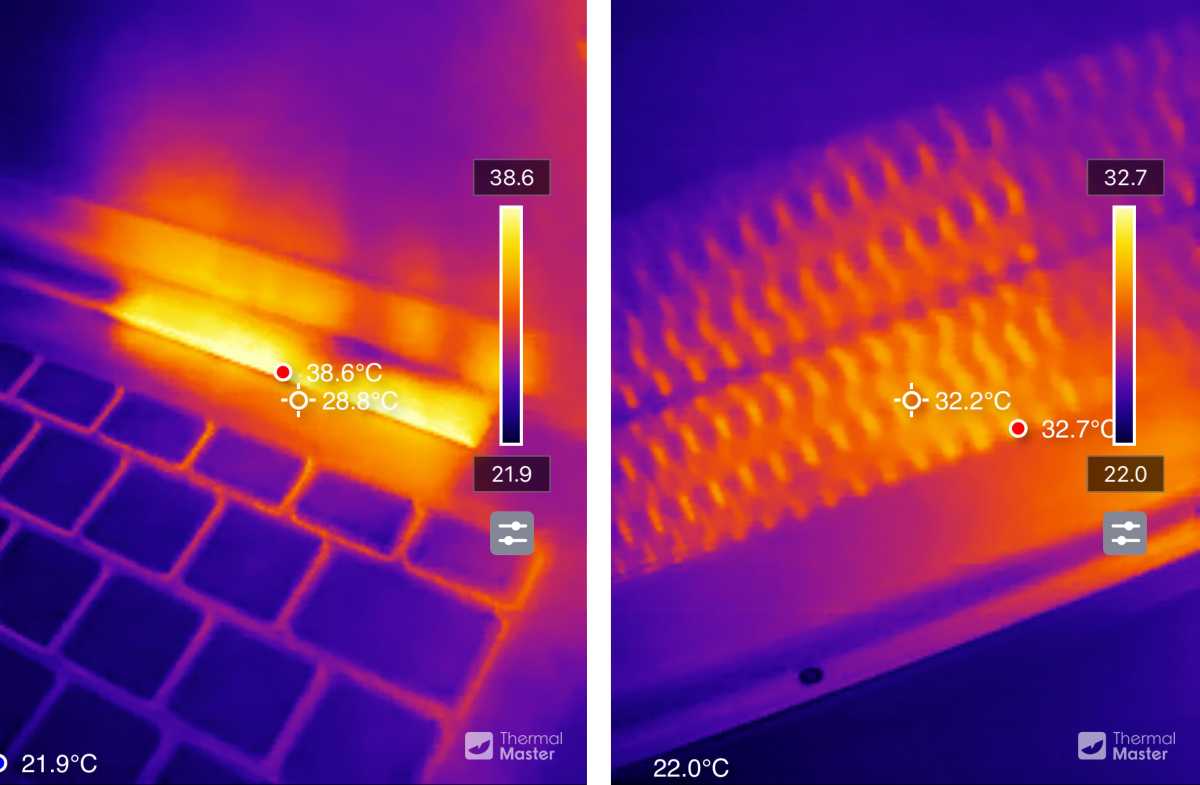
Even under load, the chassis only warms up moderately. Using the Thermal Master 3 thermal imaging camera, we measured a maximum of 101.5 degrees on the top surface. The warmest area is above the keyboard near the hinge. The keys and the palm rest remain significantly cooler. On the underside, the UniBook reaches a maximum of 90.9 degrees. This means it’s pretty comfortable to use on your lap. Just make sure the ventilation slots aren’t blocked.
Chuwi has sensibly tailored the cooling system to its target audience. The UniBook causes no disturbance, especially in a quiet working environment. The trade-off is not thermal throttling in the problematic sense, but rather a fixed performance budget. This configuration is well-suited to office software. Users with constant CPU loads will benefit more from a laptop with multiple performance cores and a larger cooler.
Chuwi UniBook: Conclusion
The Chuwi UniBook impresses in situations where an affordable device needs to be practical. The metal casing is lightweight and well-finished. The keyboard is suitable for longer typing sessions, and the battery lasts a full working day. Five USB ports, HDMI, a card reader, and Gigabit LAN mean many users won’t need an adapter. For $449, this combination is rare.
The cost-cutting measures remain evident. The display is matte and sharp, but covers only around 59 percent of the sRGB color space. Colors appear correspondingly pale. The webcam and speakers deliver basic quality. A more significant drawback is the 8 GB of soldered-on RAM. Even with demanding multitasking, there’s little room to maneuver. The Core 3 304 offers good responsiveness per core, but it doesn’t match the Ryzen 5’s performance under sustained load. Its modest Xe3 graphics are hardly suitable for gaming.
Anyone looking for a quiet, long-lasting laptop for office work will find this a well-rounded package. Buyers should assess their storage requirements and not expect any spare capacity for resource-intensive creative software. The MSI Modern 15 is larger and heavier, but offers more processing and graphics performance with the Ryzen 5 7530U. The UniBook wins when it comes to portability, but not when it comes to performance.
Chuwi UniBook: Specs
- Processor: Intel Core 3 304, Wildcat Lake, 1 P-core plus 4 LP-E cores, 5 threads, up to 4.3 GHz, 6 MB L3 cache, 15 watts
- Graphics: Intel Graphics, 1 Xe3 core, up to 2.3 GHz, 9 TOPS
- NPU: Intel NPU 5, up to 15 TOPS
- RAM: 8 GB LPDDR5-6400, soldered, dual-channel
- Storage: 256 GB HOGE H750 NVMe SSD, PCIe 3.0, M.2 2280, removable; slot supports PCIe 4.0 x4
- Display: 14-inch, IPS, matt, 1,920 × 1,200 pixels, 16:10, 60 Hz
- Ports on the left: 2 × USB-C 3.2 Gen 1 with charging and DisplayPort, HDMI 1.4b, USB-A 3.2 Gen 1
- Ports on the right: USB-A 3.2 Gen 1, USB-A 2.0, Gigabit Ethernet, micro SD card reader, 3.5 mm audio
- Connectivity: Wi-Fi 6 via Realtek RTL8852BE, Bluetooth 5.2
- Camera: 720p with mechanical privacy cover
- Keyboard: Chiclet, two-level white backlighting, QWERTY layout on the test unit
- Audio: Stereo speakers, combined headphone/microphone jack
- Battery: 53.38 Wh lithium-polymer
- Power adaptor: 65 watts, USB-C Power Delivery
- Dimensions: 314.5 × 221 × 16.4 mm
- Weight: approx. 1.2 kg
- Warranty: 12 months
- Operating system: Windows 11 Pro
- Software: Office Professional Plus 2024
This articles is written by : Nermeen Nabil Khear Abdelmalak
All rights reserved to : USAGOLDMIES . www.usagoldmines.com
You can Enjoy surfing our website categories and read more content in many fields you may like .
Why USAGoldMines ?
USAGoldMines is a comprehensive website offering the latest in financial, crypto, and technical news. With specialized sections for each category, it provides readers with up-to-date market insights, investment trends, and technological advancements, making it a valuable resource for investors and enthusiasts in the fast-paced financial world.