Now that I’m back from Google I/O, I’ve been trying to catch up on anything I may have missed while traveling, like some of the streamed sessions that followed the main keynote. In the “What’s new in Android” session, Google walked through most of the previously-announced stuff from their pre-I/O show, but they still managed to sneak in at least a couple of additional changes.
Magic Cue gets a new design?
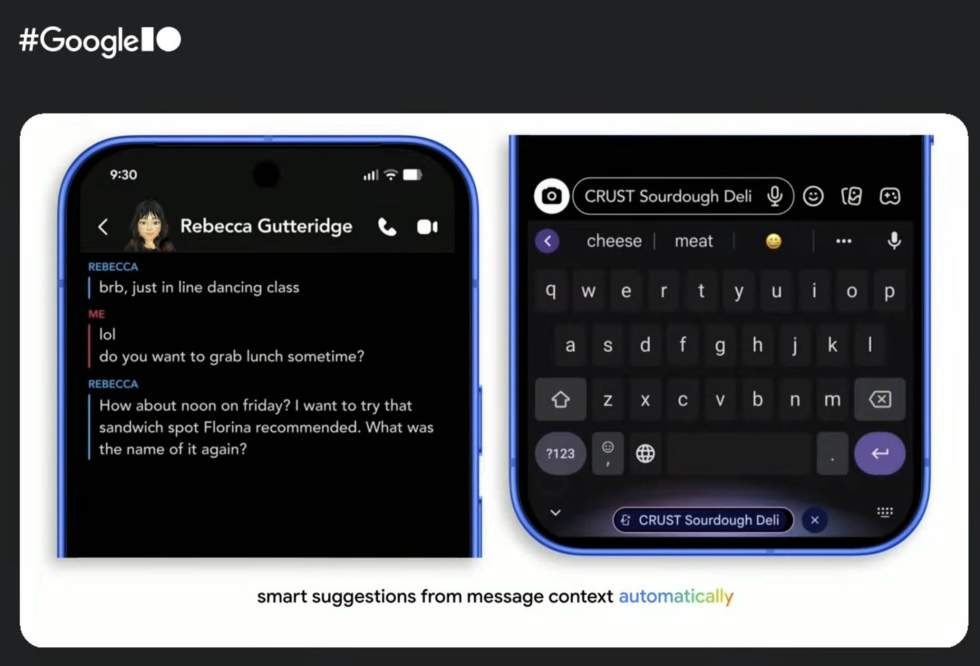
The first thing that caught my eye popped up at the 24:00-mark and certainly appears to be a new design for Magic Cue, which is currently only on the Pixel 10 series.
You know Magic Cue as the service on your Pixel 10 or Pixel 10 Pro that tries to surface info you may need at the precise moment you may consider going to look for it. This could be someone’s phone number that was requested, an address, information about a location, a shortcut to make a calendar items, a confirmation number while on a phone call, etc.
During the “What’s new in Android” talk, the speakers were talking through several proactive features of Android and then showed the image above for Magic Cue. Can you see what’s new?
First off, the image is of Magic Cue working in Snapchat, which Google confirmed is because Magic Cue will soon expand to more apps. So that’s neat! But the change in design here, with the Magic Cue option listed as a floating button at the bottom of the screen, is new.
Google must be evolving Magic Cue to overlay on top of apps, down where Gemini lives. This actually seems like a better spot for it, rather than it changing locations and showing in an area that might not be as easy to spot. This looks like a bit of a pop-up that also includes an “X” to be able to close it off.
New Continue On feature for Android 17
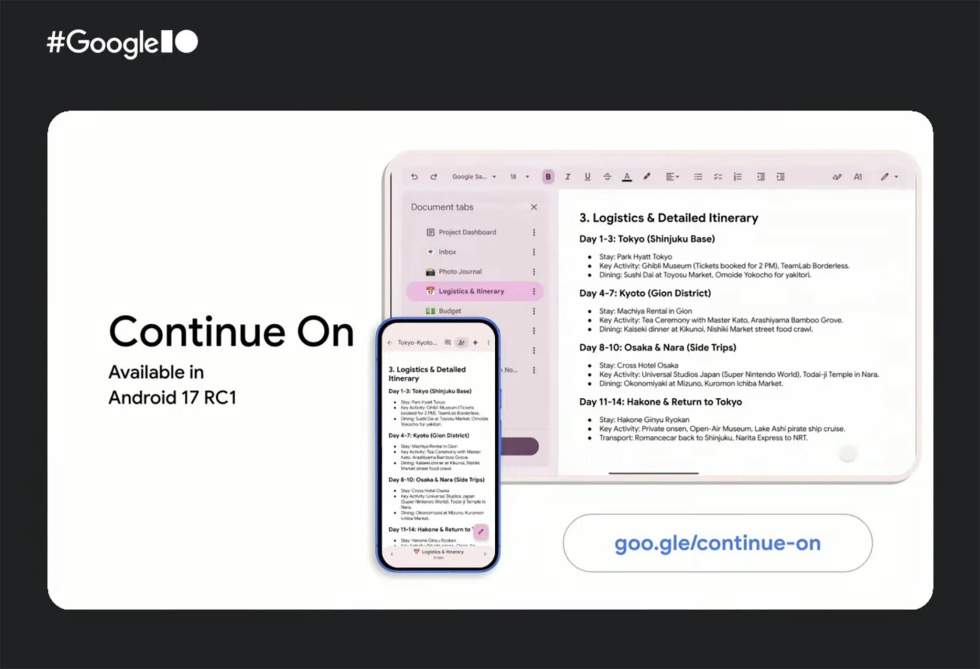
At the 42:30-mark, Google showed off a new feature called “Continue On” for Android 17 that very much feels like something they could have announced at the I/O Android pre-show.
They talked briefly about it, but the idea is pretty straight-forward. Continue On allows you to start a session in an Android app on one Android device and then transition to another device while continuing where you left off. To start, this will work in mobile-to-tablet transitions, but Google envisions it working bidirectionally between all types.
An example of this would be a Google Docs session on your phone that transitions to a tablet with Continue On. As you switch devices, you would see a taskbar suggestion for that Docs experience on the tablet. A simple tap on the shortcut would open it just where you left off on the phone.
You can see how this would look at this Continue On developer page.
The talk also ran through the new Wear OS 7 update that we detailed for you, Android XR updates, new media apps for cars that are being worked on (like Spotify, Amazon Music, YouTube Music, and more), Gemini Nano 4, a new style for Live updates (Metric Style), unified call history for multiple apps (WhatsApp, Meet and Phone all in the same history), and more.
We’ve included the session below if you want to dive into more.
Read the original post: Google Saved a Couple of New Android Secrets for I/O
This articles is written by : Nermeen Nabil Khear Abdelmalak
All rights reserved to : USAGOLDMIES . www.usagoldmines.com
You can Enjoy surfing our website categories and read more content in many fields you may like .
Why USAGoldMines ?
USAGoldMines is a comprehensive website offering the latest in financial, crypto, and technical news. With specialized sections for each category, it provides readers with up-to-date market insights, investment trends, and technological advancements, making it a valuable resource for investors and enthusiasts in the fast-paced financial world.