
I don’t know about you, but when I tuned into this week’s episode of The Full Nerd I was mostly just excited to hear about the Steam Frame. I haven’t bought a VR headset since the Quest 2 but I’m still curious about the state of VR gaming, and I’m sorely tempted to buy a Frame despite the eye-watering $1,000+ price tag.
But as it turns out, I was a lot more excited to hear about Linux! My colleague (and TFN fill-in host) Adam Patrick Murray chatted a bit about his time testing a System76 laptop running Linux on this week’s episode, and I was intrigued by the way the automatic tiling window manager works in System76’s Pop_OS distro.
I’d heard about tiling window managers over the years, but never really understood what the fuss was about. After all, Windows lets you drag and drop windows wherever you want, and with Windows 11’s Snap Layouts I find myself nearly overwhelmed with options on how to lay out running apps on my desktop. Why would I want to cede control of where and how my windows appear to my PC?
Welcome to The Full Nerd newsletter—your weekly dose of hardware talk from the enthusiasts at PCWorld. Missed the surprising topics on our YouTube show or the latest news from across the web? You’re in the right place.
Want this newsletter to come directly to your inbox? Sign up on our website!
But that’s exactly it: I feel overwhelmed by choice, so most of the time I just work with one window maximized to fill the screen. At most I’ll use two side-by-side if I need to reference something while I’m working. But I never touch the advanced layouts available in Windows 11, or futz around with the custom layouts I can create using Fancy Zones in Microsoft’s amazing (and free) PowerToys app suite.
But in Pop_OS I discovered the option to turn on a tiling window manager that automatically resizes and moves your open windows to make space for every new one you open, and I kind of fell in love. Because as simple as it sounds, that basic automation eliminates 5-10 seconds of thought, effort and distraction every time I launch a new program. That’s not a big difference if it only happens once or twice, but this week I’ve noticed it actually happens 10-20 times a day. That’s adding up to ten or fifteen minutes of wasted time and effort saved every week, as well as noticeably less wasted thought and annoyance during my day-to-day work.
And that’s great, but it’s not why I’m so blown away by a basic automatic tiling window manager. No, it’s more that I suddenly realized that this is a useful way to work and Microsoft could have included an option like this in Windows 11 at any point. Heck, there may well be such an option buried somewhere in Windows’ nested tiers of settings menus; I just couldn’t tell you where, even after testing and using Windows 11 since before it launched.
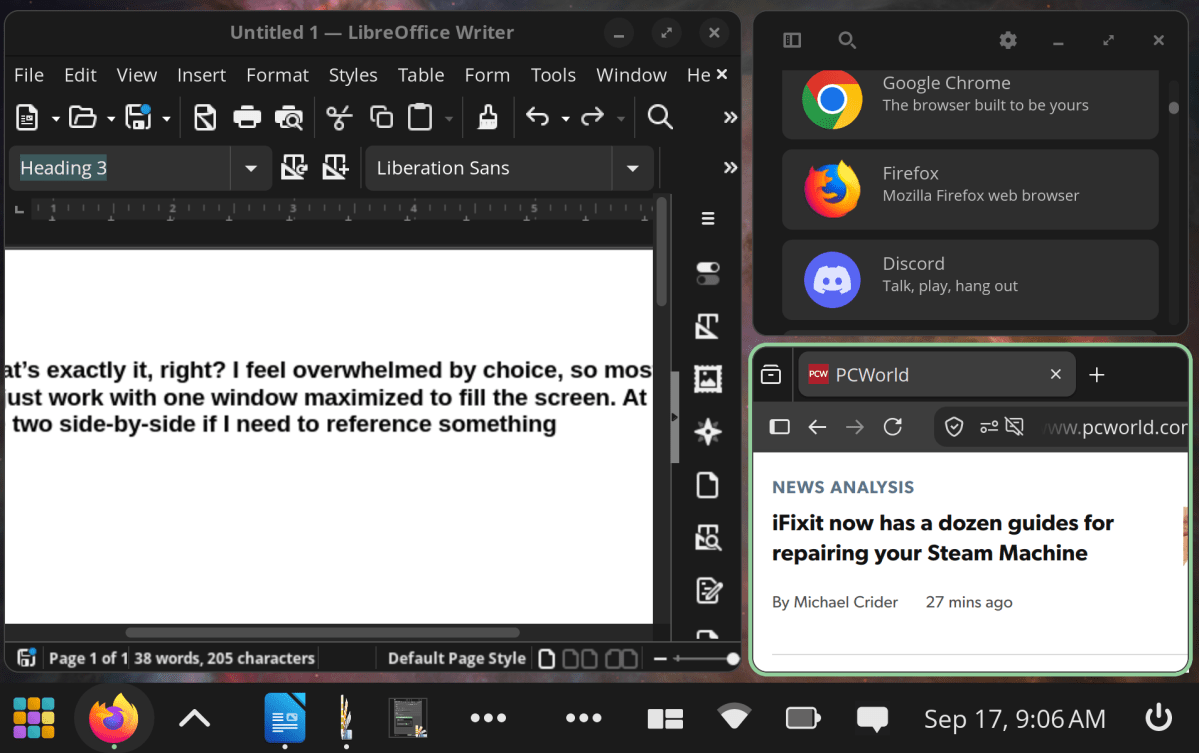
Pop_OS may have opened my eyes to the joys of an automatic tiling manager, but it can definintely feel cramped if you open too many windows or don’t take the time to dial in the settings just right.
PCWorld
So while I definitely don’t think an automatic tiling window manager is the right choice for everyone, after trying one this week I’ve come to miss having the option to use one in Windows and I wish Microsoft would patch one in. Of course, I have some issues with the way the tiling manager in Pop_OS works—for one thing, the way Pop_OS automagically squishes windows to fit them into a cluttered layout can often render the Maximize and Close buttons in the top-right corner of each window impossible to click—so I don’t think I’d want to port it over wholesale into Windows.
But one of the things I love about Windows is how easy it is to download third-party software that radically changes the way your PC operates. I know there’s a smorgasbord of downloadable automatic tiling window managers out there for Windows, now the question is…which one do I choose?
If you have thoughts, feel free to email me!
In this week’s episode of The Full Nerd
This week was the inaugural episode of The Full Nerd 2.0, aka the All-Remote All-The-Time Edition. As regular host Adam Patrick Murray gears up for his big move across the country we tested out our remote recording setup with regular cohosts Alaina Yee and Brad Chacos, and while it’s a bit bare-bones right now you can look forward to continuous improvements once Adam gets settled and we start dialing things in.
But while our streaming setup was basic the episode was rich in thoughtful discussion, starting off with a robust chat about Valve’s new Steam Frame VR headset. Would you pay $1,050 for Valve’s vision of the future of VR? I’m seriously considering it, but if Brad is to be believed I guess I’d better allocate a bit of extra spending money for the Ergonomic Accessories Kit. That second strap sounds clutch!

PCWorld
But it wasn’t just all about VR this week, as Adam also dug into his experience testing a new System76 laptop running that afore-mentioned Pop_OS Linux distro with its slick automatic window tiling manager. If you’re not as intrigued by that as I was there’s also a thoughtful Q&A segment where our hosts take questions from you about everything from GPUs to which word we’d eliminate from the English language. It’s a good time!
Nerd news of the week
I wish I had some promising news about how PC and laptop prices are about to start dropping, but sadly today is not that day. Instead, I wanted to recommend some intriguing stories from around the web about everything from dumpster diving to salvage RAM to the infamous story of perhaps the world’s most famous Windows key.
- Retired Microsoft engineer details the story about the famous leaked FCKGW Windows XP key: This is a fun summary of a recent X post by former Microsoft engineer Dave Plummer about how the infamous free Windows XP key everyone and their mother was using to pirate Windows XP at the turn of the millennium came to be.
- Hackers reveal how Flock cameras really track cars and people: This is a fascinating read about the inner workings of the Flock surveillance cameras that have sprung up across the U.S. in recent years. Turns out these cameras have algorithms that let them actively identify the presence of human beings, not just vehicles, though it sounds like there’s no active face recognition or other systems of identification running on those videos (yet?)
- Dumpster diving DIYer secures working SSDs, RAM, laptops from their local landfill: When I was a teenager too poor to afford my own laptop or PC, I would sometimes try to salvage old laptops and PC components I’d find in the trash. Fast forward nearly twenty years and it sounds like dumpster diving is becoming a rewarding pastime once again, at least for one enterprising Redditor who’s salvaged a small treasure trove of hardware from their local dump.
- Developer vibe codes a tool to let Nvidia RTX 50-series laptop owners crank up their power limits: I don’t think I’m ready to trust the long-term health and reliability of my gaming laptop to a vibe-coded app just yet, but if you’re willing to test out this self-labelled experimental app you can pull it down from GitHub right now and start relaxing the power limits on your mobile Nvidia 50-series GPU to get better performance.
That’s it for your Full Nerd newsletter this week, as I’ve got to hustle in order to make it to Adam’s farewell lunch on time. Until next week, be sure to bookmark PCWorld and subscribe to the PCWorld YouTube channel! Want this newsletter to come directly to your inbox? Sign up on our website!
This newsletter is dedicated to the memory of Gordon Mah Ung, founder and host of The Full Nerd, and executive editor of hardware at PCWorld.
This articles is written by : Nermeen Nabil Khear Abdelmalak
All rights reserved to : USAGOLDMIES . www.usagoldmines.com
You can Enjoy surfing our website categories and read more content in many fields you may like .
Why USAGoldMines ?
USAGoldMines is a comprehensive website offering the latest in financial, crypto, and technical news. With specialized sections for each category, it provides readers with up-to-date market insights, investment trends, and technological advancements, making it a valuable resource for investors and enthusiasts in the fast-paced financial world.