
This is the new, more productive Windows 11. On Friday, Microsoft said that it has begun making improvements to File Explorer, speeding up Windows under the hood, and minimizing distractions from the Windows widgets, all in the name of getting more done.
Microsoft’s moves underscore what it began talking about in March: emphasizing a cleaner, more efficient Windows while scaling back on Copilot and moving toward adding features that customers have demanded, such as a configurable taskbar. (Expect that later this month.) Microsoft said Friday that it’s beginning to roll out some of these new features as part of its overhauled Windows Insider program.
On paper, the most significant productivity improvement will probably in File Explorer, which has always felt slow and stuttery, even on the fastest machines. It’s not clear whether anything will truly change, but at least Microsoft continues to make the right noises about improving the experience.
“We’re making foundational architectural improvements and rolling them out incrementally to reduce hangs, improve responsiveness, polish, and drive consistent gains in performance,” Marcus Ash, who now leads the Windows Insider program, wrote in a blog post.

Microsoft
Ash also said that the company is trying to make File Explorer more “stable and reliable,” with more responsive launch and navigation and making the Home experience more stable with “fewer jarring transitions and improved visual polish.” Longtime Windows cynics won’t believe it until Microsoft delivers, but at least it’s a good start. Just being able to track down a file quickly will be an improvement!
Bringing a sense of “calm” to Windows
Can we talk about Widgets? I hate them. About the only use I’ve ever seen for the random collection of content in the corner of your screen is the fact that at least Microsoft links to content creators, rather than trying to summarize them with Copilot. But it’s a crazy quilt of content, with random articles on random topics, all smooshed together in a random arrangement to get me to click on them — you get the idea.
Microsoft doesn’t like this, either, and has adopted the idea of “calm” as a way to tone down widgets. Widget notifications will be minimized, he said, and Microsoft is trying to separate the Widgets and Discover feed into more distinct destinations, with “calmer defaults” that will give the user more control.
I’m all in favor of eliminating distractions to allow me to concentrate on what I need to do. But do you see what I really dislike about the new Widgets arrangement?
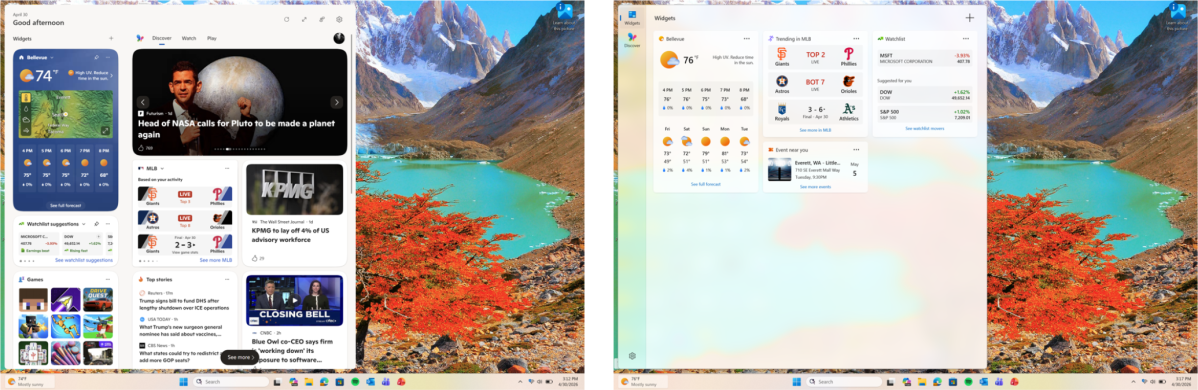
The content’s gone. Yes, I can get the information I probably care about most, but the people who actually make the content are banished to a back page: the Discover feed.
I hate the Discover feed, if only because Microsoft is pushing users to a “new” Discover feed experience that pops up on the new tab pages of Microsoft Edge. In certain cases, Microsoft simply aggregates a number of news sources and tries to summarize them into AI slop. It’s detrimental to creators and journalists, and I can’t be sure the information Discover presents is accurate.
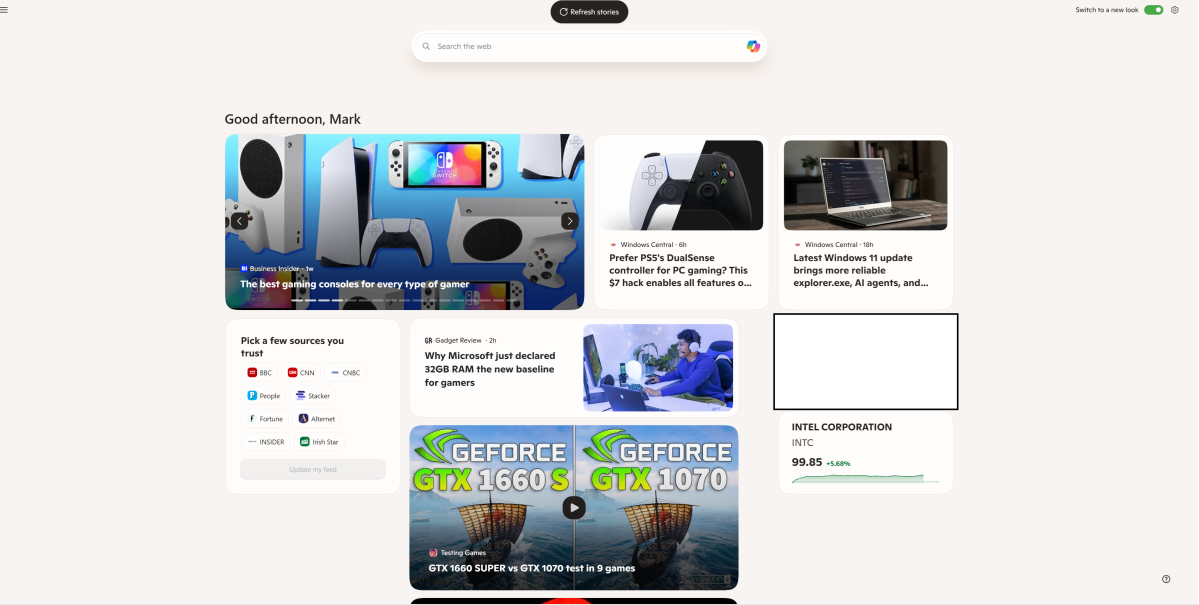
Mark Hachman / Foundry
So yes, hurray for a less distracting Widgets feed in the name of productivity. But I’m scared what this is just another bite for AI as it eats the world.
Under the hood: a “feels faster” Windows 11
The most intriguing aspect of the new updates is what Microsoft is promising under the hood: a “feels faster” commitment to improving performance.
I recently performed some tests on a variety of laptops that differed substantially in terms of productivity benchmarks…but in the real world, didn’t differ by much at all. On one laptop, Microsoft Word opened in half a second. On the other, it took two. Neither is going to cause you to pause and go fetch a cup of coffee, but one will certainly feel more productive than the other.
That’s where Apple’s Macs have had an advantage: a close-knit relationship between the operating system and the silicon, so that Macs feel snappy and productive, even if Windows follows closely behind. This is where Microsoft is putting some of its energy: on “targeted performance/power tuning improvements” for frequently-used apps and experiences like the Start menu, Search, Action Center, and more. The Windows scheduler, which decides which tasks get allocated CPU cycles, is also being tweaked to adjust for different power states, Microsoft’s Ash said. Other improvements ill include better memory management, too.
If Microsoft can smartly allocate the laptop’s performance to the tasks you need, Windows 11 will feel more productive. That’s a plus.
This week, Microsoft chief executive Satya Nadella told Wall Street that it’s hoping to lure back Windows fans. As users, we’re hearing the right things. But how Microsoft shapes Windows 11 and its experiences going forward will tell us if it’s really getting anything done.
This articles is written by : Nermeen Nabil Khear Abdelmalak
All rights reserved to : USAGOLDMIES . www.usagoldmines.com
You can Enjoy surfing our website categories and read more content in many fields you may like .
Why USAGoldMines ?
USAGoldMines is a comprehensive website offering the latest in financial, crypto, and technical news. With specialized sections for each category, it provides readers with up-to-date market insights, investment trends, and technological advancements, making it a valuable resource for investors and enthusiasts in the fast-paced financial world.