
I’ve reviewed dozens of USB-C, Thunderbolt, and DisplayLink docks. And there’s a fundamental problem: They take up a lot of space. The new Baseus Spacemate RD1 Pro USB-C dock solves this two ways: with a vertical, skyscraper-ish approach, plus a key addition few others have: 25W wireless charging.
Most of my recommended Thunderbolt docks stretch six inches or more on your desk, and that’s okay. That space is often taken up by the dock’s chunky metallic chassis, which serves as a heatsink and cools the dock without the need for a noisy fan. But you can’t help but wonder: Could that space be better used in some other way? A USB-C dock like the Spacemate saves space at the cost of some throughput, but the tradeoff can be worth it.
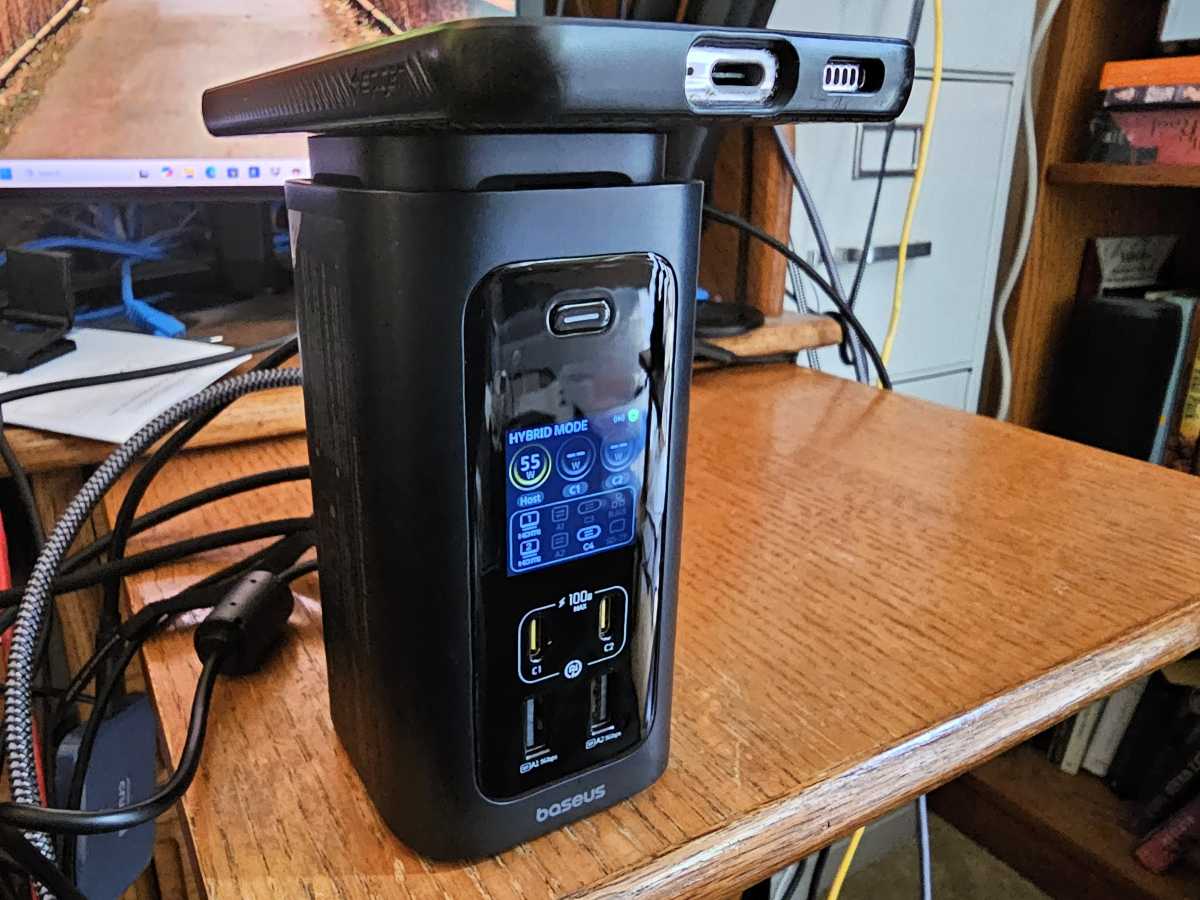
The Baseus SpaceMate RD1 Pro puts a 25W Qi2 wireless charger on the top of the dock, which can be rotated and even extended to allow your phone to be viewable in either landscape or portrait mode. This clearly caters to the Apple iPhone crowd, as it feels like a replacement for the Apple MagSafe charger that can be used with many iPhones in the 16th and 17th generations. However, Qi2 technology was powerful enough to penetrate the Spigen case attached to my Samsung Galaxy phone, allowing it to fast-charge wirelessly. The back of the case became quite warm, though.
It’s a smart addition to a technology that most docks simply ignore. Some offer 10Gbps USB-C ports that can push power, and Thunderbolt connections from a dock must provide at least 15W to a peripheral. (Powered Thunderbolt 4 docks supply up to 100W back to the laptop.) However, most dock makers simply assume you’ll know to connect a USB-C cable to the dock and power your phone.
(Technically, there’s another reason, dock makers have told me: Adding the wireless charging capability can introduced too much electrical interference. Baseus seems to have solved this problem by isolating the charger at the top of the dock.)
Mark Hachman / Foundry
The Baseus Spacemate RD1 falls into the new class of charging docks that almost fetishize the amount of power and data each port produces, displaying it all on a glowing LCD screen. Don’t get me wrong — this is my kink, too.
If you disconnect the dock from its USB-C cable to your laptop, it slips into charging mode, simply telling you how much power is being supplied by each port. Those include a pair of 10Gbps USB-C ports with up to a whopping 100W each. Combined, all of the ports can put out 160W of power, split between the host, wireless charger, and the USB-C ports.
How much power each wired port puts out depends on the power consumed by the others, and what the device itself demands. (I couldn’t push the host power much past 80W, though it’s rated for 100W of charging power to the laptop.)

Mark Hachman / Foundry
Great for charging, solid for I/O, too
On this dock you’ll find ports galore. With a touch of a button, the screen changes from charging mode to hybrid mode, where the dock will update you with what’s in use.
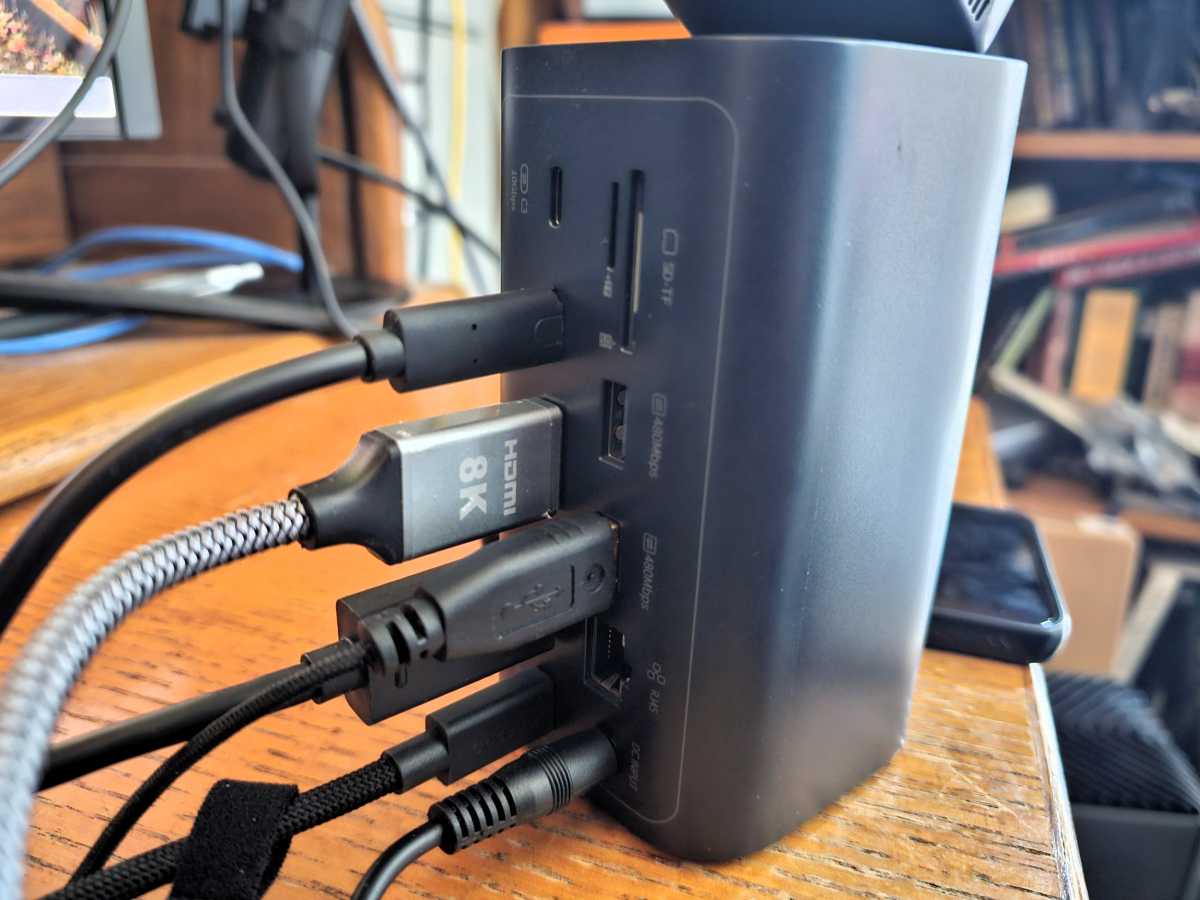
On the front of the RD1 are the two USB-C charging ports, plus a pair of 5Gbps USB-A ports without charging capabilities. On the rear, there are two more 10Gbps USB-C ports, two 480Mbps USB-A ports, a V3.0 SD/TF card slot, gigabith Ethernet, plus two HDMI video ports.
Since this is a USB-C dock, you’ll run into the same trap as other USB-C docks: The RD1’s capabilities are governed by your hardware. Newer laptops, including those with a Thunderbolt port, will have no problems; the dock can output to a single HDMI video port at 4K, and up to 120Hz. Split across both ports, the display output is 4K, 60Hz apiece. All that is dependent upon a newer laptop with DisplayPort and Direct Stream Compression, a feature most laptops don’t advertise. Without them you might see output drop to 4K30 or even 1080p.
Mark Hachman / Foundry
I’ve used the RD1 for a few days. Though installation is literally plug and play, don’t be surprised if you need to reboot and tweak your display resolution just to get the second display to light up. Remember, all of those ports are pushing data across a single 10Gbps connection, too — including the two 10Gbps USB-C ports on the dock. DSC uses compression to smooth things over. It’s effective. Still, too much data will cause things to hitch and stutter, making the 40Gbps Thunderbolt 4 or (up to) 12Gbps Thunderbolt 5 connections better choices, at least on paper.
Still, true innovation seems to happen more with 10Gbps docks than anywhere else, and the Baseus Spacemate is worth a look because of the wireless charging feature alone. And if you act fast, you’ll get a discount; Baseus is knocking a chunk off the price on Amazon until June 30, bringing the $299.99 MSRP price down to $199.99 for the promotional period. It’s a novel dock at a decent price.
This articles is written by : Nermeen Nabil Khear Abdelmalak
All rights reserved to : USAGOLDMIES . www.usagoldmines.com
You can Enjoy surfing our website categories and read more content in many fields you may like .
Why USAGoldMines ?
USAGoldMines is a comprehensive website offering the latest in financial, crypto, and technical news. With specialized sections for each category, it provides readers with up-to-date market insights, investment trends, and technological advancements, making it a valuable resource for investors and enthusiasts in the fast-paced financial world.