
At a glance
Expert’s Rating
Pros
- Only $40
- IP67 weatherizing
- Super efficient cooling via finned design
- Good 10Gbps performance
Cons
- Short two-year warranty
- Connected as NVMe on a Thunderbolt port with bizarrely fast performance (and system issues)
Our Verdict
TerraMaster’s 10Gbps D1 SSD enclosure delivers good 10Gbps performance in a heat-shedding, weatherized design under normal circumstances. But oddly, it enumerated as an internal NVMe SSD on a Thunderbolt 5 port. The result? 40Gbps reads, 20Gbps writes, and several related system issues.
Price When Reviewed
This value will show the geolocated pricing text for product undefined
Best Pricing Today
The D1 SSD is our third foray into Terramaster’s series of rugged, aluminum external SSD enclosures, following on our previous reviews of the 80Gbps D1 SSD Pro and 40Gbps D1 SSD Plus. This unit is quite a bit smaller, and unlike the others carries an IP67 rating. It is rated at 10Gbps and for the most part it performed as such.
However, I was astounded to see it read at over 4GBps and write at 2GBps via our Thunderbolt 5 port. Sadly, the bizarrely fast performance was also accompanied by several system issues soI don’t recommend you try what I stumbled on to.
Read the performance section for the full skinny on this fascinating behavior that I never even knew was possible.
Read on to learn more, then see our roundup of the best external drives for comparison.
What are the Terramaster D1 SSD’s features?
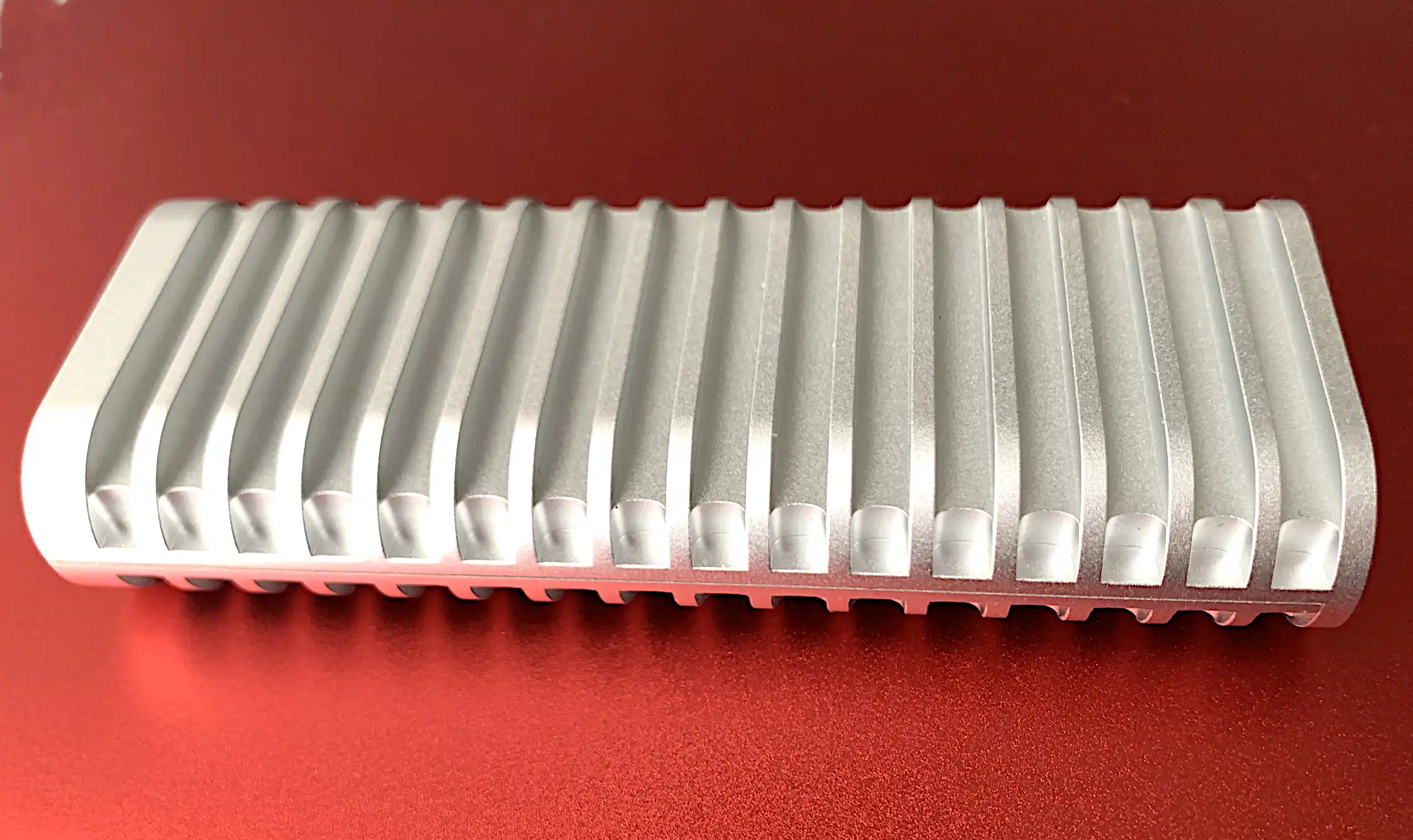
Much like its cousins, the D1 SSD is a finned aluminum enclosure. However, unlike its other family members, it sports a rubber grommet surrounding the interior that seals the unit to prevent moisture and dust from entering. You can see it in the image below.
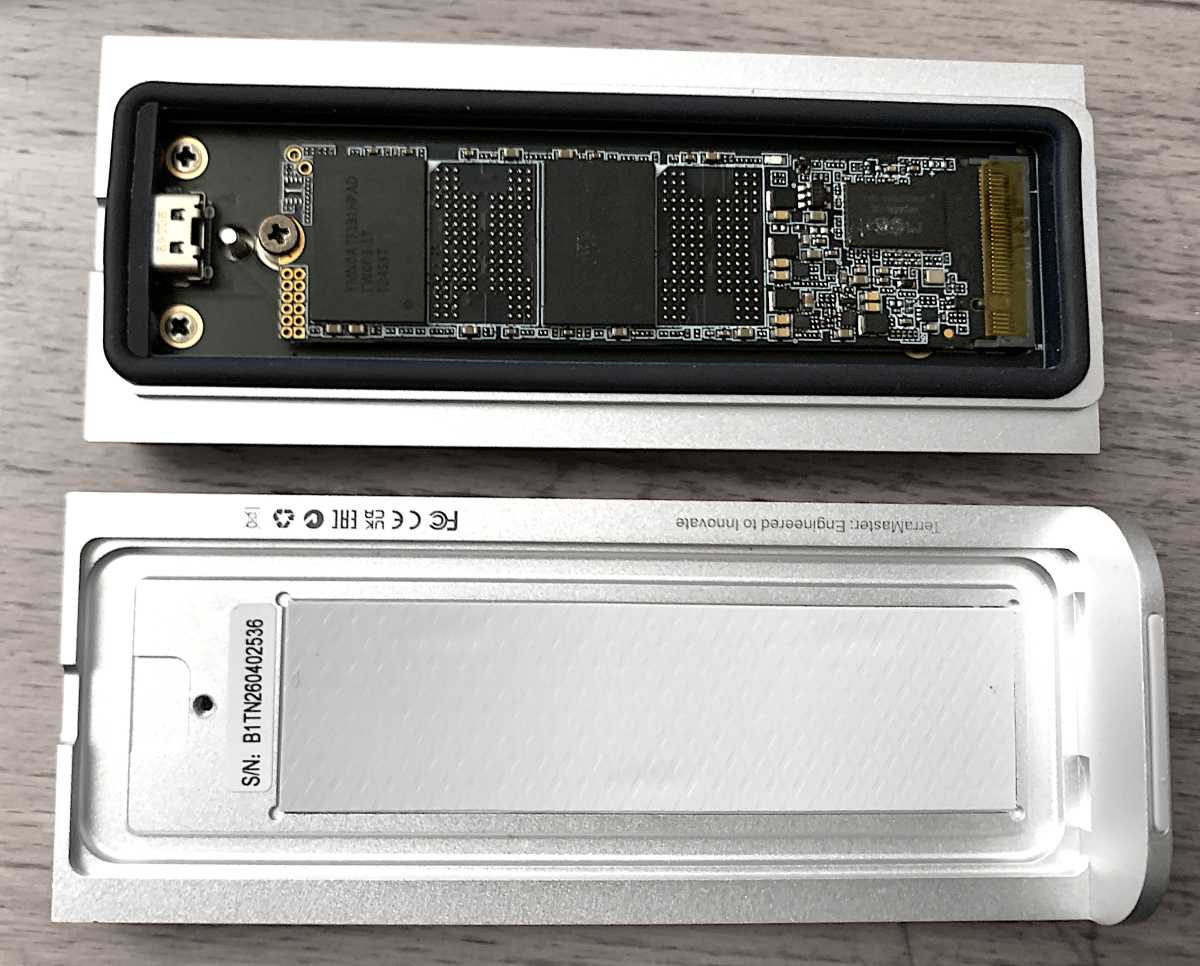
The D1 SSD measures approximately 4.5-inches long, by 1.75-inches wide, by 0.75-inches thick and weighs only around 5.5 ounces loaded. Terramaster provides a classy, zippered hard-shell case for the unit as well as a Type-C cable and screwdriver to help with installing an SSD.
I do have one complaint as regards the D1 SSD’s design — it’s not quite as easy to marry the two halves of the enclosure as it should be. There are two tabs on the top that seat in two dents in the bottom and it took some jockeying to get them to fit together properly.
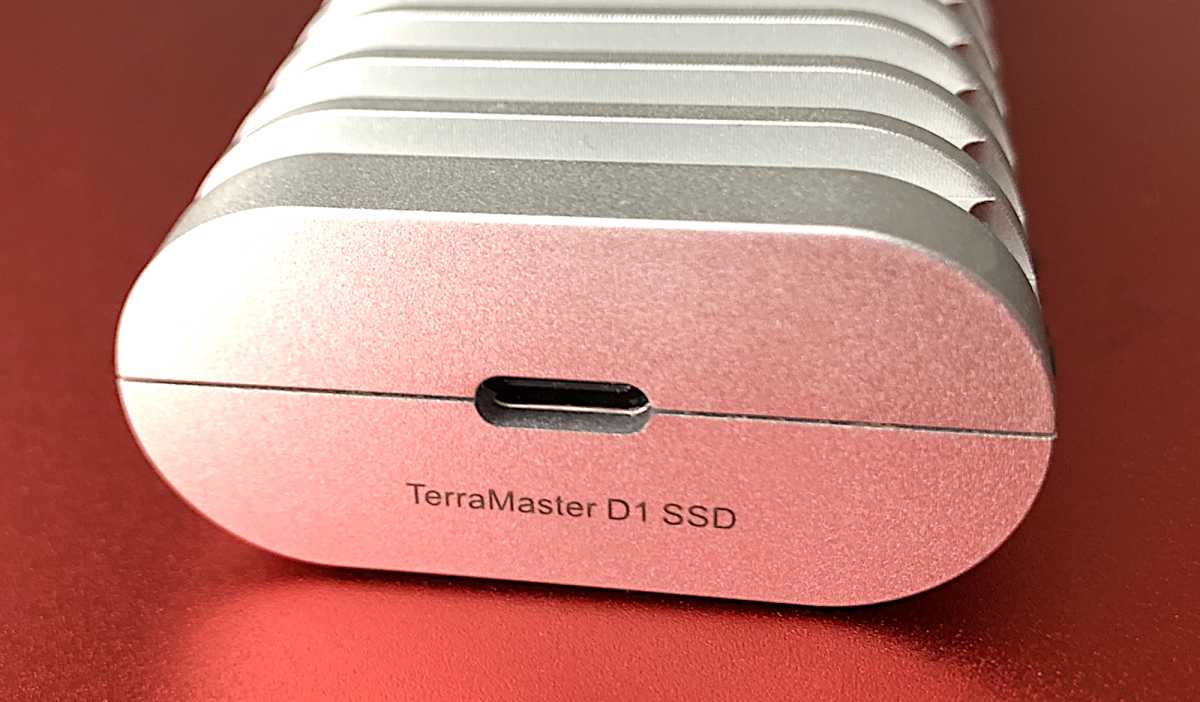
When they are oriented correctly, the ends will be flush and the captive screw that holds the two halves together will turn easily. When they aren’t, it won’t.
How much is the Terramaster D1 SSD?
The D1 SSD is dirt cheap for a weatherized IP67-rated aluminum enclosure that runs super cool: $40. Of course, you’re on your own for the NVMe SSD. Anything PCIe 3.0 or later will work as all easily outstrip 10Gbps USB. That said, I used PCI 4.0 and 5.0 types to test, and that allowed the following to occur.
How fast is the Terramaster D1 SSD?
Before I get into the D1 SSD’s normal 10Gbps results (they were good, and if that’s all you’re interested in — skip a few paragraphs). I’m going to write a bit about a phenomenon I’ve never seen, and didn’t think was possible.
Note that if I hadn’t first attached the D1 SSD to a Thunderbolt 5 port via a Thunderbolt cable I might never have experienced the following. However, having done so…
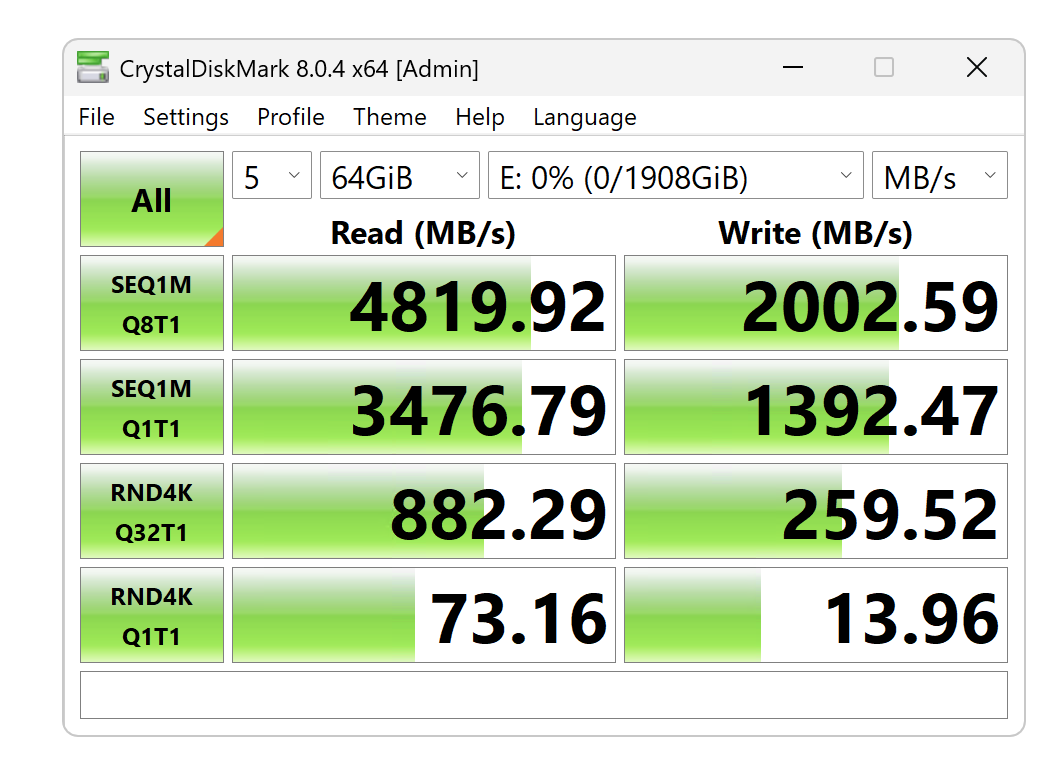
…the 10Gbps D1 SSD was able to read at 4GBps like a 40Gbps SSD, and write at around 2GBps like a 20Gbps SSD. Seriously? This even continued when I plugged into a USB 3.2×2 port, which should be capped at 20Gbps.
It took a while to figure out what was causing this leap in performance, but apparently the D1 SSD was first enumerated by Windows as an internal NVMe SSD. Indeed checking drive properties, the stornvme driver was being used rather than the normal UASPStor. Apparently, pure PCIe communications are possible even through a USB port when this happens. At least on our test bed (described at the bottom of this article).
Below you can see that the system recognized the SSD inside the enclosure, not the enclosure itself.
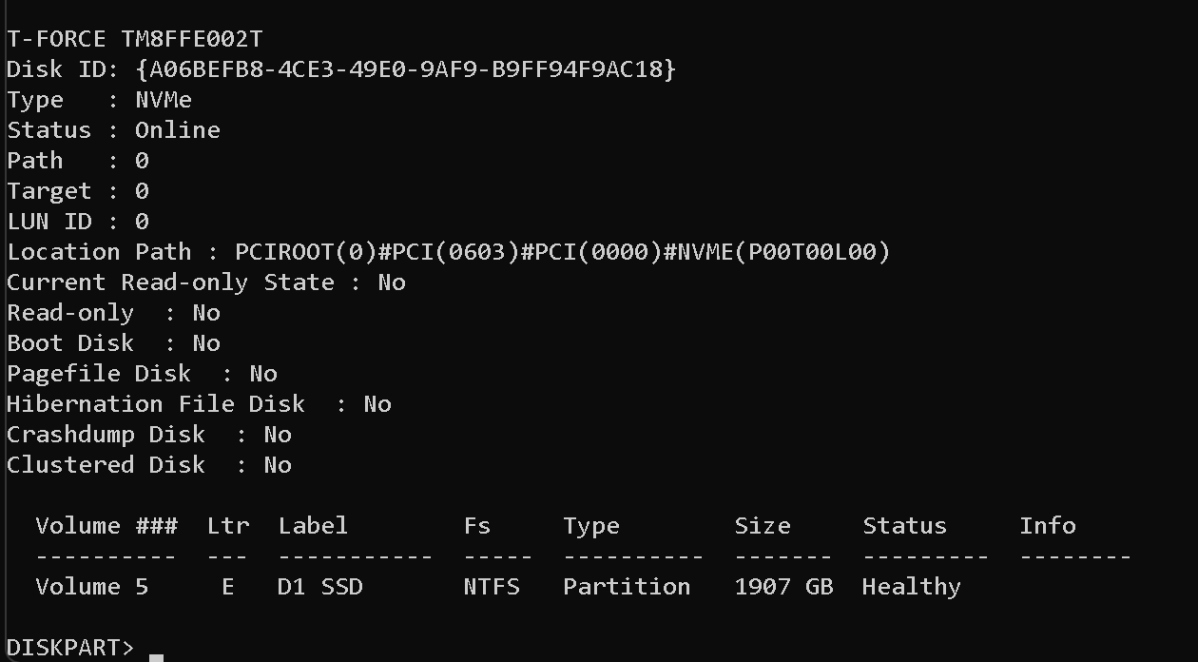
Alas, while the performance was fantastic — other issues arose. First, when subsequently attached to an M4 Max Studio, the D1 SSD enumerated as a 1TB Orico drive in Disk Utility and didn’t show up in Finder. To be fair, the 2TB T-Force SSD inside may have been installed in an Orico enclosure previously. Leftover enumeration info? Is Terramaster working with Orico? Can’t say.
Swapping in a 2TB Solidigm PCIe 4.0 SSD cured the issue on the Mac, but when reattached to our test bed, Disk Manager showed two drives that needed initialization: one unfortunately being my Linux Mint installation. Why that was trashed, I can’t say, but my best guess is that removing the D1 SSD while the system was running screwed up the enumeration table. Internal NVMe SSDs aren’t normally hot-swappable.
With the Solidigm SSD installed, the test results on our Windows test bed were roughly the same 4GBps/2GBps I saw the first go-round. On macOS and Linux Mint, the drive read and wrote at around 1GBps, which is the norm the 10Gbps.
Using Diskpart to clean, reinitialize, and partition the SSD, then rebooting and using the USB 3.2×2 port, finally enumerated the D1 SSD as an external USB SSD.
This is not the first time I’ve experienced oddities with Terramaster firmware. The D1 SSD Pro wouldn’t write at 80Gbps with the cable it shipped with until a firmware update was provided. I say firmware, because other external SSDs using the Realtek RTL921 bridge chip (PCIe 4.0 internally) found inside the D1 SSD have never exhibited this type of behavior before.
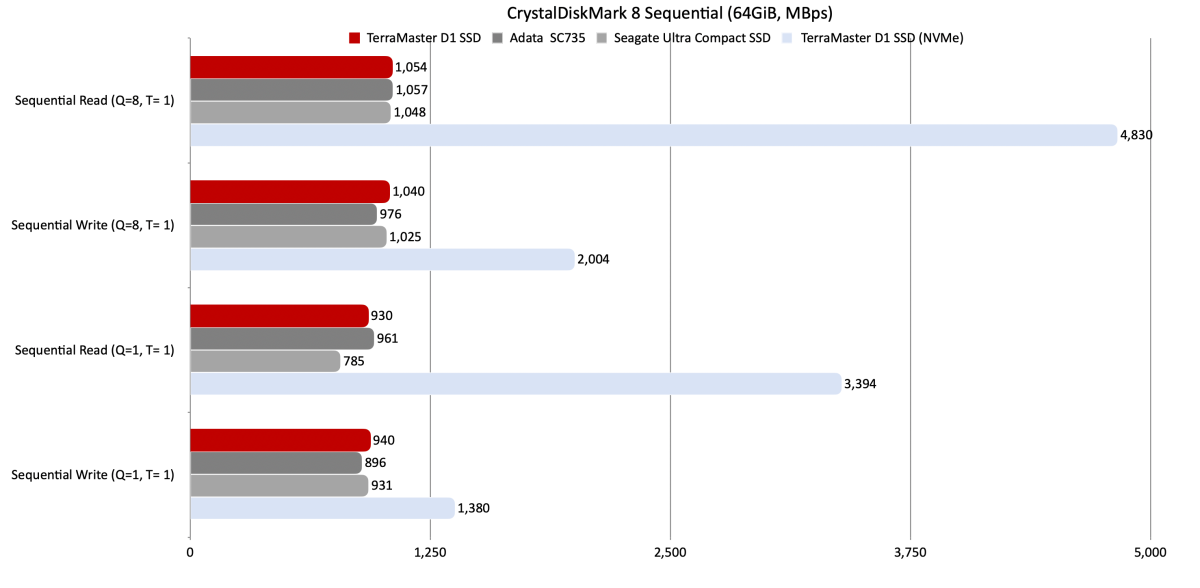
The charts below show both the normal 10Gbps and enumerated-as-NVMe numbers (light blue). In terms of 10Gbps performance, the D1 SSD is right up there with the best of them.
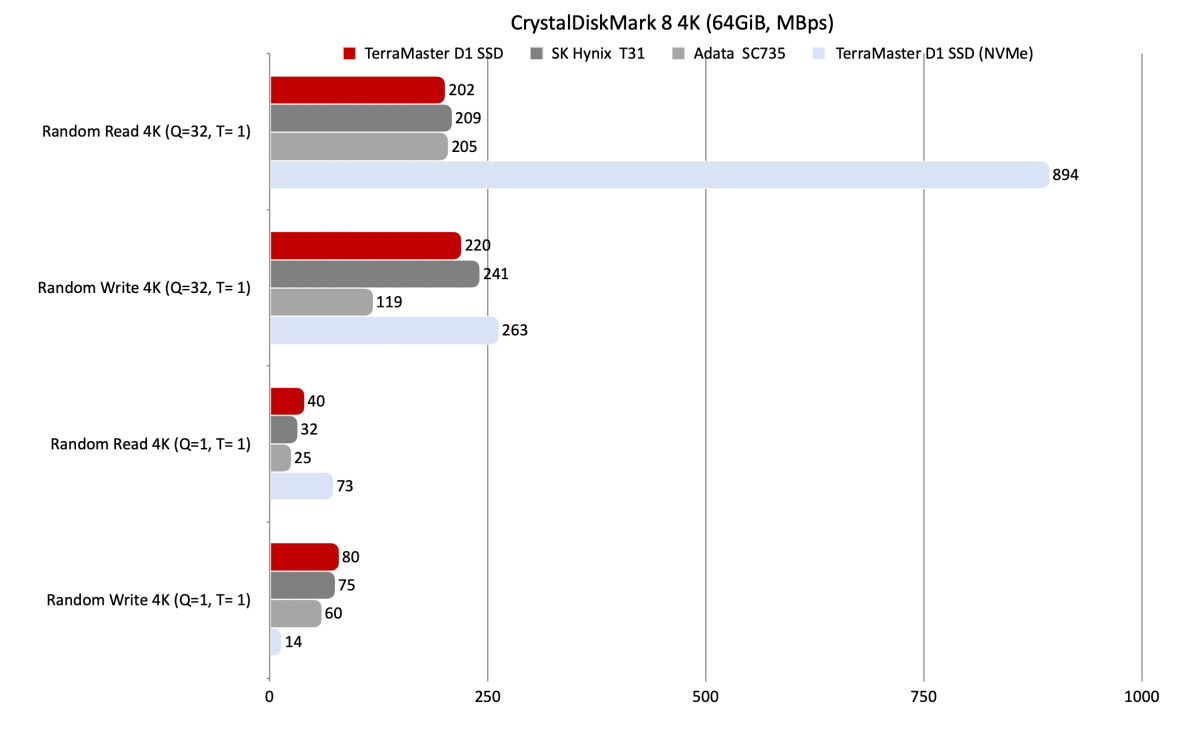
The CrystalDiskMark 8 4K read numbers below are also quite good for 10Gbps.
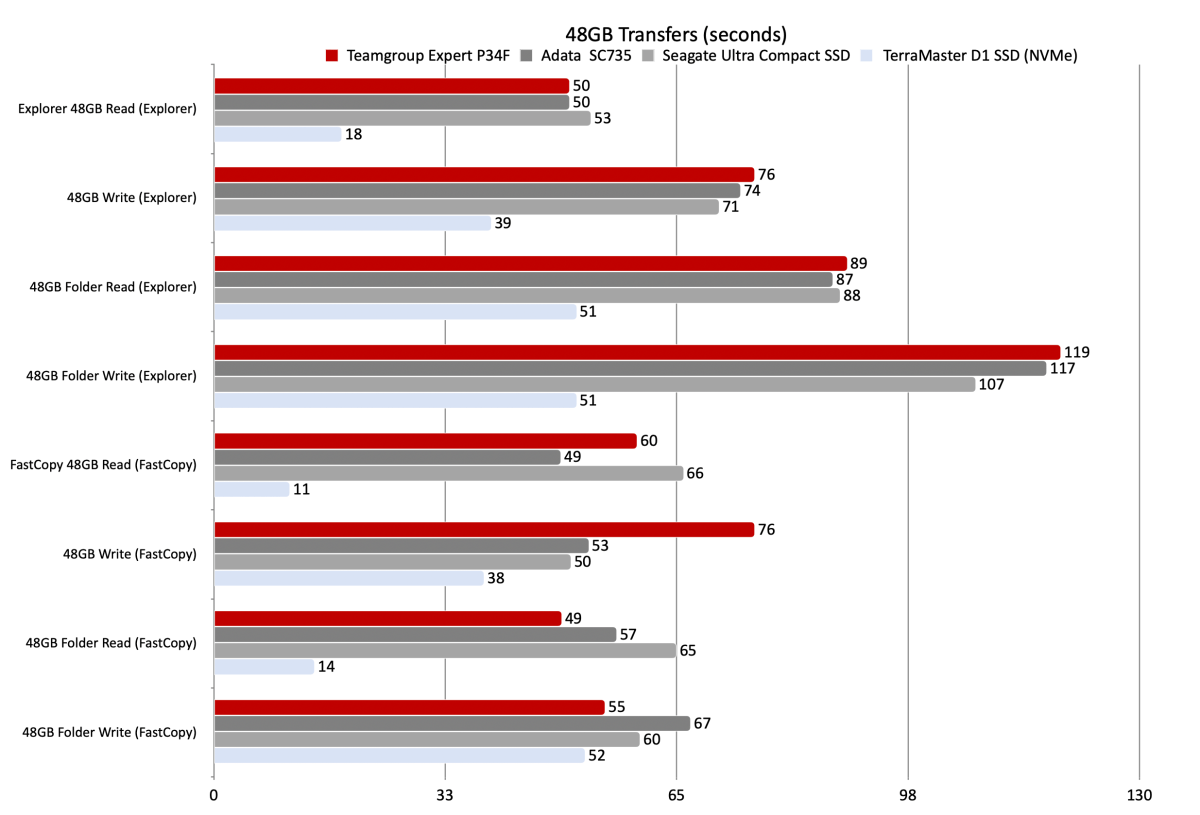
At 10Gbps the D1 SSD was faster than its rivals in some 48GB transfers, and slower in others. Again, running enumerated as NVMe, the numbers were just silly fast.
Yet more NVMe bedazzlement came courtesy of the D1 SSD’s 450GB write times, which were also superior to the other two drives (the Seagate Ultra Compact SSD and Adata SC735) at true 10Gbps. Note that FastCopy makes less difference during long writes.
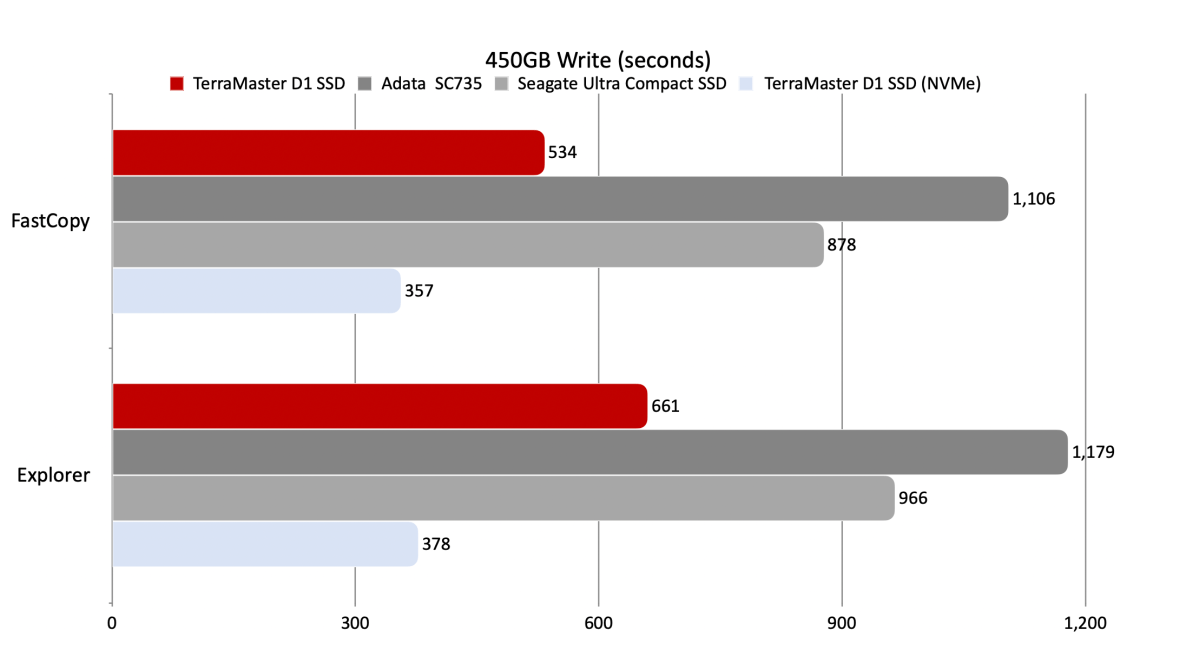
The D1 SSD proved a better-than-solid performer at the 10Gbps norm. But seeing the kind of speed I saw with the drive enumerated as NVMe raises a slew of questions. How is it even possible, and why can’t more external enclosures act this way? Just for starters.
Should you buy the D1 SSD?
The D1 SSD looks cool, runs cool, is weatherproof, and is super-affordable for such quality construction. I’m guessing you won’t be able to futz the NVMe thing after Terramaster updates the firmware, nor should you run the risk of trashing other drives on your system. That said, it was hella’ cool seeing a 10Gbps USB SSD read at 40Gbps.
If you do try to mimic my results, which may stem partly from my talent for borking otherwise stable products (it’s a blessing, it’s a curse), I suggest that you never pull the drive off the system. Especially when powered on.
I bear zero responsibility for any attempts to use this product in a manner not consistent with using a normal 10Gbps USB SSD.
How we test
Drive tests currently utilize Windows 11 24H2, 64-bit running off of a PCIe 4.0 Samsung 990 Pro in an Asus Z890-Creator WiFi (PCIe 4.0/5.0) motherboard. The CPU is a Core Ultra i5 225 feeding/fed by two Crucial 64GB DDR5 5600MHz modules (128GB of memory total).
Both 20Gbps USB and Thunderbolt 5 are integrated into the motherboard and Intel CPU/GPU graphics are used. Internal PCIe 5.0 SSDs involved in testing are mounted in an Asus Hyper M.2 x16 Gen5 adapter card sitting in a PCIe 5.0 slot.
We run the CrystalDiskMark 8.04 (and 9), AS SSD 2, and ATTO 4 synthetic benchmarks (to keep article length down, we report only the first) to find the storage device’s potential performance. Then we run a series of 48GB transfer and 450GB write tests using Windows Explorer drag and drop to show what users will see during routine copy operations, as well as the far faster FastCopy run as administrator to show what’s possible.
A 25GBps two-SSD RAID 0 array on the aforementioned Asus Hyper M.2 x16 Gen5 is used as the second drive in our transfer tests. Formerly the 48GB tests were done with a RAM disk serving that purpose.
Each test is performed on a NTFS-formatted and newly TRIM’d drive so the results are optimal. Note that in normal use, as a drive fills up, performance may decrease due to less NAND for secondary caching, as well as other factors. This issue has abated somewhat with the current crop of SSDs utilizing more mature controllers and far faster, late-generation NAND.
This articles is written by : Nermeen Nabil Khear Abdelmalak
All rights reserved to : USAGOLDMIES . www.usagoldmines.com
You can Enjoy surfing our website categories and read more content in many fields you may like .
Why USAGoldMines ?
USAGoldMines is a comprehensive website offering the latest in financial, crypto, and technical news. With specialized sections for each category, it provides readers with up-to-date market insights, investment trends, and technological advancements, making it a valuable resource for investors and enthusiasts in the fast-paced financial world.