
Headsets are the PC gaming default, but they can’t reproduce the full scale of a modern game or film soundtrack. A speaker system can, and the best way to connect is through HDMI® technology, using the Enhanced Audio Return Channel (eARC).
Why speakers win for PC gaming
Real dynamic range. Games now mix with film-like range, from footsteps to collapsing buildings. Speakers reproduce those swings naturally, while small headphone drivers compress them.
Physical bass. Many games include a Low-Frequency Effects (LFE) channel for a subwoofer. Explosions and engines move air in the room and register in your chest.
True positional sound. Instead of virtualized surround, a 5.1, 7.1 or Atmos system places discrete channels around and above you.
Comfort and shared play. No clamping force or sweaty pads over long sessions, and local multiplayer partners and an audience of friends and family hear everything too.
The bonus: movies and streaming
Film soundtracks are mixed for large rooms with a dedicated subwoofer channel. With the right connection, your PC can deliver lossless Dolby TrueHD, Dolby Atmos and uncompressed multichannel PCM.

HDMI Licensing Administrator, Inc.
Why HDMI® eARC is the best way to connect
Analog and optical connections can’t carry lossless surround. HDMI eARC supports uncompressed 24-bit/192kHz PCM, plus Dolby TrueHD with Atmos, DTS-HD Master Audio and DTS:X. HDMI-CEC lets one remote control the whole system.
There are three ways to connect:
- Use the TV as the audio hub. Connect the PC to a TV input and the soundbar or receiver to the TV’s eARC port. 4K at 120Hz and VRR go to the display, and full-quality audio goes to the speakers.
- Run the PC through an AV receiver or soundbar. Connect the PC to the receiver’s HDMI input and the receiver’s eARC output to the display’s eARC input. The receiver handles the audio directly. Make sure it supports pass-through of the gaming features you need, such as 4K at 120Hz, VRR and HDR.
- Use an HDMI audio extractor. It splits video to the monitor and audio to the eARC system when neither device does both, at the cost of an extra powered box.
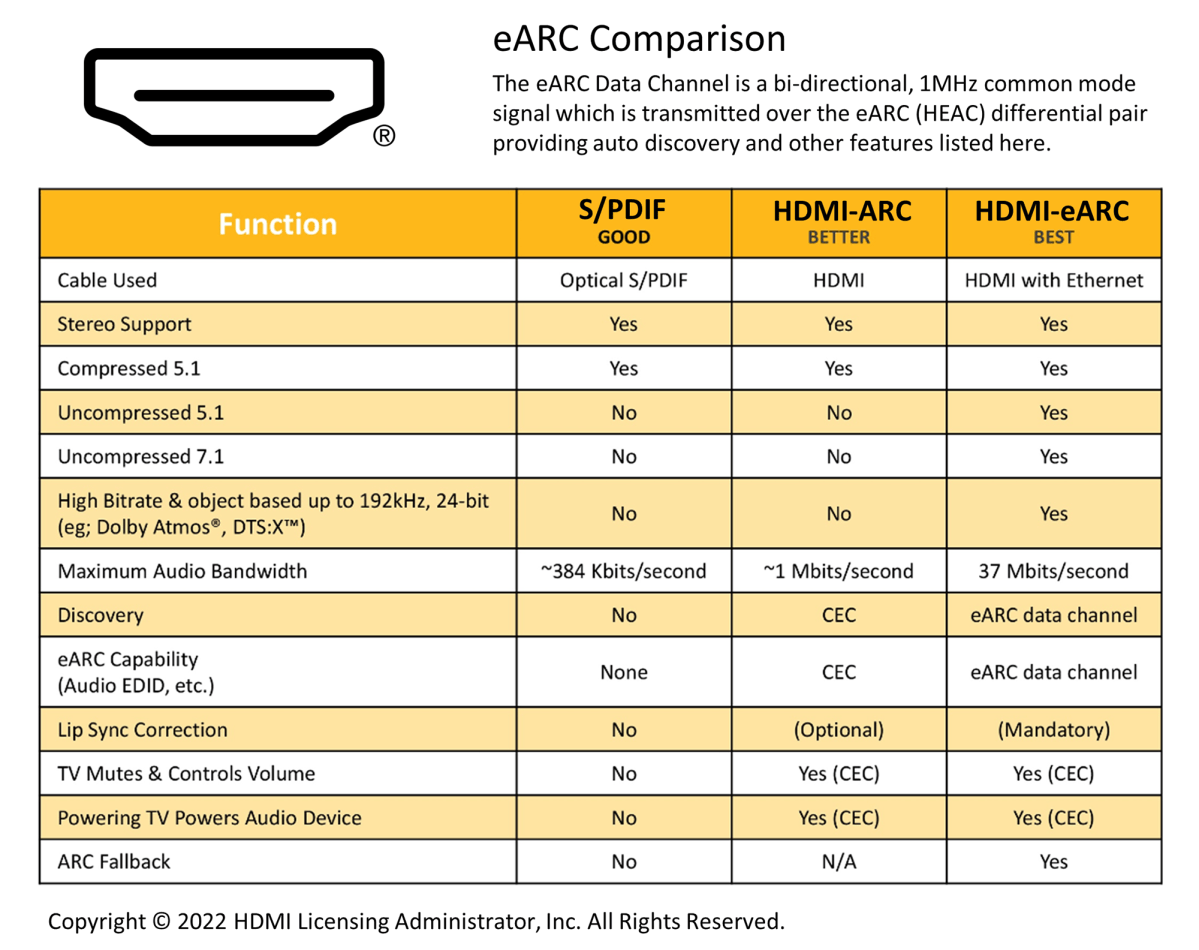
HDMI Licensing Administrator, Inc.
Setting up lossless audio and Dolby Atmos
These are general instructions and individual devices and software versions may be different.
- For uncompressed surround, open the classic Sound Control Panel (Windows key + R, then type mmsys.cpl). Right-click your HDMI audio device, choose Configure Speakers, and select 5.1 or 7.1.
- Dolby Atmos: Set up the free Dolby Atmos for home theater in the Dolby Access app, then select it on the device’s Spatial Sound tab.
- Match each game: Use Atmos for titles that support it, and switch to 5.1 or 7.1 PCM for standard surround titles.
- Check the chain: Enable HDMI audio in the NVIDIA or AMD control panel, set the TV’s eARC to On and its output to Pass-through, and use a certified Ultra High Speed HDMI® Cable rated for 48Gbps.
For immersion, comfort and shared play, speakers beat headphones for both gaming and movies. For more information, visit www.hdmi.org.
The terms HDMI, HDMI High-Definition Multimedia Interface, HDMI Trade Dress and the HDMI Logos are trademarks or registered trademarks of HDMI Licensing Administrator, Inc. All other trademarks, registered trademarks, or service marks are the property of their respective owners in the United States and/or other countries.
This articles is written by : Nermeen Nabil Khear Abdelmalak
All rights reserved to : USAGOLDMIES . www.usagoldmines.com
You can Enjoy surfing our website categories and read more content in many fields you may like .
Why USAGoldMines ?
USAGoldMines is a comprehensive website offering the latest in financial, crypto, and technical news. With specialized sections for each category, it provides readers with up-to-date market insights, investment trends, and technological advancements, making it a valuable resource for investors and enthusiasts in the fast-paced financial world.