

At a glance
Expert’s Rating
Pros
- Massive 8TB or 20TB capacity
- Doesn’t require separate AC adapter when used on a 15-watt Type-C port
- Data recovery included with two-year warranty
- Xbox on PC-certified
Cons
- Pedestrian performance (200MBps), even for a hard drive
- Bulky compared to 2.5-inch HDDs
Our Verdict
When you need more room for your game collection, the Seagate X Vault HDD, with its vast quantities of affordable capacity, is a great alternative to currently very expensive SSDs. Performance is hardly SSD-like, but the drive does run off of USB bus power alone (15 watts required) so you don’t have to hassle with an AC adapter.
Price When Reviewed
This value will show the geolocated pricing text for product undefined
Best Pricing Today
If you’ve been shopping SSD prices recently, you may be suffering a severe case of sticker shock. 1TB external SSDs are around $200 — more than twice what they cost just six months ago. And forget 8TB SSDs — $1,300 and climbing.
What if I told you you could get 8TB of storage for only $270? Alas, it’s not going to be nearly as fast as it is vast, but Seagate’s X Vault external 3.5-inch hard drive gives you the space you need for large game collections at a far more reasonable price.
Read on to learn more, then see our roundup of the best external drives for comparison.
What are the Seagate FireCuda X Vault’s features?
The FireCuda X Vault is an external 3.5-inch (yes, 3.5-inch!) hard drive with 10Gbps USB 3.2 Type-C connectivity. It’s a roughly rectangular black box with some mildly retro styling on the front as well as a configurable RGB lighting strip up the center of the top to spruce things up appearance-wise.
Measuring approximately 7.75 inches long, by 5.25-inches wide, by 1.75-inches tall, the drive also weighs the better part of 3 pounds (2 pounds, 12.5 ounces). No, it’s not demure. Instead of rubber feet, there’s a large anti-skid pad covering a good 75 percent of the drive’s belly. That’s a good thing as hard drives don’t like to be jostled when they’re operational, and don’t like it much even when they aren’t.
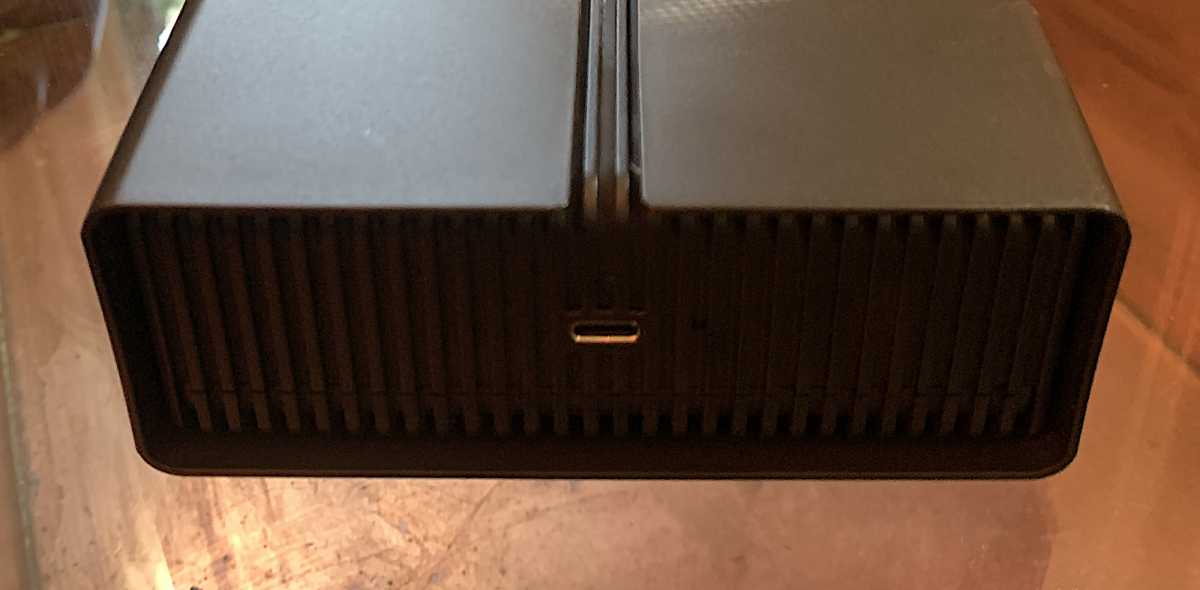
You might notice that I didn’t mention a power jack. There isn’t one. Unique for an external 3.5-inch HDD (in our experience), the X Vault relies solely on USB bus power. As long as your Type-C port can deliver 15 watts, that is. USB4, Thunderbolt 3/4/5, USB power delivery ports such as those used to charge laptops, and many used for charging other devices should measure up.
Other, older USB 3.x ports likely will not. The X Vault wouldn’t power up completely on our usual USB 3.2×2 port (blinking red activity light), but it was fine on our test bed’s Thunderbolt 4 ports and Type-C charging port. Consult the specs in your computer’s user guide before buying.
Seagate provides a two-year warranty on the X Vault, which includes free data recovery. A nice bit of peace of mind.
How much does the Seagate FireCuda X Vault cost?
The 8TB version of the X Vault costs the aforementioned $270, but there’s also a 20TB version available for $530.
I should mention that while hard disk drives are far more reliable these days than in the past, if you’re storing anything on them exclusively, about the only moderately affordable way to keep it backed up is to use another HDD of equal size as a mirror.
The good news is that two 8TB X Vaults are still less than half the cost of an 8TB SSD.
How fast is the Seagate FireCuda X Vault?
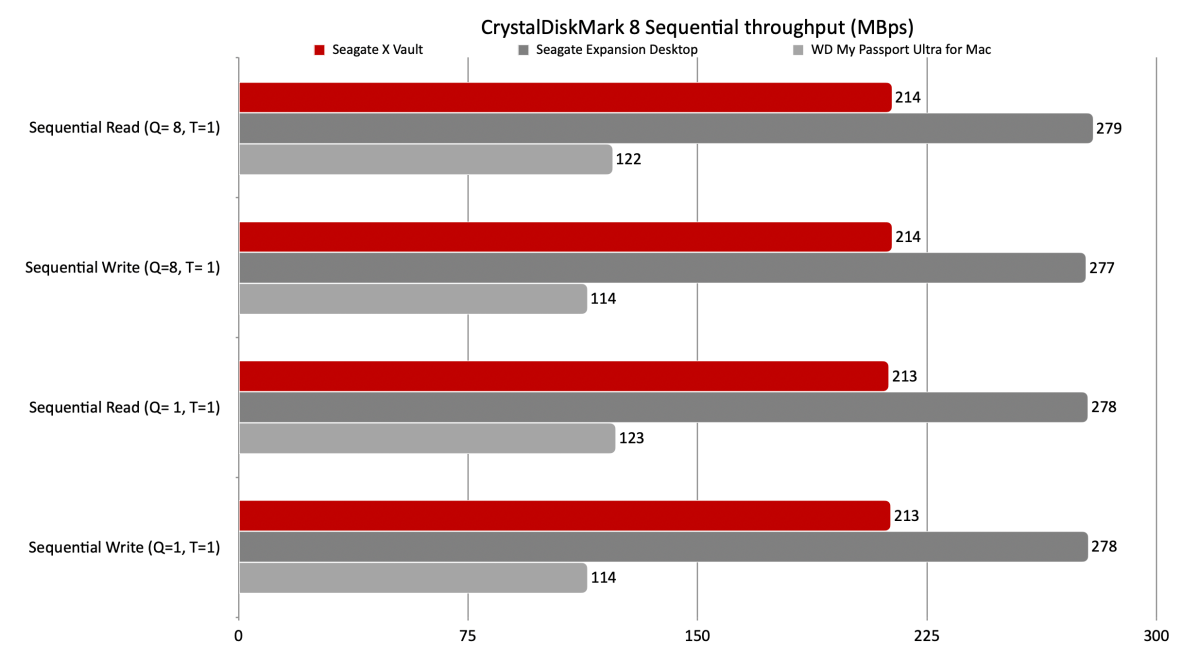
If you’re looking for SSD speed, well, look at SSDs. The 8TB FireCuda X Vault that I tested is about capacity, not blazing performance. It clocks in at 200- to 210MBps for sequential transfers, with very HDD-like seek times of 20 to 25 milliseconds. It’s on the low end for a modern 3.5-inch hard drive.
By way of comparison, I’ve seen its 3.5-inch brethren approach 300MBps. On the other hand, 2.5-inch external hard drives lag significantly around the 125MBps range, so the X Vault is certainly a step up from those.
SSD-like or not, the X Vault is still fast enough to stream 4K movies, any kind of audio, as well as load a game in a reasonable amount of time — given that the caching algorithms of the game are done properly.
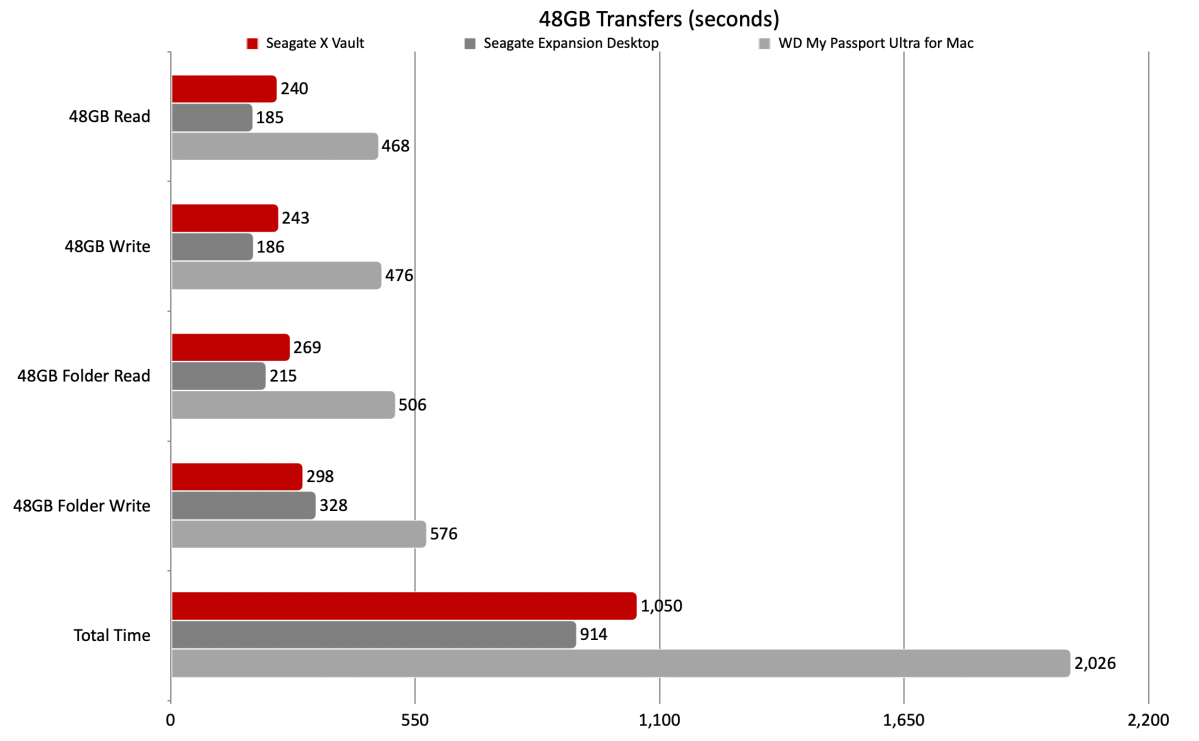
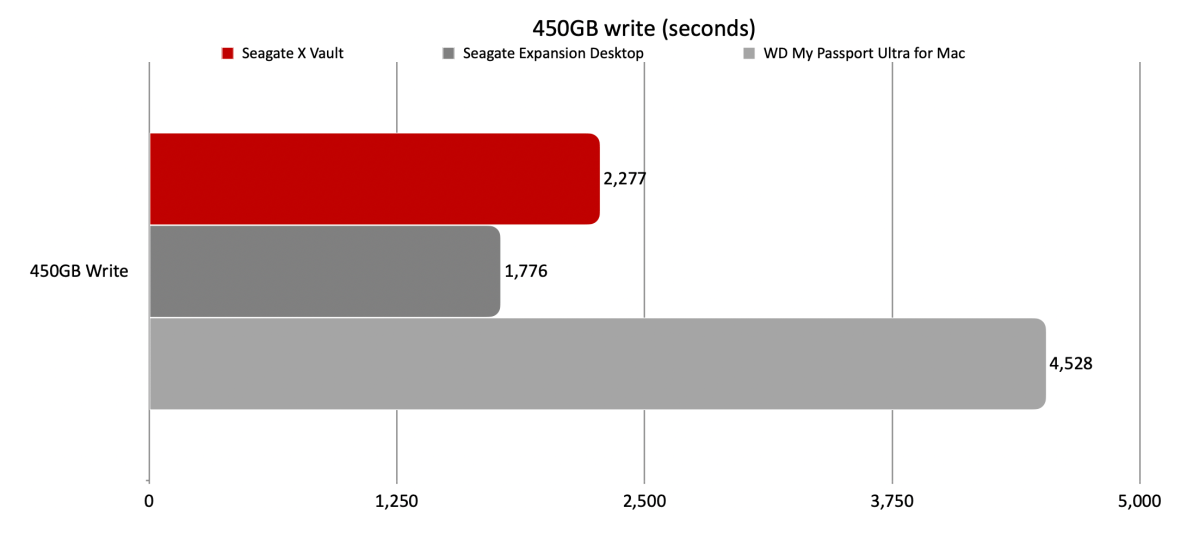
Below you can see that while slower than Seagate’s own 3.5-inch Expansion Desktop, the X Vault is far faster than a typical 2.5-inch HDD, represented in the charts below by the WD My Passport Ultra for Mac.
Two 8TB X Vaults are still less than half the cost of an 8TB SSD.
Again, the X Vault isn’t fast for a 3.5-inch HDD, but it beat the heck out of a 2.5-inch model in our 48GB transfers.
Same story with the 450GB write, the X Vault loses to the Expansion Desktop but mops the floor with the WD My Passport Ultra for Mac.
While a fifth the speed of a 10Gbps SSD, the X Vault is, once again, about affordable capacity. SSDs these days are most certainly not.
Should you buy the Seagate FireCuda X Vault?
If you need scads of storage space, and aren’t deadly serious about optimal performance, then the X Vault is easily one of the most affordable ways to accrue it. And after decades of having to corral wall warts for my external 3.5-inch hard drives — I get a real kick out of the X Vault’s lack thereof.
Just remember that the X Vault is a hard drive, and treat it with the care it requires. And consider two if you store irreplaceable data on it that’s not otherwise backed up.
How we test
Drive tests currently utilize Windows 11 24H2, 64-bit running off of a PCIe 4.0 Samsung 990 Pro in an Asus Z890-Creator WiFi (PCIe 4.0/5.0) motherboard. The CPU is a Core Ultra i5 225 feeding/fed by two Kingston Fury 32GB DDR5 4800MHz modules (64GB of memory total). Both 20Gbps USB and Thunderbolt 5 are integrated and Intel CPU/GPU graphics are used. SSDs involved in the test are mounted in a HighPoint 7604A 16x PCIe 5.0 adapter card.
We run the CrystalDiskMark 8, AS SSD 2, and ATTO 4 synthetic benchmarks (to keep article length down, we only report one) to find the storage device’s potential performance, then a series of 48GB and 450GB transfers tests using Windows Explorer drag and drop to show what you’ll see under Window, as well as the far faster Xcopy to show what’s possible.
The 48GB and 450GB write tests are written to/from a 25GBps two-SSD RAID 0 array on the aforementioned Highpoint 7604A. Formerly the 48GB tests were done with a RAM disk.
Each test is performed on a newly NTFS-formatted and TRIM’d drive so the results are optimal. Note that in normal use, as a drive fills up, performance may decrease due to less NAND for secondary caching, as well as other factors. This can be less of a factor with the current crop of SSDs with far faster late-generation NAND.
Caveat: The performance numbers shown apply only to the drive we were shipped and to the capacity tested. SSD performance can and will vary by capacity due to more or fewer chips to shotgun reads/writes across and the amount of NAND available for secondary caching. Vendors also occasionally swap components. If you ever notice a large discrepancy between the performance you experience and that which we report, by all means, let us know.
This articles is written by : Nermeen Nabil Khear Abdelmalak
All rights reserved to : USAGOLDMIES . www.usagoldmines.com
You can Enjoy surfing our website categories and read more content in many fields you may like .
Why USAGoldMines ?
USAGoldMines is a comprehensive website offering the latest in financial, crypto, and technical news. With specialized sections for each category, it provides readers with up-to-date market insights, investment trends, and technological advancements, making it a valuable resource for investors and enthusiasts in the fast-paced financial world.