|
4.97/5
Calendar 365 rating
|
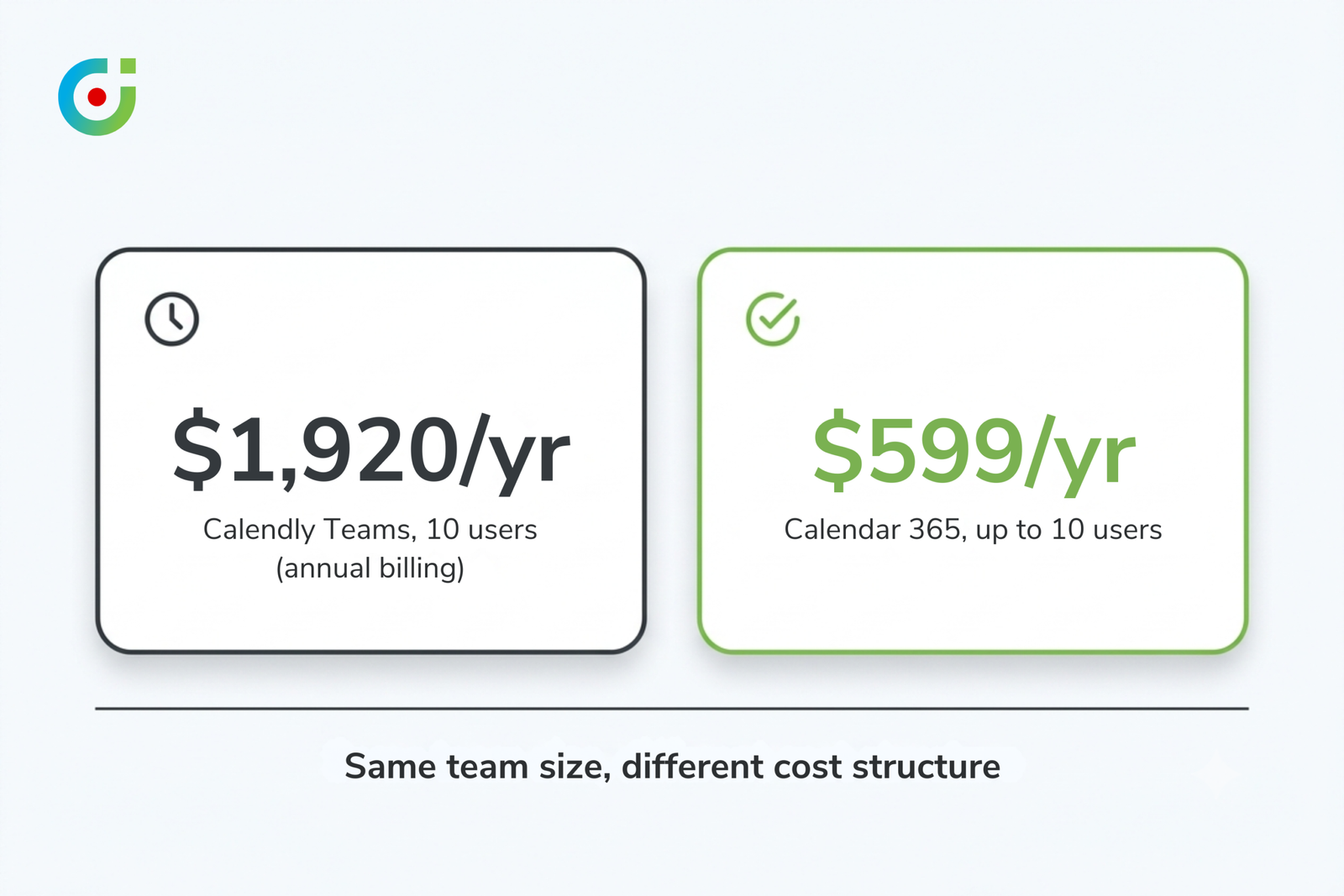
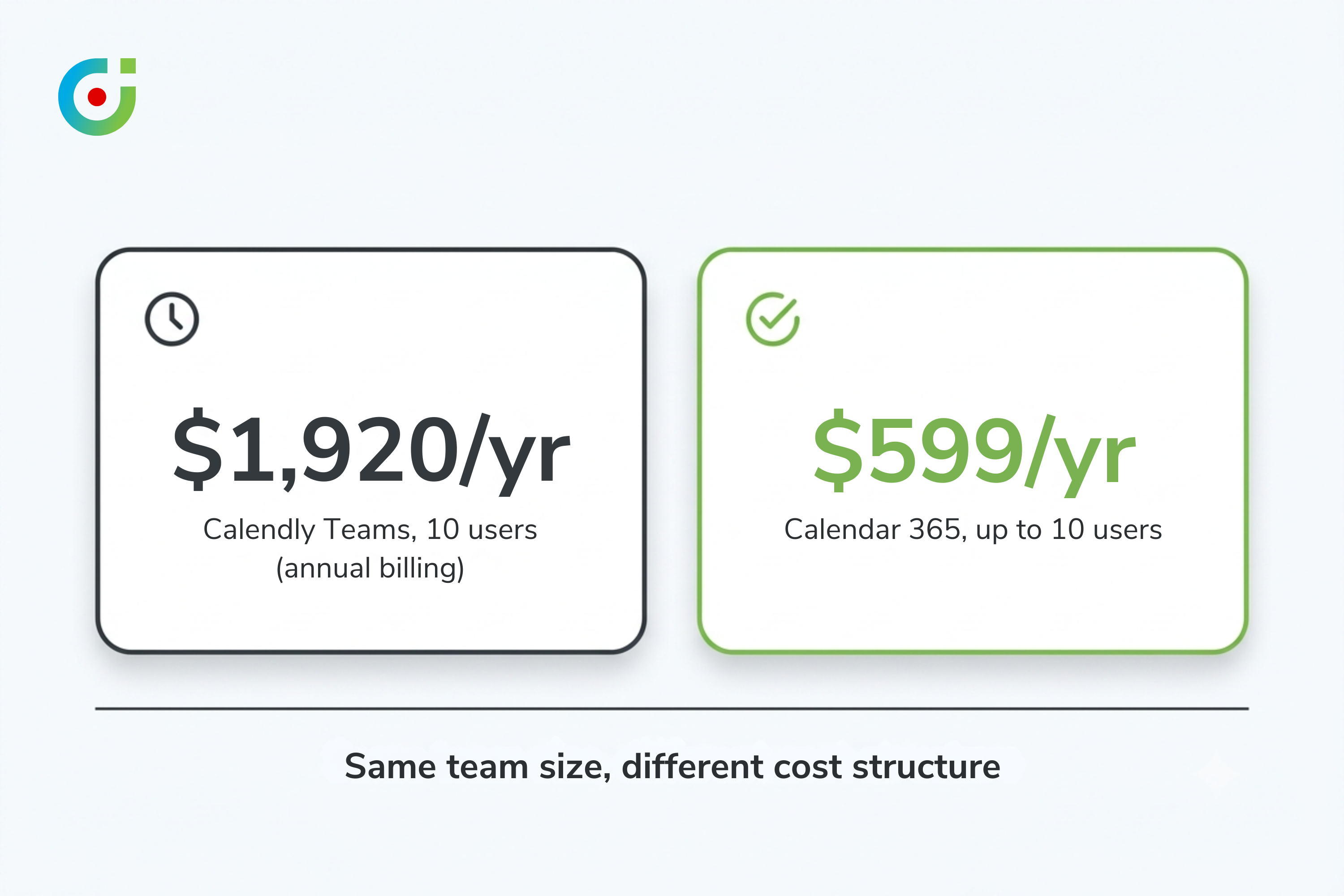
$599/yr
For 1-10 users
|
$16/seat/mo
Calendly Teams (annual billing)
|
1 in 4
workers spend 3-4 hrs/week scheduling
|
Give Calendly its due: the reputation is earned. Click a link, pick a slot, done. No fifteen-email thread about who’s free Tuesday at 2. That’s not nothing. 1 in 4 workers report spending 3-4 hours a week on scheduling logistics alone, according to Calendly’s own research [1]. So reaching for a dedicated booking tool to kill that friction isn’t a bad call. For most companies, it’s the obvious one, maybe the only one worth debating.
Dynamics 365 teams, though, are a different case. Nobody really stops to ask why. Calendly is solving a real problem, one the rest of the market genuinely has. D365 shops just happen to already own the fix: a dynamics 365 calendar layer sitting inside the CRM they’re already paying for, unopened, mostly because nobody thought to check what was behind that particular door.
Key numbers behind this argument:
- Calendar 365 holds a 4.97/5 rating across 33 reviews [2]
- Calendar 365 costs $599 a year for up to 10 users, not per seat
- Calendly’s Teams plan runs $16 per seat per month on annual billing, roughly $1,920 a year for a 10-person team [3]
- 1 in 4 workers spend 3-4 hours a week scheduling meetings alone [1]
The Conventional Wisdom: Scheduling and CRM Are Separate Jobs
Ask a Dynamics 365 admin why the team still runs Calendly, and you’ll get an answer that sounds perfectly reasonable. Dynamics 365 is the CRM, the system that stores records, tracks relationships, drives the sales and service workflow. Calendly handles availability and takes the friction out of booking a meeting. Two different jobs. Two different tools, stitched together with Power Automate or Zapier and left alone.
And the reasoning holds up, mostly, because Calendly really is better than an email thread. More than one in five sales and marketing professionals are already juggling three or more scheduling tools just to get a meeting on the books [1]. Adding one more specialist tool to that pile doesn’t read as strange. It reads as keeping pace.
Underneath it all sits one assumption, rarely stated out loud: scheduling belongs outside the CRM, in a specialist product wired back in through middleware. CRM platforms, so the thinking goes, were never built to handle this well on their own. Fair enough, for a while. That assumption held for years and, honestly, it made sense while it did. Whether it still does is worth checking, particularly once you’re the one signing the renewal invoice.
Where It Breaks Down
The trouble with pairing Calendly and D365 isn’t the booking experience, that part works fine. Calendly is genuinely good at getting a meeting onto a calendar. Trace what happens to that booking afterward, though, and the trouble starts.
Here’s the mechanism. Calendly’s connection to Dynamics 365 runs through Power Automate, a middleware layer translating between two systems that were never built to talk to each other directly. Calendly’s own documentation confirms what the integration actually does: it creates a lead, creates an appointment, and updates that lead as new appointments roll in [4]. And that’s it. Entity sync stops right there.
No Accounts. No Contacts. No custom entities, no native activity types like Tasks, Phone Calls, Letters, or Campaign Activities, the stuff most D365 teams actually track day to day. And most bookings on an active sales team aren’t brand-new leads anyway; they’re an existing account or a qualified contact already sitting in the system. Which narrows what the integration is actually doing in a given week to something smaller than the pitch implies. Somebody, usually whoever noticed first, still has to go track down the right record and link it by hand.
There’s a second catch, and it tends to surface only after the contract’s already signed. The Power Automate connection to Dynamics 365 works on Calendly’s Enterprise plan, full stop [4]. Stuck on the standard Teams plan and want any CRM sync at all? You’re building it yourself now, Zapier, Make, or a homegrown Power Automate flow, and maintaining it too.
Would a CRM admin actually clock this gap day to day? Not right away, usually. New-lead capture is the first thing anyone tests, and it works fine there. The gap shows up weeks later, when a manager pulls an activity report and the numbers just don’t add up: half the meetings never made it past the lead stage.
Try this on your own setup. Pull up the dynamics 365 calendar view for any rep who books through Calendly, and count how many of last month’s external meetings show up as anything beyond a lead record. Not many, usually. Most teams running this stack guess higher than the real number.
What the Data Actually Shows
Put the entity gap next to the plan restriction, and the case for running Calendly inside a Dynamics 365 environment thins out fast, thinner than any setup guide is going to tell you.
Start with what the integration actually delivers, not what the marketing page implies. Calendly’s own help documentation confirms it: the sync creates and updates leads. Only leads. Not Accounts, not Contacts, none of the activity types tied to an existing relationship [4]. For a team working renewals, upsells, or ongoing service rather than net-new prospecting, that scope misses most of the calendar, arguably the part that matters more.
Now add the cost. Calendly’s Teams plan runs $16 per seat per month on annual billing [3], which puts a ten-person team at roughly $1,920 a year before anyone bolts on Power Automate premium connectors or a Zapier plan. And Teams isn’t even the tier where D365 sync shows up. That lives on Enterprise, priced higher still.
Now compare that to what’s already sitting inside the platform. A native calendar layer, Calendar 365, at $599 a year for up to ten users, not per seat, carrying a 4.97/5 rating across 33 reviews [2]. Past a handful of users, the math just isn’t close anymore. And the CRM-native option never touches Power Automate, not once.
None of this makes Calendly a bad product. To be clear about that. It does what it was built to do, and does it well. The mismatch only shows up once a standalone scheduling tool gets wired into a CRM environment it was never actually designed to serve, and at that point, the promised connection covers a lot less ground than the setup guide implied.
A Better Framework: The Where-Does-It-Live Test
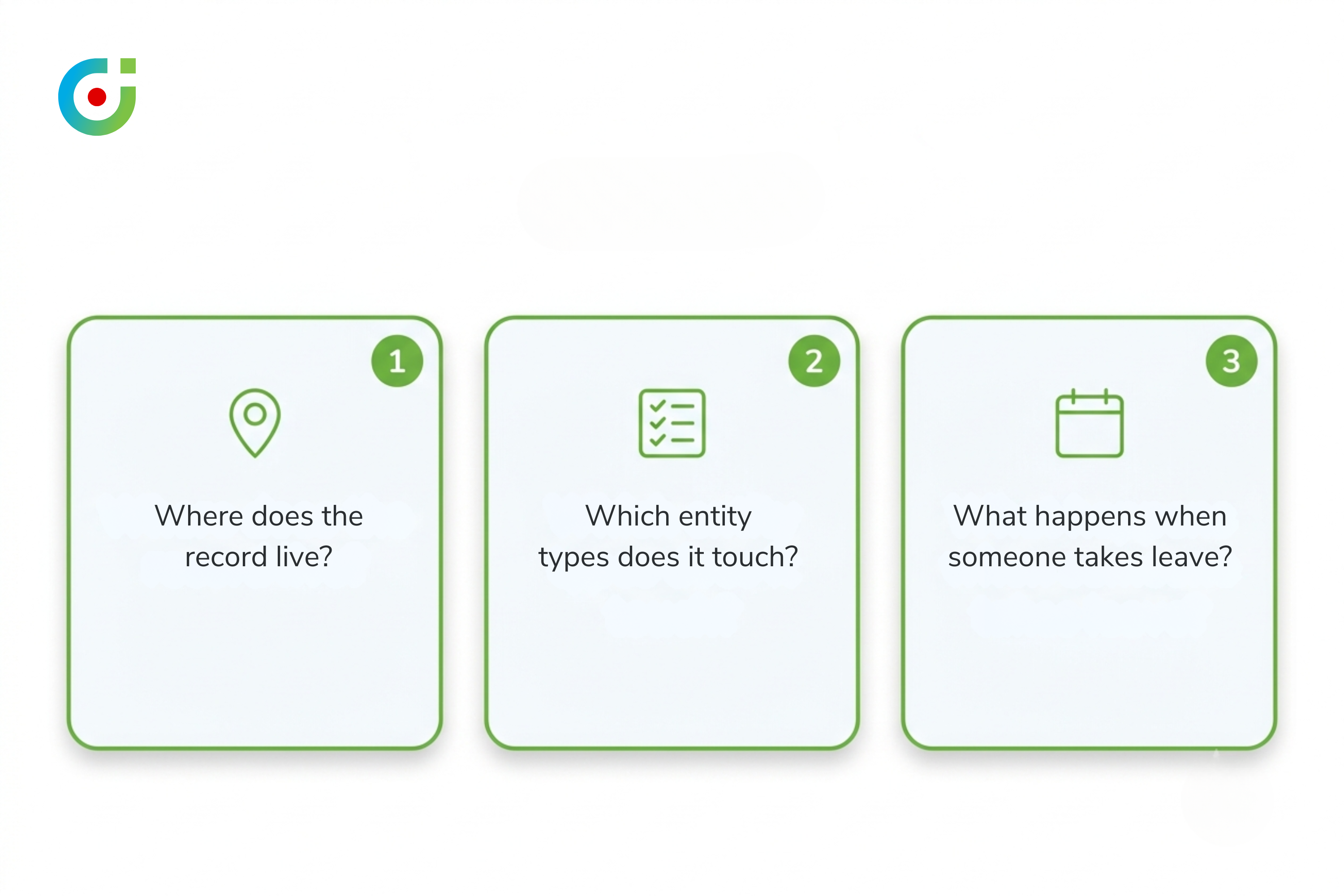
Most D365 teams evaluate scheduling software with exactly one question: does it get meetings booked efficiently? Fair starting point. It just falls apart for any team running Dynamics 365 as an actual system of record, not a rolodex. Three follow-up questions settle whether an outside tool is adding value or just adding overhead.
Where does the record live after the meeting is booked?
Say the honest answer is “partly in the scheduling tool, partly pushed to D365 through middleware.” That’s a split-record problem, full stop. Every booking turns into a small reconciliation task, and those tasks compound quietly until, six months in, nobody can say with real confidence whether the activity report reflects reality or just the fraction that survived the sync.
Which entity types does the tool actually touch?
This one’s broader than it sounds. Dynamics 365 tracks a full range of relationship activity, not just appointments, and a scheduling tool that only creates lead or appointment records hands the CRM team a partial view of everything else happening on that account. Partial views are how forecasts go wrong. It’s one of the clearest signs that the scheduling dynamics 365 teams rely on daily belongs inside the CRM, not bolted on beside it.
What happens when someone takes leave?
Picture a rep taking a half day off, and the scheduling layer never finding out. Bookings land on time that isn’t actually available. Fixing that in an external tool means somebody manually blocking the calendar, because there’s no structured leave system reading from the CRM’s own availability data. The scheduling layer sits outside the CRM entirely, so it simply doesn’t know what it doesn’t know.
Run those three questions against a typical Calendly-plus-D365 setup and the answers aren’t flattering: data splits, entity coverage is thin, leave gets managed by hand, one calendar block at a time. A native scheduling dynamics 365 layer clears the same test easily, mostly because it never leaves the CRM to begin with. Leave requests, activity types, availability, all of it reads from the same data the rest of the team is already working from. Calendar 365 is built exactly this way: collision-free booking, Google and Outlook sync, leave management, running on live dynamics 365 calendar data instead of a synced copy of it.
What This Means for Dynamics 365 Operations Managers
None of this is a failure on either company’s part, to be fair, it’s a gap in awareness, plain and simple. Teams picked up Calendly before anyone checked whether Dynamics 365 already had an answer built in. At first glance the integration seemed to work well enough. And the cost? Absorbed as a routine per-seat line item, the kind nobody questions twice.
Run the where-does-it-live test against your own setup and that math changes fast. The question stops being “how do we get more out of our Calendly integration.” It becomes “does an external scheduling tool make sense for a team whose entire operation already runs inside a CRM?” For most Dynamics 365 teams managing more than a handful of ongoing relationships, it doesn’t.
The fix isn’t a smarter Zapier flow. It isn’t a better Power Automate template either. It’s moving scheduling back inside the dynamics 365 calendar layer, where the activity data was always meant to live in the first place. Calendar 365 already does that job. No second login. No recurring per-seat bill stacked on top of a CRM subscription that’s already covering this ground.
That’s the real cost of conventional wisdom hanging around past its expiration date. Not that Calendly is a bad tool, it isn’t, but that a genuinely good external tool has spent this whole time quietly duplicating something the CRM subscription already paid for. Worth checking before the next renewal notice lands. Not after.
> Already running Dynamics 365? You don’t need a second scheduling tool.
> Calendar 365 handles collision-free scheduling, Google and Outlook sync, leave management, and team reporting, all inside your CRM. Free trial, no credit card required.
Sources
[1] Calendly State of Scheduling 2023 — https://calendly.com/newsroom/press-release/state-of-scheduling-2023
[2] Calendar 365 Rating & Pricing — AppJetty.com Product Page — https://www.appjetty.com/dynamics365-all-in-one-calendar.htm
[3] Calendly Pricing — https://calendly.com/pricing
[4] Calendly Microsoft Dynamics 365 via Power Automate — https://calendly.com/help/calendly-microsoft-dynamics-365-via-power-automate
The post Why Dynamics 365 Users Are Paying for Calendly When They Don’t Have To appeared first on AppJetty .
This articles is written by : Nermeen Nabil Khear Abdelmalak
All rights reserved to : USAGOLDMIES . www.usagoldmines.com
You can Enjoy surfing our website categories and read more content in many fields you may like .
Why USAGoldMines ?
USAGoldMines is a comprehensive website offering the latest in financial, crypto, and technical news. With specialized sections for each category, it provides readers with up-to-date market insights, investment trends, and technological advancements, making it a valuable resource for investors and enthusiasts in the fast-paced financial world.